
【MyBatis】从一千万记录中批量删除八百万条,耗时4m7s
批量删除主要借助了MySql的limit函数,其次用了in删除。
代码如下:
package com.hy.action;

import java.io.Reader;
import java.util.ArrayList;
import java.util.List;

import org.apache.ibatis.io.Resources;
import org.apache.ibatis.session.SqlSession;
import org.apache.ibatis.session.SqlSessionFactory;
import org.apache.ibatis.session.SqlSessionFactoryBuilder;
import org.apache.log4j.Logger;

import com.hy.entity.Employee;
import com.hy.mapper.EmpMapper;

public class BatchDelete1 {
private static Logger logger = Logger.getLogger(SelectById.class);

    public static void main(String[] args) throws Exception{
        long startTime = System.currentTimeMillis();

        Reader reader=Resources.getResourceAsReader("mybatis-config.xml");

        SqlSessionFactory ssf=new SqlSessionFactoryBuilder().build(reader);
        reader.close();

        SqlSession session=ssf.openSession();

        try {
            EmpMapper mapper=session.getMapper(EmpMapper.class);

            int totalChanged=0;
            int index=0;
            while(true) {
                List<Long> ids=mapper.selectIdsByDate("2018-02-02");
                if(ids.size()==0) {
                    break;
                }

                int changed=mapper.deleteByIds(ids);
                System.out.println("#"+index+" deleted="+changed);
                session.commit();
                totalChanged+=changed;

                index++;
            }

            System.out.println("All deleted="+totalChanged);
        }catch(Exception ex) {
            logger.error(ex);
            session.rollback();
        }finally {
            session.close();

            long endTime = System.currentTimeMillis();
            logger.info("Time elapsed:" + toDhmsStyle((endTime - startTime)/1000) + ".");
        }
    }

    // format seconds to day hour minute seconds style
    // Example 5000s will be formatted to 1h23m20s
    private static String toDhmsStyle(long allSeconds) {
        String DateTimes = null;

        long days = allSeconds / (60 * 60 * 24);
        long hours = (allSeconds % (60 * 60 * 24)) / (60 * 60);
        long minutes = (allSeconds % (60 * 60)) / 60;
        long seconds = allSeconds % 60;

        if (days > 0) {
            DateTimes = days + "d" + hours + "h" + minutes + "m" + seconds + "s";
        } else if (hours > 0) {
            DateTimes = hours + "h" + minutes + "m" + seconds + "s";
        } else if (minutes > 0) {
            DateTimes = minutes + "m" + seconds + "s";
        } else {
            DateTimes = seconds + "s";
        }

        return DateTimes;
    }
}
而Mapper中的SQL语句是:
<?xml version="1.0" encoding="UTF-8" ?>
<!DOCTYPE mapper PUBLIC "-//mybatis.org//DTD Mapper 3.0//EN"
"http://mybatis.org/dtd/mybatis-3-mapper.dtd" >
<mapper namespace="com.hy.mapper.EmpMapper">
<select id="selectById" resultType="com.hy.entity.Employee">
select id,name,age,cdate as ctime from emp where id=#{id}
</select>
<insert id="batchInsert">
insert into emp(name,age,cdate)
values
<foreach collection="list" item="emp" separator=",">
(#{emp.name},#{emp.age},#{emp.ctime,jdbcType=TIMESTAMP})
</foreach>
</insert>
<insert id="singleInsert">
insert into emp(name,age,cdate)
values (#{name},#{age},#{ctime,jdbcType=TIMESTAMP})
</insert>
<select id="selectIdsByDate" resultType="java.lang.Long">
select id from emp where cdate<#{date,jdbcType=TIMESTAMP} limit 10000
</select>
<delete id="deleteByIds">
delete from emp where id in
<foreach collection="list" open="(" close=")" separator="," item="id" index="i">
#{id}
</foreach>
</delete>
</mapper>
与之对应的接口是:
package com.hy.mapper;

import java.util.List;

import org.apache.ibatis.annotations.Param;

import com.hy.entity.Employee;

public interface EmpMapper {
    Employee selectById(long id);
    int batchInsert(List<Employee> emps);
    // 用@Param标签指明和SQL的参数对应能避免出现org.apache.ibatis.binding.BindingException异常
    int singleInsert(@Param("name")String name,@Param("age")int age,@Param("ctime")String ctime);

    List<Long> selectIdsByDate(String date);

    int deleteByIds(List<Long> ids);
}
以上粗体红字为涉及代码。
控制台输出如下:
#792 deleted=10000
#793 deleted=10000
#794 deleted=10000
#795 deleted=10000
#796 deleted=10000
#797 deleted=10000
#798 deleted=10000
#799 deleted=10000
#800 deleted=10000
#801 deleted=10000
#802 deleted=10000
#803 deleted=5199
All deleted=8035199
 INFO [main] - Time elapsed:4m7s.
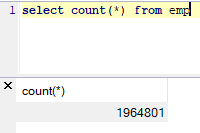
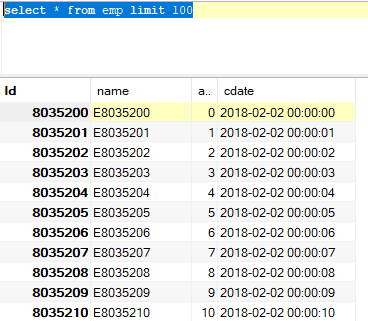
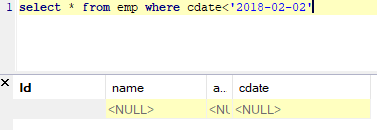
数据库中情况:
--END-- 2019年10月14日09:24:07
【MyBatis】从一千万记录中批量删除八百万条,耗时4m7s的更多相关文章
- 【MyBatis】【SQL】没有最快,只有更快,从一千万条记录中删除八百万条仅用1分9秒
这次直接使用delete from emp where cdate<'2018-02-02',看看究竟会发生什么. Mapper里写好SQL: <?xml version="1. ...
- 【MyBatis】【SQL】删除最快纪录诞生,从一千万条记录中删除八百万条仅用2分6秒
在 https://www.cnblogs.com/xiandedanteng/p/11669629.html 里我做个一个循环按时间查ID并删除之的程序,运行时间是4分7秒. 但是这个程序走了很多次 ...
- iOS开发:一个高仿美团的团购ipad客户端的设计和实现(功能:根据拼音进行检索并展示数据,离线缓存团购数据,浏览记录与收藏记录的批量删除等)
大致花了一个月时间,利用各种空闲时间,将这个客户端实现了,在这里主要是想记录下,设计的大体思路以及实现过程中遇到的坑...... 这个项目的github地址:https://github.com/wz ...
- SQL中批量删除被注入的恶意代码的方法
下文将为您介绍SQL中批量删除被注入的恶意代码的方法,供您参考,如果您也遇到了这样的问题,不妨一看,相信对您会有所帮助. 1,如果你的数据表很少的话,那么写几条简单的sql就搞定了 对于表中的nvch ...
- excel中批量删除公式,保留数值
excel中批量删除公式,保留数值 Sub macro1() Dim sh As Worksheet For Each sh In Sheets sh.UsedRange = sh.UsedRange ...
- VS中批量删除cs代码中的#region和#endregion
Visual Studio中如何批量删除cs代码中的#region和#endregion,不删除它们中间的代码,只删除这两个标记及标记的注解的方法.Vs中提供了很强大的文本查找与替换功能,简单的替换只 ...
- SqlServer表中两条全然同样的记录,怎样删除当中1条
描写叙述:表无主键ID,误插入两遍数据,怎样删除内容同样的记录,而仅仅留下1条. SELECT DISTINCT * INTO #temp FROM grade; DROP TABLE grade; ...
- gitlab中批量删除本地以及远程tag的操作
git 批量删除标签# 删除所有远程标签git show-ref --tag | awk '{print ":" $2}' | xargs git push origin # 删除 ...
- VS中批量删除注释
批量删除: 按ctrl+H 选上正则表达式 Find what: //.* Replace with: (空) 点replace all就行了
随机推荐
- jQuery EasyUI 数据网格
jQuery EasyUI 数据网格 - 转换 HTML 表格为数据网格 本节将介绍jQuery EasyUI数据网格的运用,主要内容为如何将HTML表格转换为数据网格. 本实例演示如何转换表格(ta ...
- Oracle面试题及答案整理
一下题目根据此表变换 1.表:table1(FId,Fclass,Fscore),用最高效最简单的SQL列出各班成绩最高的列表,显示班级,成绩两个字段. select stu_class, max(s ...
- Linux部署tomcat服务常用命令
cd / 转到根目录 ps -ef|grep tomcat查看进程 ./bin/shutdown.sh 关闭 rm -r logs/* 清除日志 ps -ef|grep tomcat查看进程 ./bi ...
- SPI总线的原理与Verilog实现
转载地址:https://www.cnblogs.com/liujinggang/p/9609739.html 一. 软件平台与硬件平台 软件平台: 1.操作系统:Windows-8.1 2.开发套件 ...
- 1.开始认识flask
1. pip安装flask包pip install flask2.对flask最基本的使用from flask import Flask # 导入flask包 app = Flask(__name__ ...
- appium连接Android真机,并调试
Android真机:华为pad2 Android和Windows连接同一个局域网 连接USB Android机设置: 打开USB调试 cmd>adb devices,显示Android序列号 , ...
- 用tensorflow实现SVM
环境配置 win10 Python 3.6 tensorflow1.15 scipy matplotlib (运行时可能会遇到module tkinter的问题) sklearn 一个基于Python ...
- [易学易懂系列|rustlang语言|零基础|快速入门|(28)|实战5:实现BTC价格转换工具]
[易学易懂系列|rustlang语言|零基础|快速入门|(28)|实战5:实现BTC价格转换工具] 项目实战 实战5:实现BTC价格转换工具 今天我们来开发一个简单的BTC实时价格转换工具. 我们首先 ...
- C# 之 .net core -- 创建项目
一.新建一个Web 的 应用程序 二.选择项目的基本信息(.net coer 2.2 和带有试图控制器的程序) 这个是类似以MVC的模式,也可以用其他的,总之需要什么选什么 三. 然后既可以看到这样一 ...
- LaTeX新人使用教程[转载]
LaTeX新人教程,30分钟从完全陌生到基本入门 by Nan 对于真心渴望迅速上手LaTeX的人,前言部分可以跳过不看. 本教程面向对LaTeX完全无认知无基础的新人.旨在让新人能够用最简单快捷的方 ...