
Python3之Requests模块详解
# 导入 Request模块

# 若本机无自带Request模块,可自行下载或者使用pip进行安装

# python版本Python3

import requests

import json

#######################Get请求#######################

# 发送无参数的get请求

baiDu_response = requests.get('http://www.baidu.com')

# 发送无参数的get请求 设置超时时间 timeout 单位秒

baiDu_response = requests.get('http://www.baidu.com', timeout=1)

# 查看发送请求的url地址

print('无参数的get请求地址为: ' + baiDu_response.url)

# 查看当前返回状态码

# 若状态码为200 等同于 baiDu_response.status_code == requests.codes.ok 返回为True

print('返回的状态码为: '+str(baiDu_response.status_code))

# 查看当前返回内容编码

print('返回内容编码格式为:' + baiDu_response.encoding)

# 查看当前返回内容    text返回的是字符串

print('Text返回的数据内容为:' + baiDu_response.text)

# 查看当前返回内容    content返回的是字节流

# print('Content返回的数据内容为:' + baiDu_response.content)

# 若返回内容为json格式 可用如下语句

# print('返回的Json数据为:' + baiDu_response.json())

# 获取服务器返回的原始数据 增加stream=True

# data = requests.get('https://api.github.com/events', stream=True)

# print(data.raw.read())

# 发送带参数(字典形式)的get请求

sendDictParams = {'key1': 'value1', 'key2': 'value2'}

baiDu_dictParams_response = requests.get('http://www.baidu.com', params=sendDictParams)

# 查看发送请求的url地址

print('普通参数的get请求地址为: ' + baiDu_dictParams_response.url)

# 发送list格式参数的get请求

sendListParams = {'key1': 'value1', 'key2': ['value2', 'value3']}

baiDu_listParams_response = requests.get('http://www.baidu.com', params=sendListParams)

# 查看发送请求的url地址

print('带list参数的get请求地址为: ' + baiDu_listParams_response.url)

#######################Post请求#######################

# tips:强烈建议使用二进制模式打开文件,因为如果以文本文件格式打开时,可能会因为“Content-Length”这个header而出错

# post 请求参数是通过data方式来传递的

# 第一种方式:字典格式

postResponse = requests.post("http://pythontab.com/postTest", data={'key': 'value'})

print('普通参数请求返回状态码为:' + str(postResponse.status_code))

# 第二种方式 json格式 注意json方法为dumps() 不是dump()

jsonParams = {'key': 'value'}

postJsonResponse = requests.post("http://pythontab.com/postTest", data=json.dumps(jsonParams))

print('json参数请求返回状态码为:' + str(postJsonResponse.status_code))

# 第三种方式 发送文件  (该文件同级目录下需要有test.csv文件 )rb 只读模式  wb 若没有 自动创建

files = {'file': open('test.csv', 'rb')}

fileResponse = requests.post('http://pythontab.com/postTest', files=files)

print('文件参数请求返回状态码为:' + str(fileResponse.status_code))

#######################Headers#######################

headers_response = requests.get('http://www.baidu.com')

# 查看请求响应头 :字典格式 输入时转换为字符打印到控制台

print('请求响应头为: ' + str(headers_response.headers))

# 获取请求响应头其中某一个参数

print('请求响应头的Server参数   写法一:' + headers_response.headers['Server'])

# 等同于

print('请求响应头的Server参数   写法二:' + headers_response.headers.get('Server'))

# 自定义headers 并发送

headers = {'user-agent': 'myAgent'}

custom_headers_response = requests.get('http://www.baidu.com', headers=headers)

print('自定义header发送请求状态码为:' + str(custom_headers_response.status_code))

#######################Cookies#######################

cookies_response = requests.get('http://www.baidu.com')

# 查看请求响应头 :字典格式 输入时转换为字符

print('请求地址的Cookies为: ' + str(cookies_response.cookies))

# 自定义Cookies 并发送

cookies = {'user-cookies': 'myCookies'}

custom_cookies_response = requests.get('http://www.baidu.com', cookies=cookies)

print('自定义Cookies发送请求状态码为:' + str(custom_cookies_response.status_code))

#######################代理#######################

proxies = {

  "http": "http://10.10.1.10:3128",

  "https": "http://10.10.1.10:1080",

}

# 通过代理方式发起请求 此处运行不通过,仅举例使用

# requests.get("http://baidu.com", proxies=proxies)

#######################Session#######################

# 通过requests获取session

session = requests.Session()

# 举例:登录名 密码  key为登陆表单中对应的input的name值

login_data = {'email': 'email@example.com', 'password': 'password'}

# 发送数据

session.post("http://pythontab.com/testLogin", login_data)

# 获取发送的session

session_response = session.get('http://pythontab.com/notification/')

print('session请求返回的状态码为:' + str(session_response.status_code))

#######################下载页面#######################

baiDuHtmlContent = requests.get("http://www.baidu.com")

with open("百度.html", "wb") as html:

    html.write(baiDuHtmlContent.content)

html.close()
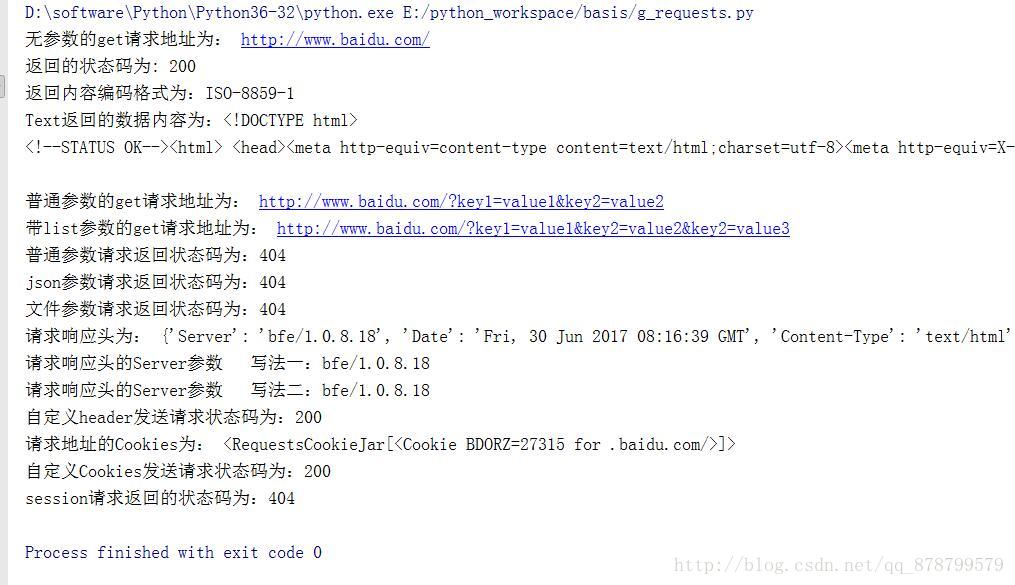
运行结果
参考:www.pythontab.com/html/2017/pythonjichu_0510/1138.html
Python3之Requests模块详解的更多相关文章
- Python—requests模块详解
1.模块说明 requests是使用Apache2 licensed 许可证的HTTP库. 用python编写. 比urllib2模块更简洁. Request支持HTTP连接保持和连接池,支持使用co ...
- Python3.5 queue模块详解
queue介绍 queue是python中的标准库,俗称队列,可以直接import 引用,在python2.x中,模块名为Queue 在python中,多个线程之间的数据是共享的,多个线程进行数据交换 ...
- (转)Python3.5 queue模块详解
原文:https://www.cnblogs.com/CongZhang/p/5274486.html queue介绍 queue是python中的标准库,俗称队列,可以直接import 引用,在py ...
- 接口自动化测试之-requests模块详解
一.requests背景 Requests 继承了urllib2的所有特性.Requests支持HTTP连接保持和连接池,支持使用cookie保持会话,支持文件上传,支持自动确定响应内容的编码,支持国 ...
- python--requests模块详解
GET请求 首先构造一个最简单的get请求,请求的链接为http://httpbin.org/get import requests 2 r = requests.get("http://h ...
- Python中操作mysql的pymysql模块详解
Python中操作mysql的pymysql模块详解 前言 pymsql是Python中操作MySQL的模块,其使用方法和MySQLdb几乎相同.但目前pymysql支持python3.x而后者不支持 ...
- 铁乐学python_shelve模块详解
python序列化模块-shelve模块详解 shelve:vt. 将(书等)放置在架子上:搁置,将某事放到一旁不予考虑:将-搁在一边:装搁架于: 个人感觉有点像字典缓存?暂时搁置到一旁的意思? 研究 ...
- Python 单向队列Queue模块详解
Python 单向队列Queue模块详解 单向队列Queue,先进先出 '''A multi-producer, multi-consumer queue.''' try: import thread ...
- Requests实践详解
Requests是什么 Requests是用python语言基于urllib编写的,采用的是Apache2 Licensed开源协议的HTTP库 如果你看过上篇文章关于urllib库的使用,你会发现, ...
随机推荐
- 【转帖】Linux的桌面环境gnome、kde、xfce、lxde 等等使用比较
Linux的桌面环境gnome.kde.xfce.lxde 等等使用比较 https://www.cnblogs.com/chenmingjun/p/8506995.html 文章目录 图形界面架起用 ...
- 解决Python查询Mysql中文乱码问题
前段时间,自己瞎动手用Django写了一个更新zip包和sql到远程服务器的工具.但Python从Mysql中读取出来的中文字符会乱码,如下图: 解决办法:Python连接Mysql时指定charse ...
- webservice的hello world
整个项目的目录结构是 Mycontroller.java:可以在localhost:8080/hello中查看 //Mycontroller.java package com.chenyun.cont ...
- Fiddler之常用操作(过滤器设置,代理设置,手机抓包设置,手机代理配置)
记录下,工作中常用的一些设置和操作~ 1.过滤“脏”请求 两个下拉框的名词解释: A.内外网过滤 No Zone Filter:不分区域过滤(内网外网都显示) Show only Intranet H ...
- Redis基本数据
Redis Redis是一个速度非常快的非关系数据库(NoSql),它可以存储键(key)与五种不同的值(value)之间的映射.可以将存储的内存的键值对数据持久化到硬盘. Redis 数据结构 Re ...
- js变量声明提升
1.变量提升 根据javascript的运行机制和javascript没有块级作用域这个特点,可以得出,变量会声明提升移至作用域 scope (全局域或者当前函数作用域) 顶部的. 变量声明提升至全局 ...
- 浅读vuex源码,了解vuex基本原理
极简版vuex代码 class KVuex { constructor (options) { this.state = options.state this.mutations = options. ...
- JS基础_运算符的优先级
<!DOCTYPE html> <html> <head> <meta charset="UTF-8"> <title> ...
- 这不是javascript:什么?
javascript协议.<a href=“javascript:void(0):”>xxx</a>基于事件的事件,例如:<input onblur=“check():” ...
- 一个简单的创建xml方式
, matnr LIKE mara-matnr , maktx LIKE makt-maktx , END OF itab_matnr . , class LIKE m_wwgha-class,&qu ...