
ArrayList插入1000w条数据的时间比较分析
一分钟系列: 读懂GC日志
ArrayList插入1000w条数据之后,我怀疑了jvm...
Java JIT性能调优
Java性能优化指南系列(三):理解JIT编译器
准备:调试程序加入VM Options: -XX:+PrintGCDetails -XX:+PrintGCDateStamps
1.List未初始化大小时,执行时间差不多,应该跟数组频繁扩容有关。
 public class Test {

     public static void main(String[] args) {

         long start0 = System.currentTimeMillis();

         List<Integer> list0 = new ArrayList<>();

         for (int i = 0; i < 10000000; i++){

             list0.add(i);

          }

         System.out.println("耗时:"+(System.currentTimeMillis() - start0));

         long start1 = System.currentTimeMillis();

         List<Integer> list1 = new ArrayList<>();

         for (int i = 0; i < 10000000; i++){

             list1.add(i);

         }

         System.out.println("耗时:"+(System.currentTimeMillis() - start1));

     }

 }
GC日志以及程序结果打印
2019-10-11T23:00:10.624+0800: [GC (Allocation Failure) [PSYoungGen: 54881K->10730K(76288K)] 54881K->36330K(251392K), 0.0467742 secs] [Times: user=0.28 sys=0.01, real=0.03 secs]

2019-10-11T23:00:10.681+0800: [GC (Allocation Failure) [PSYoungGen: 74086K->10744K(141824K)] 99686K->80960K(316928K), 0.0799013 secs] [Times: user=0.83 sys=0.05, real=0.09 secs]

2019-10-11T23:00:10.831+0800: [GC (Allocation Failure) [PSYoungGen: 141816K->10744K(141824K)] 212032K->188175K(319488K), 0.1750429 secs] [Times: user=1.50 sys=0.06, real=0.18 secs]

2019-10-11T23:00:11.009+0800: [Full GC (Ergonomics) [PSYoungGen: 10744K->0K(141824K)] [ParOldGen: 177431K->171802K(411136K)] 188175K->171802K(552960K), [Metaspace: 3220K->3220K(1056768K)], 3.6056097 secs] [Times: user=19.06 sys=0.03, real=3.61 secs]

耗时:4055

2019-10-11T23:00:14.650+0800: [GC (Allocation Failure) [PSYoungGen: 131072K->10738K(200704K)] 302874K->282502K(611840K), 0.1212870 secs] [Times: user=1.22 sys=0.03, real=0.12 secs]

2019-10-11T23:00:14.832+0800: [GC (Allocation Failure) [PSYoungGen: 200690K->10752K(272896K)] 472454K->414803K(684032K), 0.1926591 secs] [Times: user=1.91 sys=0.09, real=0.19 secs]

2019-10-11T23:00:15.025+0800: [Full GC (Ergonomics) [PSYoungGen: 10752K->0K(272896K)] [ParOldGen: 404051K->168023K(565248K)] 414803K->168023K(838144K), [Metaspace: 3731K->3731K(1056768K)], 3.9056201 secs] [Times: user=21.02 sys=0.05, real=3.90 secs]

耗时:4305

Heap

 PSYoungGen      total 272896K, used 82411K [0x000000076b500000, 0x0000000792800000, 0x00000007c0000000)

  eden space 262144K, 31% used [0x000000076b500000,0x000000077057afa8,0x000000077b500000)

  from space 10752K, 0% used [0x000000077b500000,0x000000077b500000,0x000000077bf80000)

  to   space 176128K, 0% used [0x0000000787c00000,0x0000000787c00000,0x0000000792800000)

 ParOldGen       total 565248K, used 168023K [0x00000006c1e00000, 0x00000006e4600000, 0x000000076b500000)

  object space 565248K, 29% used [0x00000006c1e00000,0x00000006cc215df8,0x00000006e4600000)

 Metaspace       used 3737K, capacity 4540K, committed 4864K, reserved 1056768K

  class space    used 410K, capacity 428K, committed 512K, reserved 1048576K
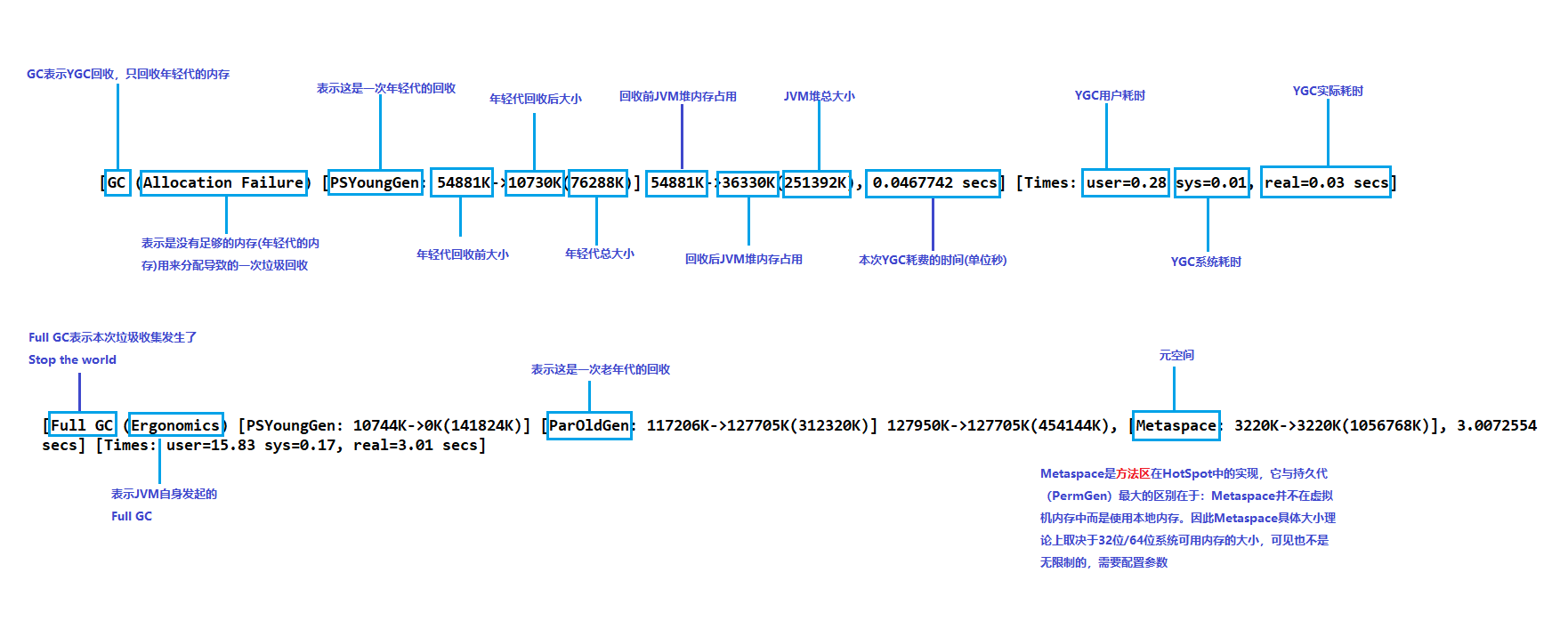
2..List初始化大小,第二次执行时间总是比第一次少较多时间。
 public class Test {

     public static void main(String[] args) {

         long start0 = System.currentTimeMillis();

         List<Integer> list0 = new ArrayList<>(10000000);

         for (int i = 0; i < 10000000; i++){

             list0.add(i);

          }

         System.out.println("耗时:"+(System.currentTimeMillis() - start0));

         long start1 = System.currentTimeMillis();

         List<Integer> list1 = new ArrayList<>(10000000);

         for (int i = 0; i < 10000000; i++){

             list1.add(i);

         }

         System.out.println("耗时:"+(System.currentTimeMillis() - start1));

     }

 }
GC日志以及程序结果打印
2019-10-11T23:02:01.720+0800: [GC (Allocation Failure) [PSYoungGen: 65536K->10728K(76288K)] 65536K->62246K(251392K), 0.1034325 secs] [Times: user=0.88 sys=0.09, real=0.12 secs]

2019-10-11T23:02:01.852+0800: [GC (Allocation Failure) [PSYoungGen: 76264K->10744K(141824K)] 127782K->127950K(316928K), 0.7058133 secs] [Times: user=5.91 sys=0.11, real=0.70 secs]

2019-10-11T23:02:02.555+0800: [Full GC (Ergonomics) [PSYoungGen: 10744K->0K(141824K)] [ParOldGen: 117206K->127705K(312320K)] 127950K->127705K(454144K), [Metaspace: 3220K->3220K(1056768K)], 3.0072554 secs] [Times: user=15.83 sys=0.17, real=3.01 secs]

耗时:3897

2019-10-11T23:02:05.611+0800: [GC (Allocation Failure) [PSYoungGen: 131072K->10752K(141824K)] 258777K->252752K(454144K), 0.5464546 secs] [Times: user=4.14 sys=0.09, real=0.55 secs]

2019-10-11T23:02:06.165+0800: [Full GC (Ergonomics) [PSYoungGen: 10752K->0K(141824K)] [ParOldGen: 242000K->57244K(365056K)] 252752K->57244K(506880K), [Metaspace: 3732K->3732K(1056768K)], 0.5518679 secs] [Times: user=2.63 sys=0.00, real=0.54 secs]

2019-10-11T23:02:06.753+0800: [GC (Allocation Failure) [PSYoungGen: 131072K->10752K(209408K)] 188316K->188596K(574464K), 1.2310512 secs] [Times: user=10.47 sys=0.01, real=1.23 secs]

耗时:2403

Heap

 PSYoungGen      total 209408K, used 24457K [0x000000076b500000, 0x0000000779180000, 0x00000007c0000000)

  eden space 198656K, 6% used [0x000000076b500000,0x000000076c2624c8,0x0000000777700000)

  from space 10752K, 100% used [0x0000000778180000,0x0000000778c00000,0x0000000778c00000)

  to   space 10752K, 0% used [0x0000000777700000,0x0000000777700000,0x0000000778180000)

 ParOldGen       total 365056K, used 177844K [0x00000006c1e00000, 0x00000006d8280000, 0x000000076b500000)

  object space 365056K, 48% used [0x00000006c1e00000,0x00000006ccbad380,0x00000006d8280000)

 Metaspace       used 3738K, capacity 4540K, committed 4864K, reserved 1056768K

  class space    used 410K, capacity 428K, committed 512K, reserved 1048576K
3.当List初始化大小时,第二次循环插入时间总是比第一次少很多。
Java JIT性能调优中介绍了:
JVM自动监控着所有方法的执行,如果某个方法是热点方法,JVM就计划把该方法的字节码代码编译成本地机器代码,同时还会在后续的执行过程中进行可能的更深层次的优化,编译成机器代码的过程是在独立线程中执行的,不会影响程序的执行;除次以外,JVM还对热点方法和很小的方法内联到调用方的方法中,减少方法栈的创建。这些就是JIT(just in time)。
On Stack Replacement (OSR):如果某个循环执行的次数非常多,那么这个循环体代码也可能会编译为本地代码。
编译阈值
- 是否对代码进行编译受两个计数器的影响:1)方法的调用次数 2)方法内循环的次数 。 当JVM执行一个JAVA方法的时候,它都会检查这两个计数器,以便确定是否需要对方法进行编译。
- 当JVM执行一个JAVA方法的时候,它会检查这两个计数器值的总和,然后确定这个方法是否需要进行编译。如果需要进行编译,这个方法会放入编译队列。这种编译没有官方的名字,一般称之为标准编译。
- 如果方法里面是一个循环,虽然方法只调用一次,但是循环在不停执行。此时,JVM会对这个循环的代码进行编译。这种编译称之为栈上替换OSR(on-stack replacement)。因为即使循环被编译了,这还不够,JVM还需要能够在循环正在执行的时候,转为执行编译后的代码。JVM采用的方式就是将编译后的代码替换当前正在执行的方法字节码。由于方法在栈上执行,所以这个操作又称之为:栈上替换。
- 可以通过配置 -XX:CompileThreshold=N来确定计数器的阈值,从而控制编译的条件。但是如果降低了这个值,会导致JVM没有收集到足够的信息就进行了编译,导致编译的代码优化不够(不过影响会比较小)。
- 如果-XX:CompileThreshold=N配置的两个值(一个大,一个小)在性能测试方面表现差不多,那么会推荐使用小一点的配置,主要有两个原因:
- 可以减小应用的warm-up period。
- 可以防止某个方法永远得不到编译。这是因为JVM会周期(每到安全点的时候)的对计数进行递减。如果阈值比较大,并且方法周期性调用的时间较长,导致计数永远达不到这个阈值,从而不会进行编译。
探寻编译过程
选项 -XX:+PrintCompilation可以打开编译日志,当JVM对方法进行编译的时候,都会打印一行信息,什么方法被编译了。具体格式如下:
timestamp compilation_idattributes (tiered_level) method_name size deopt
- timestamp是编译时相对于JVM启动的时间戳
- compliation_id是内部编译任务的ID,一般都是递增的
- attributes由5个字母组成,用来显示代码被编译的状态:
- %:编译是OSR
- s:方法是synchronized的
- !:方法有异常处理
- b:编译线程不是后台运行的,而是同步的(当前版本的JVM应该不会打印这个状态了)
- n:表示JVM产生了一些辅助代码,以便调用native 方法
- tiered_level:采用tiered compilation编译器时才会打印。
- method_name:被编译的方法名称,格式是:classname::method
- size: 被编译的代码大小(单位:字节),这里的代码是Java字节码。
- deopt:如果发生了去优化,这里说明去优化的类型。
VM Options加入 -XX:+PrintCompilation 后再运行Test,得到以下输出打印:
    129    2       3       java.lang.AbstractStringBuilder::append (50 bytes)

    130    3       3       java.lang.String::hashCode (55 bytes)

    131    4       3       sun.nio.cs.ext.DoubleByte$Encoder::encodeChar (21 bytes)

    131    5       3       java.lang.Object::<init> (1 bytes)

    131    6       3       java.lang.StringBuilder::append (8 bytes)

    131    8       3       java.lang.CharacterData::of (120 bytes)

    132    9       3       java.lang.CharacterDataLatin1::getProperties (11 bytes)

    132    7       4       java.lang.String::length (6 bytes)

    132    1       4       java.lang.String::charAt (29 bytes)

    133   10     n 0       java.lang.System::arraycopy (native)   (static)

    134   11       1       sun.instrument.TransformerManager::getSnapshotTransformerList (5 bytes)

    134   12       3       java.io.WinNTFileSystem::normalize (143 bytes)

    135   13       3       java.lang.String::equals (81 bytes)

    136   14       4       java.lang.AbstractStringBuilder::append (29 bytes)

    137   15       3       java.lang.String::getChars (62 bytes)

    138   16       3       java.lang.Math::min (11 bytes)

    138   20       3       java.lang.String::indexOf (70 bytes)

    139   19       3       java.lang.String::startsWith (72 bytes)

    139   18       3       java.lang.String::startsWith (7 bytes)

    139   22       4       java.io.WinNTFileSystem::isSlash (18 bytes)

    139   23       4       java.lang.AbstractStringBuilder::ensureCapacityInternal (27 bytes)

    139   24  s    3       java.lang.StringBuffer::append (13 bytes)

    140   21       3       java.lang.String::indexOf (7 bytes)

    140   17       1       java.util.ArrayList::size (5 bytes)

    140   25       3       java.nio.Buffer::position (43 bytes)

    140   28     n 0       sun.misc.Unsafe::getObjectVolatile (native)

    141   26       3       java.lang.System::getSecurityManager (4 bytes)

    141   27       3       java.util.concurrent.ConcurrentHashMap::tabAt (21 bytes)

    156   29       3       java.util.ArrayList::add (29 bytes)

    157   36       1       java.lang.Object::<init> (1 bytes)

    157    5       3       java.lang.Object::<init> (1 bytes)   made not entrant

    157   35       3       java.lang.Integer::valueOf (32 bytes)

    157   30       3       java.util.ArrayList::ensureCapacityInternal (13 bytes)

    157   37       4       java.util.ArrayList::add (29 bytes)

    157   38       4       java.lang.Integer::valueOf (32 bytes)

    157   32       2       java.util.ArrayList::ensureExplicitCapacity (26 bytes)

    158   31       2       java.util.ArrayList::calculateCapacity (16 bytes)

    158   33       2       java.lang.Number::<init> (5 bytes)

    158   34       2       java.lang.Integer::<init> (10 bytes)

    158   35       3       java.lang.Integer::valueOf (32 bytes)   made not entrant

    158   29       3       java.util.ArrayList::add (29 bytes)   made not entrant

    160   39 %     3       com.lucky.iot.express.base.express2.eunm.Test::main @ 17 (147 bytes)

    161   40       3       com.lucky.iot.express.base.express2.eunm.Test::main (147 bytes)

    162   41 %     4       com.lucky.iot.express.base.express2.eunm.Test::main @ 17 (147 bytes)

    164   39 %     3       com.lucky.iot.express.base.express2.eunm.Test::main @ -2 (147 bytes)   made not entrant

2019-10-12T10:11:26.812+0800: [GC (Allocation Failure) [PSYoungGen: 65536K->10728K(76288K)] 65536K->62098K(251392K), 0.0821551 secs] [Times: user=0.45 sys=0.01, real=0.08 secs]

2019-10-12T10:11:26.910+0800: [GC (Allocation Failure) [PSYoungGen: 76264K->10728K(141824K)] 127634K->127802K(316928K), 0.4259123 secs] [Times: user=2.38 sys=0.11, real=0.43 secs]

2019-10-12T10:11:27.336+0800: [Full GC (Ergonomics) [PSYoungGen: 10728K->0K(141824K)] [ParOldGen: 117074K->127504K(314368K)] 127802K->127504K(456192K), [Metaspace: 3220K->3220K(1056768K)], 2.5013968 secs] [Times: user=14.53 sys=0.14, real=2.50 secs]

   3209   42       3       java.lang.ref.Reference::<init> (25 bytes)

   3210   43       3       java.lang.Character::toLowerCase (9 bytes)

   3210   44       3       java.lang.CharacterDataLatin1::toLowerCase (39 bytes)

   3210   45       3       java.util.Arrays::copyOfRange (63 bytes)

   3211   48       3       java.io.DataInputStream::readUTF (501 bytes)

   3212   53       3       java.io.DataInputStream::readFully (63 bytes)

   3212   47       3       java.io.BufferedInputStream::getBufIfOpen (21 bytes)

   3212   49  s    3       java.io.BufferedInputStream::read (49 bytes)

   3212   55       4       java.io.BufferedInputStream::getBufIfOpen (21 bytes)

   3212   50  s    3       java.io.BufferedInputStream::read (113 bytes)

   3213   47       3       java.io.BufferedInputStream::getBufIfOpen (21 bytes)   made not entrant

   3213   57       4       java.lang.String::hashCode (55 bytes)

   3213   54       3       java.io.DataInputStream::readShort (40 bytes)

   3213   52       3       java.io.BufferedInputStream::read1 (108 bytes)

   3214   46       3       java.lang.String::<init> (82 bytes)

   3214   51       3       java.io.DataInputStream::readUTF (5 bytes)

   3214   56       3       java.util.HashMap::hash (20 bytes)

   3214    3       3       java.lang.String::hashCode (55 bytes)   made not entrant

   3215   37       4       java.util.ArrayList::add (29 bytes)   made not entrant

   3216   59       3       java.util.HashMap::putVal (300 bytes)

   3217   58       3       java.util.HashMap::put (13 bytes)

   3217   60       3       java.lang.String::indexOf (166 bytes)

   3217   61       3       java.util.HashMap$Node::<init> (26 bytes)

   3218   62       3       java.lang.String::toLowerCase (439 bytes)

   3219   63   !   3       java.io.BufferedReader::readLine (304 bytes)

   3220   65       3       java.lang.String::lastIndexOf (52 bytes)

   3220   68       3       java.lang.StringBuilder::append (8 bytes)

   3221   69  s    4       java.lang.StringBuffer::append (13 bytes)

   3221   66       3       java.util.BitSet::wordIndex (5 bytes)

   3221   67       3       java.util.BitSet::checkInvariants (111 bytes)

   3221   64       1       java.io.File::getPath (5 bytes)

   3221   70       1       java.net.URL::getProtocol (5 bytes)

   3221   71       1       java.nio.Buffer::position (5 bytes)

   3222   38       4       java.lang.Integer::valueOf (32 bytes)   made not entrant

   3224   41 %     4       com.lucky.iot.express.base.express2.eunm.Test::main @ -2 (147 bytes)   made not entrant

   3224   72       3       sun.util.locale.LocaleUtils::isUpper (18 bytes)

耗时:3082

   3224   24  s    3       java.lang.StringBuffer::append (13 bytes)   made not entrant

   3224   73       3       sun.instrument.InstrumentationImpl::transform (38 bytes)

   3224   74   !   3       sun.instrument.TransformerManager::transform (98 bytes)

   3226   76       3       java.util.LinkedHashMap::newNode (23 bytes)

   3226   75       1       java.util.LinkedHashMap::removeEldestEntry (2 bytes)

   3226   77       3       java.util.LinkedHashMap::linkNodeLast (33 bytes)

   3226   78       3       java.util.LinkedHashMap::afterNodeInsertion (40 bytes)

   3226   79       3       java.util.LinkedHashMap$Entry::<init> (10 bytes)

   3226   80       1       java.lang.ref.Reference::get (5 bytes)

   3227   81  s    3       java.util.Hashtable::get (69 bytes)

   3227   83       3       java.lang.AbstractStringBuilder::<init> (12 bytes)

   3227   82       3       java.lang.String::<init> (10 bytes)

   3227   84       3       java.lang.AbstractStringBuilder::newCapacity (39 bytes)

   3227   85       3       java.util.Properties::saveConvert (434 bytes)

   3233   86       3       java.lang.StringBuffer::<init> (6 bytes)

   3239   88       3       java.lang.Integer::valueOf (32 bytes)

   3240   90       4       java.lang.Integer::<init> (10 bytes)

   3240   87       3       java.util.ArrayList::add (29 bytes)

   3240   34       2       java.lang.Integer::<init> (10 bytes)   made not entrant

   3240   91       4       java.util.ArrayList::ensureCapacityInternal (13 bytes)

   3240   92       4       java.lang.Integer::valueOf (32 bytes)

   3240   89 %     3       com.lucky.iot.express.base.express2.eunm.Test::main @ 90 (147 bytes)

   3240   93       4       java.util.ArrayList::add (29 bytes)

   3240   30       3       java.util.ArrayList::ensureCapacityInternal (13 bytes)   made not entrant

   3241   88       3       java.lang.Integer::valueOf (32 bytes)   made not entrant

   3241   87       3       java.util.ArrayList::add (29 bytes)   made not entrant

   3241   94 %     4       com.lucky.iot.express.base.express2.eunm.Test::main @ 90 (147 bytes)

   3245   89 %     3       com.lucky.iot.express.base.express2.eunm.Test::main @ -2 (147 bytes)   made not entrant

2019-10-12T10:11:29.883+0800: [GC (Allocation Failure) [PSYoungGen: 131072K->10752K(141824K)] 258576K->252542K(456192K), 0.3817872 secs] [Times: user=2.74 sys=0.06, real=0.38 secs]

2019-10-12T10:11:30.265+0800: [Full GC (Ergonomics) [PSYoungGen: 10752K->0K(141824K)] [ParOldGen: 241790K->57043K(369664K)] 252542K->57043K(511488K), [Metaspace: 3734K->3734K(1056768K)], 0.3879005 secs] [Times: user=1.58 sys=0.00, real=0.39 secs]

2019-10-12T10:11:30.683+0800: [GC (Allocation Failure) [PSYoungGen: 131072K->10752K(204288K)] 188115K->188387K(573952K), 0.7772698 secs] [Times: user=6.06 sys=0.00, real=0.78 secs]

   4833   94 %     4       com.lucky.iot.express.base.express2.eunm.Test::main @ -2 (147 bytes)   made not entrant

耗时:1609

Heap

 PSYoungGen      total 204288K, used 24103K [0x000000076b500000, 0x0000000778c80000, 0x00000007c0000000)

  eden space 193536K, 6% used [0x000000076b500000,0x000000076c209f48,0x0000000777200000)

  from space 10752K, 100% used [0x0000000777c80000,0x0000000778700000,0x0000000778700000)

  to   space 10752K, 0% used [0x0000000777200000,0x0000000777200000,0x0000000777c80000)

 ParOldGen       total 369664K, used 177635K [0x00000006c1e00000, 0x00000006d8700000, 0x000000076b500000)

  object space 369664K, 48% used [0x00000006c1e00000,0x00000006ccb78f98,0x00000006d8700000)

 Metaspace       used 3740K, capacity 4540K, committed 4864K, reserved 1056768K

  class space    used 410K, capacity 428K, committed 512K, reserved 1048576K
ArrayList插入1000w条数据的时间比较分析的更多相关文章
- 向Oracle数据库插入一条数据
这几天搞了一下Oracle数据库.可能用sql server习惯了,感觉好不方便.PL的界面友好度比sql server差远了 .既然都收购了PL了 为什么不给它做好一点呢?各种不便.郁闷 向Orac ...
- 你向 Mysql 数据库插入 100w 条数据用了多久?
阅读本文大概需要 2 分钟. ▌目录 多线程插入(单表) 多线程插入(多表) 预处理 SQL 多值插入 SQL 事务( N 条提交一次) ▌多线程插入(单表) 问:为何对同一个表的插入多线程会比单线程 ...
- java之5分钟插入千万条数据
虽说不一定5分钟就插入完毕,因为取决去所插入的字段,如果字段过多会稍微慢点,但不至于太慢.10分钟内基本能看到结果. 之前我尝试用多线程来实现数据插入(百万条数据),半个多小时才二十多万条数据. 线程 ...
- Hibernate的配置跟简单创建一个表并插入一条数据
首先官网下载一个hibernate的架包,由于时间关系,博主已经分享到了百度网盘:https://pan.baidu.com/s/1Mw0Og3EKnouf84Njz9UicQ,提取码lens Hib ...
- log4j向oracle中插入一条系统当前时间的sql语句
配置log4j,要向oracle插入一条系统当前时间的sql语句,按网上查找的总是出现各种各样的报错,最后总结出的写法是: ### shezhi### log4j.rootLogger = debug ...
- MySql LAST_INSERT_ID 【插入多条数据时】
LAST_INSERT_ID 自动返回最后一个 INSERT 或 UPDATE 操作为 AUTO_INCREMENT 列设置的第一个发生的值. 参考这里 The ID that was generat ...
- 数据库一次性插入10w条数据,怎么插入效率快
在SQL Server 中插入一条数据使用Insert语句,但是如果想要批量插入一堆数据的话,循环使用Insert不仅效率低,而且会导致SQL一系统性能问题 下面介绍SQL Server支持的两种批量 ...
- mysql一次插入多条数据
mysql一次插入多条数据: INSERT INTO hk_test(username, passwd) VALUES ('qmf2', 'qmf2'),('qmf3', 'qmf3'),('qmf4 ...
- sql插入多条数据的sql语句
sql插入多条数据的sql语句 有三种方法:1.InSert Into <表名>(列名)Select <列名>From <源表名>如:INSERT INTO Ton ...
随机推荐
- aop 通知的执行顺序
private static final org.slf4j.Logger Logger = LoggerFactory.getLogger(LoggerAop.class); /** * 线程池 异 ...
- SpringMVC返回Map类型转换成JSON失败
错误信息:WARN DefaultHandlerExceptionResolver:380 - Failed to write HTTP message: org.springframework.ht ...
- Python动态展示遗传算法求解TSP旅行商问题(转载)
版权声明:本文为博主原创文章,遵循 CC 4.0 by-sa 版权协议,转载请附上原文出处链接和本声明.本文链接:https://blog.csdn.net/jiang425776024/articl ...
- linux shell中如何让$就表示为$呢?
答: 在$前加转义符\ 如: \$
- js生成带log的二维码(qrcodejs)
github: qrcodejs cdn: http://static.runoob.com/assets/qrcode/qrcode.min.js #qrcode #qrcode margin: 2 ...
- SQL-W3School-高级:SQL FOREIGN KEY 约束
ylbtech-SQL-W3School-高级:SQL FOREIGN KEY 约束 1.返回顶部 1. SQL FOREIGN KEY 约束 一个表中的 FOREIGN KEY 指向另一个表中的 P ...
- 阶段5 3.微服务项目【学成在线】_day03 CMS页面管理开发_13-删除页面-前端-Api调用
增加删除链接 <el-button size="small" type="text" @click="del(page.row.pageId)& ...
- CockroachDB学习笔记——[译]Cgo的成本与复杂性
原文链接:https://www.cockroachlabs.com/blog/the-cost-and-complexity-of-cgo/ 原作者:Tobias Schottdorf 原文日期:D ...
- oracle自增主键
本文参考-https://www.cnblogs.com/xxaxx/p/3584036.html oracle没有像sqlserver中identity一样的函数,需要依赖于序列.触发器来实现自增主 ...
- Hydra(爆破神器)使用方法
工具介绍 hydra是一个自动化的爆破工具,暴力破解弱密码,是一个支持众多协议的爆破工具,已经集成到KaliLinux中,直接在终端打开即可. hydra支持的服务有: POP3,SMB,RDP,SS ...