
2.Bacula Server端安装配置
1. Bacula Server端安装配置
1.1. Bacula Server端安装
1.1.1. 安装bacula依赖包
For Centos6:
yum install -y mysql mysql-server mysql-devel gcc gcc-c++ mysql-devel libacl libacl-devel
For Centos7:
yum install -y mariadb mariadb-server mysql-devel gcc gcc-c++ mysql-devel libacl libacl-devel
1.1.2. 安装bacula服务端
tar zxf bacula-9.x.tar.gz
cd bacula-9.x
CFLAGS="-g -Wall" ./configure \
--sbindir=/usr/local/bacula/bin \
--sysconfdir=/usr/local/bacula/etc \
--with-pid-dir=/usr/local/bacula/working \
--with-subsys-dir=/usr/local/bacula/working \
--with-working-dir=/usr/local/bacula/working \
--enable-smartalloc \
--with-mysql \
--enable-readline \
--with-dump-email=nmonitor@163.com \
--with-job-email=nmonitor@163.com \
--with-smtp-host=mail.163.com
--docdir configure option
# 安装bacula
make && make install && make install-autostart
1.1.3. 创建并授权数据库
For Centos6:
service mysqld start
chkconfig mysqld on
For Centos7:
systemctl start mariadb
systemctl enable mariadb
导入数据库配置(目前不支持MySQL8以上版本)
cd bacula-9.2.2/src/cats
# 赋予权限
./grant_mysql_privileges -p
# 创建数据库
./create_mysql_database -p
# 创建相关表
./make_mysql_tables -p
1.2. Bacula配置及启动
1.2.1. 修改sd address
vi /usr/local/bacula/etc/bacula-dir.conf
# 7.x的为Storage,9.x的为Autochanger
Autochanger {
Name = File1
Address = serverip # N.B. Use a fully qualified name here
# 不能使用localhost,写主机名(可以解析到)或IP地址
Autochanger {
Name = File2
Address = serverip # N.B. Use a fully qualified name here
1.2.2. 修改存储目录(根据实际环境修改)
vi /usr/local/bacula/etc/bacula-sd.conf
# /data 目录为存储备份的目录
Device {
Name = FileChgr1-Dev1
Media Type = File1
Archive Device = /data
LabelMedia = yes; # lets Bacula label unlabeled media
Random Access = Yes;
AutomaticMount = yes; # when device opened, read it
RemovableMedia = no;
AlwaysOpen = no;
Maximum Concurrent Jobs = 5
}
Device {
Name = FileChgr1-Dev2
Media Type = File1
Archive Device = /data
LabelMedia = yes; # lets Bacula label unlabeled media
Random Access = Yes;
AutomaticMount = yes; # when device opened, read it
RemovableMedia = no;
AlwaysOpen = no;
Maximum Concurrent Jobs = 5
}
1.2.3. 启动bacula
cd /usr/local/bacula/bin/
# 查看bacula状态
./bacula status
bacula-sd is stopped
bacula-fd is stopped
bacula-dir is stopped
# 启动bacula
./bacula start
Starting the Bacula Storage daemon
Starting the Bacula File daemon
Starting the Bacula Director daemon
bacula日志位于/opt/bacula/log/bacula.log
# 日志路径由bacula-dir.conf配置
# 此配置是在bacula-dir.conf中定义的“append = "/opt/bacula/log/bacula.log" = all, !skipped”
# centos6下只有出现错误时才会产生bacula.log,默认无bacula.log文件。
# centos7下安装完成后会自动生成bacula.log
1.3. bacula配置文件说明
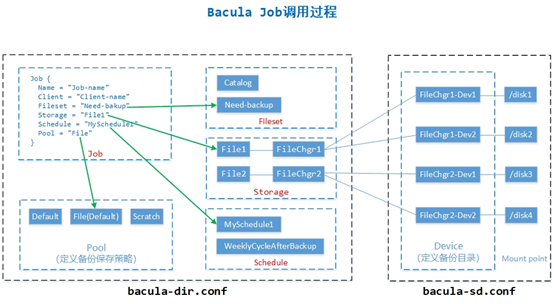
bacula服务端有如下配置文件:
bconsole.conf:bconsole的配置文件,定义可连接的director连接信息。即bconsole可以管理那些director;
bacula-dir.conf:director的配置文件,是bacula最主要的配置文件,定义了备份相关的所有配置;
bacula-fd.conf:为客户端的配置文件,定义了客户端的密码、客户端名称等配置;
bacula-sd.conf:为存储配置文件,定义了备份存储位置。
其中关系如下图所示:
1.3.1. bconsole.conf 控制台配置文件
配置详解
vi bconsole.conf
Director {
Name = server-dir
DIRport = 9101
address = localhost
Password = "pJzzuOS5FoLWTFZkbhlY3CCw8OzmJ1G9t4GhQCWfHSik"
# 控制台密码,与后面的dir等配置文件相关联
}
1.3.2. bacula-dir.conf Director配置文件
配置详解
vi bacula-dir.conf
# 定义Director
Director { # define myself
Name = server-dir
DIRport = 9101 # where we listen for UA connections
QueryFile = "/usr/local/bacula/bin/query.sql"
WorkingDirectory = "/root/bacula/bin/working"
PidDirectory = "/usr/local/bacula/bin/working"
Maximum Concurrent Jobs = 20
Password = "pJzzuOS5FoLWTFZkbhlY3CCw8OzmJ1G9t4GhQCWfHSik"
# bconsole通过该密码连接director
Messages = Daemon
}
# Job定义备份任务
JobDefs {
Name = "DefaultJob"
Type = Backup
Level = Incremental
Client = server-fd
FileSet = "Full Set"
Schedule = "WeeklyCycle"
Storage = File1
Messages = Standard
Pool = File
SpoolAttributes = yes
Priority = 10
Write Bootstrap = "/root/bacula/bin/working/%c.bsr"
}
# Fileset定义需要备份的文件
# For linux
FileSet {
Name = "Full Set"
Include {
Options {
signature = MD5
}
File = /usr/local/bacula/bin
}
Exclude {
File = /root/bacula/bin/working
File = /tmp
File = /proc
File = /tmp
File = /sys
File = /.journal
File = /.fsck
}
}
# For windows
FileSet {
Name = "FileSet2"
Include {
Options {
signature = MD5
Compression = GZIP
}
File = "C:/myfiles"
}
}
# Autochanger(storage)定义存储相关配置
Autochanger {
Name = File2
# Do not use "localhost" here
Address = 192.168.222.202 # N.B. Use a fully qualified name here
SDPort = 9103
Password = "NboyFMqm5MtBxD4+hKC+9XpDN8/1l587CslajTiCVu3i"
# 存储端密码,要和bacula-sd.conf中Director字段密码一样
Device = FileChgr1
# 指定数据备份的存储介质,必须与存储端的bacula-sd.conf配置文#件中的“Device” 逻辑段的“Name”项名称相同
Device = FileChgr2
Media Type = File2
# 指定存储介质的类别,必须与存储端SD的bacula-sd.conf配置文#件中的“Device” 逻辑段的“Media Type”项名称相同
Autochanger = File2 # point to ourself
Maximum Concurrent Jobs = 10 # run up to 10 jobs a the same time
}
# Pool定义备份保存策略
Pool {
Name = File
Pool Type = Backup
Recycle = yes # Bacula can automatically recycle Volumes 重复使用
AutoPrune = yes # Prune expired volumes表示自动清除过期备份文件
Volume Retention = 365 days # one year 指定备份文件保留的时间
Maximum Volume Bytes = 50G # Limit Volume size to something reasonable最大卷的大小(默认为Bytes,使用M或G)
Maximum Volumes = 100 # Limit number of Volumes in Pool设置最多保存多少个备份文件
Label Format = "Vol-" # Auto label自动命名创建的备份文件(Vol-0001开始的数字,后面的数字为jobid的数字)(Vol,可以自定义(File-、 Sky-......))
Maximum Volume Jobs = 1 # 每个卷文件最大支持一个Job,即每个Job产生一个文件
Recycle Current Volume = yes # 表示可以使用最近过期的备份文件来存储新备份
# 修改Pool信息之后,重启bacula,原volume未满则需要等volum满了之后新的策略,或者删除现有的volume新的任务会使用新策略生成新volume
}
1.3.3. bacula-sd.conf 存储配置文件
配置详解
vi bacula-sd.conf
Storage { # definition of myself
Name = server-sd
SDPort = 9103 # Director's port
WorkingDirectory = "/root/bacula/bin/working"
Pid Directory = "/usr/local/bacula/bin/working"
Maximum Concurrent Jobs = 20
}
Director {
Name = server-dir
Password = "P06iXvJqaxs+mowRhTyBrRSfgTSg3O1oYqYa3rKr1Cw1"
# 定义存储密码,director需要通过此密码连接存储
}
#
# Restricted Director, used by tray-monitor to get the
# status of the storage daemon
Director {
Name = server-mon
Password = "FYpq4yyI1y562EMS35bA0J0QC0M2L3t5cZObxT3XQxgxppTn"
# 配置 tray-monitor监控密码,详见《Tray Monitor服务》。
Monitor = yes
}
# 存储设备配置
Autochanger {
Name = FileChgr1
Device = FileChgr1-Dev1, FileChgr1-Dev2
Changer Command = ""
Changer Device = /dev/null
}
Device {
Name = FileChgr1-Dev1
# 定义Device的名称,这个名称在Director端配置文件
Media Type = File1
# 指定存储介质的类型,File表示使用文件系统存储
Archive Device = /data
# Archive Device用来指定备份存储的介质,可以是cd、dvd、tap等,这里是将备份的文件保存的/data目录下
LabelMedia = yes;
# lets Bacula label unlabeled media通过Label命令来建立卷文件
Random Access = Yes;
#设置是否采用随机访问存储介质
AutomaticMount = yes;
# when device opened, read it表示当存储设备打开时是否自动使用它
RemovableMedia = no;
#是否支持可移动的设备,如tap或cd
AlwaysOpen = no;
#是否确保tap设备总是可用
Maximum Concurrent Jobs = 5
}
Device {
Name = FileChgr1-Dev2
Media Type = File1
Archive Device = /data
LabelMedia = yes; # lets Bacula label unlabeled media
Random Access = Yes;
AutomaticMount = yes; # when device opened, read it
RemovableMedia = no;
AlwaysOpen = no;
}
1.3.4. bacula-fd.conf 客户端配置文件
客户端安装方式可参考《Bacula Client端安装》。
配置说明:
vi bacula-fd.conf
Director {
Name = server-dir
# 此Name为Director的名称,即server端名称而非client的名称。
Password = "3ydivk+gipxRjqbNCdwUeNi8ZWhGh3NXyvHXPZLAgMZ1"
# 定义client的密码,director需要通过此密码连接客户端
}
Director {
Name = server-mon
# 此Name为tray-monitor的名称,即monitor的名称而非client的名称。
Password = "w1yPbENlbfCMNrsD2gMarzBfLb+I1+kRN/UhUM3s5+VB"
# 配置 tray-monitor监控密码,详见《Tray Monitor服务》。。
Monitor = yes
}
重启服务
./bacula restart
./bacula status
2.Bacula Server端安装配置的更多相关文章
- Zabbix(一) : 简介以及Server端安装
一.什么是Zabbix? zabbix由AlexeiVladishev首先开发,目前在维护的是Zabbix SIA.ZABBIX是一个企业级的开源分布式监控解决方案. zabbix为监控网络和服务器的 ...
- Unity3d Web Player 与server端联网配置
针对Unity3d Web Player 的server端联网配置写一随笔咯. 以SmartFoxServer2X官方的Unity3d Example ”tris“为例,部署好服务器之后,在Unit ...
- Unity3d Web Player 的server端联网配置
新游戏出了第一个能跑完流程的版本,不得不佩服Unity3D强大的功力,PC.MAC OS.Linux.IOS.Android.web player,前天刚发布的unity3d 4.2版本还支持WIND ...
- 微信小程序Server端环境配置
主要内容:1. SSL免费证书申请步骤2. Nginx HTTPS 配置3. TLS 1.2 升级过程 微信小程序要求使用 https 发送请求,那么Web服务器就要配置成支持 https,需要先申请 ...
- Zabbix实战-简易教程(4)--Server端安装
在数据库安装完成后,接着开始安装server端了.我们这里采用yum安装. 3.2.0 安装需求 ● PHP 5.6.18 ● curl 7.47.1 ● zabbix_server (Zabbix) ...
- 03-openldap服务端安装配置
openldap服务端安装配置 阅读目录 基础环境准备 安装openldap服务端 初始化openldap配置 启动OpenLDAP 重新生成配置文件信息 规划OpenLDAP目录树组织架构 使用GU ...
- NFS相关、NFS服务端安装配置、exportfs命令、nfs客户端的问题
1.NFS (network file system,基于RPC协议) 2.NFS服务端安装配置安装服务端:yum install nfs-utils rpcbind -y安装客户端:yum inst ...
- NFS介绍 NFS服务端安装配置 NFS配置选项
NFS 介绍 • NFS是Network File System的缩写 • NFS最早由Sun公司开发,分2,,4三个版本,2和3由Sun起草开发,.0开始Netapp公司参与并主导开发,最新为4.1 ...
- SQL Server 2012安装配置(Part4 )
SQL Server 2012安装配置(Part1) SQL Server 2012安装配置(Part2) SQL Server 2012安装配置(Part3 ) SQL Server 2012安装配 ...
随机推荐
- CockroachDB学习笔记——[译]The New Stack:遇见CockroachDB,一个弹性SQL数据库
原文链接:https://www.cockroachlabs.com/blog/the-new-stack-meet-cockroachdb-the-resilient-sql-database/ 原 ...
- 一个小故事,玩转Python-while循环
无论是传统编程场景还是当下火爆的人工智能应用场景,循环的应用都是必不可少的,上一篇文章中阐述了如何使用for循环来进行编程,这篇文章将会由一个小朋友经常听的故事来讲Python编程中的while循环. ...
- 微信小程序---查看更多的显示与隐藏
平时工作中经常遇到开始只显示几行文字,点击按钮,可以查看全部文字内容. 简单写了个,代码如下: <view class="item_content f28 gray"> ...
- 【SQL】在数据库中发起http请求的小改进
市面上常见的是用MSXML2.ServerXMLHTTP这个类,但这个类在发起异步请求时并不可靠,就是当send后并不一定会发出这个请求.这里推荐改用Microsoft.XMLHTTP,如果只是简单的 ...
- 利用matlab自带函数快速提取二值图像的图像边缘 bwperim函数
clear all;close all;clc; I = imread('rice.png'); I = im2bw(I); J = bwperim(I); % 提取二值图像图像边缘 figure ...
- ZoomEye
* https://www.zoomeye.org/ *类似工具 IVRE 1. 摄像头漏洞 (1)http://www.2cto.com/Article/201401/269458.html (2) ...
- 洛谷 题解 P1353 【[USACO08JAN]跑步Running】
动态规划 状态 dp[i][j]表示第i分钟疲劳值为j的最大值 初始 全部都为一个最小值"0" 转移 考虑休息和走 如果当前疲劳值比时间要大,显然不可能出现这种情况 如果比时间小 ...
- IDEA插件之CheckStyle
1.是个啥? CheckStyle是一个检测代码格式是否满足规范的工具,其中用得比较多的是Google规范和Sun规范 2.下载安装插件 File -> Settings -> Plugi ...
- 2.5路由网关:Zuul
在原有的工程上,创建一个新的工程 创建service-zuul工程 其pom.xml文件如下: <?xml version="1.0" encoding="UTF- ...
- C++多线程基础学习笔记(十)
一.Windows临界区的基本用法 CRITICAL_SECTION my_winsc; //定义一个Windows的临界区,相当于一个mutex变量 InitializeC ...