
zabbix(4)数据库表分区优化
一、zabbix 数据库存储
zabbix-server将采集到的数据存储在数据库(mysql、oracle等),而数据存储的大小与每秒处理的数量量有关,因此数据存储取决于以下两个因数:
(1)Required server performance, new values per second(每秒处理的数据量)
(2)Housekeeper的设置(zabbix_server.conf文件中):删除数据
zabbix-server将采集到数据主要存储于Histroy和Trends表中,其表结构中的数据类型如下:
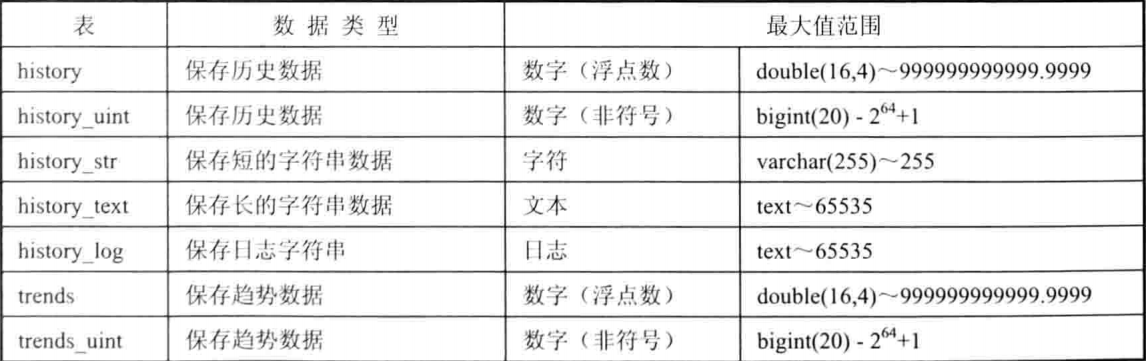
对于存储超过期限的数据,主要使用DELETE sql语句进行删除,当数据量太多,这将严重影响数据库的性能。
查询zabbix数据库中各种表存储的大小和行数:
mysql> select table_name, (data_length + index_length)// as total_mb, table_rows from information_schema.tables where table_schema='zabbix';

从上图可知,我这仅仅只是一个测试环境,histroy表存储的数据已经几十万行,如果是生成环境,估计几千、上亿万行。
二、数据库 表分区
1、
数据库的优化有横向和纵向扩展,这里使用数据的分布式,而分表可以看做是分布式的一种。。
在zabbix_server.conf文件中,找到如下两个参数:
(1)HousekeepingFrequency=1 解释:多久删除一次数据库里面的过期数据(间隔时间),默认一小时
(2)MaxHousekeeperDelete=5000 解释:每次删除数据量的上线(最大删除量),默认5000
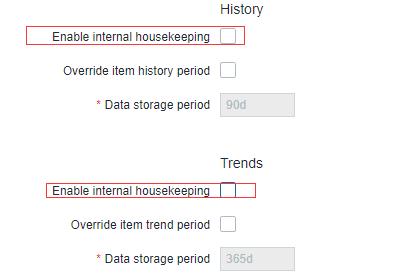
采用表分区,需要关闭Housekeeping功能,关闭流程如下:Administration ---> General ---> Housekeepin

去掉Histroy和Trends的勾选状态,如下图:
2、
(1)进行表分区,这里采用GitHub上一位大神写的表分区脚本,连接如下:
wget https://github.com/itnihao/zabbix-book/blob/master/03-chapter/partitiontables.sh
该脚本具有如下功能:
> 备份数据库
> 对表进行分区间
> 添加定时任务
如果数据量过大,可以将表数据删除(当然这样数据会全部被删除)
清空语句如下:
sql> use zabbix;

sql> truncate table histroy;

sql> optimize table histroy;

sql> truncate table histroy_str;

sql> optimize table histroy_str;

sql> truncate table histroy_uint;

sql> optimize table histroy_unit;

sql> truncate table trends;

sql> optimize table trends;

sql> truncate table trends_unit;

sql> optimize table trends_unit;

sql> truncate table events;

sql> optimize table events;
(2)运行表分区脚本
为了防止网络中断引起脚本运行中断而造成数据库故障,这里选用screen后台执行方法。
# yum install -y screen
# screen -R zabbix 需要退出的话可以按 Ctral + A 以后再执行 Ctral + D
#bash partitiontables.sh
执行过程如下:
Ready to partition tables.

Ready to update permissions of Zabbix user to create routines

Enter root DB user: zabbix

Enter zabbix password: zabbix

mysql: [Warning] Using a password on the command line interface can be insecure.

ERROR  () at line : Access denied for user 'zabbix'@'localhost' to database 'zabbix'

#   上述错误可以忽略

Do you want to backup the database (recommended) (Y/n): y

Enter output file, press return for default of /tmp/zabbix.sql

mysql: [Warning] Using a password on the command line interface can be insecure.

ERROR  () at line : Access denied for user 'zabbix'@'localhost' to database 'zabbix'

mysqldump: [Warning] Using a password on the command line interface can be insecure.

Mysqldump succeeded!, proceeding with upgrade...

Ready to proceed:

Starting yearly partioning at:

and ending at:

With  days of daily history

Ready to proceed (Y/n):

y

Altering table: history

Altering table: history_log

Altering table: history_str

Altering table: history_text

Altering table: history_uint

Altering table: trends

Altering table: trends_uint

Creating monthly partitions for table: trends

Creating monthly partitions for table: trends_uint

Creating daily partitions for table: history

Creating daily partitions for table: history_log

Creating daily partitions for table: history_str

Creating daily partitions for table: history_text

Creating daily partitions for table: history_uint

Ready to apply script to database, this may take a while.(Y/n):

y

mysql: [Warning] Using a password on the command line interface can be insecure.

Altering tables

history

history_log

ERROR  () at line : Can't DROP 'history_log_2'; check that column/key exists

If Zabbix Version = 2.0

Do you want to update the /etc/zabbix/zabbix_server.conf

to disable housekeeping (Y/n): n

Do you want to update the crontab (Y/n): y

The crontab entry can be either in /etc/cron.daily, or added

to the crontab for root

Do you want to add this to the /etc/cron.daily directory (Y/n): y

Enter email of who should get the daily housekeeping reports:
执行完脚本以后,查看计划任务:
[root@manager1 script_sh ::]#cat /etc/cron.daily/zabbixhousekeeping

#!/bin/bash

/usr/local/zabbix/cron.d/housekeeping.sh

[root@manager1 script_sh ::]#cat /usr/local/zabbix/cron.d/housekeeping.sh

#!/bin/bash

MAILTO=root@localhost

tmpfile=/tmp/housekeeping$$

date >$tmpfile

/usr/bin/mysql --skip-column-names -B -h localhost -uzabbix -pzabbix zabbix -e "CALL create_zabbix_partitions();" >>$tmpfile >&

/usr/bin/mail -s "Zabbix MySql Partition Housekeeping" $MAILTO <$tmpfile

rm -f $tmpfile

[root@manager1 script_sh ::]#
ok
zabbix(4)数据库表分区优化的更多相关文章
- 千万级SQL Server数据库表分区的实现
千万级SQL Server数据库表分区的实现 2010-09-10 13:37 佚名 数据库 字号:T | T 一般在千万级的数据压力下,分区是一种比较好的提升性能方法.本文将介绍SQL Server ...
- Oracle数据库表分区
一.Oracle数据库表分区概念和理解 1.1.已经存在的表没有方法可以直接转化为分区表. 1.2.不在分区字段上建立分区索引,在别的字段上建立索引相当于全局索引.效率 ...
- Zabbix数据库表分区
zabbix的监控主机数量将近300,且运行了一年时间了,最近zabbix server服务监控历史数据等服务不断自身告警.查询性能也变得很低 关于历史数据的两个参数,在zabbix server的配 ...
- WebGIS项目中利用mysql控制点库进行千万条数据坐标转换时的分表分区优化方案
文章版权由作者李晓晖和博客园共有,若转载请于明显处标明出处:http://www.cnblogs.com/naaoveGIS/ 1. 背景 项目中有1000万条历史案卷,为某地方坐标系数据,我们的真实 ...
- MySQL数据库表分区功能详解
1.什么是表分区? mysql数据库中的数据是以文件的形势存在磁盘上的,默认放在/mysql/data下面(可以通过my.cnf中的datadir来查看),一张表主要对应着三个文件,一个是frm存放表 ...
- mysql数据库表分区详解(数量过大的数据库表通过分区提高查询速度)
这篇文章主要介绍了MySQL的表分区,例如什么是表分区.为什么要对表进行分区.表分区的4种类型详解等,需要的朋友可以参考下 一.什么是表分区通俗地讲表分区是将一大表,根据条件分割成若干个小表.mysq ...
- sqlserver 数据库表分区
参考文档 https://msdn.microsoft.com/zh-cn/library/ms345146(SQL.90).aspx http://blog.sina.com.cn/s/blog_4 ...
- linux下关于mysqldump备份的.sql导入数据库表数据丢失优化
直切正题 前2个随笔做了linux下自动备份,但是备份的.sql文件发现表数据丢失,原因是数据库太大我的数据库文件是804M,在用ftp拉去也会丢失数据 所以对db.sh备份数据库加一个压缩gizp ...
- Mysql学习总结(17)——MySQL数据库表设计优化
1.选择优化的数据类型 MySQL支持很多种不同的数据类型,并且选择正确的数据类型对于获得高性能至关重要.不管选择何种类型,下面的简单原则都会有助于做出更好的选择: (1).更小通常更好 一般来说,要 ...
随机推荐
- springboot笔记03——quickstart程序原理
一.前言 一个quickstart程序仅仅让我们初步了解一个框架,我们还需要透过现象看本质才能学好一个框架.所以这篇文章分析一下我上次写的springboot的入门程序. 二.原理分析 1.依赖分析 ...
- SqlServer2008 / SqlServer2012 禁用windows登录,sa忘记密码或密码过期如何登陆
以管理员身份运行cmd 1.cmd 下 停止SqlServer服务,net stop mssqlserver: 2.新建windows账号test,加入administrators组里,授予管理员权 ...
- Python Web 程序使用 uWSGI 部署
Python Web 程序使用 uWSGI 部署 WSGI是什么? WSGI,全称 Web Server Gateway Interface,或者 Python Web Server Gateway ...
- 正则表达式字符&使用
正则详细解说:https://juejin.im/post/5965943ff265da6c30653879 一.正则表达式中的字符含意 \ 做为转义,即通常在"\"后面的字符不按 ...
- linux驱动开发随手记【1】
1.一个patch只完成一项任务 2.用vim编辑多个文件,想同时关闭所有文件时候,可以用 :qall 命令 .vim用户手册08 3.mmc dev 0.mmc为U-boot命令,这句话的含义是设置 ...
- echart——关系图graph详解
VueEchart组件见上一篇 <template> <VueEcharts :options="options" auto-resize /> </ ...
- Android应用查看本地数据库
使用Android Studio 视图==>工具窗口 == >Device File Explorer ==> 文件在 data/data目录下,你的应用程序报名,右键save as ...
- py网络编程学习笔记
一.异常处理 异常就是程序运行时发生错误的信号(在程序出现错误时,则会产生一个异常,若程序没有处理它,则会抛出该异常,程序的运行也随之终止),在python中,错误触发的异常如下 而错误分为两种: 1 ...
- MySql 学习之 一条查询sql的执行过程
相信大家都接触过Mysql数据库,而且也肯定都会写sql.我不知道大家有没有这样的感受,反正我是有过这样的想法.就是当我把一条sql语句写完了,并且执行完得到想要的结果.这时我就在想为什么我写这样的一 ...
- 前端自己导出Excel
1.导出当前页面,这是最简单的,只是导出当前页面的数据. exportData(tableid, name) { let table; let uri = 'data:application/vnd. ...