
将springboot安装成windows服务启动。
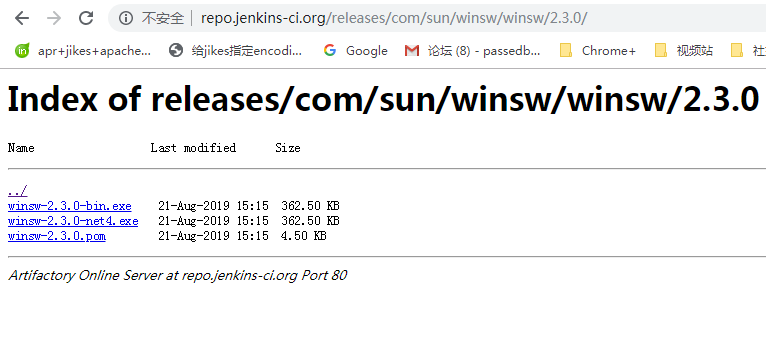
本文下载了winsw-2.3.0-bin.exe。
新建一个目录aiplatformService
在目录里面新建一个aiplatformService.xml,同时把winsw-2.3.0-bin.exe重命名陈aiplatformService.exe
必须这么做,否则无法安装启动服务。
编辑aiplatfomService.xml文件
<?xml version="1.0" encoding="utf-8" ?>

<service>

    <id>aiPlat</id> <!-- must be unique -->

    <name>ai Platfrom Daemon</name>

    <description>ai平台演示程序</description>

    <executable>javaw</executable>

    <arguments>-jar "%BASE%\web-0.2.jar"</arguments>

    <logpath>%BASE%\log</logpath>

    <log mode="roll-by-time">

    <pattern>yyyy-MM-dd</pattern>

    </log>

</service>
在目录中放入你的springboot项目,web-0.2.jar
在命令行 运行
安装服务命令
aiPlatService.exe install
启动服务
E:\aiplatformService>aiPlatService.exe stop
2019-09-05 15:59:31,974 INFO - Stopping the service with id 'aiPlat'
关闭服务
E:\aiplatformService>aiPlatService.exe start
2019-09-05 15:59:38,399 INFO - Starting the service with id 'aiPlat'
卸载服务命令
aiPlatService.exe uninstall
成功运行后如下

参考:https://reflectoring.io/autostart-with-winsw/
将springboot安装成windows服务启动。的更多相关文章
- 【先定一个小目标】Redis 安装成windows服务-开机自启
1.第一步安装成windows服务的,开机自启动 redis-server --service-install redis.windows.conf 2.启动\关闭 redis-server --se ...
- Java的jar文件安装成windows 服务
Java的jar文件安装成windows 服务: 1.下载:nssm,复制到jar文件目录下 2. jar文件目录下创建bat文件[run.bat],内容为[java -jar 文件名.jar] 3. ...
- Nginx 安装成 Windows 服务
Nginx 安装成Windows 服务方法,具体方法如下 1. 下载nginx windows版本 http://www.nginx.org 2. 下载微软的2个工具: instsrv.exe.srv ...
- Redis是可以安装成windows服务-开机自启
其实Redis是可以安装成windows服务的,开机自启动,命令如下 redis-server --service-install redis.windows.conf 安装完之后,就可看到Redis ...
- 使用srvany.exe把程序安装成windows服务的方法
http://mazhihui.iteye.com/blog/1294431 srvany.exe是什么? srvany.exe是Microsoft Windows Resource Kits工具集的 ...
- 使用srvany.exe将程序安装成windows服务的详细教程
srvany.exe介绍 srvany.exe是Microsoft Windows Resource Kits工具集的一个实用的小工具,用于将任何EXE程序作为Windows服务运行.也就是说srva ...
- Redis是可以安装成windows服务-开机自启 win7 64位
其实Redis是可以安装成windows服务的,开机自启动,命令如下: redis-server --service-install redis.windows.conf 安装完之后,就可看到Redi ...
- 使用srvany.exe把程序安装成windows服务
srvany.exe介绍 srvany.exe是Microsoft Windows Resource Kits工具集的一个实用的小工具,用于将任何EXE程序作为Windows服务运行.也就是说srva ...
- ELK安装成windows服务
一.Elasticsearch安装成windows服务 我的es所在路径为:D:\ELK5.5.0\elasticsearch-5.5.0 Java 安装目录为:C:\Program Files\Ja ...
随机推荐
- 模块化开发之sea.js
随着时间的推移,原生js越来越强大,es6中的improt,export已经可以实现模块化开发,但可惜的是现在的浏览器还不支持,需要进行编译,相信在不久的将来,一定会大行其道,今天我们来聊聊模块化开发 ...
- 15、TDM模型
论文:https://arxiv.org/pdf/1801.02294.pdf 解析: 学习基于树的推荐系统深度模型 Learning Tree-based DeepModel for Recomme ...
- HTML5游戏2D开发引擎
1.PixiJS(基于webGl和canvas) 官网:http://www.pixijs.com/ github(star:20672):https://github.com/pixijs/pixi ...
- linux实操_shell位置参数变量
基本语法: 脚本内容: 输出效果:
- hbase实践之写流程拾遗
keyvalue KeyValue中包含了丰富的自我描述信息: KeyValue是支撑"稀疏矩阵"设计的一个关键点:一些Key相同的任意数量的独立KeyValue就可以构成一行数据 ...
- selenium怎样避免被服务器检测
selenium是用来完成浏览器自动化相关的操作.可以通过代码的形式制定一些基于浏览器自动化的相关操作(行为动作),当代码执行后,浏览器就会自动触发相关的事件.但这并不能避免服务器的检测.当在浏览器中 ...
- 3、组件注册-@ComponentScan-自动扫描组件&指定扫描规则
3.组件注册-@ComponentScan-自动扫描组件&指定扫描规则 3.1 xml方式 benas.xml 导入context命名空间 <?xml version="1.0 ...
- [Javascript] Nested generators
To see how to call another generator inside a generator: function* numbers () { ; ; yield* moreNumbe ...
- hash 跟B+tree的区别
1.hash只支持in跟=,不支持范围查询,时间复杂度:O(1) 2.B+tree支持范围查询,时间复杂度:O(log n) 3. B+tree 的优点:1.磁盘读取代价更低 ...
- 边学边体验django--HttpRequest 对象
每个view函数的第一个参数是一个HttpRequest对象. HttpRequest对象包含当前请求URL的一些信息: 属性 描述 path 请求页面的全路径,不包括域名'/hello/' meth ...