
将springboot安装成windows服务启动。
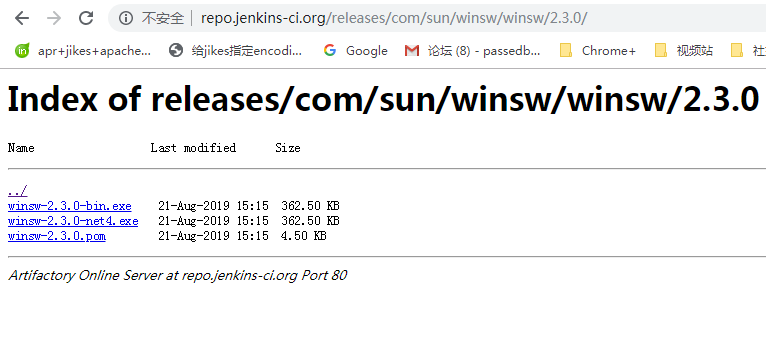
本文下载了winsw-2.3.0-bin.exe。
新建一个目录aiplatformService
在目录里面新建一个aiplatformService.xml,同时把winsw-2.3.0-bin.exe重命名陈aiplatformService.exe
必须这么做,否则无法安装启动服务。
编辑aiplatfomService.xml文件
<?xml version="1.0" encoding="utf-8" ?>

<service>

    <id>aiPlat</id> <!-- must be unique -->

    <name>ai Platfrom Daemon</name>

    <description>ai平台演示程序</description>

    <executable>javaw</executable>

    <arguments>-jar "%BASE%\web-0.2.jar"</arguments>

    <logpath>%BASE%\log</logpath>

    <log mode="roll-by-time">

    <pattern>yyyy-MM-dd</pattern>

    </log>

</service>
在目录中放入你的springboot项目,web-0.2.jar
在命令行 运行
安装服务命令
aiPlatService.exe install
启动服务
E:\aiplatformService>aiPlatService.exe stop
2019-09-05 15:59:31,974 INFO - Stopping the service with id 'aiPlat'
关闭服务
E:\aiplatformService>aiPlatService.exe start
2019-09-05 15:59:38,399 INFO - Starting the service with id 'aiPlat'
卸载服务命令
aiPlatService.exe uninstall
成功运行后如下

参考:https://reflectoring.io/autostart-with-winsw/
将springboot安装成windows服务启动。的更多相关文章
- 【先定一个小目标】Redis 安装成windows服务-开机自启
1.第一步安装成windows服务的,开机自启动 redis-server --service-install redis.windows.conf 2.启动\关闭 redis-server --se ...
- Java的jar文件安装成windows 服务
Java的jar文件安装成windows 服务: 1.下载:nssm,复制到jar文件目录下 2. jar文件目录下创建bat文件[run.bat],内容为[java -jar 文件名.jar] 3. ...
- Nginx 安装成 Windows 服务
Nginx 安装成Windows 服务方法,具体方法如下 1. 下载nginx windows版本 http://www.nginx.org 2. 下载微软的2个工具: instsrv.exe.srv ...
- Redis是可以安装成windows服务-开机自启
其实Redis是可以安装成windows服务的,开机自启动,命令如下 redis-server --service-install redis.windows.conf 安装完之后,就可看到Redis ...
- 使用srvany.exe把程序安装成windows服务的方法
http://mazhihui.iteye.com/blog/1294431 srvany.exe是什么? srvany.exe是Microsoft Windows Resource Kits工具集的 ...
- 使用srvany.exe将程序安装成windows服务的详细教程
srvany.exe介绍 srvany.exe是Microsoft Windows Resource Kits工具集的一个实用的小工具,用于将任何EXE程序作为Windows服务运行.也就是说srva ...
- Redis是可以安装成windows服务-开机自启 win7 64位
其实Redis是可以安装成windows服务的,开机自启动,命令如下: redis-server --service-install redis.windows.conf 安装完之后,就可看到Redi ...
- 使用srvany.exe把程序安装成windows服务
srvany.exe介绍 srvany.exe是Microsoft Windows Resource Kits工具集的一个实用的小工具,用于将任何EXE程序作为Windows服务运行.也就是说srva ...
- ELK安装成windows服务
一.Elasticsearch安装成windows服务 我的es所在路径为:D:\ELK5.5.0\elasticsearch-5.5.0 Java 安装目录为:C:\Program Files\Ja ...
随机推荐
- YouTube下载方法
复制要下载的视频的地址 打开此链接:https://y2mate.com/youtube/9wxePpNYShQ 如下图位置粘贴视频地址,然后选择想要的分辨率点击右面的“Download”进行下载即可
- React 新特性学习
1 context 2 contextType 3 lazy 4 suspense 5 memo 6 hooks 7 effect hooks =========== 1 Context 提供了一种方 ...
- python numpy.array插入一行或一列
numpy.array插入一行或一列 import numpy as np a = np.array([[1,2,3],[4,5,6],[7,8,9]]) b = np.array([[0,0,0]] ...
- office+visio2016版本一同安装说明
安装所需软件: Office或者visio镜像 比如:cn_visio_professional_2016_x86_x64_dvd_6970929.iso 下载网址:http://pan.baidu. ...
- 富文本编辑器粘贴word
很多时候我们用一些管理系统的时候,发布新闻.公告等文字类信息时,希望能很快的将word里面的内容直接粘贴到富文本编辑器里面,然后发布出来.减少排版复杂的工作量. 下面是借用百度doc 来快速实现这个w ...
- vii
#!/bin/bash ] then vi exit fi ] then echo "参数太多了!" exit fi ] # 文件已存在,一律直接打开不作任何处理 then exi ...
- Foundation-常用结构体
复习 void test(){ struct Date{ int year; int month; int day; }; struct Date d={2015,5,14}; d.day=6; } ...
- c++ 实现等待5s
#include <stdio.h> /* puts, printf */ #include <time.h> /* time_t, struct tm, time, loca ...
- classpath详解
在dos下编译java程序,就要用到classpath这个概念,尤其是在没有设置环境变量的时候.classpath就是存放.class等编译后文件的路径. javac:如果当前你要编译的java文件中 ...
- ASP.NET的MVC设计模式
当开发者听到“设计模式”这个词时,他们通常联想到两个场景.一组开发者正在讨论许多创造性意见,正在开会,但是却没有进行编码.另外一组人能制定出正确的计划,保证系统能够开发成功,代码可以重用. 而现实一般 ...