
Apache Log View 5.37破解笔记
之前说过要分享这个日志分析工具【记一次简单的攻击日志分析】的破解版,在破解的路上踩了几个坑,记录分享下。
0×00程序概述
原程序
大小: 2283672 字节
文件版本: 5.0.0.61
修改时间: 2017年11月3日, 8:12:16
MD5: 707AA8FDF34E226C3A942D32C2E739E3
SHA1: B8EDCF75DBE17E40E3B4D7FA99AD5BC3B4B87C93
CRC32: 6A6131AF
去混淆后程序
大小: 2305024 字节
文件版本: 5.0.0.61
修改时间: 2018年3月23日, 23:56:23
MD5: 4FD44749D867B7DA67A7400463315224
SHA1: 49F9DE8BA84C1284C3B3353942EDF322EB85D6D0
CRC32: E306E509
0×01程序侦测
拿到一款程序我通常都会进行侦壳,然后根据结果来选择相应的手段
选用PEiD和DIE来判断
PEiD识别到了一个未知壳。。
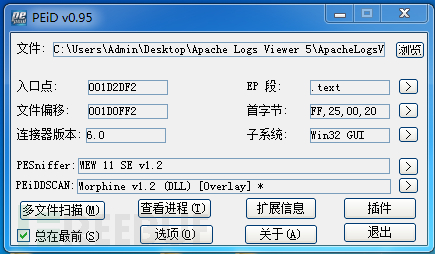
好吧,试试die
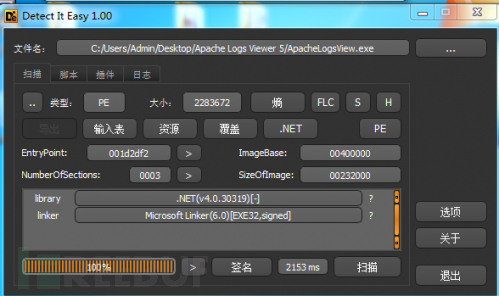
.net程序,看起来是混淆了
0×02去混淆
由于已经判断了程序被混淆了,尝试用De4dot去混淆,很幸运,一次成功

0×03开工
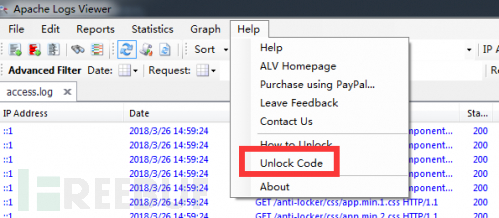
程序拖入dnSpy,搜索一些关键字[unlock、unlock code、register、thank、check等]
跟到了unlockCodeToolStripMenuItem_Click方法
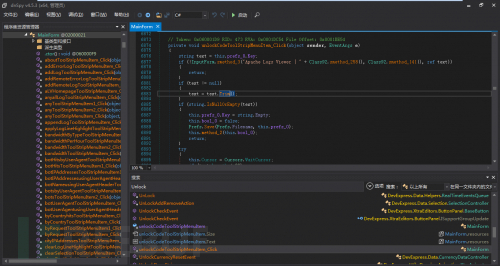
private void unlockCodeToolStripMenuItem_Click(object sender, EventArgs e) { string text = this.prefs_0.Key; if (!InputForm.smethod_3(“Apache Logs Viewer | “ + Class92.smethod_258(), Class92.smethod_141(), ref text)) { return; } if (text != null) { text = text.Trim();//去空格 } if (string.IsNullOrEmpty(text)) { this.prefs_0.Key = string.Empty; this.bool_0 = false; Prefs.Save(Prefs.Filename, this.prefs_0); this.method_2(this.bool_0); return; } try { this.Cursor = Cursors.WaitCursor; if (text.Length < 22) { throw new ApplicationException(“Failed”);//如果输入字符小于22个,弹窗提示错误 } if (Class2.smethod_1(Class2.smethod_0(text))) //验证注册码是否正确 { this.prefs_0.Key = text; //prefs_0.Key赋值为输入的码 this.method_23(); //联网提交 Prefs.Save(Prefs.Filename, this.prefs_0); this.Cursor = Cursors.Default; this.lbStatusStripNotify.Text = Class92.smethod_247() + ” Apache Logs Viewer.”; MessageBox.Show(this, Class92.smethod_247() + ” Apache Logs Viewer.”, “Apache Logs Viewer”, MessageBoxButtons.OK, MessageBoxIcon.Asterisk); this.bool_0 = true; //返回正确并弹框 } else { MessageBox.Show(this, Class92.smethod_115(), “Apache Logs Viewer | “ + Class92.smethod_258(), MessageBoxButtons.OK, MessageBoxIcon.Hand); this.bool_0 = false;//激活失败 } } catch (Exception) { this.Cursor = Cursors.Default; MessageBox.Show(this, Class92.smethod_89(), “Apache Logs Viewer | “ + Class92.smethod_258(), MessageBoxButtons.OK, MessageBoxIcon.Hand); this.bool_0 = false;//激活失败 } finally { this.Cursor = Cursors.Default; } this.method_2(this.bool_0);
踩第一个坑
好了,分析完这一段代码,直接ctrl+shift+e修改为如下:
public void unlockCodeToolStripMenuItem_Click(object sender, EventArgs e) { string text = this.prefs_0.Key; if (text != null) { text = text.Trim(); } if(string.IsNullOrEmpty(text)) { this.prefs_0.Key = string.Empty; this.bool_0 = false; Prefs.Save(Prefs.Filename, this.prefs_0); this.method_2(this.bool_0); return; } this.Cursor = Cursors.WaitCursor; if (text.Length < 1) { throw newApplicationException(“Failed”); } this.prefs_0.Key = text; Prefs.Save(Prefs.Filename, this.prefs_0); this.Cursor = Cursors.Default; this.lbStatusStripNotify.Text = Class92.smethod_247() + ” Apache Logs Viewer.”; MessageBox.Show(this, Class92.smethod_247() + ” Apache Logs Viewer.”, “Apache Logs Viewer”, MessageBoxButtons.OK, MessageBoxIcon.Asterisk); this.bool_0 = true; this.method_2(this.bool_0); }}
然后保存
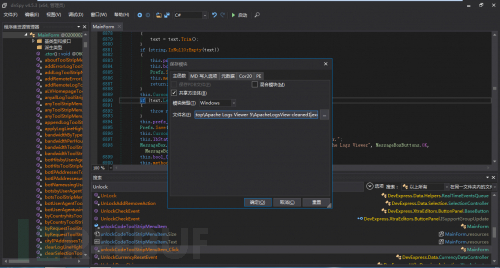
嗯,不用输入字符都能注册了
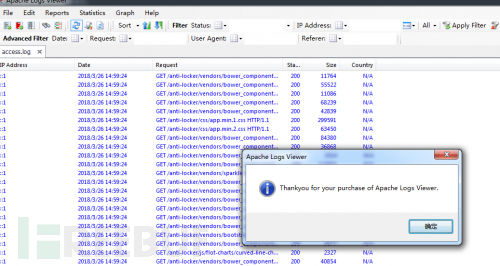
关闭,重启程序
EXM???我尼玛???

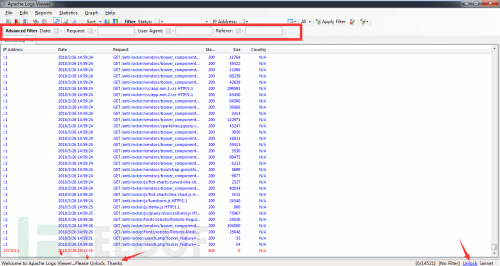
咋成未注册了,不对,冷静分♂析下,一定是漏了哪步

踩第二个坑
如果有重启验证,那么肯定是本地保存了注册码,要么是文件格式要么是注册表,于是用PM跟踪了他的行为,发现了有♂趣的东西
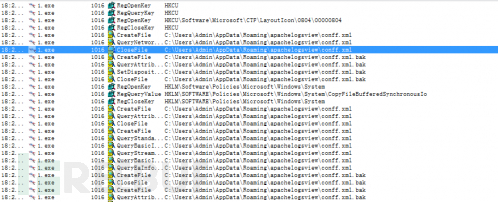
这货竟然把配置文件保存在C:\Users\Admin\AppData\Roaming\apachelogsview\conff.xml
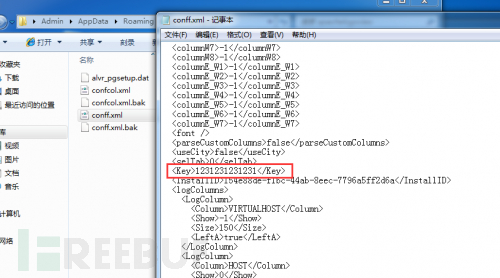
那我不是改注册码就能完成注册了吗?(事实证明我太天真)
改了一个好看点的注册码:
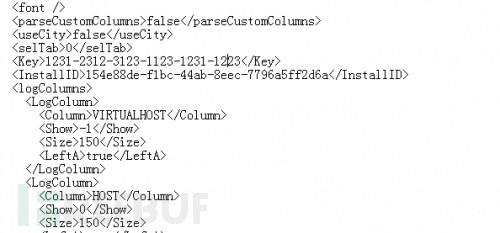
结果依然……
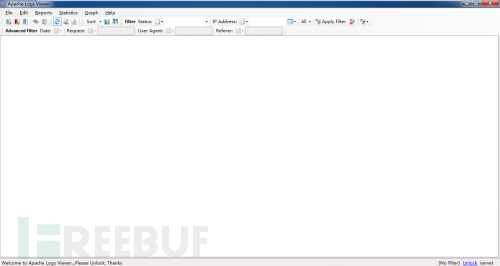
继续分析
0×04柳暗花明
在一番分析后发现了一个名为method_2的方法不停的被调用,难道为关键方法?
逐全局搜索method_2,发现在启动时调用了method_2
private void MainForm_Load(object sender, EventArgs e) { try { if(Class91.bool_2) { Prefs.DeletePrefs(); } ALV.Common.Debug.Info("Started.."); Prefs prefs = Prefs.Load(Prefs.Filename); if (string.IsNullOrEmpty(prefs.InstallID)) { prefs.InstallID = Guid.NewGuid().ToString(); } if (prefs.sizex > 10) { base.Width = prefs.sizex; } if (prefs.sizey > 10) { base.Height = prefs.sizey; } if (prefs.maximised) { base.WindowState = FormWindowState.Maximized; } if (prefs.x >= 0 && prefs.y >=0) { base.Location = new Point(prefs.x, prefs.y); } this.prefs_0 = prefs; if (this.prefs_0.logColumns == null ||this.prefs_0.logColumns.Count <= 0) { this.prefs_0.logColumns = LogColumn.ResetLogColumns(); } ALV.Common.Debug.Info("Loading Custom Columns"); this.prefsColumns_0 = PrefsColumns.Load(PrefsColumns.Filename); this.method_42(); DummyListView.prefs = prefs; ALV.Common.Debug.Info("Loading IP DB"); this.ip2Country_0 = new IP2Country(true, this.prefs_0.useCity); this.parser_0 = new Parser(this.ip2Country_0); this.parser_0.ParseCustomColumns =this.prefs_0.parseCustomColumns; Statistics.int_0 = this.prefs_0.topNumber; try { if (prefs.monitorAuto) { ALV.Common.Debug.Info("Opening Logs..."); foreach (LoggerInfo loggerInfo inprefs.logsToView) { if (loggerInfo.Highlight != null) { this.method_48(loggerInfo.Highlight, true); } try { this.method_6(loggerInfo); if (Class91.bool_0) { GC.Collect(); } } catch { } } } if (Class91.list_0 != null) { foreach (string text in Class91.list_0) { try { bool flag = this.parser_0.IsErrorLog(text); this.method_4(text, !flag, false); if (Class91.bool_0) { GC.Collect(); } } catch { } } } } catch (Exception) { MessageBox.Show(Class92.smethod_241()); } if (this.prefs_0.selTab >= 0 &&this.tabControl1.TabPages.Count > this.prefs_0.selTab) { this.tabControl1.SelectedTabPageIndex = this.prefs_0.selTab; } try { if (!string.IsNullOrEmpty(this.prefs_0.Key)) { string string_ = Class2.smethod_0(this.prefs_0.Key); this.bool_0 = Class2.smethod_1(string_); } } catch (Exception) { this.bool_0 = false; } try { if(IsStoreApp.IsWindowsStoreApp) { this.bool_0 = true; this.bool_1 = true; this.method_0(); } } catch { } if (!this.bool_0)//关键处 { this.lbStatusStripNotify.Text = Class92.smethod_263() + " Apache Logs Viewer..." + Class92.smethod_66(); this.method_2(false); } else { this.lbStatusStripNotify.Text = Class92.smethod_263() + " Apache Logs Viewer"; this.method_2(true); }
在关键处上面bool_0已经被赋值为true了,但是这里被判断为非bool_0即if (this.bool_0==false)
直接干掉感叹号试试,不行再来
找对位置Ctrl+Shift+E继续编辑,干掉感叹号
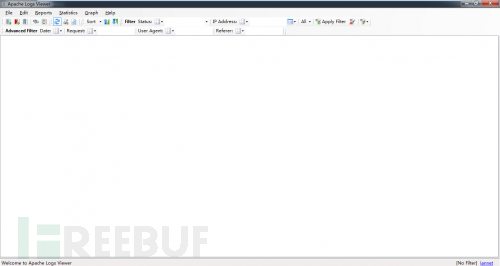
OK了,高级功能解锁,可以完美使用!
抽空再汉化下就完美了

Apache Log View 5.37破解笔记的更多相关文章
- Sublime Text 4 破解笔记
Sublime Text 4 破解笔记 偶然看到Sublime已经更新到版本4了,多了许多很nice的新特性,例如: 船新 UI 感知上下文的自动补全 支持 TypeScript, JSX 和 TSX ...
- Apache索引目录浏览的学习笔记
在浏览一些镜像文件站的时候,会发现网站目录是可以浏览文件(夹)列表的.举两个例子:网易开源镜像:Ubuntu.只要 Web 服务器是基于 Apache 的网站都可以开启或禁止索引(目录浏览),那么如何 ...
- ApexSql Log 2014.04.1133破解版&补丁
已上传最新的2016版本,请移步: http://www.cnblogs.com/gsyifan/p/ApexSql_Log_2016_Crack.html 状态不好,鬼使补差的跑到服务器上updat ...
- 【转载】apache log配置 按日期写日志
指定apache日志每天生成一个文件 Linux系统配置方法 在apache的配置文件httpd.conf中找到 代码如下1 ErrorLog logs/error_log CustomLog log ...
- 斐讯K2P配置文件破解笔记
手上有一个斐讯K2P路由器,刷机前我想把原机带的固件备份出来.搜到恩山A大开启telnet.固件备份的教程,里面提到了配置文件破解的方法,心血来潮试了一下,发现算出的密码不能解密,一直报"b ...
- apache log 按日期记录 格式 <GOOD>-- (转)
在apache的配置文件中找到ErrorLog logs/error_logCustomLog logs/access_log common Linux系统配置方法: 将其改为ErrorLog “| ...
- iOS 用xib自定义view控件 debug笔记
1.在view不是很复杂的情况下,如果多次检查后依旧出现coding-compliant这种情况,干脆彻底删除这个xib重新新建一个xib来做一遍.(至今未明真相) 2.初始化xib中的view的大致 ...
- WPA/WAP2wifi 密码破解笔记
前言: 相对于前一段时间脆弱的WEP路由器而言,当今的路由器加密方式也大都改变为WPA/WPA2,使得无线路由器的破解难度增加.虽然如此,但还是有很多漏洞层出不穷,如WPS.退一步来说,即使加密算法无 ...
- 苹果ipa软件包破解笔记
苹果的验证机制: Appstore上的应用都採用了DRM(digital rights management)数字版权加密保护技术,直接的表现是A帐号购买的app,除A外的帐号无法使用,事实上就是有了 ...
随机推荐
- OSG节点访问和遍历
遍历节点树:osg::Node类中有两个辅助函数: void ascend(NodeVisitor& nv) //虚函数,向上一级节点推进访问器 void traverse(NodeVisit ...
- vmware安装centos7.5、配置网卡、环境配置
1.vmware安装centos7.5虚拟机 参考连接: https://blog.csdn.net/guo_ridgepole/article/details/78973763 可能遇到的问题 ...
- 使用json_encode编码中文返回null的解决方案
在gbk的程序中,直接使用json_encode编码包含中文字符的数组,将会返回null. 解决方法: 1.把程序文件编码改为utf8 2.使用mb_convert_encoding把编码转换为utf ...
- IdentityServer4学习笔记汇总(实现传送门在底部)
前言 互联网时代,对信息和资源的保护越发苛刻,在所有应用中授权和认证是必不可少缺少的一部分.如果一个应用没有授权和认证那么这个应用就是不完整或者说不安全的应用.在.Net平台给我们提供了一套完整的授权 ...
- FromServices回来
FromServices回来 起因 这两天,我忽然有点怀念 Asp.NET MVC 5 之前的时代,原因是我看到项目里面有这么一段代码(其实不止一段,几乎每个 Controller 都是) [Rout ...
- rsyslog服务日志报错分析1
客户问题: 最近对服务器进行日志检查时,发现部分主机的rsyslog服务状态有报错,报错详情如下 排查过程: 1.从报错截图来看,报错主要发生在文件'/usr/lib64/rsyslog/omazur ...
- NoSQL数据库一Redis基本使用
基本操作 参考教程:https://www.yiibai.com/redis/Redis 是 Key-Value 内存数据库,操作是通过各种指令进行的,比如 SET 指令可以设置键值对,而 GET 指 ...
- 《Mysql - 我的Mysql为什么会抖一下?》
一: 抖一下? - 平时的工作中,不知道有没有遇到过这样的场景. - 一条 SQL 语句,正常执行的时候特别快,但是有时也不知道怎么回事,它就会变得特别慢. - 并且这样的场景很难复现,它不只随机,而 ...
- Java面试笔记整理4
一.Java内存溢出的产生原因和解决办法? java.lang.OutOfMemoryError这个错误我相信大部分开发人员都有遇到过,产生该错误的原因大都出于以下原因:JVM内存过小.程序不严密,产 ...
- Word 查找替换高级玩法系列之 -- 段首批量添加字符
打开「查找和替换」输入框,按照下图操作: 更多查找替换高级玩法,参看:Word查找替换高级玩法系列 -- 目录篇 未完 ...... 点击访问原文(进入后根据右侧标签,快速定位到本文)