
Apache Log View 5.37破解笔记
之前说过要分享这个日志分析工具【记一次简单的攻击日志分析】的破解版,在破解的路上踩了几个坑,记录分享下。
0×00程序概述
原程序
大小: 2283672 字节
文件版本: 5.0.0.61
修改时间: 2017年11月3日, 8:12:16
MD5: 707AA8FDF34E226C3A942D32C2E739E3
SHA1: B8EDCF75DBE17E40E3B4D7FA99AD5BC3B4B87C93
CRC32: 6A6131AF
去混淆后程序
大小: 2305024 字节
文件版本: 5.0.0.61
修改时间: 2018年3月23日, 23:56:23
MD5: 4FD44749D867B7DA67A7400463315224
SHA1: 49F9DE8BA84C1284C3B3353942EDF322EB85D6D0
CRC32: E306E509
0×01程序侦测
拿到一款程序我通常都会进行侦壳,然后根据结果来选择相应的手段
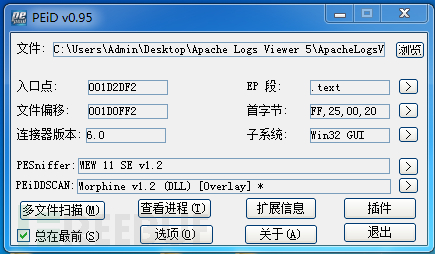
选用PEiD和DIE来判断
PEiD识别到了一个未知壳。。
好吧,试试die
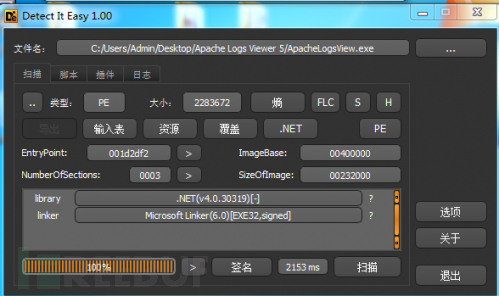
.net程序,看起来是混淆了
0×02去混淆
由于已经判断了程序被混淆了,尝试用De4dot去混淆,很幸运,一次成功

0×03开工
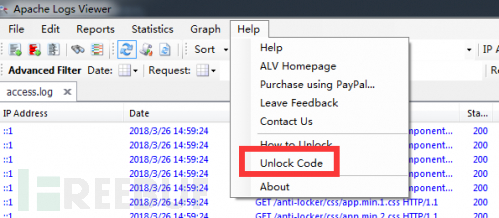
程序拖入dnSpy,搜索一些关键字[unlock、unlock code、register、thank、check等]
跟到了unlockCodeToolStripMenuItem_Click方法
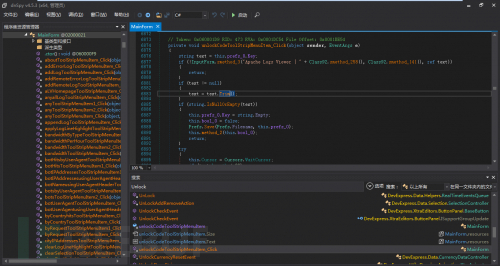
private void unlockCodeToolStripMenuItem_Click(object sender, EventArgs e) { string text = this.prefs_0.Key; if (!InputForm.smethod_3(“Apache Logs Viewer | “ + Class92.smethod_258(), Class92.smethod_141(), ref text)) { return; } if (text != null) { text = text.Trim();//去空格 } if (string.IsNullOrEmpty(text)) { this.prefs_0.Key = string.Empty; this.bool_0 = false; Prefs.Save(Prefs.Filename, this.prefs_0); this.method_2(this.bool_0); return; } try { this.Cursor = Cursors.WaitCursor; if (text.Length < 22) { throw new ApplicationException(“Failed”);//如果输入字符小于22个,弹窗提示错误 } if (Class2.smethod_1(Class2.smethod_0(text))) //验证注册码是否正确 { this.prefs_0.Key = text; //prefs_0.Key赋值为输入的码 this.method_23(); //联网提交 Prefs.Save(Prefs.Filename, this.prefs_0); this.Cursor = Cursors.Default; this.lbStatusStripNotify.Text = Class92.smethod_247() + ” Apache Logs Viewer.”; MessageBox.Show(this, Class92.smethod_247() + ” Apache Logs Viewer.”, “Apache Logs Viewer”, MessageBoxButtons.OK, MessageBoxIcon.Asterisk); this.bool_0 = true; //返回正确并弹框 } else { MessageBox.Show(this, Class92.smethod_115(), “Apache Logs Viewer | “ + Class92.smethod_258(), MessageBoxButtons.OK, MessageBoxIcon.Hand); this.bool_0 = false;//激活失败 } } catch (Exception) { this.Cursor = Cursors.Default; MessageBox.Show(this, Class92.smethod_89(), “Apache Logs Viewer | “ + Class92.smethod_258(), MessageBoxButtons.OK, MessageBoxIcon.Hand); this.bool_0 = false;//激活失败 } finally { this.Cursor = Cursors.Default; } this.method_2(this.bool_0);
踩第一个坑
好了,分析完这一段代码,直接ctrl+shift+e修改为如下:
public void unlockCodeToolStripMenuItem_Click(object sender, EventArgs e) { string text = this.prefs_0.Key; if (text != null) { text = text.Trim(); } if(string.IsNullOrEmpty(text)) { this.prefs_0.Key = string.Empty; this.bool_0 = false; Prefs.Save(Prefs.Filename, this.prefs_0); this.method_2(this.bool_0); return; } this.Cursor = Cursors.WaitCursor; if (text.Length < 1) { throw newApplicationException(“Failed”); } this.prefs_0.Key = text; Prefs.Save(Prefs.Filename, this.prefs_0); this.Cursor = Cursors.Default; this.lbStatusStripNotify.Text = Class92.smethod_247() + ” Apache Logs Viewer.”; MessageBox.Show(this, Class92.smethod_247() + ” Apache Logs Viewer.”, “Apache Logs Viewer”, MessageBoxButtons.OK, MessageBoxIcon.Asterisk); this.bool_0 = true; this.method_2(this.bool_0); }}
然后保存
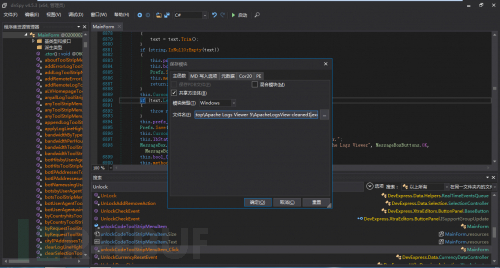
嗯,不用输入字符都能注册了
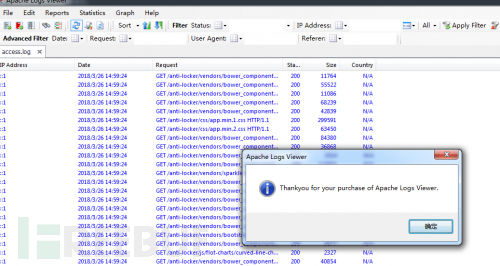
关闭,重启程序
EXM???我尼玛???

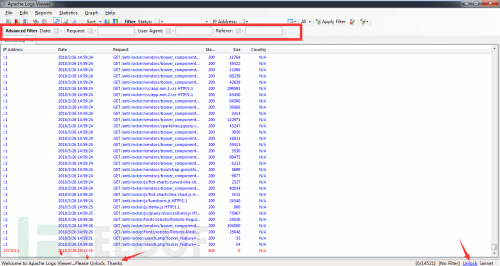
咋成未注册了,不对,冷静分♂析下,一定是漏了哪步

踩第二个坑
如果有重启验证,那么肯定是本地保存了注册码,要么是文件格式要么是注册表,于是用PM跟踪了他的行为,发现了有♂趣的东西
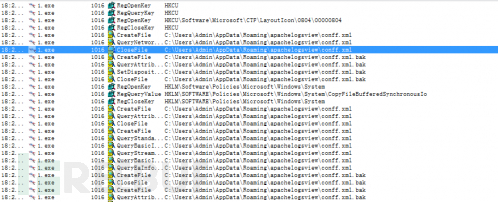
这货竟然把配置文件保存在C:\Users\Admin\AppData\Roaming\apachelogsview\conff.xml
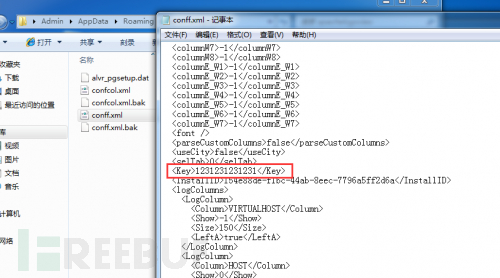
那我不是改注册码就能完成注册了吗?(事实证明我太天真)
改了一个好看点的注册码:
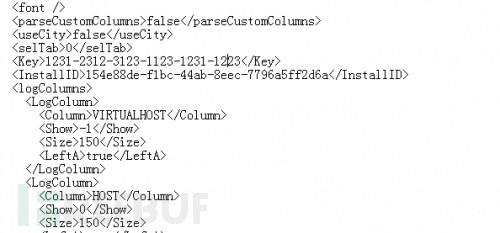
结果依然……
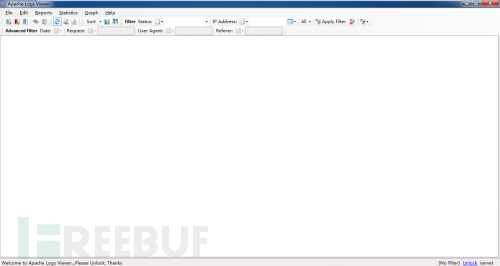
继续分析
0×04柳暗花明
在一番分析后发现了一个名为method_2的方法不停的被调用,难道为关键方法?
逐全局搜索method_2,发现在启动时调用了method_2
private void MainForm_Load(object sender, EventArgs e) { try { if(Class91.bool_2) { Prefs.DeletePrefs(); } ALV.Common.Debug.Info("Started.."); Prefs prefs = Prefs.Load(Prefs.Filename); if (string.IsNullOrEmpty(prefs.InstallID)) { prefs.InstallID = Guid.NewGuid().ToString(); } if (prefs.sizex > 10) { base.Width = prefs.sizex; } if (prefs.sizey > 10) { base.Height = prefs.sizey; } if (prefs.maximised) { base.WindowState = FormWindowState.Maximized; } if (prefs.x >= 0 && prefs.y >=0) { base.Location = new Point(prefs.x, prefs.y); } this.prefs_0 = prefs; if (this.prefs_0.logColumns == null ||this.prefs_0.logColumns.Count <= 0) { this.prefs_0.logColumns = LogColumn.ResetLogColumns(); } ALV.Common.Debug.Info("Loading Custom Columns"); this.prefsColumns_0 = PrefsColumns.Load(PrefsColumns.Filename); this.method_42(); DummyListView.prefs = prefs; ALV.Common.Debug.Info("Loading IP DB"); this.ip2Country_0 = new IP2Country(true, this.prefs_0.useCity); this.parser_0 = new Parser(this.ip2Country_0); this.parser_0.ParseCustomColumns =this.prefs_0.parseCustomColumns; Statistics.int_0 = this.prefs_0.topNumber; try { if (prefs.monitorAuto) { ALV.Common.Debug.Info("Opening Logs..."); foreach (LoggerInfo loggerInfo inprefs.logsToView) { if (loggerInfo.Highlight != null) { this.method_48(loggerInfo.Highlight, true); } try { this.method_6(loggerInfo); if (Class91.bool_0) { GC.Collect(); } } catch { } } } if (Class91.list_0 != null) { foreach (string text in Class91.list_0) { try { bool flag = this.parser_0.IsErrorLog(text); this.method_4(text, !flag, false); if (Class91.bool_0) { GC.Collect(); } } catch { } } } } catch (Exception) { MessageBox.Show(Class92.smethod_241()); } if (this.prefs_0.selTab >= 0 &&this.tabControl1.TabPages.Count > this.prefs_0.selTab) { this.tabControl1.SelectedTabPageIndex = this.prefs_0.selTab; } try { if (!string.IsNullOrEmpty(this.prefs_0.Key)) { string string_ = Class2.smethod_0(this.prefs_0.Key); this.bool_0 = Class2.smethod_1(string_); } } catch (Exception) { this.bool_0 = false; } try { if(IsStoreApp.IsWindowsStoreApp) { this.bool_0 = true; this.bool_1 = true; this.method_0(); } } catch { } if (!this.bool_0)//关键处 { this.lbStatusStripNotify.Text = Class92.smethod_263() + " Apache Logs Viewer..." + Class92.smethod_66(); this.method_2(false); } else { this.lbStatusStripNotify.Text = Class92.smethod_263() + " Apache Logs Viewer"; this.method_2(true); }
在关键处上面bool_0已经被赋值为true了,但是这里被判断为非bool_0即if (this.bool_0==false)
直接干掉感叹号试试,不行再来
找对位置Ctrl+Shift+E继续编辑,干掉感叹号
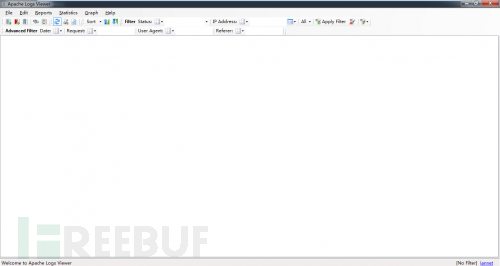
OK了,高级功能解锁,可以完美使用!
抽空再汉化下就完美了

Apache Log View 5.37破解笔记的更多相关文章
- Sublime Text 4 破解笔记
Sublime Text 4 破解笔记 偶然看到Sublime已经更新到版本4了,多了许多很nice的新特性,例如: 船新 UI 感知上下文的自动补全 支持 TypeScript, JSX 和 TSX ...
- Apache索引目录浏览的学习笔记
在浏览一些镜像文件站的时候,会发现网站目录是可以浏览文件(夹)列表的.举两个例子:网易开源镜像:Ubuntu.只要 Web 服务器是基于 Apache 的网站都可以开启或禁止索引(目录浏览),那么如何 ...
- ApexSql Log 2014.04.1133破解版&补丁
已上传最新的2016版本,请移步: http://www.cnblogs.com/gsyifan/p/ApexSql_Log_2016_Crack.html 状态不好,鬼使补差的跑到服务器上updat ...
- 【转载】apache log配置 按日期写日志
指定apache日志每天生成一个文件 Linux系统配置方法 在apache的配置文件httpd.conf中找到 代码如下1 ErrorLog logs/error_log CustomLog log ...
- 斐讯K2P配置文件破解笔记
手上有一个斐讯K2P路由器,刷机前我想把原机带的固件备份出来.搜到恩山A大开启telnet.固件备份的教程,里面提到了配置文件破解的方法,心血来潮试了一下,发现算出的密码不能解密,一直报"b ...
- apache log 按日期记录 格式 <GOOD>-- (转)
在apache的配置文件中找到ErrorLog logs/error_logCustomLog logs/access_log common Linux系统配置方法: 将其改为ErrorLog “| ...
- iOS 用xib自定义view控件 debug笔记
1.在view不是很复杂的情况下,如果多次检查后依旧出现coding-compliant这种情况,干脆彻底删除这个xib重新新建一个xib来做一遍.(至今未明真相) 2.初始化xib中的view的大致 ...
- WPA/WAP2wifi 密码破解笔记
前言: 相对于前一段时间脆弱的WEP路由器而言,当今的路由器加密方式也大都改变为WPA/WPA2,使得无线路由器的破解难度增加.虽然如此,但还是有很多漏洞层出不穷,如WPS.退一步来说,即使加密算法无 ...
- 苹果ipa软件包破解笔记
苹果的验证机制: Appstore上的应用都採用了DRM(digital rights management)数字版权加密保护技术,直接的表现是A帐号购买的app,除A外的帐号无法使用,事实上就是有了 ...
随机推荐
- js 点击列表li,获得当前li的id
html <ul id="demo"> <li id="li-1">li1</li> <li id="li- ...
- Python3类和实例之获取对象信息
当我们拿到一个对象的引用时,如何知道这个对象是什么类型,有哪些方法呢 使用type() 判断对象类型使用type()函数 基本类型都可以用type()判断 <class 'int'> &g ...
- 关于LSTM的输入和训练过程的理解
1.训练的话一般一批一批训练,即让batch_size 个样本同时训练: 2.每个样本又包含从该样本往后的连续seq_len个样本(如seq_len=15),seq_len也就是LSTM中cell的个 ...
- 推特Twitter视频下载的2种方法
Twitter上面的小视频越来越受欢迎了,其实,从社会发展的角度看,短视频的流行是一种必然的趋势.首先,智能手机和高速网络的普及,让人们的碎片化时间得以利用.坐地铁.吃饭的时间,点开一个视频段子.学一 ...
- golang web框架 beego 学习 (六) request body和module的映射
router.go package routers import ( "gowebProject/controllers" "github.com/astaxie/bee ...
- Andrew Ng机器学习课程14(补)
Andrew Ng机器学习课程14(补) 声明:引用请注明出处http://blog.csdn.net/lg1259156776/ 利用EM对factor analysis进行的推导还是要参看我的上一 ...
- QtCreator中打开.ui文件时卡死崩溃的解决方法
问题 QtCreator中打开一个项目,在编辑器中打开普通的.cpp或.h等文件正常,构建正常,运行正常,但是打开ui文件(QtCreator自动调用designer)时会卡死然后崩溃退出. 解决方法 ...
- php 生成32位随机字符串 用于支付验证 用户注册
//32位随机字符串 function randstrpay($length=32) { $rand=''; $randstr= 'ABCDEFGHIJKLMNOPQRSTUVWXYZ01234567 ...
- 最新 东方财富java校招面经 (含整理过的面试题大全)
从6月到10月,经过4个月努力和坚持,自己有幸拿到了网易雷火.京东.去哪儿.东方财富等10家互联网公司的校招Offer,因为某些自身原因最终选择了东方财富.6.7月主要是做系统复习.项目复盘.Leet ...
- Homebrew介绍和使用
一.Homebrew是什么 Homebrew是一款Mac OS平台下的软件包管理工具,拥有安装.卸载.更新.查看.搜索等很多实用的功能.简单的一条指令,就可以实现包管理,而不用你关心各种依赖和文件路径 ...