
C# Winfrom DataGridView DataSource绑定数据源后--解决排序问题
帮助类:
 public class SortBindingHelper<T> : BindingList<T>

    {

        private bool isSortedCore = true;

        private ListSortDirection sortDirectionCore = ListSortDirection.Ascending;

        private PropertyDescriptor sortPropertyCore = null;

        private string defaultSortItem;

        public SortBindingHelper() : base() { }

        public SortBindingHelper(IList<T> list) : base(list) { }

        protected override bool SupportsSortingCore

        {

            get { return true; }

        }

        protected override bool SupportsSearchingCore

        {

            get { return true; }

        }

        protected override bool IsSortedCore

        {

            get { return isSortedCore; }

        }

        protected override ListSortDirection SortDirectionCore

        {

            get { return sortDirectionCore; }

        }

        protected override PropertyDescriptor SortPropertyCore

        {

            get { return sortPropertyCore; }

        }

        protected override int FindCore(PropertyDescriptor prop, object key)

        {

            for (int i = 0; i < this.Count; i++)

            {

                if (Equals(prop.GetValue(this[i]), key)) return i;

            }

            return -1;

        }

        protected override void ApplySortCore(PropertyDescriptor prop, ListSortDirection direction)

        {

            isSortedCore = true;

            sortPropertyCore = prop;

            sortDirectionCore = direction;

            Sort();

        }

        protected override void RemoveSortCore()

        {

            if (isSortedCore)

            {

                isSortedCore = false;

                sortPropertyCore = null;

                sortDirectionCore = ListSortDirection.Ascending;

                Sort();

            }

        }

        public string DefaultSortItem

        {

            get { return defaultSortItem; }

            set

            {

                if (defaultSortItem != value)

                {

                    defaultSortItem = value;

                    Sort();

                }

            }

        }

        private void Sort()

        {

            List<T> list = (this.Items as List<T>);

            list.Sort(CompareCore);

            ResetBindings();

        }

        private int CompareCore(T o1, T o2)

        {

            int ret = 0;

            if (SortPropertyCore != null)

            {

                ret = CompareValue(SortPropertyCore.GetValue(o1), SortPropertyCore.GetValue(o2), SortPropertyCore.PropertyType);

            }

            if (ret == 0 && DefaultSortItem != null)

            {

                PropertyInfo property = typeof(T).GetProperty(DefaultSortItem, BindingFlags.Public | BindingFlags.GetProperty | BindingFlags.Instance | BindingFlags.IgnoreCase, null, null, new Type[0], null);

                if (property != null)

                {

                    ret = CompareValue(property.GetValue(o1, null), property.GetValue(o2, null), property.PropertyType);

                }

            }

            if (SortDirectionCore == ListSortDirection.Descending) ret = -ret;

            return ret;

        }

        private static int CompareValue(object o1, object o2, Type type)

        {

            if (o1 == null) return o2 == null ? 0 : -1;

            else if (o2 == null) return 1;

            else if (type.IsPrimitive || type.IsEnum) return Convert.ToDouble(o1).CompareTo(Convert.ToDouble(o2));

            else if (type == typeof(DateTime)) return Convert.ToDateTime(o1).CompareTo(o2);

            else return String.Compare(o1.ToString().Trim(), o2.ToString().Trim());

        }

    }
使用方式:
 private void NewMethod()

        {

            List<StudentInfo> list = new List<StudentInfo>();

            for (int i = 1; i <= 50; i++)

            {

                StudentInfo stu = new StudentInfo();

                stu.NameA = "学生aaaaaaaa" + i;

                string str = i.ToString().PadLeft(3, '0');//001

                stu.Age = str;

                list.Add(stu);

            }

            SortBindingHelper<StudentInfo> temp = new SortBindingHelper<StudentInfo>();

            foreach (StudentInfo item in list)

            {

                temp.Add(item);

            }

            this.dgvList.DataSource = temp;

        }
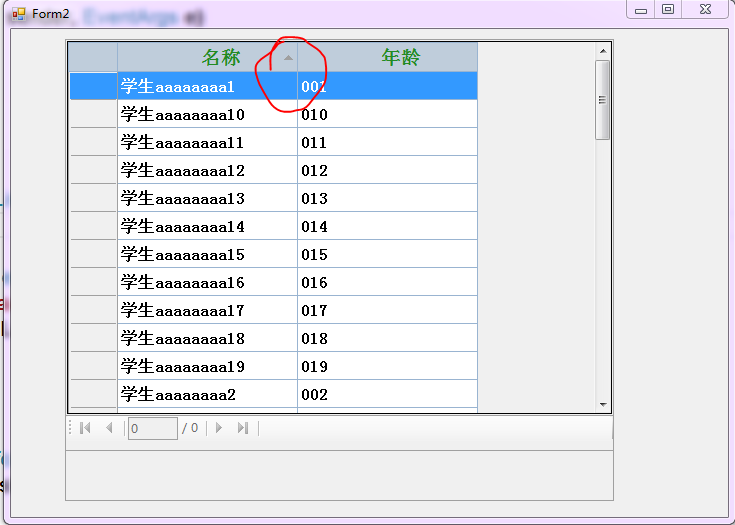
C# Winfrom DataGridView DataSource绑定数据源后--解决排序问题的更多相关文章
- ComboBox控件绑定数据源后,添加'请选择'或'全部'
ComboBox控件绑定数据源后,添加'请选择'或'全部' 当使用ComboBox控件绑定数据源之后,通过Items 属性添加的数据是无效的,此时如果要在所有选项前添加 选项 ,则需要考虑从数据源下手 ...
- DataGridView绑定数据源后添加行
本文链接:https://blog.csdn.net/u012386475/article/details/88639799 在已经绑定数据源时,无法以Add的方式方式添加行,会报错 解决方法一: D ...
- DropDownList绑定数据源后,要插入项的处理
private void BindDivision() { DivisionService divisionService = new DivisionService(); var divisions ...
- Winfrom 中 ComboBox 绑定数据后设置选定项问题
在为 ComboBox 当定数据的时候,如果遇到界面显示需要用文本,而获取选定项的值时需要用数字,我们就很习惯使用 DataSource 来进行绑定. 例如以下代码: List<TextVal ...
- 章鱼哥出品—VB.NET DataGridView绑定数据源 "与货币管理器的位置关联的行不能设置为不可见" 问题的解决
DtaGridView绑定数据源后.假设想让数据条件显示的话,直接使用 My_Row.Visible = False就会出错.错误类型是 "与货币管理器的位置关联的行不能设置为不可见&qu ...
- DataGridView绑定数据源
给DataGridView绑定数据源比較简单,方法主要有两种: 1.直接在控件属性中绑定数据源,这样的方法最简单,但它是直接连接数据库的,这样就和传DataTable的后果差点儿相同了,所以还是尽量避 ...
- Winfrom中ListBox绑定List数据源更新问题
Winfrom中ListBox绑定List数据源更新问题 摘自:http://xiaocai.info/2010/09/winform-listbox-datasource-update/ Winfr ...
- C# DataGridView绑定数据源的几种常见方式
开始以前,先认识一下WinForm控件数据绑定的两种形式,简单数据绑定和复杂数据绑定. 1. 简单的数据绑定 例1 using (SqlConnection conn = new SqlConnect ...
- DataGridView绑定数据源的几种方式
使用DataGridView控件,可以显示和编辑来自多种不同类型的数据源的表格数据. 将数据绑定到DataGridView控件非常简单和直观,在大多数情况下,只需设置DataSource属性即可.在绑 ...
随机推荐
- 【Leetcode_easy】1089. Duplicate Zeros
problem 1089. Duplicate Zeros 题意: solution: 其中关于虚拟新数组的下标的计算还是有点迷糊... class Solution { public: void d ...
- react ant design TreeNode——树形菜单笔记
2017-12-04补充说明——树形菜单版本号2.x 设置默认该树形组件展开(默认展开所有树节点) 参考文档的写法: defaultExpandAll={true} //经过测试并不生效, 另外注意 ...
- 跟我学Shiro目录贴
转发地址:https://www.iteye.com/blog/jinnianshilongnian-2018398 扫一扫,关注我的公众号 购买地址 历经三个月左右时间,<跟我学Shiro&g ...
- iOS-CGAffineTransform相关函数
CGAffineTransform相关函数 CGAffineTransformMakeTranslation(width, 0.0);是改变位置的,CGAffineTransformRotate(tr ...
- netcore mvc菜单,角色,权限
netcore mvc快速开发系统(菜单,角色,权限[精确到按钮])开源 AntMgr https://github.com/yuzd/AntMgr 基于netcore2.0 mvc 开发的 快速搭建 ...
- cocos creator 判断滑动方向
定义变量 public firstX = null; public firsty = null; 点击 获取坐标 this.viewNode.on(cc.Node.EventType.TOUCH_ST ...
- Linux之问题诊断工具strace
转载于:https://www.cnblogs.com/lidabo/p/4523755.html 引言 “Oops,系统挂死了..." “Oops,程序崩溃了..." “Oops ...
- php类常量
类常量类常量可以使用define定义,也可用const定义,但是在类的内部,只允许用const定义,类常量不能更新,也不能删除类常量通常是大写的,两个单词之间用下滑线连接,如MY_NATION类常量在 ...
- python学习-44 程序的解耦 (不是特别懂的,回头在复习)
import os def file_handler(backend_data,res=None,type='fetch'): # 查询功能 if type == 'fetch': with open ...
- Java+Tomcat 环境部署
Java+Tomcat 环境部署 下面在Centos7进行安装Java+Tomcat,网上的很多文章,我在部署中都有些问题,下面是我自己总结的一个安装过程! 安装Java环境 首先,我们先到Java官 ...