
oozie JAVA Client 编程提交作业
1,eclipse环境搭建
在eclipse中新建一个JAVA工程,导入必要的依赖包,目前用到的有:
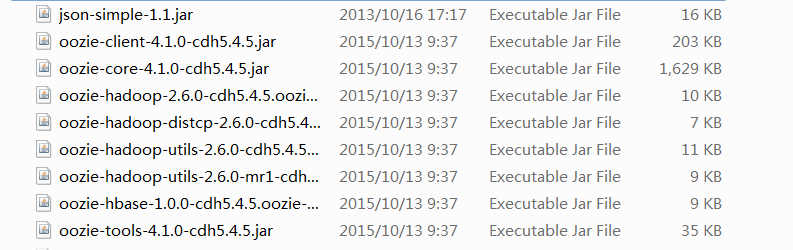
其次编写JAVA 程序提交Oozie作业,这里可参考:oozie官方参考文档
在运行提交程序前,首先需要把相应的程序打成jar包,定义好workflow.xml,再把它们上传到HDFS中。然后在程序中指定作业的属性,这里我是直接用的oozie-examples.tar.gz中的示例。
部分代码参考如下:
 OozieClient wc = new OozieClient("http://192.168.121.35:11000/oozie");

         //create workflow job configuration

         Properties conf = wc.createConfiguration();

         conf.setProperty(OozieClient.APP_PATH, "hdfs://datanode1:8020/user/cdhfive/examples/apps/map-reduce");

         //set a workflow parameters

         conf.setProperty("nameNode", "hdfs://datanode1:8020");

         conf.setProperty("jobTracker", "datanode1:8032");

         conf.setProperty("inputDir", "/user/cdhfive/examples/input-data");

 //        conf.setProperty("outputDir", "hdfs://192.168.121.35:8020/user/cdhfive/examples/output-data");

         conf.setProperty("outputDir", "/user/cdhfive/examples/output-data");

         conf.setProperty("queueName", "default");

         conf.setProperty("examplesRoot", "examples");

         conf.setProperty("user.name", "cdhfive");
在代码中workflow的参数时需要注意以下几点:
①在workflow.xml中定义的变量需要在程序中进行设置。如workflow.xml中的 ${jobTracker},则在JAVA程序中需要用语句:
conf.setProperty("jobTracker", "datanode1:8032");设置好。并且value 值要符合相应的格式。
2,作业提交过程中碰到的一些问题及解决:
由于我在本地windows系统上的用户hapjin运行的eclipse应用程序进行的提交,而集群则是远程的虚拟机。因此作业执行时报权限错误。
这里可以在作业提交过程中指定作业的用户名:conf.setProperty("user.name", "cdhfive")
ⓑ变量不能解析的错误:这是因为在workflow.xml中定义了一些变量,如${examplesRoot},而在JAVA代码中没有给这些变量赋值(conf.setProperty(key,value))。
javax.servlet.jsp.el.ELException: variable [examplesRoot] cannot be resolved
解决:workflow.xml中定义的变量需要在Java代码中使用 conf.setProerty方法指定值。
整个完整的程序代码参考如下:
package test;

import java.util.Properties;

import org.apache.oozie.client.OozieClient;

import org.apache.oozie.client.OozieClientException;

import org.apache.oozie.client.WorkflowJob.Status;

public class CommitJob {

    public static void main(String[] args) {

        //get a OozieClient for local Oozie

        OozieClient wc = new OozieClient("http://192.168.121.35:11000/oozie");

        //create workflow job configuration

        Properties conf = wc.createConfiguration();

        conf.setProperty(OozieClient.APP_PATH, "hdfs://datanode1:8020/user/cdhfive/examples/apps/map-reduce");

        //set a workflow parameters

        conf.setProperty("nameNode", "hdfs://datanode1:8020");

        conf.setProperty("inputDir", "/user/cdhfive/examples/input-data");

//        conf.setProperty("outputDir", "hdfs://192.168.121.35:8020/user/cdhfive/examples/output-data");

        conf.setProperty("outputDir", "/user/cdhfive/examples/output-data");

        conf.setProperty("queueName", "default");

        conf.setProperty("examplesRoot", "examples");

        conf.setProperty("user.name", "cdhfive");

        //submit and start the workflow job

        try{

            String jobId = wc.run(conf);

            System.out.println("Workflow job submitted");

            //wait until the workflow job finishes

            while(wc.getJobInfo(jobId).getStatus() == Status.RUNNING){

                System.out.println("Workflow job running...");

                try{

                    Thread.sleep(10*1000);

                }catch(InterruptedException e){e.printStackTrace();}

            }

            System.out.println("Workflow job completed!");

            System.out.println(wc.getJobId(jobId));

        }catch(OozieClientException e){e.printStackTrace();}

    }

}
运行结果截图:


3,Oozie处理错误的方式
If the failure is of transient nature, Oozie will perform retries after a pre-defined time interval. The number of retries and timer interval for a type of action must be pre-configured at Oozie level. Workflow jobs can override such configuration.
Examples of a transient failures are network problems or a remote system temporary unavailable.
If the failure is of non-transient nature, Oozie will suspend the workflow job until an manual or programmatic intervention resumes the workflow job and the action start or end is retried.
如果作业是临时失败的,如因为网络原因或远程系统临时不可用,此时OOzie将会以预定的时间间隔重启作业。若作业不是临时失败的,Oozie将会挂起作业,此时需要手工或程序的干预才能恢复作业的运行。
oozie JAVA Client 编程提交作业的更多相关文章
- oozie java api提交作业
今晚试验用java的api来提交代码,由于代码是在我机器上写的,然后提交到我的虚拟机集群当中去,所以中间产生了一个错误..要想在任意一台机器上向oozie提交作业的话,需要对hadoop的core-s ...
- 利用SparkLauncher 类以JAVA API 编程的方式提交Spark job
一.环境说明和使用软件的版本说明: hadoop-version:hadoop-2.9.0.tar.gz spark-version:spark-2.2.0-bin-hadoop2.7.tgz jav ...
- oozie 重新提交作业
在oozie的运行过程当中可能会出现错误,比如数据库连接不上,或者作业执行报错导致流程进入suspend或者killed状态,这个时候我们就要分析了,如果确实是数据或者是网络有问题,我们比如把问题解决 ...
- Java第八次作业--数据库编程
Deadline: 2017-5-18 23:00 一.学习要点 认真看书并查阅相关资料,掌握以下内容: 掌握应用JDBC访问数据库的基本步骤 掌握DriverManager类.Connection接 ...
- java网络编程serversocket
转载:http://www.blogjava.net/landon/archive/2013/07/24/401911.html Java网络编程精解笔记3:ServerSocket详解ServerS ...
- java网络编程socket解析
转载:http://www.blogjava.net/landon/archive/2013/07/02/401137.html Java网络编程精解笔记2:Socket详解 Socket用法详解 在 ...
- Java 网络编程---分布式文件协同编辑器设计与实现
目录: 第一部分:Java网络编程知识 (一)简单的Http请求 一般浏览网页时,使用的时Ip地址,而IP(Internet Protocol,互联网协议)目前主要是IPv4和IPv6. IP地址是一 ...
- Java多线程编程中Future模式的详解
Java多线程编程中,常用的多线程设计模式包括:Future模式.Master-Worker模式.Guarded Suspeionsion模式.不变模式和生产者-消费者模式等.这篇文章主要讲述Futu ...
- Java并发编程面试题 Top 50 整理版
本文在 Java线程面试题 Top 50的基础上,对部分答案进行进行了整理和补充,问题答案主要来自<Java编程思想(第四版)>,<Java并发编程实战>和一些优秀的博客,当然 ...
随机推荐
- python格式化字符串Type Error: Format Requires Mapping 的问题
最近几天 频繁看到有这种写法 BASIC_FORMAT = "%(levelname)s:%(name)s:%(message)s" 第一次看到的pythoner看到可能会有点懵逼 ...
- protocol buffer开发指南(官方)
欢迎来到protocol buffer的开发者指南文档,一种语言无关.平台无关.扩展性好的用于通信协议.数据存储的结构化数据序列化方法. 本文档是面向计划将protocol buffer使用的到自己的 ...
- python之多线程举例
# 多线程举例 from threading import Thread from threading import current_thread class messager(Thread): de ...
- python之设置控制台字体颜色
# 设置控制台输出字体颜色 # 格式:\033[显示方式;前景色;背景色m # 采用终端默认设置:\033[0m # 红色字体 print('\033[1;31m') print('*' * 10) ...
- StringBuilder String string.Concat 字符串拼接速度再议
首先看测试代码: public class StringSpeedTest { "; public string StringAdd(int count) { string str = st ...
- git-stash用法小结
[时间:2016-10] [状态:Open] [关键词:git,版本控制,版本管理,stash,git储藏] 缘起 今天在看一个bug,之前一个分支的版本是正常的,在新的分支上上加了很多日志没找到原因 ...
- BZOJ1070[SCOI2007]修车——最小费用最大流
题目描述 同一时刻有N位车主带着他们的爱车来到了汽车维修中心.维修中心共有M位技术人员,不同的技术人员对不同的车进行维修所用的时间是不同的.现在需要安排这M位技术人员所维修的车及顺序,使得顾客平均等待 ...
- Luogu5055 【模板】可持久化文艺平衡树(fhq-treap)
注意下传标记时也需要新建节点.空间开的尽量大. #include<iostream> #include<cstdio> #include<cmath> #inclu ...
- BZOJ1124 POI2008枪战Maf(环套树+贪心)
每个点出度都为1,可以发现这张图其实是个环套树森林,树中儿子指向父亲,环上边同向. 首先自环肯定是没救的,先抬出去. 要使死亡人数最多的话,显然若一个点入度为0其不会死亡,而一个孤立的环至少会留下一个 ...
- day10 局部变量 全局变量 作用域前奏
规则命名以及基本介绍 name="LHF" # 顶头写的全局都可以调用的就是全局变量,命名规则要求大写全局变量 def chang_name(): # global name # ...