
(23)ajax实现上传文件的功能
form表单上传文件
urls.py
from django.conf.urls import url
from django.contrib import admin
from app01 import views
urlpatterns = [
    url(r'^admin/', admin.site.urls),
    url(r'^index/$',views.index),
    url(r'^upload_file/$', views.upload_file),

]
views.py
from django.shortcuts import render,HttpResponse,redirect
from app01 import models
from django.http import JsonResponse  #这个模块就是向前端返回json格式数据

def index(request):
    return render(request,'index.html')

def upload_file(request):
    '''form表单的文件上传'''
    # file是一个文件对象
    file = request.FILES.get('myfile')  #这个FILES就是指发送过来的所有的文件,是一个字典形式
    files = r'D:\%s'%file.name
    with open(files,'wb')as f:
        for line in file:
            f.write(line)
    return HttpResponse('文件上传成功')
index.html
<!DOCTYPE html>
<html>
<head>
    <meta charset="UTF-8">
    <link rel="stylesheet" href="/static/bootstrap-3.3.7-dist/bootstrap-3.3.7-dist/css/bootstrap.css">
    <script src="/static/jquery-3.3.1.js"></script>
    <title>我是index页面</title>
</head>
<body>
    <h1>form表单实现文件上传</h1>
    {#form 表单上传文件一定要指定method的什么请求,然后enctye要指定格式    #}
    <form action="/upload_file/" method="post" enctype="multipart/form-data">
        <input type="file" name="myfile">
        <input type="submit" value="上传文件">
    </form>
</body>
</html>
Ajax 实现上传文件
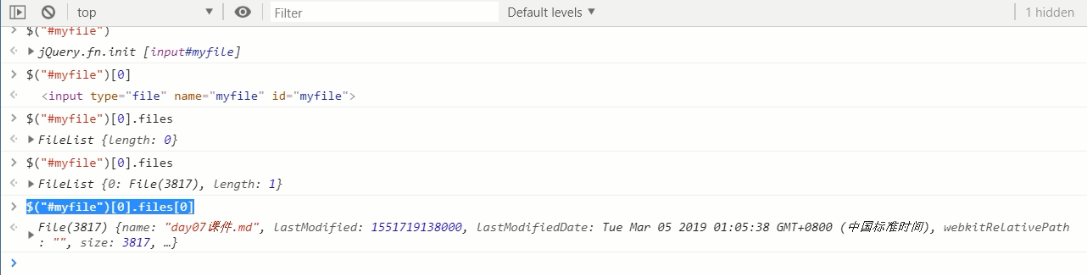
PS:用Jquery获取文件,有固定的格式,$('#myfile')就是根据id的名字获取到控件,$('#myfile')[0]就是取到原生的dom,$('#myfile')[0].files就会取到这个框内的所有文件(有可能是多个文件),$('#myfile')[0].files[0]这个取第0个就是我当前传的文件
前后端交互有三种格式:urlencoded、formdata、json
1、默认是urlencoded格式(name=lqz&age=19)
2、上传文件要设置formdata格式
urls.py
from django.conf.urls import url
from django.contrib import admin
from app01 import views
urlpatterns = [
    url(r'^admin/', admin.site.urls),
    url(r'^index/$',views.index),
    url(r'^login/$',views.login),
    url(r'^upload_file/$', views.upload_file),

]
views.py
from django.shortcuts import render,HttpResponse,redirect

def index(request):
    return render(request,'index.html')

def upload_file(request):
    '''form表单的文件上传'''
    file = request.FILES.get('myfile')
    files = r'D:\%s'%file.name
    with open(files,'wb')as f:
        for line in file:
            print(line)
            f.write(line)
    return HttpResponse('文件上传成功')
index.html
<!DOCTYPE html>
<html>
<head>
    <meta charset="UTF-8">
    <link rel="stylesheet" href="/static/bootstrap-3.3.7-dist/bootstrap-3.3.7-dist/css/bootstrap.css">
    <script src="/static/jquery-3.3.1.js"></script>
    <title>我是index页面</title>
</head>
<body>
    <h1>ajax实现上传文件</h1>
    <input type="file" name="myfile" id="myfile">
    <button id="file_upload">点击上传文件</button>

</body>

<script>
    {#ajax要上传文件必须借助FormData这个对象    #}
    $('#file_upload').click(function () {
        {#取到id为file的文件对象#}
        var myfile = $('#myfile')[0].files[0]
        {#生成一个空的FormData对象#}
        var formdata = new FormData()
        {#把文件放到formdata对象中,#}
        formdata.append('myfile',myfile)
        $.ajax({
            url:'/upload_file/',
            type:'post',
            //要上传文件一定要指定这两个参数processData,contentType
            processData:false,  //不要预处理数据
            contentType:false,  //不指定编码格式
            {#如果不写processData,则程序自己会以默认格式urlencode处理数据格式,也会指定默认的编码格式#}
            //formdata这个对象会自己处理数据格式和编码格式

            //直接把formdata对象放入data传到后台
            data:formdata,
            success:function (data) {
                console.log(data)
            }
        })
    })
</script>
</html>
(23)ajax实现上传文件的功能的更多相关文章
- Ajax方式上传文件
用到两个对象 第一个对象:FormData 第二个对象:XMLHttpRequest 目前新版的Firefox 与 Chrome 等支持HTML5的浏览器完美的支持这两个对象,但IE9尚未支持 For ...
- koa2:通过Ajax方式上传文件,使用FormData进行Ajax请求
koa2通过表单上传的网上很多,但通过Ajax方式上传文件,使用FormData进行Ajax请求,不好找. 参考了这个用base64上传图片的例子.https://github.com/Yuki-Mi ...
- SSM框架下,使用ajax请求上传文件(doc\docx\excel\图片等)
1.准备工作 1.1.添加上传必要jar包 <dependency> <groupId>commons-io</groupId> <artifactId> ...
- ajax异步上传文件和表单同步上传文件 的区别
1. 用表单上传文件(以照片为例)-同步上传 html部分代码:这里请求地址index.php <!DOCTYPE html> <html lang="en"&g ...
- ajax如何上传文件(整理)
ajax如何上传文件(整理) 一.总结 一句话总结:用FormData,FormData+ajax=异步上传二进制文件 <form enctype="multipart/form-da ...
- django中通过文件和Ajax来上传文件
一.通过form表单来上传文件 1.在html模板中 <form action="/index/" method="post" enctype=" ...
- 基于Flask开发网站 -- 前端Ajax异步上传文件到后台
大家好,我是辰哥~ 辰哥最近利用空闲时间在写一个在线可视化平台,过程中也觉得一些技术还是比较有意思的,所以就以模块化的形式分享出来.如:从网页界面(前端)上传文件到服务器(后端). 放一下该模块的界面 ...
- 编写Java程序,实现客户端向服务端上传文件的功能
查看本章节 查看作业目录 需求说明: 实现客户端向服务端上传文件的功能 当启动服务端后,运行客户端程序,系统提示客户在客户端输入上传文件的完整路径.当客户在客户端输入完成后,服务端实现文件上传 实现思 ...
- jquery 实现ajax 上传文件的功能(使用插件 ajaxfileupload)
js文件的下载地址 : http://files.cnblogs.com/wangqc/ajaxfileupload.js 页面代码: <html> <!-- 引入相关的js文 ...
随机推荐
- mac 安装Seaslog扩展及SeasLogger应用
首先下载 http://pecl.php.net/package/SeasLog 下载最新解压 cd /SeasLog-2.0.2/SeasLog-2.0.2/ phpize ./configure ...
- laravel管理员表中的模型
<?php namespace App; use App\Model; use Illuminate\Foundation\Auth\User as Authenticatable; class ...
- laravel的validation 中文 文件
使用方法: 直接替换resources/lang/en/validation.php中的内容 <?php return [ 'unique' => ':attribute 已存在', 'a ...
- centos 安装 composer
1 安装 composer curl -sS https://getcomposer.org/installer | php 2 添加到环境变量 mv co ...
- 每天CSS学习之text-align
text-align是CSS的一个属性,其作用是设置文本的对齐方式.其值如下所示: 1.left:文本左对齐.如下所示: div{ text-align:left; } 结果: 2.right:文本右 ...
- PLY文件格式
一.PLY简介 PLY文件格式是Stanford大学开发的一套三维mesh模型数据格式,图形学领域内很多著名的模型数据,比如Stanford的三维扫描数据库(其中包括很多文章中会见到的Happy Bu ...
- 接口测试-webservice接口---soapui
1.添加项目 2.填入wsdl地址 3.编辑参数,运行接口
- PCP架构设计
1.引言 现如今已经进入互联网时代,无论是工作还好娱乐都已经离不开互联网,与此同时,网络相关的问题也时不时的侵扰着我们,这需要我们具有一定网络相关知识来解决相关问题,而这时,一款工作便利,免费的网络分 ...
- h5页面嵌入android app时遇到的问题
1.h5页面 通过 .css("transform") 或 .style.transform 获取 transform属性,并通过 split 方法解析 页面translateY ...
- DM浅尝辄止
都是大佬的笔记啊啊啊啊 dialog management 对话状态维护(dialog state tracking, DST) 生成系统决策(dialog policy) 系统行为(dialog a ...