
Qt编写守护程序保证程序一直运行(开源)
没有任何人敢保证自己写的程序没有任何BUG,尤其是在商业项目中,程序量越大,复杂度越高,出错的概率越大,尤其是现场环境千差万别,和当初本地电脑测试环境很可能不一样,有很多特殊情况没有考虑到,如果需要保证程序7*24小时运行,则需要想一些办法能够让程序死了能够活过来,在嵌入式linux上,大部分会采用看门狗的形式来处理,程序打开看门狗驱动后,定时喂狗,一旦超过规定的时间,则硬件软复位等。这种方式相对来说比较可靠,如果需要在普通PC机上运行怎办呢?本篇文章提供一个软件实现守护进程的办法,原理就是udp通信,单独写个守护进程程序,专门负责检测主程序是否存在,不存在则启动。主程序只需要启动live类监听端口,收到hello就回复ok就行。
为了使得兼容任意程序,特意提炼出来共性,增加了多种设置。
1:可设置检测的程序名称。
2:可设置udp通信端口。
3:可设置超时次数。
4:自动记录已重启次数。
5:自动记录最后一次重启时间。
6:是否需要重新刷新桌面。
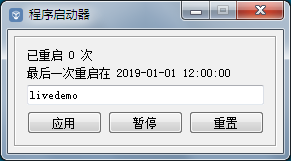
7:可重置当前重启次数和最后重启时间。
8:自动隐藏的托盘运行或者后台运行。
9:提供界面设置程序名称已经开启和暂停服务。
完整代码下载:https://download.csdn.net/download/feiyangqingyun/10989964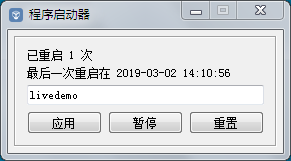
守护程序核心代码:
 #pragma execution_character_set("utf-8")

 #include "frmmain.h"

 #include "ui_frmmain.h"

 #include "qtimer.h"

 #include "qudpsocket.h"

 #include "qsharedmemory.h"

 #include "qprocess.h"

 #include "qdatetime.h"

 #include "qapplication.h"

 #include "qdesktopservices.h"

 #include "qmessagebox.h"

 #if (QT_VERSION > QT_VERSION_CHECK(5,0,0))

 #include "qstandardpaths.h"

 #endif

 #include "app.h"

 frmMain::frmMain(QWidget *parent) : QWidget(parent), ui(new Ui::frmMain)

 {

     ui->setupUi(this);

     this->initForm();

 }

 frmMain::~frmMain()

 {

     delete ui;

 }

 void frmMain::changeEvent(QEvent *event)

 {

     //隐藏当前界面,最小化到托盘

     if(event->type() == QEvent::WindowStateChange) {

         if(windowState() & Qt::WindowMinimized) {

             hide();

         }

     }

     QWidget::changeEvent(event);

 }

 void frmMain::initForm()

 {

     count = ;

     ok = false;

     //每秒钟定时询问心跳

     timerHeart = new QTimer(this);

     timerHeart->setInterval();

     connect(timerHeart, SIGNAL(timeout()), this, SLOT(sendHearData()));

     //从6050端口开始,如果绑定失败则将端口加1,直到绑定成功

     udp = new QUdpSocket(this);

     int port = ;

     while(!udp->bind(port)) {

         port++;

     }

     connect(udp, SIGNAL(readyRead()), this, SLOT(readData()));

     if (App::TargetAppName.isEmpty()) {

         ui->btnStart->setText("启动");

         ui->btnStart->setEnabled(false);

         timerHeart->stop();

     } else {

         ui->btnStart->setText("暂停");

         ui->btnStart->setEnabled(true);

         timerHeart->start();

     }

     ui->txtAppName->setText(App::TargetAppName);

     ui->txtAppName->setFocus();

 }

 void frmMain::sendHearData()

 {

     udp->writeDatagram("hello", QHostAddress::LocalHost, App::TargetAppPort);

     //判断当前是否没有回复

     if (!ok) {

         count++;

     } else {

         count = ;

         ok = false;

     }

     //如果超过规定次数没有收到心跳回复,则超时重启

     if (count >= App::TimeoutCount) {

         timerHeart->stop();

         QSharedMemory mem(App::TargetAppName);

         if (!mem.create()) {

             killApp();

         }

         QTimer::singleShot( , this, SLOT(killOther()));

         QTimer::singleShot( , this, SLOT(startApp()));

         QTimer::singleShot( , this, SLOT(startExplorer()));

     }

 }

 void frmMain::killApp()

 {

     QProcess *p = new QProcess;

     p->start(QString("taskkill /im %1.exe /f").arg(App::TargetAppName));

 }

 void frmMain::killOther()

 {

     QProcess *p = new QProcess;

     p->start(QString("taskkill /im %1.exe /f").arg("WerFault"));

     //重建缓存,彻底清除托盘图标

     if (App::ReStartExplorer) {

         QProcess *p1 = new QProcess;

         p1->start("taskkill /f /im explorer.exe");

     }

 }

 void frmMain::startApp()

 {

     if (ui->btnStart->text() == "开始" || ui->btnStart->text() == "启动") {

         count = ;

         return;

     }

     QProcess *p = new QProcess;

     p->start(QString("\"%1/%2.exe\"").arg(qApp->applicationDirPath()).arg(App::TargetAppName));

     count = ;

     ok = true;

     timerHeart->start();

     App::ReStartCount++;

     App::ReStartLastTime = QDateTime::currentDateTime().toString("yyyy-MM-dd HH:mm:ss");

     App::writeConfig();

     ui->labCount->setText(QString("已重启 %1 次").arg(App::ReStartCount));

     ui->labInfo->setText(QString("最后一次重启在 %1").arg(App::ReStartLastTime));

 }

 void frmMain::startExplorer()

 {

     //取得操作系统目录路径,指定操作系统目录下的explorer程序,采用绝对路径,否则在64位操作系统下无效

 #if (QT_VERSION > QT_VERSION_CHECK(5,0,0))

     QString str = QStandardPaths::writableLocation(QStandardPaths::ApplicationsLocation);

 #else

     QString str = QDesktopServices::storageLocation(QDesktopServices::ApplicationsLocation);

 #endif

     if (App::ReStartExplorer) {

         str = QString("%1\\Windows\\explorer.exe").arg(str.mid(, ));

         QProcess *p = new QProcess(this);

         p->start(str);

     }

 }

 void frmMain::readData()

 {

     QByteArray tempData;

     do {

         tempData.resize(udp->pendingDatagramSize());

         udp->readDatagram(tempData.data(), tempData.size());

         QString data = QLatin1String(tempData);

         if (data.right() == "OK") {

             count = ;

             ok = true;

         }

     } while (udp->hasPendingDatagrams());

 }

 void frmMain::on_btnOk_clicked()

 {

     App::TargetAppName = ui->txtAppName->text();

     if (App::TargetAppName == "") {

         QMessageBox::critical(this, "提示", "应用程序名称不能为空!");

         ui->txtAppName->setFocus();

         return;

     }

     App::writeConfig();

     ui->btnStart->setEnabled(true);

 }

 void frmMain::on_btnStart_clicked()

 {

     count = ;

     if (ui->btnStart->text() == "暂停") {

         timerHeart->stop();

         ui->btnStart->setText("开始");

     } else {

         timerHeart->start();

         ui->btnStart->setText("暂停");

     }

 }

 void frmMain::on_btnReset_clicked()

 {

     App::ReStartCount = ;

     App::ReStartLastTime = "2019-01-01 12:00:00";

     App::writeConfig();

     ui->txtAppName->setText(App::TargetAppName);

     ui->labCount->setText(QString("已重启 %1 次").arg(App::ReStartCount));

     ui->labInfo->setText(QString("最后一次重启在 %1").arg(App::ReStartLastTime));

     QMessageBox::information(this, "提示", "重置配置文件成功!");

 }
主程序使用代码:
 #include "applive.h"

 #include "qmutex.h"

 #include "qudpsocket.h"

 #include "qstringlist.h"

 #include "qapplication.h"

 #include "qdatetime.h"

 #include "qdebug.h"

 #define TIMEMS qPrintable(QTime::currentTime().toString("HH:mm:ss zzz"))

 QScopedPointer<AppLive> AppLive::self;

 AppLive *AppLive::Instance()

 {

     if (self.isNull()) {

         QMutex mutex;

         QMutexLocker locker(&mutex);

         if (self.isNull()) {

             self.reset(new AppLive);

         }

     }

     return self.data();

 }

 AppLive::AppLive(QObject *parent) : QObject(parent)

 {

     udpServer  = new QUdpSocket(this);

     QString name = qApp->applicationFilePath();

     QStringList list = name.split("/");

     appName = list.at(list.count() - ).split(".").at();

 }

 void AppLive::readData()

 {

     QByteArray tempData;

     do {

         tempData.resize(udpServer->pendingDatagramSize());

         QHostAddress sender;

         quint16 senderPort;

         udpServer->readDatagram(tempData.data(), tempData.size(), &sender, &senderPort);

         QString data = QLatin1String(tempData);

         if (data == "hello") {

             udpServer->writeDatagram(QString("%1OK").arg(appName).toLatin1(), sender, senderPort);

         }

     } while (udpServer->hasPendingDatagrams());

 }

 bool AppLive::start(int port)

 {

     bool ok = udpServer->bind(port);

     if (ok) {

         connect(udpServer, SIGNAL(readyRead()), this, SLOT(readData()));

         qDebug() << TIMEMS << "Start AppLive Ok";

     }

     return ok;

 }

 void AppLive::stop()

 {

     udpServer->abort();

     disconnect(udpServer, SIGNAL(readyRead()), this, SLOT(readData()));

 }
Qt编写守护程序保证程序一直运行(开源)的更多相关文章
- Qt 编写多窗口程序
该文章原创于Qter开源社区(www.qter.org),作者yafeilinux,转载请注明出处! 导语 程序要实现的功能是:程序开始出现一个对话框,按下按钮后便能进入主窗口,如果直接关闭 ...
- nohup保证程序后台运行
前言 我们运行某些命令的时候,它会默认在前台执行.如果要进行其他操作,则需要先停掉此程序.然后就蛋疼了. 解决 碰到这种情况,我们可以使用"nohup"命令和"&am ...
- QT编写上位机程序一定要初始化变量以及谨慎操作指针
背景: 在编写QT上位机界面时,界面在运行的时候经常出现卡死或者直接挂掉的怪现象. 正文: 上位机有个函数为check_receive():该函数的作用为定时调用循环检测USB是否有数据.若有,则将信 ...
- 转:Qt编写串口通信程序全程图文讲解
转载:http://blog.csdn.net/yafeilinux/article/details/4717706 作者:yafeilinux (说明:我们的编程环境是windows xp下,在Q ...
- Qt编写串口通信程序全程图文讲解 .
在Qt中并没有特定的串口控制类,现在大部分人使用的是第三方写的qextserialport类,我们这里也是使用的该类.我们可以去 http://sourceforge.net/projects/qex ...
- 【转】Qt编写串口通信程序全程图文讲解
本文章原创于www.yafeilinux.com 转载请注明出处. (说明:我们的编程环境是windows xp下,在Qt Creator中进行,如果在Linux下或直接用源码编写,程序稍有不同,请自 ...
- Qt编写串口通信程序全程图文解说
(说明:我们的编程环境是windows xp下,在Qt Creator中进行,假设在Linux下或直接用源代码编写,程序稍有不同,请自己修改.) 在Qt中并没有特定的串口控制类,如今大部分人使用的是第 ...
- CentOS 不间断会话(ssh关闭后如何保证程序继续运行)(nohup和screen)
当使用ssh与远程主机的会话被关闭时,在远程主机上运行的命令也随之被中断. 就是ssh 打开以后,bash等都是他的子程序,一旦ssh关闭,系统将所有相关进程杀掉!! 导致一旦ssh关闭,执行中的任务 ...
- 【深入学习linux】在linux系统下怎么编写c语言程序并运行
1. 首先安装下 gcc : centos yum -y gcc 2. 编写c程序保存hello.c: #include <stdio.h> #include <stdlib.h&g ...
随机推荐
- 【ZH奶酪】如何用textgenrnn处理中文
如何用textgenrnn处理中文 1. 什么是textgenrnn? textgenrnn是建立在Keras和TensorFlow之上的,可用于生成字级别和词级别文本.网络体系结构使用注意力加权来加 ...
- 修改QGIS来支持DPI为96的WMTS/WMS服务
缘由 因为各种各种wmts地图客户端产品的标准的支持不一定是一致的,就像ArcGIS不同版本加载WMTS图层的时候计算的规则就有差别(米和经纬度之间转换系数的区别),导致会出现适应各个客户端而出的WM ...
- Android Data Recovery for Mac(安卓数据恢复软件)破解版安装
1.软件简介 Android Data Recovery 是 macOS 系统上一款 Android 设备数据恢复软件,能够帮助我们在 mac 电脑上对 Android 设备进行数据恢复,文档. ...
- openssl - X509证书操作函数
原文链接: http://blog.csdn.net/zqt520/article/details/26965797 现有的证书大都采用X.509规范,主要同以下信息组成:版本号.证书序列号.有效期. ...
- 2018年末--积极拥抱h5.转载 大前端时代来临,我们何去何从?
1.大前端时代是什么? 大前端时代是WEB统一的时代,利用html5或者6甚至7,不但可以开发传统的网站,做炫酷的网页动态效果,更可以采用BS架构应用程序.开发手机端web应用.移动端Native应用 ...
- intellij idea (Android studio )外部程序 打开某扩展名(格式)
最近在为项目开发写思维导图, 为了留下思考的过程和业务逻辑. 本人使用的工具是很可怜的freemind,所以“脑图”的扩展名是“.mm” 情景: 在intellij idea (Android stu ...
- 第一部分:开发前的准备-第三章 Application 基本原理
第3章 应用程序基本原理 首先我们需要强调一下Android 应用程序是用java写的.Android SDK工具编译代码并把资源文件和数据打包成一个文件.这个名字的扩展名是.APK.要在androi ...
- 判断一棵二叉树是否为AVL树
思路:AVL树是高度平衡的二叉搜索树,这里为了清晰说明,分别判断是否为搜索树,是否为平衡树. struct TreeNode { struct TreeNode *left; struct TreeN ...
- windows下安装pycharm并连接Linux的python环境
1. 下载安装Pycharm专业版 具体方法略.Pycharm5激活方法参考http://www.cnblogs.com/snsdzjlz320/p/7110186.html 2. 添加配置连接远程服 ...
- RSA加密和解密工具类
import org.apache.commons.codec.binary.Base64; import javax.crypto.Cipher; import java.security.*; i ...