
iOS - UIProgressView
前言
	NS_CLASS_AVAILABLE_IOS(2_0) @interface UIProgressView : UIView <NSCoding>

	@available(iOS 2.0, *)		 public class UIProgressView : UIView, NSCoding
1、UIProgressView 的创建
Objective-C
由 frame 创建
	// 高度不起作用

	UIProgressView *progressView = [[UIProgressView alloc] initWithFrame:CGRectMake(50, 100, 200, 0)];

	// 将 progressView 添加到 View

	[self.view addSubview:progressView];
由类型创建
	// 长度为系统默认长度

	UIProgressView *progressView = [[UIProgressView alloc] initWithProgressViewStyle:UIProgressViewStyleDefault];

	// 将 progressView 添加到 View

	[self.view addSubview:progressView];
Swift
由 frame 创建
	// 高度不起作用

	let progressView:UIProgressView = UIProgressView(frame: CGRectMake(50, 100, 200, 0))

	// 将 progressView 添加到 View

	self.view.addSubview(progressView)
由类型创建
	// 长度为系统默认长度

	let progressView:UIProgressView = UIProgressView(progressViewStyle: UIProgressViewStyle.Default)

	// 将 progressView 添加到 View

	self.view.addSubview(progressView)
2、UIProgressView 的设置
Objective-C
	// 设置 frame,高度不起作用

	progressView.frame = CGRectMake(50, 100, 200, 0);

	// 设置位置

	progressView.center = self.view.center;

	// 设置进度条的类型

	/*

        UIProgressViewStyleDefault    // normal progress bar

        UIProgressViewStyleBar        // for use in a toolbar

	*/

	progressView.progressViewStyle = UIProgressViewStyleBar;

	// 设置当前值

	/*

		范围 0~1

	*/

	progressView.progress = 0.8;

	[progressView setProgress:0.8 animated:YES];

	// 设置走过的颜色

	progressView.progressTintColor = [UIColor redColor];

	// 设置未走过的颜色

	progressView.trackTintColor = [UIColor blueColor];

	// 设置走过的图片

	progressView.progressImage = [UIImage imageNamed:@"pic1"];

	// 设置未走过的图片

	progressView.trackImage = [UIImage imageNamed:@"pic2"];
Swift
	// 设置 frame,高度不起作用

	progressView.frame = CGRectMake(50, 100, 200, 0)

	// 设置位置

	progressView.center = self.view.center

	// 设置进度条的类型

	/*

		case Default   // normal progress bar

		case Bar       // for use in a toolbar

	*/

	progressView.progressViewStyle = .Bar

	// 设置当前值

	/*

		范围 0~1

	*/

	progressView.progress = 0.8

	progressView.setProgress(0.8, animated: true)

	// 设置走过的颜色

	progressView.progressTintColor = UIColor.redColor()

	// 设置未走过的颜色

	progressView.trackTintColor = UIColor.blueColor()

	// 设置走过的图片

	progressView.progressImage = UIImage(named: "pic1")

	// 设置未走过的图片

	progressView.trackImage = UIImage(named: "pic2")
3、Storyboard 中设置
在 Storyboard 场景中设置
Progress View 设置
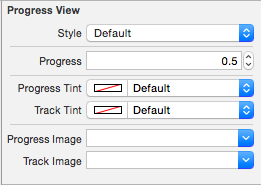
Style | 类型
-------------------|---------------
Progress | 当前进度
|
Progress Tint | 走过的颜色
Track Tint | 未走过的颜色
|
Progress Image | 走过的图片
Track Image | 未走过的图片
iOS - UIProgressView的更多相关文章
- iOS UIProgressView控件用法
IOS中进度条控件的用法总结. 进度条控件是IOS开发中一个简单的系统控件,使用总结如下: 初始化一个进度条: - (instancetype)initWithProgressViewStyle:(U ...
- ios基础篇(七)——UISwich、UISlider、UIProgressView的用法总结
一.UISlider UIslider滑块控件在IOS开发中会常用到,可用于调节音量,字体大小等UI方面的交互:UISlider实例提供一个控件,让用户通过左右拖动一个滑块(可称其为“缩略图”)来选择 ...
- 【IOS 开发】基本 UI 控件详解 (UISegmentedControl | UIImageView | UIProgressView | UISlider | UIAlertView )
转载请注明出处 : http://blog.csdn.net/shulianghan/article/details/50163725 一. 分段控件 (UISegmentedControl) 控件展 ...
- ios之UIProgressView
UIProgressView和UIActivityIndicator有些类似 但是不同之处在于, UIProgressView能够更加精确的反应进度 UIActivityIndicator则只能表 ...
- iOS开发——UI篇Swift篇&UIProgressView
UIProgressView override func viewDidLoad() { super.viewDidLoad() titleLabel.text = titleString // Do ...
- iOS中 UIProgressView 技术分享
UIProgressView 继承自UIView,用来显示进度的,如音乐,视频的缓冲进度,文件的上传下载进度等.让用户知道当前操作完成了多少,离操作结束还有多远 AppDelegate.m Progr ...
- 转 UIActivityIndicatorView、UIProgressView 活动与进度指示器-IOS开发
活动指示器(UIActivityIndicatorView)可以告知用户有一个操作正在进行中.进度指示器(UIProgressView )也具有同样功能,而且还可以告知用户离操作结束还多远. 这两个指 ...
- iOS UIWebView 之 UIProgressView
之前做等待跳转都是用UIActivityIndicatorView ,后来做webView 加载页面的时候,发现了一个特别好用又超级炫酷的加载提示NJKWebViewProgress,作者巧妙的通过计 ...
- iOS开发系列--音频播放、录音、视频播放、拍照、视频录制
--iOS多媒体 概览 随着移动互联网的发展,如今的手机早已不是打电话.发短信那么简单了,播放音乐.视频.录音.拍照等都是很常用的功能.在iOS中对于多媒体的支持是非常强大的,无论是音视频播放.录制, ...
随机推荐
- Linux下后台程序完成自动输入密码等交互行为的例子
今天要开发一个定时任务,然后加入cron列表中.但是有个问题摆在眼前,脚本的执行中需要输入数据库密码: mysql -u root -p << SQL use db; set names ...
- oracle初次使用连接不上
问题描述: win10下,cmd运行 输入sqlplus报一下错误 SP2-1503: 无法初始化 Oracle 调用界面 SP2-0152: ORACLE 不能正常工作 解决办法 cmd右键--以管 ...
- hdwiki 框架简介
虽然HDwiki是一个开源的wiki系统,并且代码简洁易懂,但如果想在系统上做做进一步开发还需要对框架有一个整体的认识.熟悉了HDwiki的框架以后完全可以独立出来做其他功能的开发,当做一个开源的PH ...
- android 数据库操作详解
请看郭大神的八篇专栏,包含sql语句 android封装的databasehelper 和郭大神自己的LitePal 三种使用详解 http://blog.csdn.net/column/deta ...
- 判断listview是上滑还是下滑的方法
方法一: 用setOnScrollListener(new AbsListView.OnScrollListener())来实现,判断滑动后显示的第一个条目 ,与滑动前的第一个条目的大小来判断, 这种 ...
- 原来样式改变不了(input type="file")
label { background-color: #979fa8; color: #fff; display: inline-block; padding: .8rem 4rem; cursor: ...
- C++中的类型重定义
发现重复定义是由于从两个不同的路径包含了同一个头文件而引起的,同事也建议从另外一个路径打开工程试试, 这才慢慢发现了原因.这个原因可能有些拗口,而事实上要出现这种错误也有些"曲折" ...
- eclipse+maven 无法编译
Archive for required library: 'F:/mavenLib/org/mybatis/mybatis/3.4.1/mybatis-3.4.1.jar' in project ' ...
- myeclipse的快捷键和myeclipse快捷键设置
1.Ctrl+M切换窗口的大小 2.Ctrl+Q跳到最后一次的编辑处 3.F2当鼠标放在一个标记处出现Tooltip时候按F2则把鼠标移开时Tooltip还会显示即Show Tooltip D ...
- linux后台开发排错常用工具
一.前言 二.工具介绍 1.ps 查看进程信息 2.gstack 查看进程堆栈 3.pmap 查看程序分配的内存 4.ldd 查看程序用到的动态链接库 5.strace 用来跟踪和监视程序的每一个系统 ...