
Android——例子:简单计算器
今天没事干,做了个单击事件的练习。
截图如下:(一个小小的计算器)
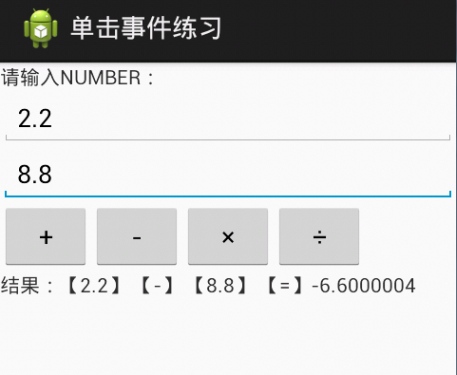
XMl文件中的代码:
 <LinearLayout xmlns:android="http://schemas.android.com/apk/res/android"

     android:layout_width="match_parent"

     android:layout_height="match_parent"

     android:orientation="vertical">

     <TextView

         android:id="@+id/startTextView"

         android:layout_width="wrap_content"

         android:layout_height="wrap_content"

         android:text="请输入NUMBER:" />

     <EditText

         android:id="@+id/num1"

         android:layout_width="match_parent"

         android:layout_height="wrap_content"

         android:ems="10" />

     <EditText

         android:id="@+id/num2"

         android:layout_width="match_parent"

         android:layout_height="wrap_content"

         android:ems="10" />

     <LinearLayout

         android:layout_width="match_parent"

         android:layout_height="wrap_content" >

         <Button

             android:id="@+id/btnAdd"

             android:layout_width="wrap_content"

             android:layout_height="wrap_content"

             android:text="+" />

         <Button

             android:id="@+id/btnSub"

             android:layout_width="wrap_content"

             android:layout_height="wrap_content"

             android:text="-" />

         <Button

             android:id="@+id/btnMul"

             android:layout_width="wrap_content"

             android:layout_height="wrap_content"

             android:text="×" />

         <Button

             android:id="@+id/btnDiv"

             android:layout_width="wrap_content"

             android:layout_height="wrap_content"

             android:text="÷" />

     </LinearLayout>

     <TextView

         android:id="@+id/showResult"

         android:layout_width="match_parent"

         android:layout_height="wrap_content"

             />

 </LinearLayout>
Activity代码:
package com.example.clickproject;

import android.os.Bundle;

import android.app.Activity;

import android.view.View;

import android.view.View.OnClickListener;

import android.widget.Button;

import android.widget.EditText;

import android.widget.TextView;

public class MainActivity extends Activity {

    private EditText num1 = null;

    private EditText num2 = null;

    private TextView showResult = null;

    private Button btnAdd = null;

    private Button btnSub = null;

    private Button btnMul = null;

    private Button btnDiv = null;

    @Override

    protected void onCreate(Bundle savedInstanceState) {

        super.onCreate(savedInstanceState);

        setContentView(R.layout.main);

        num1 = (EditText) super.findViewById(R.id.num1);

        num2 = (EditText) super.findViewById(R.id.num2);

        showResult = (TextView) super.findViewById(R.id.showResult);

        btnAdd = (Button) super.findViewById(R.id.btnAdd);

        btnSub = (Button) super.findViewById(R.id.btnSub);

        btnMul = (Button) super.findViewById(R.id.btnMul);

        btnDiv = (Button) super.findViewById(R.id.btnDiv);

        btnAdd.setOnClickListener(new AddOnclickListener());

        btnSub.setOnClickListener(new SubOnclickListener());

        btnMul.setOnClickListener(new MulOnclickListener());

        btnDiv.setOnClickListener(new DivOnclickListener());

    }

    /**

     * 加法监听子类

    * ClassName AddOnclickListener

    * Description TODO(这里用一句话描述这个类的作用)

    * @author 石头杨    北科维拓公司

    * date 2013-7-26 下午01:58:32

    *

     */

    private class AddOnclickListener implements OnClickListener{

        @Override

        public void onClick(View v) {

            float a = Float.parseFloat(MainActivity.this.num1.getText().toString());

            float b = Float.parseFloat(MainActivity.this.num2.getText().toString());

            float c = a+b;

            MainActivity.this.showResult.setText("结果:【"+a+"】 【+】 【"+b+"】 【=】"+c);

        }

    }

    /**

     * 减法监听子类

    * ClassName SubOnclickListener

    * Description TODO(这里用一句话描述这个类的作用)

    * @author 石头杨    北科维拓公司

    * date 2013-7-26 下午01:58:56

    *

     */

    private class SubOnclickListener implements OnClickListener{

        @Override

        public void onClick(View v) {

            float a = Float.parseFloat(MainActivity.this.num1.getText().toString());

            float b = Float.parseFloat(MainActivity.this.num2.getText().toString());

            float c = a-b;

            MainActivity.this.showResult.setText("结果:【"+a+"】 【-】 【"+b+"】 【=】"+c);

        }

    }

    /**

     * 乘法监听子类

    * ClassName MulOnclickListener

    * Description TODO(这里用一句话描述这个类的作用)

    * @author 石头杨    北科维拓公司

    * date 2013-7-26 下午01:59:11

    *

     */

    private class MulOnclickListener implements OnClickListener{

        @Override

        public void onClick(View v) {

            float a = Float.parseFloat(MainActivity.this.num1.getText().toString());

            float b = Float.parseFloat(MainActivity.this.num2.getText().toString());

            float c = a*b;

            MainActivity.this.showResult.setText("结果:【"+a+"】 【*】 【"+b+"】 【=】"+c);

        }

    }

    /**

     * 除法监听子类

    * ClassName DivOnclickListener

    * Description TODO(这里用一句话描述这个类的作用)

    * @author 石头杨    北科维拓公司

    * date 2013-7-26 下午01:59:22

    *

     */

    private class DivOnclickListener implements OnClickListener{

        @Override

        public void onClick(View v) {

            float a = Float.parseFloat(MainActivity.this.num1.getText().toString());

            float b = Float.parseFloat(MainActivity.this.num2.getText().toString());

            float c = a/b;

            MainActivity.this.showResult.setText("结果:【"+a+"】 【/】 【"+b+"】 【=】"+c);

        }

    }

}
Android——例子:简单计算器的更多相关文章
- 菜鸟学Android编程——简单计算器《一》
菜鸟瞎搞,高手莫进 本人菜鸟一枚,最近在学Android编程,网上看了一些视频教程,于是想着平时手机上的计算器应该很简单,自己何不尝试着做一个呢? 于是就冒冒失失的开撸了. 简单计算器嘛,功能当然很少 ...
- 每天2个android小例子----简单计算器源代码
通过Android4.0 网格布局GridLayout来实现一个简单的计算器界面布局 package com.android.xiong.gridlayoutTest; import java.mat ...
- android实现简单计算器
前台代码如下 <?xml version="1.0" encoding="utf-8"?> <LinearLayout xmlns:andro ...
- 简单计算器 安卓 Android 作业
Android老师布置的课程作业——简单计算器 功能要求实现四则运算,参考界面见下图: 首先给各位老铁提供apk安装包以及项目压缩包,略表诚意~ github地址:https://github.com ...
- Android 简单计算器实现源码
1.string.xml代码 <?xml version="1.0" encoding="utf-8"?> <resources> &l ...
- Android发展简单介绍
Android一词的本义指“机器人”,同一时候也是Google于2007年11月5日宣布的基于Linux平台的开源手机操作系统的名称,该平台由操作系统.中间件.用户界面和应用软件组成,号称是首个为移动 ...
- android Glide简单使用
版权声明:大家可以转载,请写明转载申明 https://blog.csdn.net/bzlj2912009596/article/details/81702367 今天,简单讲讲Android里Gli ...
- C语言,简单计算器【上】
由于工作需要最近在研究PHP扩展,无可避免的涉及到了C语言.从出了学校以后C语言在实际工作中还没有用到过,所以必须要先进行一点复习工作.个人认为对于熟悉一样东西说最好的方法是上手实践.于是便想起了当时 ...
- hdu1237 简单计算器[STL 栈]
目录 题目地址 题干 代码和解释 参考 题目地址 hdu1237 题干 代码和解释 解本题时使用了STL 栈,要记得使用#include<stack>. 解本题时使用了isdigit()函 ...
- 1.C#WinForm基础制作简单计算器
利用c#语言编写简单计算器: 核心知识点: MessageBox.Show(Convert.ToString(comboBox1.SelectedIndex));//下拉序号 MessageBox.S ...
随机推荐
- [Android新手区] SQLite 操作详解--SQL语法
该文章完全摘自转自:北大青鸟[Android新手区] SQLite 操作详解--SQL语法 :http://home.bdqn.cn/thread-49363-1-1.html SQLite库可以解 ...
- diff 文件比较
测试数据: [xiluhua@vm-xiluhua][~]$ cat msn.txt aaa bbb bbb ccc ccc ddd bbb eee aaa ccc bbb sss [xiluhua@ ...
- HDU 2846:Repository(Trie)
http://acm.hdu.edu.cn/showproblem.php?pid=2846 题意:给出N个模式串,再给出M个文本串,问每一个文本串在多少个模式串中出现. 思路:平时都是找前缀的,这里 ...
- Yahoo! s4和Twitter storm的粗略比较
- 20145227《Java程序设计》第10周学习总结
20145227<Java程序设计>第10周学习总结 教材学习内容总结 网络编程 就是在两个或两个以上的设备(例如计算机)之间传输数据.程序员所作的事情就是把数据发送到指定的位置,或者接收 ...
- 减少GC开销的措施
程序的运行会直接影响系统环境的变化,从而影响GC的触发.若不针对GC的特点进行设计和编码,就会出现内存驻留等一系列负面影响.为了避免这些影响,基本的原则就是尽可能地减少垃圾和减少GC过程中的开销.具体 ...
- thinkphp和uploadfiy
上传页面 用的是bootstrap <div class="col-sm-6"> <div style="width: 200px; height: 1 ...
- Counterfeit Dollar 分类: POJ 2015-06-12 15:28 19人阅读 评论(0) 收藏
Counterfeit Dollar Time Limit: 1000MS Memory Limit: 10000K Total Submissions: 41559 Accepted: 13 ...
- JAVA基础知识之多线程——线程组和未处理异常
线程组 Java中的ThreadGroup类表示线程组,在创建新线程时,可以通过构造函数Thread(group...)来指定线程组. 线程组具有以下特征 如果没有显式指定线程组,则新线程属于默认线程 ...
- shell脚本判断文件类型
转自:http://www.cnblogs.com/sunyubo/archive/2011/10/17/2282047.html 1. shell判断文件,目录是否存在或者具有权限 2. #!/bi ...