
理解Mac和iOS中的 Event 处理
根据现在的理解,我把event处理分为5部分,第一是,Event处理的Architecture;第二是,Event的Dispatch到first responder之前; 第三是,Event从first responder出来后;第四是,Action与Event的关系;第五是,Apple Event的处理。
1. Event Handling Architecture
下面这张图解释了在MacOSX上event处理的过程。
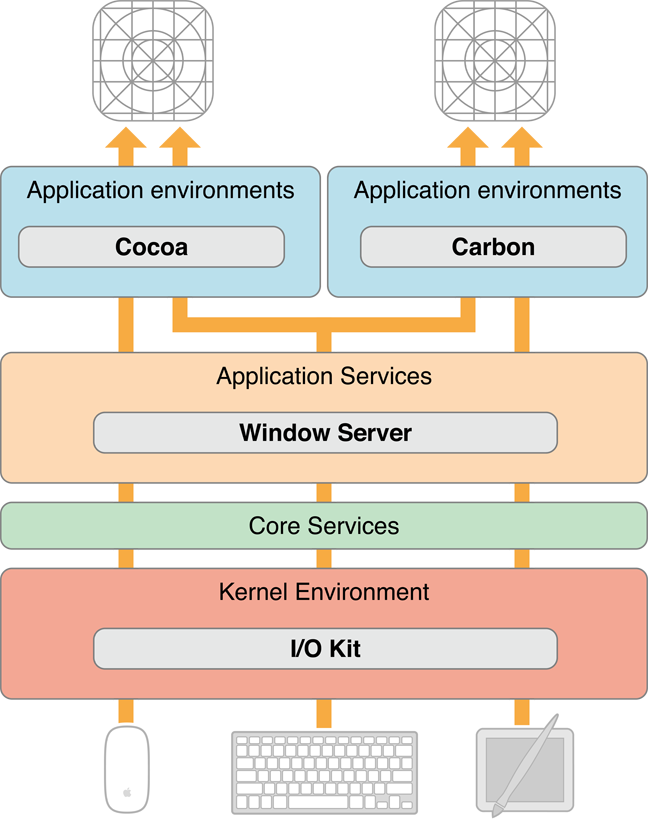
Before it dispatches an event to an application, the window server processes it in various ways; it time-stamps it, annotates it with the associated window and process port, and possibly performs other tasks as well. As an example, consider what happens when a user presses a key. The device driver translates the raw scan code into a virtual key code which it then passes off (along with other information about the key-press) to the window server in an event record. The window server has a translation facility that converts the virtual key code into a Unicode character.
In OS X, events are delivered as an asynchronous stream. This event stream proceeds “upward” (in an architectural sense) through the various levels of the system—the hardware to the window server to the Event Manager—until each event reaches its final destination: an application. As it passes through each subsystem, an event may change structure but it still identifies a specific user action.
在event到达Window Server之后,就等着发给各个Application去处理了,如果一个App是基于Cocoa的,它会使用Run Loop从Window Server中获取应该由本App处理的event。
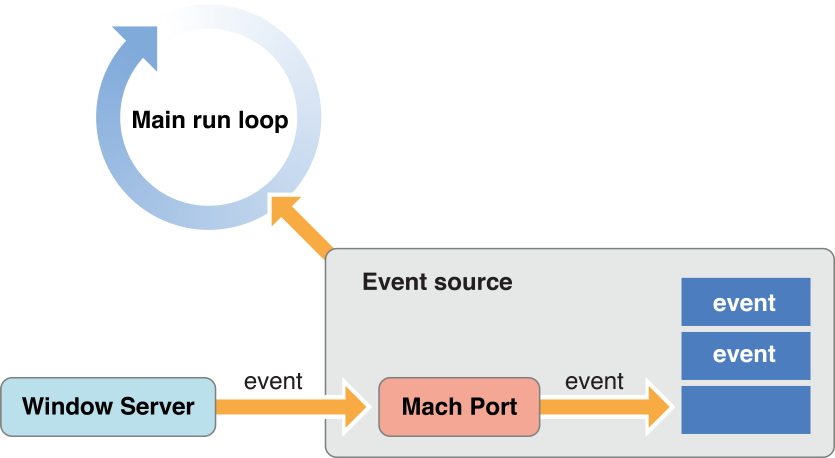
从这个图可以看出,每个应用有一个Event Source与之对应。Event Source中有个Mach port用于从Window Server接收Event,然后存放在一个队列中。每个应用的Main run Loop是一个只负责从event source中取 event,如果没有event,Run Loop就会Block住,一直等到有event为止。之所以这里有个Main run loop是因为,在Cocoa应用中,每个线程都有一个run loop,主线程的run loop叫main run loop。Run loop就是一个NSRunLoop对象。Apple event一会通过Run Loop进入一个App,详细可以见Apple Event部分的描述。
2. Event Dispatch : Arriving at First Responder;
3. Event Dispatch: After First Responder;
4. Action
参考文档
1. Cocoa Event Handling Guide: https://developer.apple.com/library/mac/documentation/Cocoa/Conceptual/EventOverview/EventArchitecture/EventArchitecture.html#//apple_ref/doc/uid/10000060i-CH3-SW2
2. Event Handling Guide for iOS:https://developer.apple.com/library/ios/documentation/EventHandling/Conceptual/EventHandlingiPhoneOS/event_delivery_responder_chain/event_delivery_responder_chain.html#//apple_ref/doc/uid/TP40009541-CH4-SW2
3. Mac vs. iOS event 比较:https://developer.apple.com/library/ios/documentation/general/conceptual/Devpedia-CocoaApp/Responder.html
理解Mac和iOS中的 Event 处理的更多相关文章
- iOS中多线程原理与runloop介绍
一.线程概述 有些程序是一条直线,起点到终点:有些程序是一个圆,不断循环,直到将它切断.直线的如简单的Hello World,运行打印完,它的生命周期便结束了,像昙花一现那样:圆如操作系统,一直运行直 ...
- IOS中的多线程和NSRunLoop概述(转载)
线程概述 有些程序是一条直线,从起点到终点,如Hello World,运行打印完,它的生命周期便结束了:有些程序是一个圆,不断循环,直到将它切断,如操作系统,一直运行直到你关机. 一个运行着的程序就 ...
- 在Quick-cocos2dx中使用云风pbc解析Protocol Buffers,支持win、mac、ios、android
本例主要介绍 如何将 pbc 集成到quick-cocos2dx框架中,让我们的cocos2dx客户端Lua拥有编解码Protocol Buffers能力. 参考: 云风pbc的用法: http:// ...
- [NodeJs系列][译]理解NodeJs中的Event Loop、Timers以及process.nextTick()
译者注: 为什么要翻译?其实在翻译这篇文章前,笔者有Google了一下中文翻译,看的不是很明白,所以才有自己翻译的打算,当然能力有限,文中或有错漏,欢迎指正. 文末会有几个小问题,大家不妨一起思考一下 ...
- iOS中web app调试(mac)
原文 iOS中web app调试(mac).md 目录 一.真机联调配置 二.mac上Safari配置及真机联调 三.iOS模拟器使用 四.在iOS模拟器中安装app 近期公司vue项目开发,目的是一 ...
- iOS中的堆(heap)和栈(stack)的理解
操作系统iOS 中应用程序使用的计算机内存不是统一分配空间,运行代码使用的空间在三个不同的内存区域,分成三个段:“text segment “,“stack segment ”,“heap segme ...
- iOS中 常用的mac终端指令汇总 技术分享
通常情况下,只有高端用户才会经常用到终端应用.这并不意味着命令行非常难学,有的时候命令行可以轻松.快速的解决问题.相信所有Mac用户都尝试过命令行,今天为大家带来9个非常实用的命令行操作.一些命令行需 ...
- IOS中调用系统的电话、短信、邮件、浏览功能
iOS开发系列--通讯录.蓝牙.内购.GameCenter.iCloud.Passbook系统服务开发汇总 2015-01-13 09:16 by KenshinCui, 26990 阅读, 35 评 ...
- iOS中数据库应用基础
iOS 数据库入门 一.数据库简介 1.什么是数据库? 数据库(Database) 是按照数据结构来组织,存储和管理数据的仓库 数据库可以分为2大种类 关系型数据库(主流) PC端 Oracle My ...
随机推荐
- SAP 物料主数据屏幕增强
1. 用事务代码OMT3C,(或者用SPRO进入,后勤-常规->物料主记录->配置物料主记录->创建定制子屏幕的程序)创建函数功能组,如ZMGD1,然后保存. 2. 用事务代码SE8 ...
- 我常用的Webstorm快捷键
ctrl+b 跳转到方法内部 meta:vp + tab 生成移动端 ctrl + alt + l 整理代码 ctrl + shift + up/down 行移动 ctrl + shift + ent ...
- isDebugEnabled作用
早上写了日志级别,然后想起在使用的时候经常用isDebugEnabled,一鼓作气.彻底弄懂它: 现象 if (logger.isDebugEnabled()) { logger.debug(m ...
- hdu----149850 years, 50 colors(最小覆盖点)
50 years, 50 colors Time Limit: 2000/1000 MS (Java/Others) Memory Limit: 32768/32768 K (Java/Othe ...
- div垂直居中的问题
工作和面试时常常会遇到怎么设置div垂直居中与浏览器中:包括固定宽高和不固定宽高的 1.固定宽高的div垂直居中 宽高固定的div很容易设置让其垂直居中 <div class="cen ...
- Ubuntu 设置su密码
如果之前安装时没有设置root密码,可以如下设置: 命令窗口中输入:sudo passwd [sudo] password for 用户名: 这里输入你sudo 的密码输入新的 UNIX 密码: 重 ...
- bat产生随机数并复制文件及生成文件列表
有这样一个场景:我需要将同一个文件复制为上千个文件,并且文件名应为随机数.为了简单起见,不想写程序,直接写个BAT来,方便,简单,易用: 1. 搞定用BAT产生32位随机数,存为变量并使用,保存以下代 ...
- mysql用户备份与修复
1.修复表repair table tb1 [use frm]; #红色部分代表可添加也可不加, 2.show variables like '%timeout%'; #查询关键字 3. 更改数据, ...
- System.Web.Optimization找不到引用
在程序包管理控制程序中录入:Install-Package Microsoft.AspNet.Web.Optimization,安装即可.
- qml的打包问题
qml2的打包问题: 相对于早期的项目,只需要打包plugin和动态库.带有sqlite的程序如果需要打包,需要打包如下东西: 1.打包AppData目录下的 Local/Qt Project/项目 ...