
Unity5.x版本AssetBundle打包研究
Unity5的AssetBundle打包机制和以前版本不太一样。简单的说就是,只要给你要打包的资源设置一个AssetBundleName ,Unity自身会对这些设置了名字的资源进行打包,如果一个资源依赖了另一个资源。Unity自己会处理依赖关 系,AssetBundleManifest文件就保存着这些资源的依赖关系。
比如一个UI面板.Prefab,依赖了一个图集Atlas,一个字体文件
做个测试:
只给UI面板3.prefab设置AssetBundleName。

打出包来看,别看只有371KB,那是因为我拿得面板不是很复杂,依赖的图集,字体,本身就不是很大。
要是项目中的话,你不处理依赖打包的话,几M都是有的。
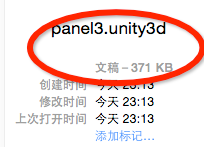
要是有其它的UI面板,设置AssetBundleName,打出包,都是这么大的
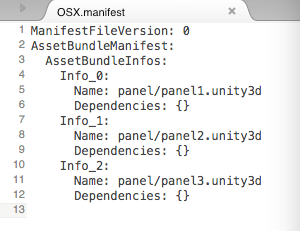
依赖文件显示资源没依赖,这是因为每一个面板里面都单独打包了一份图集资源,字体资源。显然这是不可取的。
对于同类型的UI面板来说,这些图集和字体文件,大家用的都是同一份,只要打包出一份,大家共享就好了。
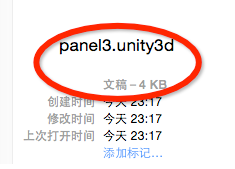
接下给图集资源,字体文件都设置AssetBundleName,再进行打包,可以看到变小了。
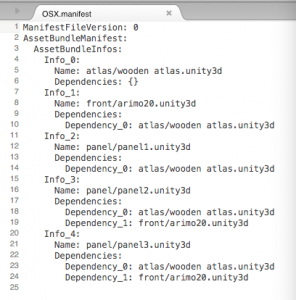
在看.manifest文件,有了依赖关系。
项目中,资源辣么多,总不能在编辑器里一个一个给资源进行设置AssetBundleName吧,那会蛋疼死的,是吧。
上代码
using UnityEngine;

using System.Collections;

using UnityEditor;

using System.IO;

/// <summary>

/// 把Resource下的资源打包成.unity3d 到StreamingAssets目录下

/// </summary>

public class Builder : Editor

{

    public static string sourcePath = Application.dataPath + "/Resources";

    const string AssetBundlesOutputPath = "Assets/StreamingAssets";

    [MenuItem("Tools/AssetBundle/Build")]

    public static void BuildAssetBundle()

    {

        ClearAssetBundlesName ();

        Pack (sourcePath);

        string outputPath = Path.Combine (AssetBundlesOutputPath,Platform.GetPlatformFolder(EditorUserBuildSettings.activeBuildTarget));

        if (!Directory.Exists (outputPath))

        {

            Directory.CreateDirectory(outputPath);

        }

        //根据BuildSetting里面所激活的平台进行打包

        BuildPipeline.BuildAssetBundles (outputPath,,EditorUserBuildSettings.activeBuildTarget);

        AssetDatabase.Refresh ();

        Debug.Log ("打包完成");

    }

    /// <summary>

    /// 清除之前设置过的AssetBundleName,避免产生不必要的资源也打包

    /// 之前说过,只要设置了AssetBundleName的,都会进行打包,不论在什么目录下

    /// </summary>

    static void ClearAssetBundlesName()

    {

        int length = AssetDatabase.GetAllAssetBundleNames ().Length;

        Debug.Log (length);

        string[] oldAssetBundleNames = new string[length];

        for (int i = ; i < length; i++)

        {

            oldAssetBundleNames[i] = AssetDatabase.GetAllAssetBundleNames()[i];

        }

        for (int j = ; j < oldAssetBundleNames.Length; j++)

        {

            AssetDatabase.RemoveAssetBundleName(oldAssetBundleNames[j],true);

        }

        length = AssetDatabase.GetAllAssetBundleNames ().Length;

        Debug.Log (length);

    }

    static void Pack(string source)

    {

        DirectoryInfo folder = new DirectoryInfo (source);

        FileSystemInfo[] files = folder.GetFileSystemInfos ();

        int length = files.Length;

        for (int i = ; i < length; i++) {

            if(files[i] is DirectoryInfo)

            {

                Pack(files[i].FullName);

            }

            else

            {

                if(!files[i].Name.EndsWith(".meta"))

                {

                    file (files[i].FullName);

                }

            }

        }

    }

    static void file(string source)

    {

        string _source = Replace (source);

        string _assetPath = "Assets" + _source.Substring (Application.dataPath.Length);

        string _assetPath2 = _source.Substring (Application.dataPath.Length + );

        //Debug.Log (_assetPath);

        //在代码中给资源设置AssetBundleName

        AssetImporter assetImporter = AssetImporter.GetAtPath (_assetPath);

        string assetName = _assetPath2.Substring (_assetPath2.IndexOf("/") + );

        assetName = assetName.Replace(Path.GetExtension(assetName),".unity3d");

        //Debug.Log (assetName);

        assetImporter.assetBundleName = assetName;

    }

    static string Replace(string s)

    {

        return s.Replace("\\","/");

    }

}

public class Platform

{

    public static string GetPlatformFolder(BuildTarget target)

    {

        switch (target)

        {

        case BuildTarget.Android:

            return "Android";

        case BuildTarget.iOS:

            return "IOS";

        case BuildTarget.WebPlayer:

            return "WebPlayer";

        case BuildTarget.StandaloneWindows:

        case BuildTarget.StandaloneWindows64:

            return "Windows";

        case BuildTarget.StandaloneOSXIntel:

        case BuildTarget.StandaloneOSXIntel64:

        case BuildTarget.StandaloneOSXUniversal:

            return "OSX";

        default:

            return null;

        }

    }

}
有了这个包含所有资源的依赖关系的.manifest文件,那么在加载使用一个资源的时候,就要根据这个文件,先去加载这个资源依赖的所有资源,然后再加载这个资源,然后就可以使用啦。加载这块,下次再整理。
代码都在这了,工程我就不上传了。
拜了个拜!
- 本文固定链接: http://www.shihuanjue.com/?p=57
- 转载请注明: 乔 2015年08月10日 于 是幻觉 发表
Unity5.x版本AssetBundle打包研究的更多相关文章
- Unity5.x版本AssetBundle加载研究
之前说了 “Unity5.x版本AssetBundle打包研究”,没看过的请先看一下:http://www.shihuanjue.com/?p=57 再来看本文,有一定的连接性. 先梳理一下思路: 要 ...
- Unity5.X 新版AssetBundle打包控制
一.什么是AssetBundle 估计很多人只知道Unity的模型之类的东西可以导出成一种叫做AssetBundle的文件,然后打包后可以在Unity程序运行的时候再加载出来用.那么AssetBund ...
- Unity5系列资源管理AssetBundle——打包
资源管理是游戏开发的重要环节,Unity中使用AssetBundle可以非常方便地帮我们打包和更新游戏内容,在5系列中,AssetBundle更是方便好用,现在让我们先进行打包吧. 刚说了,5系列打包 ...
- Unity3d 5.x AssetBundle打包与加载
1.AssetBundle打包 unity 5.x版本AssetBundle打包,只需要设置好AssetBundle的名称后,unity会自动将其打包,无需处理其他,唯独需要做的是设置好个AssetB ...
- Unity5 AssetBundle打包加载及服务器加载
Assetbundle为资源包不是资源 打包1:通过脚本指定打包 AssetBundleBuild ab = new AssetBundleBuild ...
- AssetBundle打包优化解决方式
第一阶段:AssetBundle出一套解决方式 1.解决如今同一个资源打2个bundle的冗余问题 2.測试验证节省资源的比率是多少 问题拆分 一.bundle反复 问 题 :同样资源拆分问题? ...
- Unity5系列资源管理AssetBundle——加载
上次我们进行了AssetBundle打包,现在我们还把打包的资源加载到我们的游戏中.在加载之前,我们需要把打包好的Bundle包裹放到服务器上,如果没有,也可以使用XAMPP搭建本地服务器. 加载的A ...
- AssetBundle打包
为热更新打基础(xlua\tolua) 素材.源码链接:http://www.sikiedu.com/course/74/task/1812/show 一.AssetBundle的定义和作用 1,As ...
- 一个灵活的AssetBundle打包工具
尼尔:机械纪元 上周介绍了Unity项目中的资源配置,今天和大家分享一个AssetBundle打包工具.相信从事Unity开发或多或少都了解过AssetBundle,但简单的接口以及众多的细碎问题 ...
随机推荐
- poj 1005:I Think I Need a Houseboat(水题,模拟)
I Think I Need a Houseboat Time Limit: 1000MS Memory Limit: 10000K Total Submissions: 85149 Acce ...
- 在SSIS包中的事务处理
在处理SSIS包的数据ETL操作过程中,我们经常遇到的一个问题就是一系列步骤在运行的过程中,如果中间的一个步骤失败了,那么我们就需要清理前面已经运行过的步骤所产生的数据或者结果,这往往是一个很头疼的过 ...
- golang channel buffer
package mainimport ( "fmt" "time")func main() { // Case-1: no buffer //chanMessa ...
- Getting Started with Blocks
本文来源为:developer.apple.com,仅仅是博主练习排版所用. Getting Started with Blocks The following sections help you t ...
- phpcms_v9 多图字段 内容页,首页,分页自定义字段调用
phpcms_v9 多图字段 内容页,首页,分页自定义字段调用 说明:自定义多图字段名 shigongtu 1 内容页调用 {loop $shigongtu $r} <img src= ...
- linux 用户之间的切换
从root用户切换到普通用户fxm, 使用如下命令:su - fxm 从普通用户切换到root用户,使用如下命令:su - 或者 su, root可以省略不写.
- HDU 5213 Lucky 莫队+容斥
Lucky Problem Description WLD is always very lucky.His secret is a lucky number K.k is a fixed odd n ...
- hdu 4597 + uva 10891(一类区间dp)
题目链接:http://vjudge.net/problem/viewProblem.action?id=19461 思路:一类经典的博弈类区间dp,我们令dp[l][r]表示玩家A从区间[l, r] ...
- 通信原理实践(四)——模拟通信系统性能分析
一.模拟通信系统性能分析 1.系统框图 2.信噪比定义 (1)输入信噪比: (2)输出信噪比: (3)调制制度增益: 3.模拟通信系统分析等价模型 即自己产生一个高斯白噪声,加入到调制信号,然后在送入 ...
- checkbox全选和子选
用jq: $(function() { var $subBox = $("input[name='subBox']"); $("#checkAll").clic ...