
Centos中的Docker 配置:将loop-lvm改为derict-lvm
重新装了个虚拟机,回顾一下最近三天的工作:
Centos 查看版本 cat /etc/redhat-release
yum -y upgrade 升级所有包,不改变软件设置和系统设置,系统版本升级,内核不改变
目前的版本为CentOS Linux release 7.2.1511 (Core)
添加内核参数
默认配置下,在 CentOS 使用 Docker 可能会碰到下面的这些警告信息:
WARNING: bridge-nf-call-iptables is disabled

WARNING: bridge-nf-call-ip6tables is disabled
添加内核配置参数以启用这些功能。
$ sudo tee -a /etc/sysctl.conf <<-EOF

net.bridge.bridge-nf-call-ip6tables = 1

net.bridge.bridge-nf-call-iptables = 1

EOF
然后重新加载 sysctl.conf 即可
$ sudo sysctl -p
添加 yum 源
虽然 CentOS 软件源 Extras 中有 Docker,名为 docker,但是不建议使用系统源中的这个版本,它的版本相对比较陈旧,而且并非 Docker 官方维护的版本。因此,我们需要使用 Docker 官方提供的 CentOS 软件源。
执行下面的命令添加 yum 软件源。
$ sudo tee /etc/yum.repos.d/docker.repo <<-'EOF'

[dockerrepo]

name=Docker Repository

baseurl=https://yum.dockerproject.org/repo/main/centos/7/

enabled=1

gpgcheck=1

gpgkey=https://yum.dockerproject.org/gpg

EOF
安装 Docker
更新 yum 软件源缓存,并安装 docker-engine。
$ sudo yum update

$ sudo yum install docker-engine
启动 Docker 引擎
$ sudo systemctl enable docker

$ sudo systemctl start docker
建立 docker 用户组
默认情况下,docker 命令会使用 Unix socket 与 Docker 引擎通讯。而只有 root用户和 docker 组的用户才可以访问 Docker 引擎的 Unix socket。出于安全考虑,一般 Linux 系统上不会直接使用 root 用户。因此,更好地做法是将需要使用 docker的用户加入 docker 用户组。
建立 docker 组:
$ sudo groupadd docker
将当前用户加入 docker 组:
$ sudo usermod -aG docker $USER
将Loop-LVM改为Direct-LVM

新添加一块硬盘SDB,新建分区,格式化
新添加一块硬盘 sdb
$dd if=/dev/zero of=/dev/sdb bs=4k count=1k
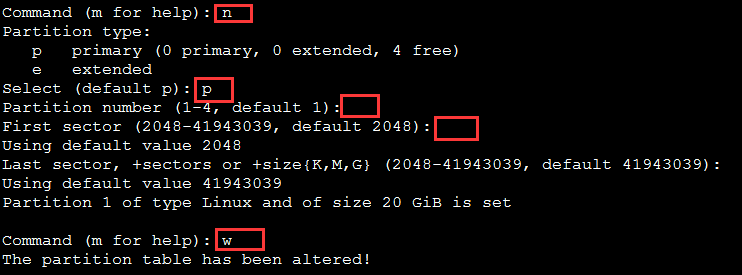
新建分区
$fdisk /dev/sdb
$mkfs.ext3 /dev/sdb
备份本地镜像,停止docker daemon并清除存储目录
$systemctl stop docker.service
$rm -rf /var/lib/docker
在/dev/sdb上创建LVM物理卷(PV)
$pvcreate /dev/sdb
创建卷组vg-docker
$vgcreate vg-docker /dev/sdb
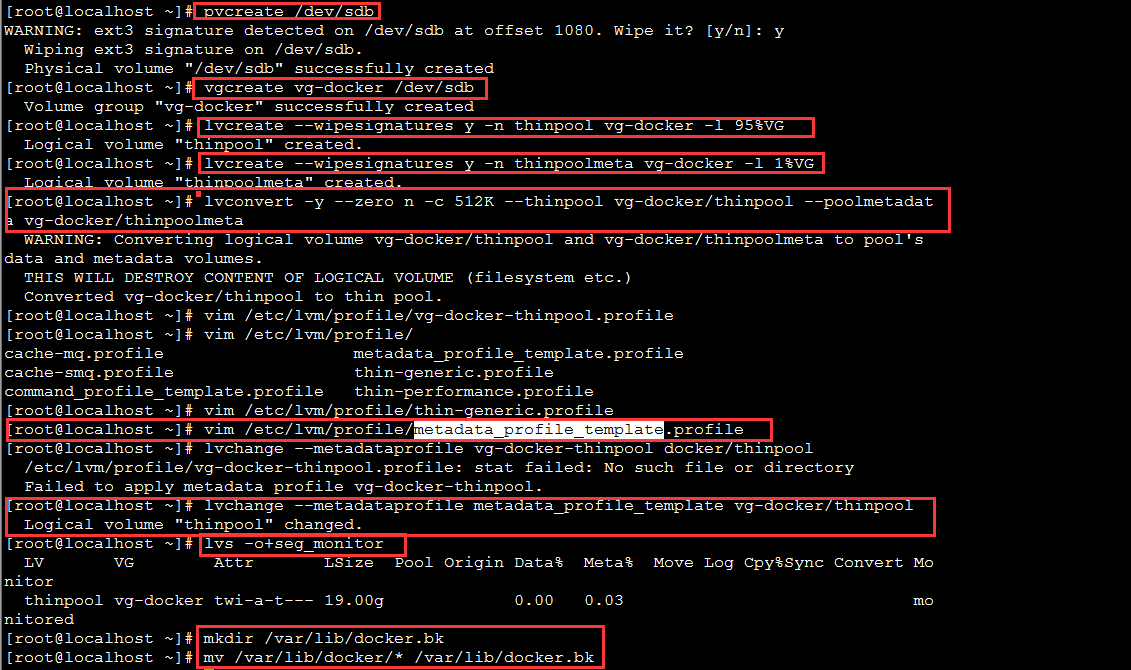
Create a thin pool named thinpool.
In this example, the data logical is 95% of the ‘docker’ volume group size. Leaving this free space allows for auto expanding of either the data or metadata if space runs low as a temporary stopgap.
$ lvcreate --wipesignatures y -n thinpool vg-docker -l 95%VG
$ lvcreate --wipesignatures y -n thinpoolmeta vg-docker -l 1%VG
Convert the pool to a thin pool.
$ lvconvert -y --zero n -c 512K --thinpool vg-docker/thinpool --poolmetadata vg-docker/thinpoolmeta
Configure autoextension of thin pools via an lvm profile.
$ vi /etc/lvm/profile/docker-thinpool.profile
thin_pool_autoextend_threshold = 80
thin_pool_autoextend_percent = 20
Apply your new lvm profile
$ lvchange --metadataprofile metadata_profile_template vg-docker/thinpool
Verify the lv is monitored.
$ lvs -o+seg_monitor
If the Docker daemon was previously started, move your existing graph driver directory out of the way.
$ mkdir /var/lib/docker.bk
$ mv /var/lib/docker/* /var/lib/docker.bk
Configure the Docker daemon with specific devicemapper options.


reload systemd to scan for changes,Start the Docker daemon
$ systemctl daemon-reload
$ systemctl start docker
$journalctl -fu dm-event.service
$ rm -rf /var/lib/docker.bk
参考文档
https://docs.docker.com/engine/userguide/storagedriver/device-mapper-driver/
http://blog.sina.com.cn/s/blog_6f2d2e310102wrvi.html
http://www.bubuko.com/infodetail-1039489.html
Centos中的Docker 配置:将loop-lvm改为derict-lvm的更多相关文章
- Docker学习笔记之-在CentOS中安装Docker
上一节演示了如何 通过Xshell连接CentOS服务,链接:Docker学习笔记之-通过Xshell连接 CentOS服务 本节将演示 如何在CentOS中安装 Docker 第一步:更新系统包到最 ...
- CentOS中利用Docker安装RabbitMQ
CentOS中利用Docker安装RabbitMQ 1.拉取镜像(带管理平台) #docker pull rabbitmq:3.7.7-management 2.启动容器: #docker run - ...
- CentOS中利用Docker安装Redis
CentOS中利用Docker安装Redis 1.拉取镜像 #docker pull redis:4.0.10 2.加载镜像 #docker run -p 6379:6379 --name test- ...
- CentOS 中利用docker安装MySQL
1.前提条件 centos7 且内核版本高于3.10, 可通过命令: uname -r 查看内核版本 2.利用yum 安装docker 安装一些必要的系统工具: sudo yum install -y ...
- centos中apache-tomcat的配置
在centos中配置Apache-toncat需要先安装jdk,前面文章已经写了怎么配置jdk,这里略过. 首先到官网下载好Apache-tomcat安装包,我这里下载的是apache-tomcat- ...
- 1,Linux(CentOS)中的基本配置
1,hostname(主机名) 查看主机名:hostname 临时修改主机名:hostname hadoop1 永久修改主机名:vi etc/sysconfig/network : [NETWORK ...
- CentOs中玩docker
1.启动: systemctl start docker.service 2.停止: systemctl stop docker 3.从usts上拉取仓库 编辑文件 vi /etc/docker/da ...
- centos中网卡的配置
配置临时IP: ip a a 192.168.59.100/24 dev ens32 ifconfig ens32 192.168.59.100 up 在Linux最小安装之后,一般需要手动配置网络地 ...
- Centos中使用Docker部署Apollo
采用微服务开发框架开发项目时会涉及多个系统,如果要更改配置参数需要在多个系统间逐一更改,比较费时,而且容易遗漏,效率低下,次问题可以采用Apollo配置中心的方式解决,下面将介绍如何配置: 准备环境: ...
随机推荐
- poj2240 floyd
//Accepted 732 KB 782 ms //floyd应用 #include <cstdio> #include <cstring> #include <ios ...
- Opencv 2.4.10 +VS2010 项目配置记录
http://blog.csdn.net/scottly1/article/details/40978625?utm_source=tuicool 因为工作需要,小小的研究一下Opencv的图像处理, ...
- 1、datatable与datagrid之间的绑定
1.前台代码: 插入一个datagrid控件,设置几列. 这里有两点要注意: 1)为了显示所要查询的日期,我将前台的列名与后台查询出来的日期绑定了,用了x:Name这个属性 2)与后台datatabl ...
- PAT (Basic Level) Practise:1014. 福尔摩斯的约会
[题目链接] 大侦探福尔摩斯接到一张奇怪的字条:“我们约会吧! 3485djDkxh4hhGE 2984akDfkkkkggEdsb s&hgsfdk d&Hyscvnm”.大侦探很快 ...
- 最短路径问题——dijkstra算法
仅谈谈个人对dijkstra的理解,dijkstra算法是基于邻接表实现的,用于处理单源最短路径问题(顺便再提一下,处理单源最短路径问题的还有bellman算法).开辟一个结构体,其变量为边的终点和边 ...
- null、空对象和undefined
null:是对象,但是空引用(不指向任何对象) 空对象:是对象,但它的值是指向没有任何属性的对象的引用 undefined:未定义,所以不是对象,本身被定义为“undefined”这一特殊类型 1. ...
- postfix启动脚本
使用该脚本是一定要注意postfix安装路径 #!/bin/bash # # postfix Postfix Mail Transger Agent # # chkconfig: # descript ...
- 理解伪元素 :before和:after
在CSS中有一特性允许我们添加额外元素而不扰乱文档本身,就是伪元素. 下面举例说明: html: <blockquote> blockquote只是一个块引用 </blockquo ...
- C#项目实例中读取并修改App.config文件
C#项目是指一系列独特的.复杂的并相互关联的活动,这些活动有着一个明确的目标或目的,必须在特定的时间.预算.资源限定内,依据规范完成.项目参数包括项目范围.质量.成本.时间.资源. 1. 向C#项目实 ...
- (转)神经网络和深度学习简史(第一部分):从感知机到BP算法
深度|神经网络和深度学习简史(第一部分):从感知机到BP算法 2016-01-23 机器之心 来自Andrey Kurenkov 作者:Andrey Kurenkov 机器之心编译出品 参与:chen ...