
jQuery - 5.样式操作
样式操作
2.设置样式attr("class","myclass"),
3.追加样式addClass("myclass")(不影响其他样式),
6.判断是否存在样式:hasClass("myclass")
练习:点击表格行,被点击的行高亮显示(背景是黄色),其他行白色背景。监听每个tr的click事件,将点击的背景设置为黄色,其他的设置为白色背景。颜色定义为class样式。
样式操作
1.获取样式 attr("class"),
2.设置样式attr("class","myclass"),
3.追加样式addClass("myclass")(不影响其他样式),
4.移除样式removeClass("myclass"),
<style type="text/css">
.my
{
width: 200px;
height: 200px;
}
.m
{
border: 1px rgb(156, 92, 92) solid;
}
<body>
<div class="my">111</div>
<input id="btn" type="button" value="点击" />
<br />
<input id="Button1" type="button" value="关灯" />
</body>
.src_container{background-color:#e7e5dc; width:99%; overflow:hidden; margin:12px 0 12px 0 !important; padding:0px 3px 3px 0px}
.src_container .titlebar{ background-color:#d4dfff; border:1px solid #4f81bd; border-bottom:0; padding:3px 24px; margin:0; width:auto; line-height:120%; overflow:hidden; text-align:left; font-size:12px}
.src_container .toolbar{ display:inline; font-weight:normal; font-size:100%; float:right; cursor:hand; color:#00f; text-align:left; overflow:hidden}
.toolbar span.button{ display:inline; font-weight:normal; font-size:100%; cursor:hand; color:#00f; text-align:left; overflow:hidden; cursor:pointer;}
.src_container div.clientarea{ background-color:white; border:1px solid #4f81bd; margin:0; width:auto !important; width:100%; height:auto; overflow:auto; text-align:left; font-size:12px; font-family: "Courier New","Consolas","Fixedsys",courier,monospace,serif}
.src_container ol.mainarea{ padding:0 0 0 52px; margin:0; background-color:#f7f7ff !important}
.number_show{ padding-left:52px !important; list-style:decimal outside !important}
.number_show li{ list-style:decimal outside !important; border-left:1px dotted #4f81bd}
.number_hide{ padding-left:0px !important; list-style-type:none !important}
.number_hide li{ list-style-type:none !important; border-left:0px}
ol.mainarea li{ display:list-item !important; font-size:12px !important; margin:0 !important; line-height:18px !important; padding:0 0 0 0px !important; background-color:#f7f7ff !important; color:#4f81bd}
ol.mainarea li pre{color:black; line-height:18px; padding:0 0 0 12px !important; margin:0em; background-color:#fff !important}
.linewrap ol.mainarea li pre{white-space:pre-wrap; white-space:-moz-pre-wrapwhite-space:-pre-wrap; white-space:-o-pre-wrap; word-wrap:break-word}
ol.mainarea li pre.alt{ background-color:#f7f7ff !important}显示行号 复制代码 ? 这是一段程序代码。
$(function () {$("#btn").click(function () {$(".my").addClass("m");$(".my").removeClass("my");
| 追加样式: | 移除样式: | 一起使用的效果: |
 |
 |
 |
5.切换样式(如果存在样式则去掉样式,如果没有样式则添加样式)toggleClass("myclass"),
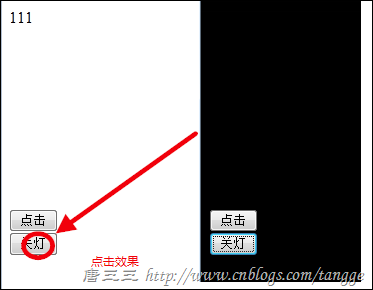
.dark
{
background-color: black;
}
//开灯关灯
$(function () {
$("#Button1").click(function () {
$("body").toggleClass("dark");
})
6.判断是否存在样式:hasClass("myclass")
案例:网页开关灯的效果。background
练习:给body设置body{ filter:Gray; } 这个style就可以让网页变为黑白显示,做切换黑白效果的按钮。
gray
none
用黑白色来呈现元素
filter:gray;
练习:点击表格行,被点击的行高亮显示(背景是黄色),其他行白色背景。监听每个tr的click事件,将点击的背景设置为黄色,其他的设置为白色背景。颜色定义为class样式。
<!DOCTYPE html>
<html xmlns="http://www.w3.org/1999/xhtml">
<head>
<meta http-equiv="Content-Type" content="text/html; charset=utf-8"/>
<title></title>
<style type="text/css">
.ye {background-color: yellow;
}
</style>
<script src="Jqeury/jquery-1.10.2.js"></script>
<script type="text/javascript">
$(function () {$("#tb tr").click(function () {$($(this), ".m").attr("class", "ye");$($(this), ".m").siblings().removeClass("ye");})
})
</script>
</head>
<body>
<table id="tb" border="1px" width="400">
<tr class="m">
<td>节目</td>
<td>收视率</td>
</tr>
<tr class="m">
<td>running man</td>
<td>11.4%</td>
</tr>
<tr class="m">
<td>2天1夜</td>
<td>26.2%</td>
</tr>
<tr class="m">
<td>男人的资格</td>
<td>7.2%</td>
</tr>
</table>
</body>
</html>

练习:聚焦控件的高亮显示。颜色定义为class样式。 $("body *"),选择器*表示所有类型的控件。
<!DOCTYPE html>
<html xmlns="http://www.w3.org/1999/xhtml">
<head>
<meta http-equiv="Content-Type" content="text/html; charset=utf-8" />
<title></title>
<style type="text/css">
.ye
{background-color: red;
}
</style>
<script src="Jqeury/jquery-1.10.2.js"></script>
<script type="text/javascript">
$(function () {$("input").focus(function () {$(this).addClass("ye");}).blur(function () {$(this).removeClass("ye");})
})
</script>
</head>
<body>
<input type="text" /><br />
<input type="text" /><br />
<input type="text" /><br />
<input type="text" /><br />
<input type="text" /><br />
</body>
</html>
.src_container{background-color:#e7e5dc; width:99%; overflow:hidden; margin:12px 0 12px 0 !important; padding:0px 3px 3px 0px}
.src_container .titlebar{ background-color:#d4dfff; border:1px solid #4f81bd; border-bottom:0; padding:3px 24px; margin:0; width:auto; line-height:120%; overflow:hidden; text-align:left; font-size:12px}
.src_container .toolbar{ display:inline; font-weight:normal; font-size:100%; float:right; cursor:hand; color:#00f; text-align:left; overflow:hidden}
.toolbar span.button{ display:inline; font-weight:normal; font-size:100%; cursor:hand; color:#00f; text-align:left; overflow:hidden; cursor:pointer;}
.src_container div.clientarea{ background-color:white; border:1px solid #4f81bd; margin:0; width:auto !important; width:100%; height:auto; overflow:auto; text-align:left; font-size:12px; font-family: "Courier New","Consolas","Fixedsys",courier,monospace,serif}
.src_container ol.mainarea{ padding:0 0 0 52px; margin:0; background-color:#f7f7ff !important}
.number_show{ padding-left:52px !important; list-style:decimal outside !important}
.number_show li{ list-style:decimal outside !important; border-left:1px dotted #4f81bd}
.number_hide{ padding-left:0px !important; list-style-type:none !important}
.number_hide li{ list-style-type:none !important; border-left:0px}
ol.mainarea li{ display:list-item !important; font-size:12px !important; margin:0 !important; line-height:18px !important; padding:0 0 0 0px !important; background-color:#f7f7ff !important; color:#4f81bd}
ol.mainarea li pre{color:black; line-height:18px; padding:0 0 0 12px !important; margin:0em; background-color:#fff !important}
.linewrap ol.mainarea li pre{white-space:pre-wrap; white-space:-moz-pre-wrapwhite-space:-pre-wrap; white-space:-o-pre-wrap; word-wrap:break-word}
ol.mainarea li pre.alt{ background-color:#f7f7ff !important}
jQuery - 5.样式操作的更多相关文章
- 解密jQuery内核 样式操作
基础回顾 jQuery里节点样式读取以及设置都是通过.css()这个方法来实现的,本章通一下分解探究下jquery里这部分代码的实现 那么jQuery要处理样式的哪些问题? 先简单回顾下样式操作会遇到 ...
- jquery动态样式操作
获取与设置样式 获取class和设置class都可以使用attr()方法来完成.例如使用attr()方法来获取p元素的class,JQuery代码如下: 1 var p_class = $(" ...
- jQuery 源码解析(二十九) 样式操作模块 尺寸详解
样式操作模块可用于管理DOM元素的样式.坐标和尺寸,本节讲解一下尺寸这一块 jQuery通过样式操作模块里的尺寸相关的API可以很方便的获取一个元素的宽度.高度,而且可以很方便的区分padding.b ...
- jQuery 2.0.3 源码分析 样式操作
根据API分类 CSS addClass() jQuery.cssHooks .hasClass() .removeClass() .toggleClass() .addClass() 对元素的样式操 ...
- 深入学习jQuery样式操作
× 目录 [1]设置样式 [2]增加样式 [3]删除样式[4]切换样式[5]判断样式[6]样式操作 前面的话 使用javascript脚本化CSS是一个系列,包括行间样式.计算样式.CSS类.样式表. ...
- 【Java EE 学习 33 上】【JQuery样式操作】【JQuery中的Ajax操作】【JQuery中的XML操作】
一.JQuery中样式的操作 1.给id=mover的div采用属性增加样式.one $("#b1").click(function(){ $("#mover" ...
- jQuery编程基础精华02(属性、表单过滤器,元素的each,表单选择器,子元素过滤器(*),追加方法,节点,样式操作)
属性.表单过滤器 属性过滤选择器: $("div[id]")选取有id属性的<div> $("div[title=test]")选取title属性为 ...
- jquery系列教程2-style样式操作全解
全栈工程师开发手册 (作者:栾鹏) 快捷链接: jquery系列教程1-选择器全解 jquery系列教程2-style样式操作全解 jquery系列教程3-DOM操作全解 jquery系列教程4-事件 ...
- JQuery DOM操作 、属性和CSS样式操作、其他函数
DOM操作 1.在div1内部最后追加一个节点 $("#div1").append("<img src='../01-HTML基本标签/img/Male.gif'/ ...
随机推荐
- [BZOJ1691][Usaco2007 Dec]挑剔的美食家
[BZOJ1691][Usaco2007 Dec]挑剔的美食家 试题描述 与很多奶牛一样,Farmer John那群养尊处优的奶牛们对食物越来越挑剔,随便拿堆草就能打发她们午饭的日子自然是一去不返了. ...
- mysql 时间戳 按周、日、月 统计方法 附 date格式
create_time时间戳格式 SELECT FROM_UNIXTIME(create_time,'%Y%u') weeks,COUNT(id) COUNT FROM role GROUP BY w ...
- 如何给zencart安装image handler插件?
以下内容均为个人的工作总结,有错误的理解都很正常,所以提醒您,可以参考,但是由此造成的一切后果,本人概不负责. 1 去zencart官网下载一个插件包(注意版本是否匹配相应的zencart版本,我的是 ...
- rest api设计的一般原则
本文参考自:http://www.ruanyifeng.com/blog/2014/05/restful_api.html,http://www.dongming8.cn/?p=590 服务器端: 1 ...
- win7下配置Apache本地虚拟主机
我们有时候从网上下载下来的php源码很多都是应用在网站根目录下的,而我们又想在本地先测试一遍确定没有问题了再上传空间,但一换到子目录下的时候因为路径问题,使得许多图片.内容都无法显示. 这个时候我们就 ...
- java的事务处理
本文转自http://zhenchengchagangzi.iteye.com/blog/1159493 java的事务处理,如果对数据库进行多次操作,每一次的执行或步骤都是一个事务.如果数据库操作在 ...
- Find celebrity
Suppose you are at a party with n people (labeled from 0 to n - 1) and among them, there may exist o ...
- C#之GDI+
1.使用Brushes填充矩形区域 Graphics g = e.Graphics; g.FillRectangle(Brushes.Green, , , , )); 2.使用LinearGradie ...
- Provider:SSL提供程序,error:0 - 接收到的消息异常,或格式不正确
引自 :http://www.cnblogs.com/liuguozhu2015/p/3413496.html 非常感谢这位同学 我用笔记本的sql客户端去连服务器,正常连接. 在页面中连接时,直接导 ...
- yum简单安装salt master与minion
首先得先安装epel的yum源: rpm -ivh http://mirrors.skyshe.cn/epel/6/x86_64/epel-release-6-8.noarch.rpm 1.SaltS ...