
JAVA CDI 学习(1) - @Inject基本用法
CDI(Contexts and Dependency Injection 上下文依赖注入),是JAVA官方提供的依赖注入实现,可用于Dynamic Web Module中,先给3篇老外的文章,写得很不错
1、Java EE CDI Dependency Injection (@Inject) tutorial
2、Java EE CDI Producer methods tutorial
3、Java EE CDI bean scopes
此外,还有jboss官方的参考文档:http://docs.jboss.org/weld/reference/latest/en-US/html/
如果不想啃洋文,也可以继续往下看:
一、基本的Inject注入
1.1 在eclipse中先创建一个常规的maven Dynamic Web项目(不熟悉maven的,可以先看看这里),下面是完整的项目截图
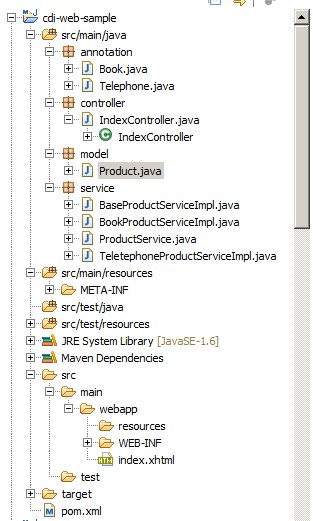
里面各package的代码,后面会给出。 项目的属性中,注意有几个属性要勾上(默认情况下,应该已经自动勾上了),如下图:
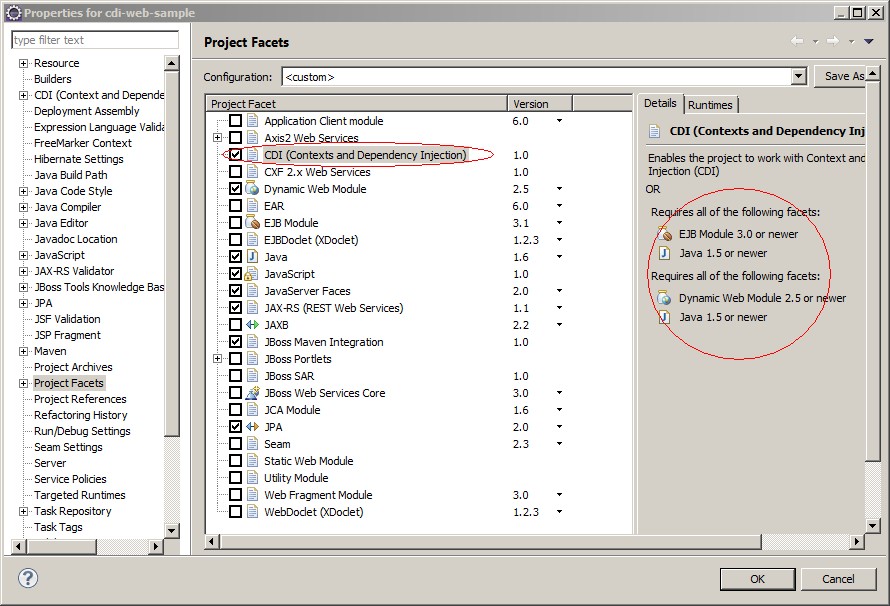
上图右侧的圆圈,其实就是CDI 1.0使用的先决条件。
Pom.xml的内容如下:
 <?xml version="1.0" encoding="UTF-8"?>

 <!--

     JBoss, Home of Professional Open Source

     Copyright 2013, Red Hat, Inc. and/or its affiliates, and individual

     contributors by the @authors tag. See the copyright.txt in the

     distribution for a full listing of individual contributors.

     Licensed under the Apache License, Version 2.0 (the "License");

     you may not use this file except in compliance with the License.

     You may obtain a copy of the License at

     http://www.apache.org/licenses/LICENSE-2.0

     Unless required by applicable law or agreed to in writing, software

     distributed under the License is distributed on an "AS IS" BASIS,

     WITHOUT WARRANTIES OR CONDITIONS OF ANY KIND, either express or implied.

     See the License for the specific language governing permissions and

     limitations under the License.

 -->

 <project xmlns="http://maven.apache.org/POM/4.0.0" xmlns:xsi="http://www.w3.org/2001/XMLSchema-instance"

     xsi:schemaLocation="http://maven.apache.org/POM/4.0.0 http://maven.apache.org/maven-v4_0_0.xsd">

     <modelVersion>4.0.0</modelVersion>

     <groupId>cnblogs</groupId>

     <artifactId>cdi-web-sample</artifactId>

     <version>0.0.1-SNAPSHOT</version>

     <packaging>war</packaging>

     <name>cdi-web-sample</name>

     <description>A starter Java EE 6 webapp project for use on JBoss AS 7 / EAP 6, generated from the jboss-javaee6-webapp archetype</description>

     <url>http://jboss.org/jbossas</url>

     <licenses>

         <license>

             <name>Apache License, Version 2.0</name>

             <distribution>repo</distribution>

             <url>http://www.apache.org/licenses/LICENSE-2.0.html</url>

         </license>

     </licenses>

     <properties>

         <!-- Explicitly declaring the source encoding eliminates the following

             message: -->

         <!-- [WARNING] Using platform encoding (UTF-8 actually) to copy filtered

             resources, i.e. build is platform dependent! -->

         <project.build.sourceEncoding>UTF-8</project.build.sourceEncoding>

         <!-- JBoss dependency versions -->

         <version.jboss.maven.plugin>7.4.Final</version.jboss.maven.plugin>

         <!-- Define the version of the JBoss BOMs we want to import to specify

             tested stacks. -->

         <version.jboss.bom>1.0.7.Final</version.jboss.bom>

         <!-- Alternatively, comment out the above line, and un-comment the line

             below to use version 1.0.4.Final-redhat-4 which is a release certified to

             work with JBoss EAP 6. It requires you have access to the JBoss EAP 6

             maven repository. -->

         <!-- <version.jboss.bom>1.0.4.Final-redhat-4</version.jboss.bom>> -->

         <!-- other plugin versions -->

         <version.surefire.plugin>2.10</version.surefire.plugin>

         <version.war.plugin>2.1.1</version.war.plugin>

         <!-- maven-compiler-plugin -->

         <maven.compiler.target>1.6</maven.compiler.target>

         <maven.compiler.source>1.6</maven.compiler.source>

     </properties>

     <dependencyManagement>

         <dependencies>

             <!-- JBoss distributes a complete set of Java EE 6 APIs including a Bill

                 of Materials (BOM). A BOM specifies the versions of a "stack" (or a collection)

                 of artifacts. We use this here so that we always get the correct versions

                 of artifacts. Here we use the jboss-javaee-6.0-with-tools stack (you can

                 read this as the JBoss stack of the Java EE 6 APIs, with some extras tools

                 for your project, such as Arquillian for testing) and the jboss-javaee-6.0-with-hibernate

                 stack you can read this as the JBoss stack of the Java EE 6 APIs, with extras

                 from the Hibernate family of projects) -->

             <dependency>

                 <groupId>org.jboss.bom</groupId>

                 <artifactId>jboss-javaee-6.0-with-tools</artifactId>

                 <version>${version.jboss.bom}</version>

                 <type>pom</type>

                 <scope>import</scope>

             </dependency>

             <dependency>

                 <groupId>org.jboss.bom</groupId>

                 <artifactId>jboss-javaee-6.0-with-hibernate</artifactId>

                 <version>${version.jboss.bom}</version>

                 <type>pom</type>

                 <scope>import</scope>

             </dependency>

         </dependencies>

     </dependencyManagement>

     <dependencies>

         <!-- First declare the APIs we depend on and need for compilation. All

             of them are provided by JBoss AS 7 -->

         <!-- Import the CDI API, we use provided scope as the API is included in

             JBoss AS 7 -->

         <dependency>

             <groupId>javax.enterprise</groupId>

             <artifactId>cdi-api</artifactId>

             <scope>provided</scope>

         </dependency>

         <!-- Import the Common Annotations API (JSR-250), we use provided scope

             as the API is included in JBoss AS 7 -->

         <dependency>

             <groupId>org.jboss.spec.javax.annotation</groupId>

             <artifactId>jboss-annotations-api_1.1_spec</artifactId>

             <scope>provided</scope>

         </dependency>

         <!-- Import the JAX-RS API, we use provided scope as the API is included

             in JBoss AS 7 -->

         <dependency>

             <groupId>org.jboss.spec.javax.ws.rs</groupId>

             <artifactId>jboss-jaxrs-api_1.1_spec</artifactId>

             <scope>provided</scope>

         </dependency>

         <!-- Import the JPA API, we use provided scope as the API is included in

             JBoss AS 7 -->

         <dependency>

             <groupId>org.hibernate.javax.persistence</groupId>

             <artifactId>hibernate-jpa-2.0-api</artifactId>

             <scope>provided</scope>

         </dependency>

         <!-- Import the EJB API, we use provided scope as the API is included in

             JBoss AS 7 -->

         <dependency>

             <groupId>org.jboss.spec.javax.ejb</groupId>

             <artifactId>jboss-ejb-api_3.1_spec</artifactId>

             <scope>provided</scope>

         </dependency>

         <!-- JSR-303 (Bean Validation) Implementation -->

         <!-- Provides portable constraints such as @Email -->

         <!-- Hibernate Validator is shipped in JBoss AS 7 -->

         <dependency>

             <groupId>org.hibernate</groupId>

             <artifactId>hibernate-validator</artifactId>

             <scope>provided</scope>

             <exclusions>

                 <exclusion>

                     <groupId>org.slf4j</groupId>

                     <artifactId>slf4j-api</artifactId>

                 </exclusion>

             </exclusions>

         </dependency>

         <!-- Import the JSF API, we use provided scope as the API is included in

             JBoss AS 7 -->

         <dependency>

             <groupId>org.jboss.spec.javax.faces</groupId>

             <artifactId>jboss-jsf-api_2.1_spec</artifactId>

             <scope>provided</scope>

         </dependency>

         <!-- Now we declare any tools needed -->

         <!-- Annotation processor to generate the JPA 2.0 metamodel classes for

             typesafe criteria queries -->

         <dependency>

             <groupId>org.hibernate</groupId>

             <artifactId>hibernate-jpamodelgen</artifactId>

             <scope>provided</scope>

         </dependency>

         <!-- Annotation processor that raising compilation errors whenever constraint

             annotations are incorrectly used. -->

         <dependency>

             <groupId>org.hibernate</groupId>

             <artifactId>hibernate-validator-annotation-processor</artifactId>

             <scope>provided</scope>

         </dependency>

         <!-- Needed for running tests (you may also use TestNG) -->

         <dependency>

             <groupId>junit</groupId>

             <artifactId>junit</artifactId>

             <scope>test</scope>

         </dependency>

         <!-- Optional, but highly recommended -->

         <!-- Arquillian allows you to test enterprise code such as EJBs and Transactional(JTA)

             JPA from JUnit/TestNG -->

         <dependency>

             <groupId>org.jboss.arquillian.junit</groupId>

             <artifactId>arquillian-junit-container</artifactId>

             <scope>test</scope>

         </dependency>

         <dependency>

             <groupId>org.jboss.arquillian.protocol</groupId>

             <artifactId>arquillian-protocol-servlet</artifactId>

             <scope>test</scope>

         </dependency>

     </dependencies>

     <build>

         <!-- Maven will append the version to the finalName (which is the name

             given to the generated war, and hence the context root) -->

         <finalName>${project.artifactId}</finalName>

         <plugins>

             <plugin>

                 <artifactId>maven-war-plugin</artifactId>

                 <version>${version.war.plugin}</version>

                 <configuration>

                     <!-- Java EE 6 doesn't require web.xml, Maven needs to catch up! -->

                     <failOnMissingWebXml>false</failOnMissingWebXml>

                 </configuration>

             </plugin>

             <!-- The JBoss AS plugin deploys your war to a local JBoss AS container -->

             <!-- To use, run: mvn package jboss-as:deploy -->

             <plugin>

                 <groupId>org.jboss.as.plugins</groupId>

                 <artifactId>jboss-as-maven-plugin</artifactId>

                 <version>${version.jboss.maven.plugin}</version>

             </plugin>

         </plugins>

     </build>

     <profiles>

         <profile>

             <!-- The default profile skips all tests, though you can tune it to run

                 just unit tests based on a custom pattern -->

             <!-- Seperate profiles are provided for running all tests, including Arquillian

                 tests that execute in the specified container -->

             <id>default</id>

             <activation>

                 <activeByDefault>true</activeByDefault>

             </activation>

             <build>

                 <plugins>

                     <plugin>

                         <artifactId>maven-surefire-plugin</artifactId>

                         <version>${version.surefire.plugin}</version>

                         <configuration>

                             <skip>true</skip>

                         </configuration>

                     </plugin>

                 </plugins>

             </build>

         </profile>

         <profile>

             <!-- An optional Arquillian testing profile that executes tests in your

                 JBoss AS instance -->

             <!-- This profile will start a new JBoss AS instance, and execute the

                 test, shutting it down when done -->

             <!-- Run with: mvn clean test -Parq-jbossas-managed -->

             <id>arq-jbossas-managed</id>

             <dependencies>

                 <dependency>

                     <groupId>org.jboss.as</groupId>

                     <artifactId>jboss-as-arquillian-container-managed</artifactId>

                     <scope>test</scope>

                 </dependency>

             </dependencies>

         </profile>

         <profile>

             <!-- An optional Arquillian testing profile that executes tests in a remote

                 JBoss AS instance -->

             <!-- Run with: mvn clean test -Parq-jbossas-remote -->

             <id>arq-jbossas-remote</id>

             <dependencies>

                 <dependency>

                     <groupId>org.jboss.as</groupId>

                     <artifactId>jboss-as-arquillian-container-remote</artifactId>

                     <scope>test</scope>

                 </dependency>

             </dependencies>

         </profile>

         <profile>

             <!-- When built in OpenShift the 'openshift' profile will be used when

                 invoking mvn. -->

             <!-- Use this profile for any OpenShift specific customization your app

                 will need. -->

             <!-- By default that is to put the resulting archive into the 'deployments'

                 folder. -->

             <!-- http://maven.apache.org/guides/mini/guide-building-for-different-environments.html -->

             <id>openshift</id>

             <build>

                 <plugins>

                     <plugin>

                         <artifactId>maven-war-plugin</artifactId>

                         <version>${version.war.plugin}</version>

                         <configuration>

                             <outputDirectory>deployments</outputDirectory>

                             <warName>ROOT</warName>

                         </configuration>

                     </plugin>

                 </plugins>

             </build>

         </profile>

     </profiles>

 </project>
pom.xml
1.2 model包下,会创建Product类
 package model;

 public class Product {

     private String productName;

     private String productNo;

     public String getProductNo() {

         return productNo;

     }

     public void setProductNo(String productNo) {

         this.productNo = productNo;

     }

     public String getProductName() {

         return productName;

     }

     public void setProductName(String productName) {

         this.productName = productName;

     }

     public String toString() {

         return this.productName + " "    + this.productNo;

     }

 }
Product
这个类其实是打酱油的
1.3 service包下,建一个ProductService接口
 package service;

 import model.Product;

 public interface ProductService {

     Product getNewProduct();

 }
ProductService
1.4 service包下,再来几个实现
 package service;

 import javax.inject.Inject;

 import model.Product;

 public abstract class BaseProductServiceImpl implements ProductService {

     @Inject

     protected Product product;

     public abstract Product getNewProduct();

 }
BaseProductServiceImpl
这个是实现类的基类,注意这里私有成员上打了一个注解@Inject,表示运行时将动态注入(实例化)一个Product
再来二个具体的实现类,BookProductServiceImpl生成"书籍"
 package service;

 import annotation.Book;

 import model.Product;

 @Book

 public class BookProductServiceImpl extends BaseProductServiceImpl {

     public Product getNewProduct() {

         product.setProductName("论程序员的自我修养");

         product.setProductNo("ISBN 999");

         return product;

     }

 }
BookProductServiceImpl
TelephoneProductServiceImpl生成“电话”
 package service;

 import annotation.Telephone;

 import model.Product;

 @Telephone

 public class TeletephoneProductServiceImpl extends BaseProductServiceImpl {

     public Product getNewProduct() {

         product.setProductName("NOKIA LUMIA");

         product.setProductNo("920");

         return product;

     }

 }
TeletephoneProductServiceImpl
可能有朋友注意到了,里面用到了二个自己写的注释@Book和@Telephone,接下来会讲到,这里先忽略
1.5 controller包下,添加IndexController类
为了能跟JSF的前台页面交互,这里需要添加一个Controller
 package controller;

 import javax.faces.bean.ManagedBean;

 import javax.inject.Inject;

 import annotation.*;

 import service.*;

 @ManagedBean(name = "Index")

 public class IndexController {

     @Inject

     @Book

     private ProductService bookProductService;

     @Inject

     @Telephone

     private ProductService telephoneProductService;

     public ProductService getBookProductService() {

         return bookProductService;

     }

     public ProductService getTelephoneProductService() {

         return telephoneProductService;

     }

 }

 IndexController
IndexController
好了,一下子搞了这么多代码,先停下来消化一下,这里我们模拟了分层架构:
model - 代表了业务模型层(本例中,为了简单起见,没有细分 业务模型、实体模型、以及web中的ViewModel)
service - 代表了服务层(为了简单起见,我们把接口+实现都放在一起了,实际中,可能会把这二个分开来)
controller - 这是web层MVC中的控制器层
当然,为了能展示最终的效果,我们会在后面加一个页面做为View层来提供UI
1.6 webapp下,新建一个index.xhtml文件,内容如下:
 <!DOCTYPE html PUBLIC "-//W3C//DTD XHTML 1.0 Transitional//EN" "http://www.w3.org/TR/xhtml1/DTD/xhtml1-transitional.dtd">

 <html xmlns="http://www.w3.org/1999/xhtml"

     xmlns:h="http://java.sun.com/jsf/html"

     xmlns:f="http://java.sun.com/jsf/core"

     xmlns:ui="http://java.sun.com/jsf/facelets">

 <h:head></h:head>

 <body>

     Book:

     <br /> #{Index.bookProductService.newProduct.toString()}

     <br />

     <br /> Telephone:

     <br /> #{Index.telephoneProductService.newProduct.toString()}

 </body>
index.xhtml
页面里几乎没啥代码,就是调用IndexController实例中的getBookProductService、getTelephoneProductService方法,进而得到相应的"服务实现类实例",最终输出产品信息
1.7 Inject用在什么地方了?
a) 页面显示时,IndexController里,bookProductService和telephoneProductService这二个私有成员上,都加了@Inject注解,所以运行时,这二个成员都能被实例化,但是问题来了,它们都是ProductService的接口类型,而这个接口有二个具体的实现(BookProductServiceImpl和TeletephoneProductServiceImpl),最终运行时,应该实现化哪一个呢?
关键在于另一个注解@Book和@Telephone,观察一下:BookProductServiceImpl类上我们也加了@Book,而TeletephoneProductServiceImpl上加了@Telephone,这样正好可以跟IndexControll中这二个私成成员的注释“匹配”上,所以最终系统知道私有成员bookProductService应该被实例化成BookProductServiceImpl,telephoneProductService被实例化成TeletephoneProductServiceImpl
@Book和@Telephone的代码如下:
 package annotation;

 import java.lang.annotation.Retention;

 import java.lang.annotation.RetentionPolicy;

 import javax.inject.Qualifier;

 @Qualifier

 @Retention(RetentionPolicy.RUNTIME)

 public @interface Book {

 }
Book
 package annotation;

 import java.lang.annotation.Retention;

 import java.lang.annotation.RetentionPolicy;

 import javax.inject.Qualifier;

 @Qualifier

 @Retention(RetentionPolicy.RUNTIME)

 public @interface Telephone {

 }
Telephone
b) BaseProductServiceImpl中,在私成成员product上加了@Inject,这样运行时,能自动实例化Product对象
1.8 运行结果
jboss中部署后,浏览http://localhost:8080/cdi-web-sample/faces/index.xhtml 或http://localhost:8080/cdi-web-sample/index.jsf
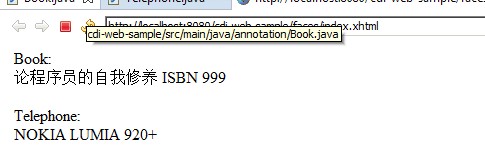
1.9 Method(方法)注入及Constructor(构造器)注入
刚才我们看到的都是在Field(成员)上注入,除了这种方式,也可以在Method或Constructor上注入
     private Product product ;

     /**

      * 演示在方法上使用@Inject注入

      * @param p

      */

     @Inject

     public void setProduct(Product p){

         product = p;

     }

     public Product getProduct(){

         return product;

     }
Method Inject
上面的代码即是Method注入的示例,最后来看下构造器注入,我们再新建一个ClothProductServiceImpl用于生产服装
 package service;

 import javax.inject.Inject;

 import annotation.*;

 import model.Product;

 @Cloth

 public class ClothProductServiceImpl implements ProductService {

     private Product product;

     /**

      * 构造器注入

      * @param p

      */

     @Inject

     public ClothProductServiceImpl(Product p ){

         p.setProductName("A New Dress");

         p.setProductNo("SPRIT-001");

         product = p;

     }

     public Product getNewProduct() {

         return product;

     }

 }
Constructor Inject
运行时,系统会自动给构造器ClothProductServiceImpl传递一个实例化的Product对象作为参数,以实现Product实例的注入
附文中示例源码下载:cdi-web-sample.zip
下一节,我们将学习Bean注入后的生命周期管理
JAVA CDI 学习(1) - @Inject基本用法的更多相关文章
- JAVA CDI 学习(3) - @Produces及@Disposes
上一节学习了注入Bean的生命周期,今天再来看看另一个话题: Bean的生产(@Produces)及销毁(@Disposes),这有点象设计模式中的工厂模式.在正式学习这个之前,先来看一个场景: 基于 ...
- JAVA CDI 学习(4) - @Alternative/@Default/@Any & Extension
前面几节学习到的CDI内容,基本上都是hard-code,以硬编码的方式在代码里指定注入类型,这并非依赖注入的本意,依赖注入的优势之一在于“解耦”,这一节我们将学习如何利用配置来动态注入的类型及属性初 ...
- JAVA CDI 学习(2) - Scope 生命周期
在上一节中,我们已经知道了如何用@Inject实现基本注入,这一节研究Bean实例注入后的“生命周期”,web application中有几种基本的生命周期(不管哪种编程语言都类似) 1.Applic ...
- JAVA CDI 学习(5) - 如何向RESTFul Service中注入EJB实例
RESTFul Service中如果要注入EJB实例,常规的@Inject将不起作用,在Jboss中,应用甚至都启动不起来(因为@Inject注入失败),解决方法很简单:将@Inject换成@EJB ...
- 【Java学习笔记之二十九】Java中的"equals"和"=="的用法及区别
Java中的"equals"和"=="的用法及区别 在初学Java时,可能会经常碰到下面的代码: String str1 = new String(" ...
- 我的Java开发学习之旅------>Java 格式化类(java.util.Formatter)基本用法
本文参考: http://docs.oracle.com/javase/1.5.0/docs/api/java/util/Formatter.html http://www.blogjava.net/ ...
- Java Web 学习路线
实际上,如果时间安排合理的话,大概需要六个月左右,有些基础好,自学能力强的朋友,甚至在四个月左右就开始找工作了.大三的时候,我萌生了放弃本专业的念头,断断续续学 Java Web 累计一年半左右,总算 ...
- Java多线程学习(转载)
Java多线程学习(转载) 时间:2015-03-14 13:53:14 阅读:137413 评论:4 收藏:3 [点我收藏+] 转载 :http://blog ...
- Java EE学习——Quartz的Cron表达式
经历过低谷后,还是要好好学习,越失落会越来越落后. 今天写一下Cron表达式的用法,虽然是之前自己写的,也过了挺长一段时间,这次就拿出来作为回顾吧. Cron表达式是Quartz的精髓(个人觉得),比 ...
随机推荐
- 这个错误,每个ScrumMaster都犯过
[小编]ScrumMaster要授之以渔,还是授之以鱼?从04年开始接触XP,到08年自己的团队开始提出敏捷的概念,再到10年接受ScrumMaster培训:在刚开始做ScrumMaster的一段时间 ...
- Unknown tag
<c:forEach items="" var="" varStatus="s">缺少<%@ taglib uri=&qu ...
- [20140504] ADO.NET客户端超时
背景: 最近总是出现客户端超时,那么根据超时进行排查 System.Data.SqlClient.SqlException (0x80131904): Timeout expire ...
- 按要求编写一个Java应用程序: (1)编写一个矩形类Rect,包含: 两个属性:矩形的宽width;矩形的高height。 两个构造方法: 1.一个带有两个参数的构造方法,用于将width和height属性初化; 2.一个不带参数的构造方法,将矩形初始化为宽和高都为10。 两个方法: 求矩形面积的方法area() 求矩形周长的方法perimeter() (2)通过继承Rect类编写一个具有确定位
package com.hanqi.test; public class Rect { ; ; public double getWidth() { return width; } public vo ...
- 0002 Oracle账户相关的几个语句
Oracle安装完成后,在“开始”里找到SQL Plus运行,要求输入帐号和密码,用system/密码连接. 1.Oracle里有一个默认的scott账户密码tiger,用该账户连接: CONN 用户 ...
- 万能面试问题大全,教你怎么回答,怎么拿下offer
一.你对薪资的要求? 回答提示: 说实话,大家找工作,都希望找个高薪的,那我们如何和公司去谈薪酬呢?如果你对薪酬的要求太低,那显然贬低自己的能力:如果你对薪酬的要求太高,那又会显得你分量过重,公司受用 ...
- 简单阐述下Ajax以get方式请求的步骤 初学,不对的话,跟我说下,谢谢!
首先, 在GET提交中"=,&"等字符与请求字符串的关键字相混淆.所以: 第一步,先对get提交过来的数据进行编码. 第二步,实例化ajax对象. 第三步,创建对服务器的连 ...
- 【转】RHadoop实践系列之一:Hadoop环境搭建
RHadoop实践系列之一:Hadoop环境搭建 RHadoop实践系列文章,包含了R语言与Hadoop结合进行海量数据分析.Hadoop主要用来存储海量数据,R语言完成MapReduce 算法,用来 ...
- strlen和sizeof的区别
1.sizeof操作符的结果类型是size_t,它在头文件中typedef为unsigned int类型.该类型保证能容纳实现所建立的最大对象的字节大小. 2.sizeof是算符,strlen是函 ...
- hadoop2.3cdh5.0.2 upgrade to hadoop2.5cdh5.5.0
两台机器,nn1,nn2搭建的ha,同时又担任nn,dn,rm,nm,jn,zkfc,zk等职能. 以下是升级回滚再升级的记录.仅供参考,同时参考了cdh官网的说明,官网主要是使用CM的. 1 官网上 ...