
服务器内部模拟Http请求
前言:
在做小程序的开发时需要获取用户的openId用来做唯一标识,来获取对应用户的相关数据
官方的文档说明上有四个必须传的参数
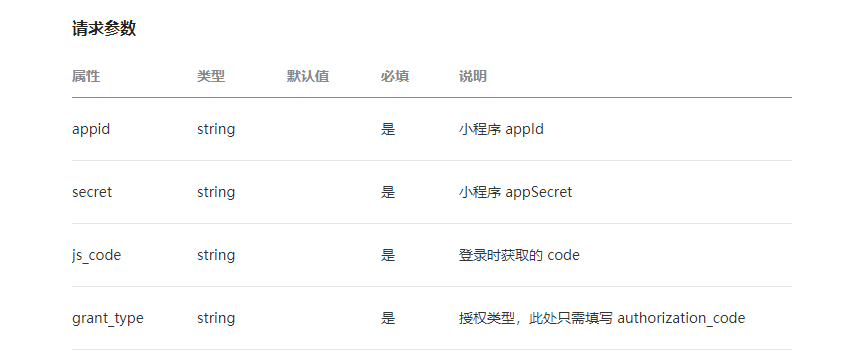
其中appId和appSecret可在自己的微信公众号平台上获取,同时这些也是属于私密信息,应该妥善保管的,因为微信手机客户端是很容易反编译获取到这些信息的,所以在前端的ajax请求将这些参数传到后台是不可取的,最好的方式是将这两个参数在后台传入,然后发送请求至官方接口
1.Http请求工具类
package com.btw.util;

import java.io.IOException;

import java.io.InputStream;

import java.io.InputStreamReader;

import java.io.PrintWriter;

import java.io.Reader;

import java.net.HttpURLConnection;

import java.net.ProtocolException;

import java.net.URL;

import java.util.Map;

public class HttpUtil {

    /**

     * 请求类型: GET

     */

    public final static String GET = "GET";

    /**

     * 请求类型: POST

     */

    public final static String POST = "POST";

    /**

     * 模拟Http Get请求

     * @param urlStr

     *             请求路径

     * @param paramMap

     *             请求参数

     * @return

     * @throws Exception

     */

    public static String get(String urlStr, Map<String, String> paramMap) throws Exception{

        urlStr = urlStr + "?" + getParamString(paramMap);

        HttpURLConnection conn = null;

        try{

            //创建URL对象

            URL url = new URL(urlStr);

            //获取URL连接

            conn = (HttpURLConnection) url.openConnection();

            //设置通用的请求属性

            setHttpUrlConnection(conn, GET);

            //建立实际的连接

            conn.connect();

            //获取响应的内容

            return readResponseContent(conn.getInputStream());

        }finally{

            if(null!=conn) conn.disconnect();

        }

    }

    /**

     * 模拟Http Post请求

     * @param urlStr

     *             请求路径

     * @param paramMap

     *             请求参数

     * @return

     * @throws Exception

     */

    public static String post(String urlStr, Map<String, String> paramMap) throws Exception{

        HttpURLConnection conn = null;

        PrintWriter writer = null;

        try{

            //创建URL对象

            URL url = new URL(urlStr);

            //获取请求参数

            String param = getParamString(paramMap);

            //获取URL连接

            conn = (HttpURLConnection) url.openConnection();

            //设置通用请求属性

            setHttpUrlConnection(conn, POST);

            //建立实际的连接

            conn.connect();

            //将请求参数写入请求字符流中

            writer = new PrintWriter(conn.getOutputStream());

            writer.print(param);

            writer.flush();

            //读取响应的内容

            return readResponseContent(conn.getInputStream());

        }finally{

            if(null!=conn) conn.disconnect();

            if(null!=writer) writer.close();

        }

    }

    /**

     * 读取响应字节流并将之转为字符串

     * @param in

     *         要读取的字节流

     * @return

     * @throws IOException

     */

    private static String readResponseContent(InputStream in) throws IOException{

        Reader reader = null;

        StringBuilder content = new StringBuilder();

        try{

            reader = new InputStreamReader(in);

            char[] buffer = new char[1024];

            int head = 0;

            while( (head=reader.read(buffer))>0 ){

                content.append(new String(buffer, 0, head));

            }

            return content.toString();

        }finally{

            if(null!=in) in.close();

            if(null!=reader) reader.close();

        }

    }

    /**

     * 设置Http连接属性

     * @param conn

     *             http连接

     * @return

     * @throws ProtocolException

     * @throws Exception

     */

    private static void setHttpUrlConnection(HttpURLConnection conn, String requestMethod) throws ProtocolException{

        conn.setRequestMethod(requestMethod);

        conn.setRequestProperty("accept", "*/*");

        conn.setRequestProperty("Accept-Language", "zh-CN");

        conn.setRequestProperty("User-Agent", "Mozilla/5.0 (compatible; MSIE 9.0; Windows NT 6.1; WOW64; Trident/5.0)");

        conn.setRequestProperty("Proxy-Connection", "Keep-Alive");

        if(null!=requestMethod && POST.equals(requestMethod)){

            conn.setDoOutput(true);

            conn.setDoInput(true);

        }

    }

    /**

     * 将参数转为路径字符串

     * @param paramMap

     *             参数

     * @return

     */

    private static String getParamString(Map<String, String> paramMap){

        if(null==paramMap || paramMap.isEmpty()){

            return "";

        }

        StringBuilder builder = new StringBuilder();

        for(String key : paramMap.keySet() ){

            builder.append("&")

                    .append(key).append("=").append(paramMap.get(key));

        }

        return builder.deleteCharAt(0).toString();

    }

}
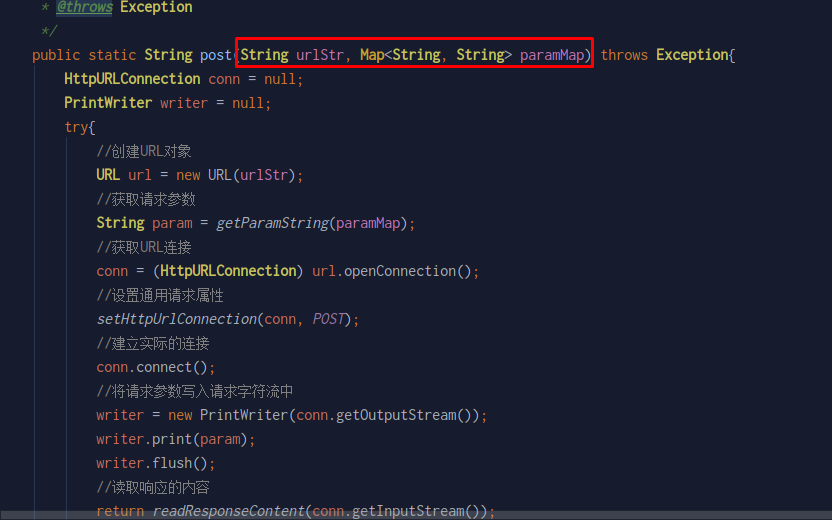
其中请求参数已经封装成map的形式,非常方便
2.请求接口
在这个接口我们只需要接收一个code的参数,然后用String类型接收Util类返回的数据即可,其中的url为官方接口地址
package com.btw.controller;

import com.btw.util.AppConstant;

import com.btw.util.HttpUtil;

import org.springframework.web.bind.annotation.RequestMapping;

import org.springframework.web.bind.annotation.RequestMethod;

import org.springframework.web.bind.annotation.RequestParam;

import org.springframework.web.bind.annotation.RestController;

import javax.servlet.http.HttpServletRequest;

import javax.servlet.http.HttpServletResponse;

import java.util.HashMap;

import java.util.Map;

@RestController

@RequestMapping("/system")

public class SecretController {

    @RequestMapping(value = "/getOpenId",method = RequestMethod.GET)

    public String getOpenid(HttpServletRequest request,HttpServletResponse response, @RequestParam String code){

        Map<String,String> paramMap=new HashMap<>();

        paramMap.put("appid", AppConstant.AppId);

        paramMap.put("secret",AppConstant.AppSecret);

        paramMap.put("js_code",code);

        paramMap.put("grant_type","authorization_code");

        String url="https://api.weixin.qq.com/sns/jscode2session";

        String res=null;

        try {

            res=HttpUtil.post(url,paramMap);

        } catch (Exception e) {

            e.printStackTrace();

        }

        return res;

    }

}
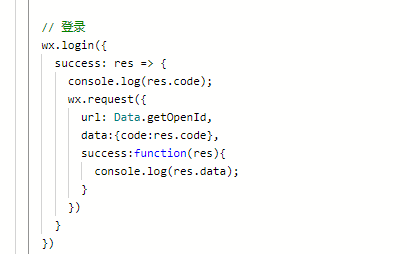
3.前端Ajax请求
服务器内部模拟Http请求的更多相关文章
- NodeJs本地搭建服务器,模拟接口请求,获取json数据
最近在学习Node.js,虽然就感觉学了点皮毛,感觉这个语言还不错,并且也会一步步慢慢的学着的,这里实现下NodeJs本地搭建服务器,模拟接口请求,获取json数据. 具体的使用我就不写了,这个博客写 ...
- Node.js创建服务器和模拟客户端请求
1. 何为服务器 服务器是某种长期运行,等待请求资源的应用程序 2. 常见Web应用架构 3. 如何创建web服务器 Web服务器是使用HTTP协议,等待客户端连接后请求资源的驻守应用程序:HTTP协 ...
- 关于wcf异常异常信息:由于内部错误,服务器无法处理该请求。有关该错误的详细信息,请打开服务器上的 IncludeExceptionDetailInFaults (从 ServiceBehaviorAttribut
异常信息:由于内部错误,服务器无法处理该请求.有关该错误的详细信息,请打开服务器上的 IncludeExceptionDetailInFaults (从 ServiceBehaviorAttribut ...
- C#模拟httpwebrequest请求_向服务器模拟cookie发送
使用C#代码模拟web请求,是一种常用的方法,以前没专门整理过,这里暂时贴上自己整理的完整代码,以后再做梳理: public class MyRequest { #region 辅助方法 public ...
- js_html_input中autocomplete="off"在chrom中失效的解决办法 使用JS模拟锚点跳转 js如何获取url参数 C#模拟httpwebrequest请求_向服务器模拟cookie发送 实习期学到的技术(一) LinqPad的变量比较功能 ASP.NET EF 使用LinqPad 快速学习Linq
js_html_input中autocomplete="off"在chrom中失效的解决办法 分享网上的2种办法: 1-可以在不需要默认填写的input框中设置 autocompl ...
- PHP+SOCKET 模拟HTTP请求
HTTP消息结构 客户端请求包括四部份:请求行(状态行).请求头.空行.请求主体(数据),如下图: 服务端响应包括四部份:响应行(状态行).响应头.空行.响应主体(数据),如图: HTTP请求方法: ...
- requests模拟浏览器请求模块初识
requests模拟浏览器请求模块初识 一.下载 requests模拟浏览器请求模块属于第三方模块 源码下载地址http://docs.python-requests.org/zh_CN/lates ...
- ASP模拟POST请求异步提交数据的方法
这篇文章主要介绍了ASP模拟POST请求异步提交数据的方法,本文使用MSXML2.SERVERXMLHTTP.3.0实现POST请求,需要的朋友可以参考下 有时需要获取远程网站的某些信息,而服务器又限 ...
- HttpClientUtil [使用apache httpclient模拟http请求]
基于httpclient-4.5.2 模拟http请求 以get/post方式发送json请求,并获取服务器返回的json -------------------------------------- ...
随机推荐
- windows笔记-在可执行文件或DLL的多个实例之间共享静态数据
全局数据和静态数据不能被同一个. exe或DLL文件的多个映像共享,这是个安全的默认设置.但是,在某些情况下,让一个. exe文件的多个映像共享一个变量的实例是非常有用和方便的. 每个. exe或DL ...
- WPF Grid新增框选功能
有时候会有框选的需求,类似EXCEL一样,画一个框选择里面的子控件. 选择后比如可以将子控件的Border设置为红色边框 说下这个功能的大致原理.背景是一个Grid,比如里面放了很多的Button. ...
- linux 下文件的权限
- MySQL时间戳、字符串、日期
1.时间转字符串:date_format(date, format) SELECT date_format(now(), '%Y-%m-%d') 2.时间转时间戳:unix_timestamp() S ...
- unitest单元测试TestCase 执行测试用例(一)
前言 unittest单元测试框架不仅可以适用于单元测试,还可以适用自动化测试用例的开发与执行,该测试框架可组织执行测试用例,并且提供了丰富的断言方法,判断测试用例是否通过,最终生成测试结果. uni ...
- CSS布局中最小高度的妙用
CSS布局中最小高度的妙用 --最小高度可以设定一个BOX的最小高度,当其内容较少时时,也能保持BOX的高度为一定,超出就自动向下延伸最小高度可以设定一个BOX的最小高度,当其内容较少时时,也能保持B ...
- Mac 安装 Android commandlinetools 各种报错的问题
https://developer.android.com/studio/releases/platform-tools commandlinetools-mac 下载地址 解压后直接运行 sdkma ...
- 如何实现LRU缓存?
面试官:来了,老弟,LRU缓存实现一下? 我:直接LinkedHashMap就好了. 面试官:不要用现有的实现,自己实现一个. 我:..... 面试官:回去等消息吧.... 大家好,我是程序员学长,今 ...
- Kafka内外网访问
本文介绍了Kafka内外网访问的设置. kafka的两个配置listeners和advertised.listeners listeners kafka监听的网卡的ip,假设你机器上有两张网卡,内网1 ...
- layui的CRUD案列
用layui来实现一个简单的二级权限和增删改查案列 利用layui提供的组件(table , layer , form,tree)来进行开发 写一个简单的登录界面 根据用户的ID来 获取用户所对应 ...