
【UE4 C++】调用外部链接库 lib静态库
简述
- 本例以插件形式测试
- 使用Lib引用,打包程序运行不用再拷贝lib文件
- 需要 lib 文件和 .h 头文件
lib部分的代码
- .h 头文件
#pragma once

#ifndef __MYTEST_LIB_H__

#define __MYTEST_LIB_H__

#include <string>

#include <iostream>

int myPrint( int _age);

#endif
- .cpp 文件
#include "MyTestLib.h"

int myPrint(int _age)

{

	return _age + 1000;

}
UE4 插件代码
Plugin lib文件部署
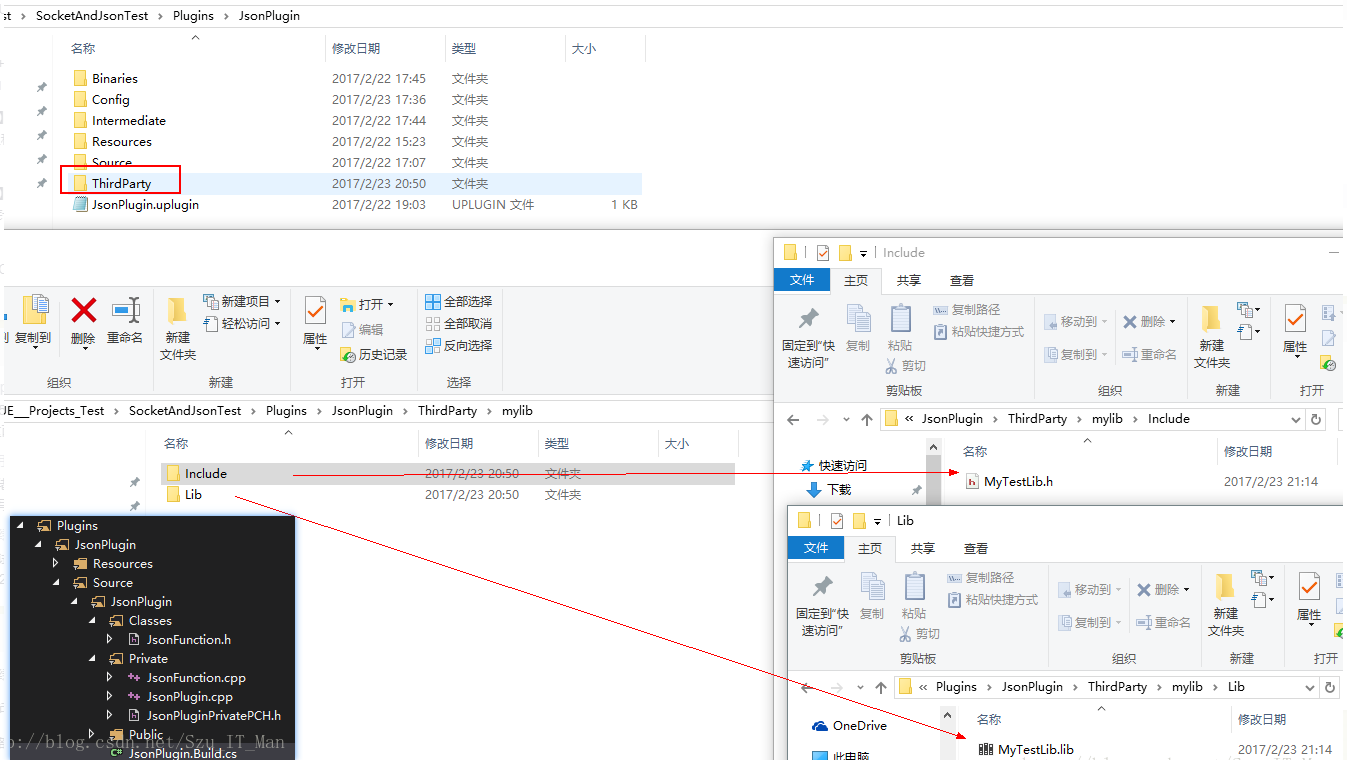
插件 build.cs设置
using System.IO;

namespace UnrealBuildTool.Rules

{

    public class JsonPlugin : ModuleRules

    {

        private string ModulePath

        {

            // get { return Path.GetDirectoryName(RulesCompiler.GetModuleFilename(this.GetType().Name)); }

            get { return ModuleDirectory; }

        }

        private string ThirdPartyPath

        {

            get { return Path.GetFullPath(Path.Combine(ModulePath, "../../ThirdParty/")); }

        }

        private string MyLibPath //第三方库MyTestLib的目录

        {

            get { return Path.GetFullPath(Path.Combine(ThirdPartyPath, "mylib")); }

        }

        public JsonPlugin(TargetInfo Target)

        {

            PublicIncludePaths.AddRange(

                new string[] {

                    "JsonPlugin/Public",

                    // ... add public include paths required here ...

                }

                );

            PrivateIncludePaths.AddRange(

                new string[] {

                    "JsonPlugin/Private",

                    // ... add other private include paths required here ...

                }

                );

            PublicDependencyModuleNames.AddRange(

                new string[]

                {

                    "Core",

                    "CoreUObject",

                    "Engine",

                    "HTTP",

                    "Json"

                    // ... add other public dependencies that you statically link with here ...

                }

                );

            PrivateDependencyModuleNames.AddRange(

                new string[]

                {

                    // ... add private dependencies that you statically link with here ...

                }

                );

            DynamicallyLoadedModuleNames.AddRange(

                new string[]

                {

                    // ... add any modules that your module loads dynamically here ...

                }

                );

            LoadThirdPartyLib(Target);

        }

        public bool LoadThirdPartyLib(TargetInfo Target)

        {

            bool isLibrarySupported = false;

            if ((Target.Platform == UnrealTargetPlatform.Win64) || (Target.Platform == UnrealTargetPlatform.Win32))//平台判断

            {

                isLibrarySupported = true;

                System.Console.WriteLine("----- isLibrarySupported true");

                //string PlatformSubPath = (Target.Platform == UnrealTargetPlatform.Win64) ? "Win64" : "Win32";

                string LibrariesPath = Path.Combine(MyLibPath, "Lib");

                PublicAdditionalLibraries.Add(Path.Combine(LibrariesPath,/* PlatformSubPath,*/ "MyTestLib.lib"));//加载第三方静态库.lib

            }

            if (isLibrarySupported) //成功加载库的情况下,包含第三方库的头文件

            {

                // Include path

                System.Console.WriteLine("----- PublicIncludePaths.Add true");

                PublicIncludePaths.Add(Path.Combine(MyLibPath, "Include"));

            }

            return isLibrarySupported;

        }

    }

}
调用
- JsonFunction.cpp代码
#include "../ThirdParty/mylib/Include/MyTestLib.h"

int UJsonFunction::MyOutput()

{

    int str = myPrint(100); //lib 里的函数

    return str;

}
原文最早发布于:https://blog.csdn.net/Szu_IT_Man/article/details/58232638
【UE4 C++】调用外部链接库 lib静态库的更多相关文章
- 自己在linux上编译、链接、动态库和静态库的学习笔记
在平常的项目中,我们都是使用公司要求的makefile.makedebug一类的文件,因此,在编译.链接.生成和链接动态库与静态库的时候,我们只是简单的使用一些已经设置的变量,只是简单的修改.添加一些 ...
- Linux链接库一(动态库,静态库,库放在什么路径下)
http://www.cppblog.com/wolf/articles/74928.html http://www.cppblog.com/wolf/articles/77828.html http ...
- CMake 添加头文件目录,链接动态、静态库(添加子文件夹)
CMake支持大写.小写.混合大小写的命令. 当编译一个需要第三方库的项目时,需要知道: 去哪找头文件(.h),-I(GCC) INCLUDE_DIRECTORIES() 去哪找库文件(.so/.dl ...
- malloc,colloc,realloc内存分配,动态库,静态库的生成与调用
1.在main方法里面直接定义一个很大的数组的时候.可能会出现栈溢出:错误代码演示: #include<stdio.h> #include<stdlib.h> void ...
- Linux系统中“动态库”和“静态库”那点事儿 /etc/ld.so.conf 动态库的后缀为*.so 静态库的后缀为 libxxx.a ldconfig 目录名
Linux系统中“动态库”和“静态库”那点事儿 /etc/ld.so.conf 动态库的后缀为*.so 静态库的后缀为 libxxx.a ldconfig 目录名 转载自:http://b ...
- Linux系统中“动态库”和“静态库”那点事儿【转】
转自:http://blog.chinaunix.net/uid-23069658-id-3142046.html 今天我们主要来说说Linux系统下基于动态库(.so)和静态(.a)的程序那些猫腻. ...
- Linux系统中“动态库”和“静态库”那点事儿
摘自http://blog.chinaunix.net/uid-23069658-id-3142046.html 今天我们主要来说说Linux系统下基于动态库(.so)和静态(.a)的程序那些猫腻.在 ...
- linux动态库与静态库混合连接
1, 在应用程序需要连接外部库的情况下,linux默认对库的连接是使用动态库,在找不到动态库的情况下再选择静态库.使用方式为: gcc test.cpp -L. -ltestlib 如果当前目录有 ...
- Windows 下VC++6.0制作、使用动态库和静态库
Windows 下VC++6.0制作.使用动态库和静态库 一.VC++6.0制作.使用静态库 静态库制作 1.如图一在VC++6.0中new一个的为win32 static library工程并新建一 ...
随机推荐
- Linux查看英伟达GPU信息
命令: nvidia-smi 结果:
- Django中使用MySQL数据库的连接配置
1. 安装pymysql pip install pymysql 2. 导入 # 在与 settings.py 同级目录下的 __init__.py 中引入模块和进行配置 import pymysql ...
- MongoDB 常见问题 - 解决找不到 mongo、mongod 命令的问题
问题背景 成功安装 MongoDB 后执行 Mongo.MongoD 显示找不到命令 解决方案 echo 'export PATH="/usr/local/opt/mongodb-commu ...
- poll?transport=longpoll&connection...烦人的请求c
1.问题描述: 最近使用miniui做了一个后台管理系统,打开浏览器调试时,总发现一堆无关的请求,结构大致是:poll?transport=longpoll&connection.....一直 ...
- 通过url把第一个页面的数据传到第二页面
第一个页面: function GetQueryString(name) { var reg = new RegExp("(^|&)"+ name +"=([^& ...
- salesforce零基础学习(一百零六)Dynamic Form
本篇参考:https://trailblazer.salesforce.com/ideaview?id=08730000000BroxAAC https://help.salesforce.com/s ...
- CentOS8部署tftp
tftp:简单文本传输协议,而ftp:文本传输协议.可以把tftp看成是ftp的精简版.tftp用于免登录传输小文件,tftp服务端监听在udp协议的69端口tftp简单的工作原理: tftp服务端与 ...
- P4233-射命丸文的笔记【NTT,多项式求逆】
正题 题目链接:https://www.luogu.com.cn/problem/P4233 题目大意 随机选择一条有哈密顿回路的\(n\)个点的竞赛图,求选出图的哈密顿回路的期望个数. 对于每个\( ...
- Redis核心原理与实践--散列类型与字典结构实现原理
Redis散列类型可以存储一组无序的键值对,它特别适用于存储一个对象数据. > HSET fruit name apple price 7.6 origin china 3 > HGET ...
- Python列表操作常用API
1.列表的概念 (1)列表的定义 列表是Python中一种基本的数据结构.列表存储的数据,我们称为元素.在列表中的每个元素都会有一个下标来与之对应,第一个索引是0,第二个索引是1,依此类推的整数. 列 ...