
如何在 Qt Creator 中应用 one dark pro 主题
前言
Qt Creator 自带了几款主题,但是并不好看。在博客 《Qt Creator打造VScode one dark pro主题配色》 中给出了 one dark pro 主题的配置文件,但是效果并不好,所以这里给出改进后的主题文件(只针对代码部分)。
配置文件
在 D:\Qt\Tools\QtCreator\share\qtcreator\styles 中创建一个 onedark.xml 文件,然后在文件里面写入以下内容:
<?xml version="1.0" encoding="UTF-8"?>

<style-scheme version="1.0" name="One Dark">

  <style name="Text" foreground="#abb2bf" background="#282c34"/>

  <style name="Link" underlineStyle="SingleUnderline"/>

  <style name="Selection" background="#3e4451"/>

  <style name="LineNumber" foreground="#4b5363"/>

  <style name="SearchResult" background="#324365"/>

  <style name="SearchScope" background="#3e4451"/>

  <style name="Parentheses" background="#515a6b" />

  <style name="ParenthesesMismatch" foreground="#000000" background="#c678dd"/>

  <style name="AutoComplete" background="#3e4451"/>

  <style name="CurrentLine" background="#3a3f4b"/>

  <style name="CurrentLineNumber" foreground="#abb2bf" />

  <style name="Occurrences" background="#324365"/>

  <style name="Occurrences.Unused" underlineColor="#d19a66" underlineStyle="DashUnderline"/>

  <style name="Occurrences.Rename" background="#e06c75"/>

  <style name="Number" foreground="#d19a66"/>

  <style name="String" foreground="#98c379"/>

  <style name="Type" foreground="#61afef"/>

  <style name="Local" foreground="#e06c75" />

  <style name="Parameter" foreground="#e06c75" />

  <style name="Global" foreground="#e06c75" />

  <style name="Field" foreground="#e06c75"/>

  <style name="Static" foreground="#56b6c2" />

  <style name="VirtualMethod" foreground="#61afef" italic="true"/>

  <style name="Function" foreground="#61afef"/>

  <style name="Keyword" foreground="#c678dd"/>

  <style name="PrimitiveType" foreground="#c678dd"/>

  <style name="Type" foreground="#e5c07b" />

  <style name="Operator" foreground="#56b6c2" />

  <style name="Overloaded Operator" foreground="#c678dd"/>

  <style name="Punctuation"/>

  <style name="Preprocessor" foreground="#c678dd"/>

  <style name="Label" foreground="#e06c75" bold="true"/>

  <style name="Comment" foreground="#5c6370" italic="true"/>

  <style name="Doxygen.Comment" foreground="#5c6370" italic="true"/>

  <style name="Doxygen.Tag" foreground="#61afef"/>

  <style name="VisualWhitespace" foreground="#3c4049"/>

  <style name="QmlLocalId" foreground="#61afef"/>

  <style name="QmlExternalId"/>

  <style name="QmlTypeId" foreground="#61afef"/>

  <style name="QmlRootObjectProperty" foreground="#61afef"/>

  <style name="QmlScopeObjectProperty" foreground="#61afef"/>

  <style name="QmlExternalObjectProperty"/>

  <style name="JsScopeVar"/>

  <style name="JsImportVar" foreground="#d19a66"/>

  <style name="JsGlobalVar" foreground="#d19a66"/>

  <style name="QmlStateName" foreground="#61afef"/>

  <style name="Binding" foreground="#c678dd"/>

  <style name="DisabledCode" foreground="#5c6370"/>

  <style name="AddedLine" foreground="#98c379"/>

  <style name="RemovedLine" foreground="#e06c75"/>

  <style name="DiffFile" foreground="#61afef"/>

  <style name="DiffLocation" foreground="#d19a66"/>

  <style name="DiffFileLine" foreground="#000000" background="#e5c07b"/>

  <style name="DiffContextLine" foreground="#000000" background="#56b6c2"/>

  <style name="DiffSourceLine" foreground="#000000" background="#be5046"/>

  <style name="DiffSourceChar" foreground="#000000" background="#e06c75"/>

  <style name="DiffDestLine" foreground="#000000" background="#789353"/>

  <style name="DiffDestChar" foreground="#000000" background="#98c379"/>

  <style name="LogChangeLine" foreground="#e06c75"/>

  <style name="LogAuthorName" foreground="#61afef"/>

  <style name="LogCommitDate" foreground="#98c379"/>

  <style name="LogCommitHash" foreground="#e06c75"/>

  <style name="LogCommitSubject"/>

  <style name="LogDecoration" foreground="#c678dd"/>

  <style name="Warning" underlineColor="#d19a66" underlineStyle="SingleUnderline"/>

  <style name="WarningContext" underlineColor="#d19a66" underlineStyle="DotLine"/>

  <style name="Error" underlineColor="#e06c75" underlineStyle="SingleUnderline"/>

  <style name="ErrorContext" underlineColor="#e06c75" underlineStyle="DotLine"/>

  <style name="Declaration"/>

  <style name="FunctionDefinition"/>

  <style name="OutputArgument" italic="true"/>

  <style name="LastStyleSentinel"/>

</style-scheme>
然后在 Qt Creator 中的 工具 --> 选项 --> 文本编辑器 中将主题换成 One Dark 即可。重启之后就可以看到代码样式的变化了,至于 Qt Creator 界面的主题可以参照上述博客中的配置。
界面截图
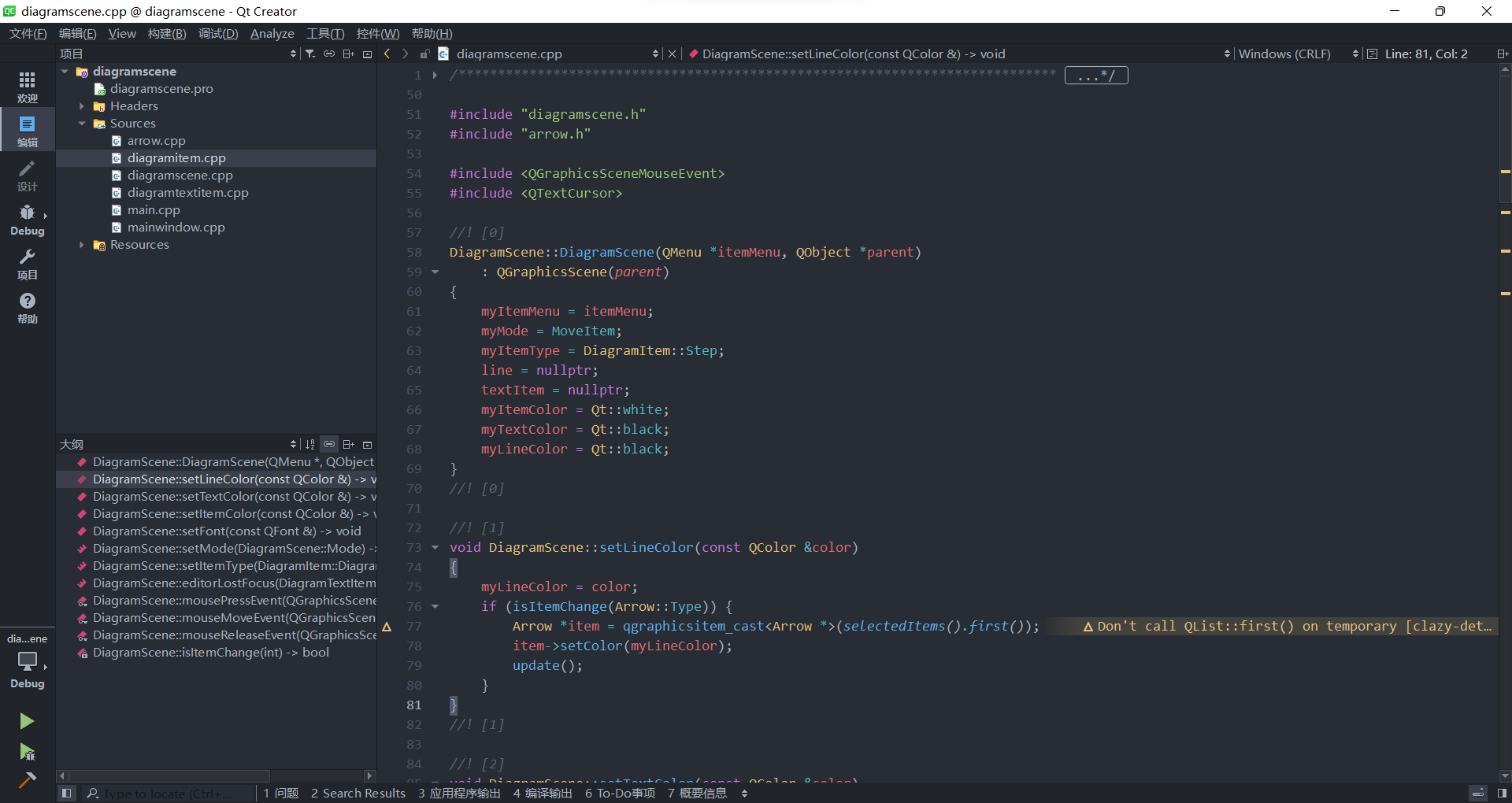
配置完成之后的界面如下图所示,有 VS Code 的 one dark pro 的感觉了,当然代码编辑体验还是差了点,想要完全使用 VS Code 来开发 Qt 的话可以参见之前的博客 《如何在 VS Code 中搭建 Qt 开发环境》。
如何在 Qt Creator 中应用 one dark pro 主题的更多相关文章
- Qt Creator打造VScode one dark pro主题配色
1.缘由 我之前习惯使用 vscode 进行开发,对 vscode 的 one dark pro 主题情有独钟.无奈公司需要使用 Qt Creator 进行日常开发,只能暂时舍弃 vscode,采用曲 ...
- 如何在Qt Creator中导入图标资源
本文主要描述如何在Qt Creator中创建资源文件,并的打入导入图标文件. 查看图标资源文件时,可以在项目的工程文件上鼠标单击右键-Open With-资源编辑器,效果如下图所示: 在项目的工程文件 ...
- 如何在Qt Creator中创建pri文件,以及pri文件的说明
初学Qt的人可还不会接触到这个问题,但是一旦你开始编写某个较大项目的时候,这个问题就不可避免需要解决. 对于大神们来讲可能这是个很简单的问题,但是对于新手来说,想要搞清楚需要下很大功夫. 怎么创建pr ...
- 如何在Qt Creator中添加库文件和头文件目录
在使用QtCreator开发图像处理程序的时候想加入Opencv库来处理图形,添加头文件,需要编辑工程文件夹下的.pro文件在文件中添加以下内容,即可包含头文件的文件夹: INCLUDEPATH += ...
- Windows XP 下如何使用Qt Creator中的Git版本控制功能
原文地址:http://www.qtcn.org/bbs/simple/?t16960.html Qt Creator是针对Qt应用开发平台专门设计的IDE开发工具,集成了很多功能,分别有win ...
- Qt Creator中的3D绘图及动画教程(参照NeHe)
Qt Creator中的3D绘图及动画教程(参照NeHe) http://blog.csdn.net/cly116/article/details/47184729 刚刚学习了Qt Creator,发 ...
- 如何在Qt Creator 创建一个.pri文件
如何在Qt Creator 创建一个.pri文件 2013年10月09日 ⁄ 综合 ⁄ 共 254字 ⁄ 字号 小 中 大 ⁄ 评论关闭 这个问题很少人写,因为比较简单,但是让却让我花了好大功夫才 ...
- qt creator中使用qwt插件
前提:我用mingw编译的qwt. 将qwt插件集成到qt designer非常easy.仅仅要把qwt编译的qwt_designer_plugin.dll复制到C:\Qt\Qt5.3.1\5.3\m ...
- Qt在VS2013或Qt Creator 中的控制台输出方式设置
首先值得注意的是:在写程序的时候,项目保存路径不要涉及到中文,否则容易出错! 一.Qt在VS2013中的控制台输出方式: 注意:这里是而不是Qt Application. 然后直接点击finish即可 ...
随机推荐
- 序列化之serialVersionUID
serialVersionUID作用: 序列化时为了保持版本的兼容性,即在版本升级时反序列化仍保持对象的唯一性. 序列化ID起着关键的作用,java的序列化机制是通过在运行时判断类的serialVer ...
- 慢 SQL 优化
# 导致SQL执行慢的原因 1. 硬件问题.如网络速度慢,内存不足,I/O吞吐量小,磁盘空间满了等. 2. 没有索引或者索引失效.(一般在互联网公司,DBA会在半夜把表锁了,重新建立一遍索引,因为当你 ...
- SOFA 通信
私有通信协议设计: 我们的分布式架构,所需要的内部通信模块,采用了私有协议来设计和研发. 可以有效地利用协议里的各个字段 灵活满足各种通信功能需求:比如 CRC 校验,Server Fail-Fast ...
- Pandas系列(十七)-EDA(pandas-profiling)
对于探索性数据分析来说,做数据分析前需要先看一下数据的总体概况,pandas_profiling工具可以快速预览数据. 安装 pip install pandas-profiling 使用 impor ...
- SSM工程常见问题
1.引入Junit测试 <!--引入junit单元测试,两个一起引用,spring-test版本要与Spring-core保持一致--> <dependency> <gr ...
- vue爬坑之路(webpack 配置篇)
在vue cli下 1.npm run dev 打开浏览器在config的index.js中修改autoOpenBrowser为true 关闭sourcemap productionSourceMap ...
- 移动端调试 - UC浏览器开发者版 - WIFI
Chrome 功能特性 支持PC或Pad设备,实时调试手机网页 DOM.CSS.JS调试 多功能面板满足多种调试需求 1 准备工作 保证手机与PC处于同一个无线网段. 下载Android平台的U ...
- What's The Next|Kube-OVN 社区线上 Meetup 预告!
Kube-OVN 社区线上Meetup 直播预约通道已开启! 活动时间 2021年8月26日(周四)19:00-20:30 活动介绍 8月26日,Kube-OVN 社区 Meetup 将通过线 ...
- 性能优化-使用双buffer实现无锁队列
借助本文,实现一种在"读多写一"场景下的无锁实现方式 在我们的工作中,多线程编程是一件太稀松平常的事.在多线程环境下操作一个变量或者一块缓存,如果不对其操作加以限制,轻则变量值或者 ...
- Linux中的一些基本命令
文章目录 ls cd Linux的目录 文件的权限 1.用户,组,权限 2.文件的权限 文件的基本操作 增:创建文件 删:删除文件 改:修改文件 查:查看 vi/vim 是一个编辑工具,主要用来编辑文 ...