
idea创建普通Web项目lib目录无法输出,tomcat不报错问题
idea创建普通Web项目lib目录无法输出,tomcat不报错问题
idea版本:2021.2
tomcat版本:9.0.50
项目结构
创建一个普普通通的web项目,目录结构大概就是这样
.

├── .idea

│   ├── artifacts

│   ├── inspectionProfiles

│   ├── libraries

│   └── sonarlint

│       └── issuestore

├── conf

├── lib

├── out

│   ├── artifacts

│   │   └── test03_war_exploded

│   │       └── WEB-INF

│   │           ├── classes

│   │           │   └── top

│   │           │       └── ctong

│   │           │           └── controller

│   │           └── lib

│   └── production

│       └── test03

│           ├── generated

│           └── top

│               └── ctong

│                   └── controller

├── src

│   └── top

│       └── ctong

│           └── controller

└── web

    └── WEB-INF
lib文件夹已经设置为Library文件夹。
controller搞了个hello请求
@Controller

public class TestController implements Serializable {

    private static final long serialVersionUID = 6290967590153117614L;

    @RequestMapping("/hello")

    public void test01() {

        System.out.println("Hello World!");

    }

}
配置了自动包扫描
<?xml version="1.0" encoding="UTF-8"?>

<beans xmlns="http://www.springframework.org/schema/beans"

       xmlns:xsi="http://www.w3.org/2001/XMLSchema-instance"

       xmlns:mvc="http://www.springframework.org/schema/mvc"

       xmlns:context="http://www.springframework.org/schema/context"

       xsi:schemaLocation="http://www.springframework.org/schema/beans http://www.springframework.org/schema/beans/spring-beans.xsd

       http://www.springframework.org/schema/mvc http://www.springframework.org/schema/mvc/spring-mvc.xsd

       http://www.springframework.org/schema/context http://www.springframework.org/schema/context/spring-context.xsd">

    <context:component-scan base-package="top.ctong"/>

</beans>
加载了DispatcherServlet
<?xml version="1.0" encoding="UTF-8"?>

<web-app xmlns="http://xmlns.jcp.org/xml/ns/javaee"

         xmlns:xsi="http://www.w3.org/2001/XMLSchema-instance"

         xsi:schemaLocation="http://xmlns.jcp.org/xml/ns/javaee http://xmlns.jcp.org/xml/ns/javaee/web-app_4_0.xsd"

         version="4.0">

    <servlet>

        <servlet-name>dispatcherServlet</servlet-name>

        <servlet-class>org.springframework.web.servlet.DispatcherServlet</servlet-class>

        <init-param>

            <param-name>contextConfigLocation</param-name>

            <param-value>classpath:springmvc.xml</param-value>

        </init-param>

    </servlet>

    <servlet-mapping>

        <servlet-name>dispatcherServlet</servlet-name>

        <url-pattern>/</url-pattern>

    </servlet-mapping>

</web-app>
问题
点启动,访问/hello成功荣获404….干掉out目录重启….404…
重新建一个项目,启动…..hello world…..
再创建新项目,启动…404…
打开FileMerge文件对比工具…嗯?差不多啊…
…打开out文件夹,嗯?怎么lib目录没加进来…
…反反复复2天后…
…
…
…
解决
尝试将lib目录拖进web/WEB-INF目录…hello world…
不信邪,再把lib拖到项目根目录…404…
……MMP……我之前一直这样都没问题…
不知道第几次打开 idea === >> Proiect Structure…
无意间点了 Proiect Settings ===>> Artifacts…嗯?怎么有警告…..
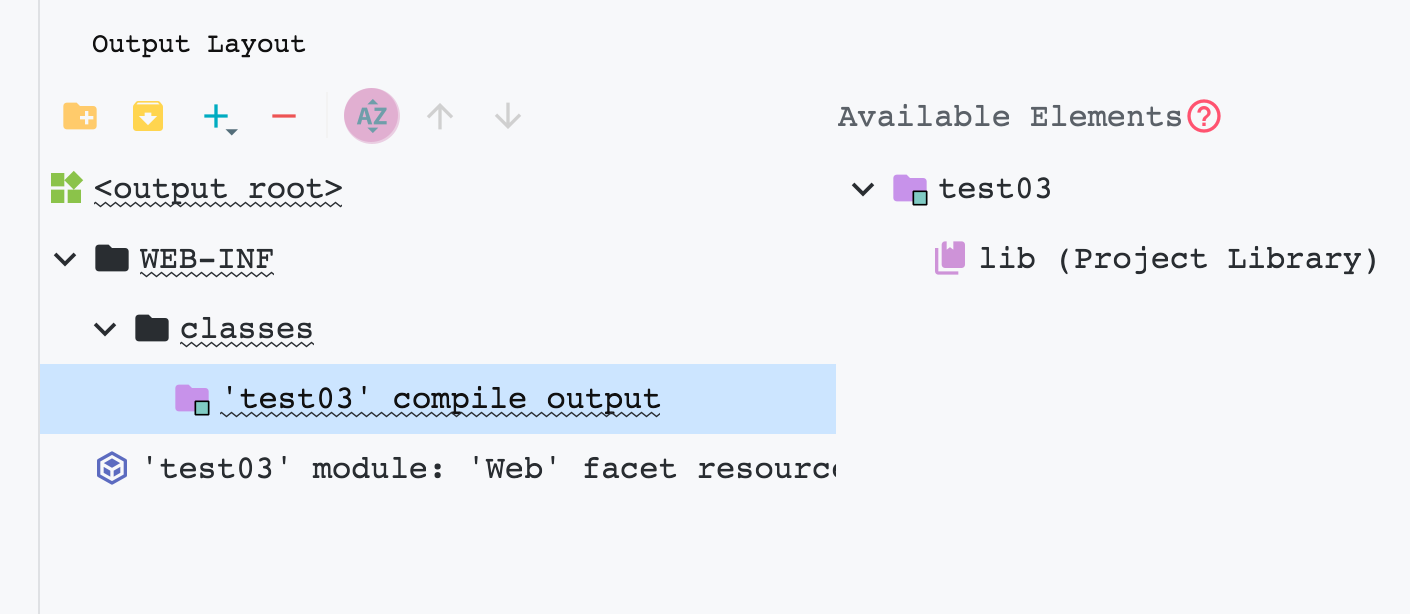
Library lib ' required for module test03 is missing from the artifact 嗯?莫名其妙双击了右边的lib。警告消失了…
启动…hello world…
什么妖魔鬼怪…
idea创建普通Web项目lib目录无法输出,tomcat不报错问题的更多相关文章
- 刚创建的maven项目,pom.xml的第一行就报错
刚创建的maven项目,马上pom.xml的第一行就报错这是第一行:<project xmlns="http://maven.apache.org/POM/4.0.0" xm ...
- STS创建spring boot项目,pom.xml文件第一行报错
亲测能用url地址:https://blog.csdn.net/jrx1995/article/details/100008552
- 创建maven web项目无法创建sec目录
创建maven web项目无法创建sec目录 解决方法:-DarchetypeCatalog=internal
- springmvc 项目完整示例02 项目创建-eclipse创建动态web项目 配置文件 junit单元测试
包结构 所需要的jar包直接拷贝到lib目录下 然后选定 build path 之后开始写项目代码 配置文件 ApplicationContext.xml <?xml version=" ...
- Intellij Idea 创建一个Web项目
今天想用IDEA创建一个web项目: 准备工具 1.jdk1.7 2.tomcat6.0,由于下载的8.5没有lib目录不能配置改6.0 3.idea2019.1.2 Intellij Idea的安装 ...
- 创建简单web项目
Intellij Idea直接安装(可根据需要选择自己设置的安装目录),jdk使用1.6/1.7/1.8都可以,主要是配置好系统环境变量,tomcat7上tomcat的官网下载压缩包解压即可. 一.创 ...
- IDEA创建动态Web项目
1.IDEA创建动态Web项目 1.1.使用IDEA创建动态Web项目,选择Java Enterprise,记得选择服务器,我这里使用的时tomcat 1.2记得勾选Web Application,其 ...
- eclipse创建maven web项目
eclipse创建maven web项目: 1.安装eclipse maven插件 2.新建maven project选择webapp模板. 3.改造为maven文档结构. 4.添加项目的JAVAEE ...
- eclipes创建一个web项目web.xml不能自动更新的原因(web.xml和@WebServlet的作用)
在eclipse中创建一个Web项目的时候,虽然有web.xml生成,但是再添加Servlet类文件的时候总是看不见web.xml的更新,所以异常的郁闷!上网查了查,原来我们在创建Web项目的时候,会 ...
随机推荐
- JVM到底是什么呢
在我们运行和调试Java程序的时候,经常会提到一个JVM的概念.那JVM到底是什么呢? JVM是Java程序的运行环境,它同时也是一个操作系统的一个应用程序.一个进程,因此他也有他自己的运行生命周期, ...
- 堆&&优先队列&&TreeMap
题目描述 5710. 积压订单中的订单总数 题解 题目不难,主要是要读懂题意,一步步模拟,代码较长,需要细心检查. 坑较多,比如我犯了很多傻逼问题:想都不想就拿1<<9+7当作100000 ...
- iOS导入其他APP下载的文件(用其他应用打开)
今天给自己的APP新增了一个小功能 可以打开iOS其他APPTXT 文件,一个很小的功能,做阅读APP的小伙伴不要错过. 附上APP地址: 一阅阅读 有想看小说的小伙伴可以试下 支持换源 支持自定义书 ...
- BUU mrctf shit
吐槽:去年没写出的题,现在终于可以上手了,昂哥nb 动调发现直接卡着不动了,怀疑是反调试,果然有好几处反调试 这里选择就不先nop了,先让程序跑起来,然后attach,在输入函数下面下个断点,atta ...
- MRCTF (re和crypto)wp
RE: 一.PixelShooter(这题比赛我居然没看,靠,血亏,所以做不出来就不要一直死怼,这题挺好写的,) unity一般是用c#写的,刚好又是apk,可以用dnspy来反编译看看,在源码中找到 ...
- 开源的负载测试/压力测试工具 NBomber
负载测试和压力测试对于确保 web 应用的性能和可缩放性非常重要. 尽管它们的某些测试是相同的,但目标不同. 负载测试:测试应用是否可以在特定情况下处理指定的用户负载,同时仍满足响应目标. 应用在正常 ...
- 4.Java基础
为了项目方便管理,创建空项目 一.注释 平时编写代码,在代码量比较少的时候,还可以看懂自己写的,但是当项目结构一复杂起来,我们就需要用到注释了 注释并不会被执行,是给写代码的人看的 书写注释是一个非常 ...
- c++ 进制转换源代码
#include<stdio.h> int main() { char ku[16]={'0','1','2','3','4','5','6','7','8','9','A','B','C ...
- python 交换变量的值 不需要借助第三个变量
>>> a,b,c,d=1,2,3,4>>> a,b,c,d=d,c,b,a>>> print(a,b,c,d)4 3 2 1>>&g ...
- Vim的操作
记录下vim的快捷键操作: I 进入编辑: Esc 退出编辑: 按ESC键 跳到命令模式,然后::w 保存文件但不退出vi:w file 将修改另外保存到file中,不退出vi:w ...