
流暢的pyhton4---數據庫備份
一、linux數據庫備份腳本
1、数据库备份,命令如下:
./pg_dump -h localhost -p 5432 -U postgres -W -F c -b -v -f "/opt/xxx.backup" xxx
2.在数据库安装目录bin下,./psql 进入数据库,输入密码,\c xxx(数据库名称) 进入指定数据库
\i 文件路径
postgresql數據庫:
备份:pg_dump -h localhost -p 5432 -U tradesns -W -F c -b -v -f "/home/tradeworkwangbin/us2010.backup" us2010恢复:pg_restore -h 127.0.0.1 -p 5432 -U postgres -W -d zjyj_gxversion -v "/opt/zjyj_gxversion_0410.backup"
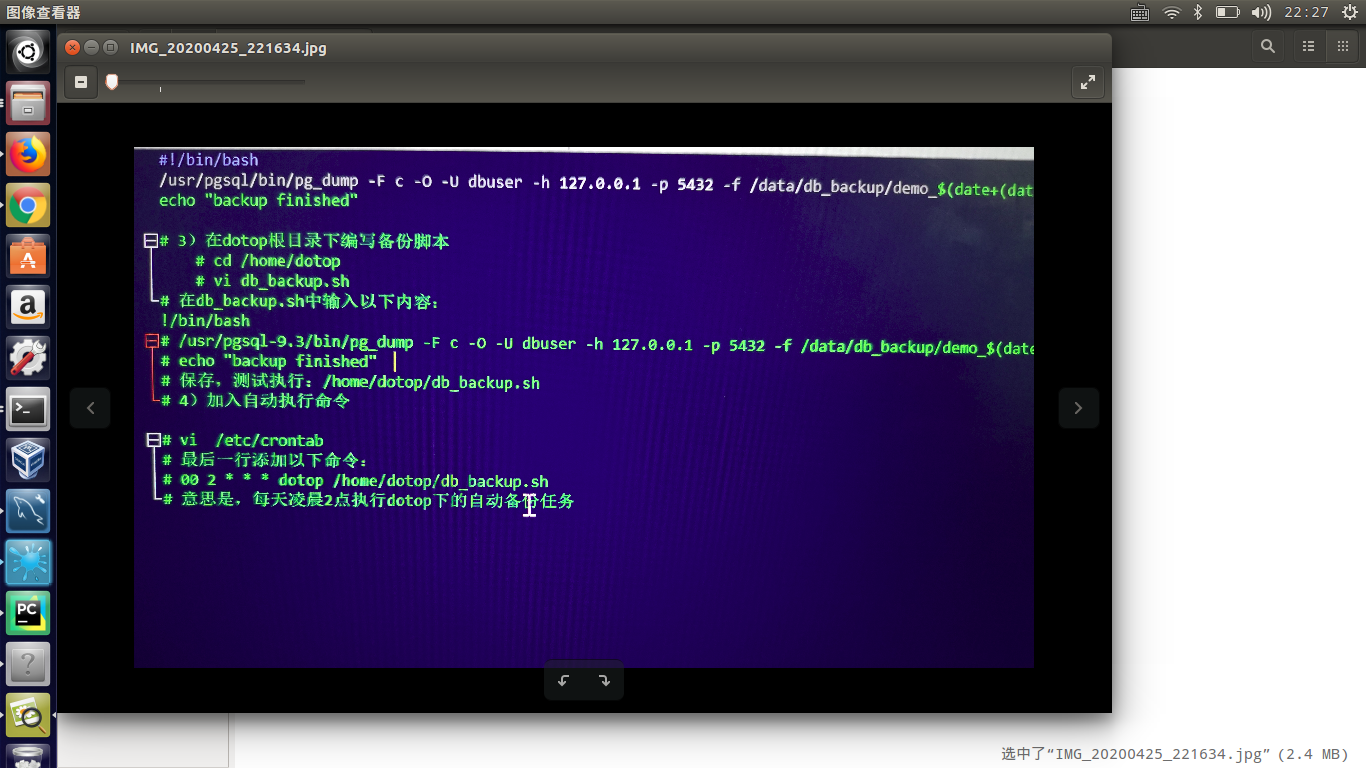
db_backup.sh

#!/bin/bash
/usr/pgsql/bin/pg_dump -F c -O -U dbuser -h 127.0.0.1 -p 5432 -f /data/db_backup/demo_$(date+(date+%Y%m%d_%H_%M_%S).sql dotop
echo "backup finished"
二、python腳本備份數據庫
#!/usr/bin/env python3

# -*- coding: utf-8 -*-

"""

Created on Sat Apr 25 22:05:43 2020

@author: root

"""

import os

import sys

import psycopg2

import time

db_host='127.0.0.1'

db_port=5432

db_user='odoo'

db_password='odoo'

db_default='postgres'

backup_path="/usr/local/pgsql/dba/exp"

log_success="/usr/local/pgsql/dba/exp/log_success.txt"

log_error="/usr/local/pgsql/dba/exp/log_error.txt"

mail_list="xxxxx"

backup_day=time.strftime("%Y%m%d")

def check_backup_path():

    if not os.path.exists(backup_path):

       os.mkdir(backup_path)

def get_all_databases():

    global databases

    try:

       conn=psycopg2.connect(host=db_host,port=db_port,user=db_user,password=db_password,database=db_default)

    except BaseException as e:

       with open(log_error,"a",encoding="utf-8") as f:

            f.truncate()

            f.write(str(e))

       os.system("/bin/mailx -s '[Urgent]:Database on {0} connect failed, please check.' {1} < {2}".format(

            db_host, mail_list, log_error))

    else:

        cur = conn.cursor()

        cur.execute("select datname from pg_database where datname not in('template0','template1','postgres')")

        rows = cur.fetchall()

        for row in rows:

            databases.append(list(row))

        conn.close()

def backup_all_databases():

    global databases

    try:

        for database in databases:

            db = str(database).replace('[', '').replace(']', '')

            os.system("/usr/local/pgsql/bin/pg_dump --verbose --create {0} | gzip > {2}/{0}_{1}_sql.gz".format(

                db, backup_day, backup_path))

            with open(log_success, "a", encoding="utf-8") as f:

                f.write("Database {0} backup finished...\n".format(db))

    except BaseException as e:

        with open(log_error, "a", encoding="utf-8") as f:

            f.truncate()

            f.write(str(e))

            os.system("/bin/mailx -s '[Urgent]:Database {0} backup failed, please check.' {1}} < {2}".format(

                db, mail_list, log_error))

    else:

        os.system("/bin/mailx -s 'All Database backup finished.' {0} < {1}".format(mail_list, log_success))

check_backup_path()

get_all_databases()

backup_all_databases()
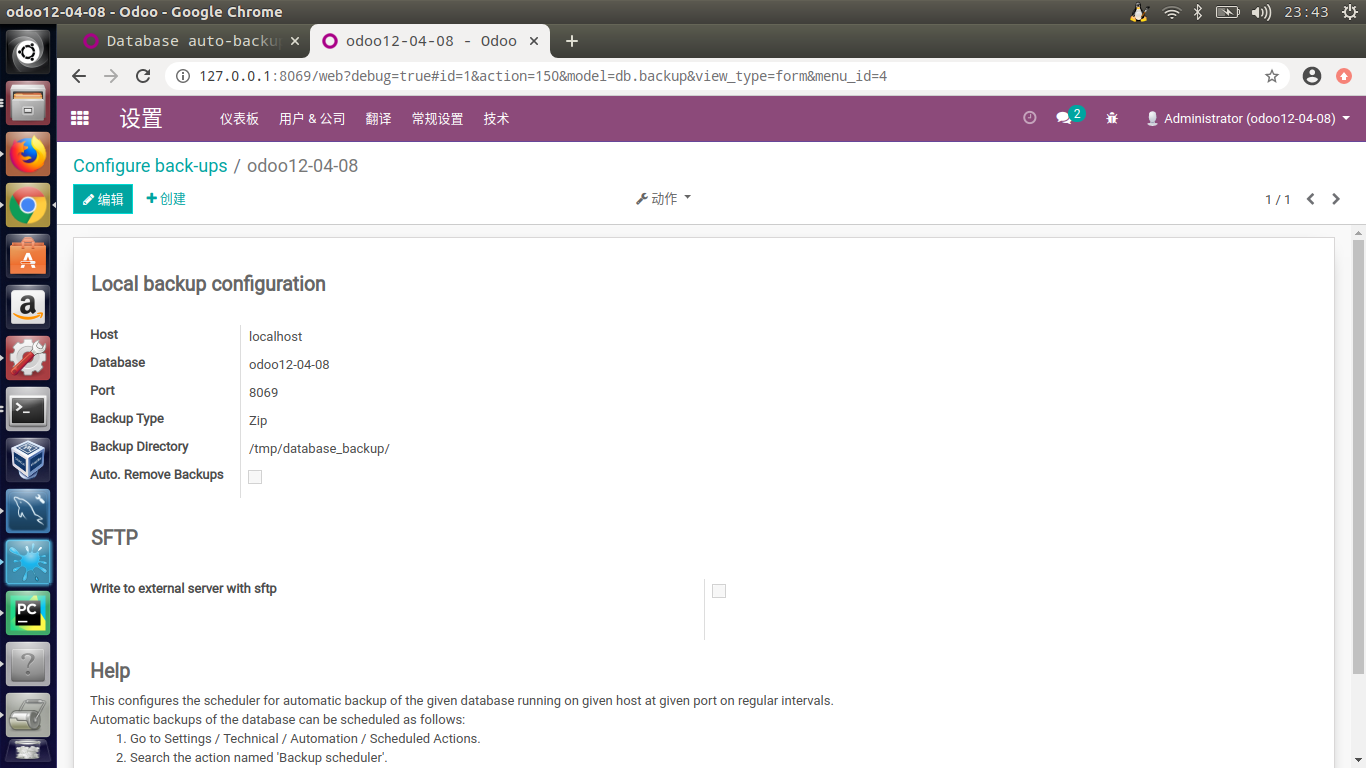
三、odoo裏面備份數據庫
# -*- coding: utf-8 -*-

from odoo import models, fields, api, tools, _

from odoo.exceptions import Warning

import odoo

from odoo.http import content_disposition

import logging

_logger = logging.getLogger(__name__)

from ftplib import FTP

import os

import datetime

try:

    from xmlrpc import client as xmlrpclib

except ImportError:

    import xmlrpclib

import time

import base64

import socket

try:

    import paramiko

except ImportError:

    raise ImportError(

        'This module needs paramiko to automatically write backups to the FTP through SFTP. Please install paramiko on your system. (sudo pip3 install paramiko)')

def execute(connector, method, *args):

    res = False

    try:

        res = getattr(connector, method)(*args)

    except socket.error as error:

        _logger.critical('Error while executing the method "execute". Error: ' + str(error))

        raise error

    return res

class db_backup(models.Model):

    _name = 'db.backup'

    _description = 'Backup configuration record'

    @api.multi

    def get_db_list(self, host, port, context={}):

        uri = 'http://' + host + ':' + port

        conn = xmlrpclib.ServerProxy(uri + '/xmlrpc/db')

        db_list = execute(conn, 'list')

        return db_list

    @api.multi

    def _get_db_name(self):

        dbName = self._cr.dbname

        return dbName

    # Columns for local server configuration

    host = fields.Char('Host', required=True, default='localhost')

    port = fields.Char('Port', required=True, default=8069)

    name = fields.Char('Database', required=True, help='Database you want to schedule backups for',

                       default=_get_db_name)

    folder = fields.Char('Backup Directory', help='Absolute path for storing the backups', required='True',

                         default='/odoo/backups')

    backup_type = fields.Selection([('zip', 'Zip'), ('dump', 'Dump')], 'Backup Type', required=True, default='zip')

    autoremove = fields.Boolean('Auto. Remove Backups',

                                help='If you check this option you can choose to automaticly remove the backup after xx days')

    days_to_keep = fields.Integer('Remove after x days',

                                  help="Choose after how many days the backup should be deleted. For example:\nIf you fill in 5 the backups will be removed after 5 days.",

                                  required=True)

    # Columns for external server (SFTP)

    sftp_write = fields.Boolean('Write to external server with sftp',

                                help="If you check this option you can specify the details needed to write to a remote server with SFTP.")

    sftp_path = fields.Char('Path external server',

                            help='The location to the folder where the dumps should be written to. For example /odoo/backups/.\nFiles will then be written to /odoo/backups/ on your remote server.')

    sftp_host = fields.Char('IP Address SFTP Server',

                            help='The IP address from your remote server. For example 192.168.0.1')

    sftp_port = fields.Integer('SFTP Port', help='The port on the FTP server that accepts SSH/SFTP calls.', default=22)

    sftp_user = fields.Char('Username SFTP Server',

                            help='The username where the SFTP connection should be made with. This is the user on the external server.')

    sftp_password = fields.Char('Password User SFTP Server',

                                help='The password from the user where the SFTP connection should be made with. This is the password from the user on the external server.')

    days_to_keep_sftp = fields.Integer('Remove SFTP after x days',

                                       help='Choose after how many days the backup should be deleted from the FTP server. For example:\nIf you fill in 5 the backups will be removed after 5 days from the FTP server.',

                                       default=30)

    send_mail_sftp_fail = fields.Boolean('Auto. E-mail on backup fail',

                                         help='If you check this option you can choose to automaticly get e-mailed when the backup to the external server failed.')

    email_to_notify = fields.Char('E-mail to notify',

                                  help='Fill in the e-mail where you want to be notified that the backup failed on the FTP.')

    @api.multi

    def _check_db_exist(self):

        self.ensure_one()

        db_list = self.get_db_list(self.host, self.port)

        if self.name in db_list:

            return True

        return False

    _constraints = [(_check_db_exist, _('Error ! No such database exists!'), [])]

    @api.multi

    def test_sftp_connection(self, context=None):

        self.ensure_one()

        # Check if there is a success or fail and write messages

        messageTitle = ""

        messageContent = ""

        error = ""

        has_failed = False

        for rec in self:

            db_list = self.get_db_list(rec.host, rec.port)

            pathToWriteTo = rec.sftp_path

            ipHost = rec.sftp_host

            portHost = rec.sftp_port

            usernameLogin = rec.sftp_user

            passwordLogin = rec.sftp_password

            # Connect with external server over SFTP, so we know sure that everything works.

            try:

                s = paramiko.SSHClient()

                s.set_missing_host_key_policy(paramiko.AutoAddPolicy())

                s.connect(ipHost, portHost, usernameLogin, passwordLogin, timeout=10)

                sftp = s.open_sftp()

                messageTitle = _("Connection Test Succeeded!\nEverything seems properly set up for FTP back-ups!")

            except Exception as e:

                _logger.critical('There was a problem connecting to the remote ftp: ' + str(e))

                error += str(e)

                has_failed = True

                messageTitle = _("Connection Test Failed!")

                if len(rec.sftp_host) < 8:

                    messageContent += "\nYour IP address seems to be too short.\n"

                messageContent += _("Here is what we got instead:\n")

            finally:

                if s:

                    s.close()

        if has_failed:

            raise Warning(messageTitle + '\n\n' + messageContent + "%s" % str(error))

        else:

            raise Warning(messageTitle + '\n\n' + messageContent)

    @api.model

    def schedule_backup(self):

        conf_ids = self.search([])

        for rec in conf_ids:

            db_list = self.get_db_list(rec.host, rec.port)

            if rec.name in db_list:

                try:

                    if not os.path.isdir(rec.folder):

                        os.makedirs(rec.folder)

                except:

                    raise

                # Create name for dumpfile.

                bkp_file = '%s_%s.%s' % (time.strftime('%Y_%m_%d_%H_%M_%S'), rec.name, rec.backup_type)

                file_path = os.path.join(rec.folder, bkp_file)

                uri = 'http://' + rec.host + ':' + rec.port

                conn = xmlrpclib.ServerProxy(uri + '/xmlrpc/db')

                bkp = ''

                try:

                    # try to backup database and write it away

                    fp = open(file_path, 'wb')

                    odoo.service.db.dump_db(rec.name, fp, rec.backup_type)

                    fp.close()

                except Exception as error:

                    _logger.debug(

                        "Couldn't backup database %s. Bad database administrator password for server running at http://%s:%s" % (

                        rec.name, rec.host, rec.port))

                    _logger.debug("Exact error from the exception: " + str(error))

                    continue

            else:

                _logger.debug("database %s doesn't exist on http://%s:%s" % (rec.name, rec.host, rec.port))

            # Check if user wants to write to SFTP or not.

            if rec.sftp_write is True:

                try:

                    # Store all values in variables

                    dir = rec.folder

                    pathToWriteTo = rec.sftp_path

                    ipHost = rec.sftp_host

                    portHost = rec.sftp_port

                    usernameLogin = rec.sftp_user

                    passwordLogin = rec.sftp_password

                    _logger.debug('sftp remote path: %s' % pathToWriteTo)

                    try:

                        s = paramiko.SSHClient()

                        s.set_missing_host_key_policy(paramiko.AutoAddPolicy())

                        s.connect(ipHost, portHost, usernameLogin, passwordLogin, timeout=20)

                        sftp = s.open_sftp()

                    except Exception as error:

                        _logger.critical('Error connecting to remote server! Error: ' + str(error))

                    try:

                        sftp.chdir(pathToWriteTo)

                    except IOError:

                        # Create directory and subdirs if they do not exist.

                        currentDir = ''

                        for dirElement in pathToWriteTo.split('/'):

                            currentDir += dirElement + '/'

                            try:

                                sftp.chdir(currentDir)

                            except:

                                _logger.info('(Part of the) path didn\'t exist. Creating it now at ' + currentDir)

                                # Make directory and then navigate into it

                                sftp.mkdir(currentDir, 777)

                                sftp.chdir(currentDir)

                                pass

                    sftp.chdir(pathToWriteTo)

                    # Loop over all files in the directory.

                    for f in os.listdir(dir):

                        if rec.name in f:

                            fullpath = os.path.join(dir, f)

                            if os.path.isfile(fullpath):

                                try:

                                    sftp.stat(os.path.join(pathToWriteTo, f))

                                    _logger.debug(

                                        'File %s already exists on the remote FTP Server ------ skipped' % fullpath)

                                # This means the file does not exist (remote) yet!

                                except IOError:

                                    try:

                                        # sftp.put(fullpath, pathToWriteTo)

                                        sftp.put(fullpath, os.path.join(pathToWriteTo, f))

                                        _logger.info('Copying File % s------ success' % fullpath)

                                    except Exception as err:

                                        _logger.critical(

                                            'We couldn\'t write the file to the remote server. Error: ' + str(err))

                    # Navigate in to the correct folder.

                    sftp.chdir(pathToWriteTo)

                    # Loop over all files in the directory from the back-ups.

                    # We will check the creation date of every back-up.

                    for file in sftp.listdir(pathToWriteTo):

                        if rec.name in file:

                            # Get the full path

                            fullpath = os.path.join(pathToWriteTo, file)

                            # Get the timestamp from the file on the external server

                            timestamp = sftp.stat(fullpath).st_atime

                            createtime = datetime.datetime.fromtimestamp(timestamp)

                            now = datetime.datetime.now()

                            delta = now - createtime

                            # If the file is older than the days_to_keep_sftp (the days to keep that the user filled in on the Odoo form it will be removed.

                            if delta.days >= rec.days_to_keep_sftp:

                                # Only delete files, no directories!

                                if sftp.isfile(fullpath) and (".dump" in file or '.zip' in file):

                                    _logger.info("Delete too old file from SFTP servers: " + file)

                                    sftp.unlink(file)

                    # Close the SFTP session.

                    sftp.close()

                except Exception as e:

                    _logger.debug('Exception! We couldn\'t back up to the FTP server..')

                    # At this point the SFTP backup failed. We will now check if the user wants

                    # an e-mail notification about this.

                    if rec.send_mail_sftp_fail:

                        try:

                            ir_mail_server = self.env['ir.mail_server']

                            message = "Dear,\n\nThe backup for the server " + rec.host + " (IP: " + rec.sftp_host + ") failed.Please check the following details:\n\nIP address SFTP server: " + rec.sftp_host + "\nUsername: " + rec.sftp_user + "\nPassword: " + rec.sftp_password + "\n\nError details: " + tools.ustr(

                                e) + "\n\nWith kind regards"

                            msg = ir_mail_server.build_email("auto_backup@" + rec.name + ".com", [rec.email_to_notify],

                                                             "Backup from " + rec.host + "(" + rec.sftp_host + ") failed",

                                                             message)

                            ir_mail_server.send_email(self._cr, self._uid, msg)

                        except Exception:

                            pass

            """

            Remove all old files (on local server) in case this is configured..

            """

            if rec.autoremove:

                dir = rec.folder

                # Loop over all files in the directory.

                for f in os.listdir(dir):

                    fullpath = os.path.join(dir, f)

                    # Only delete the ones wich are from the current database

                    # (Makes it possible to save different databases in the same folder)

                    if rec.name in fullpath:

                        timestamp = os.stat(fullpath).st_ctime

                        createtime = datetime.datetime.fromtimestamp(timestamp)

                        now = datetime.datetime.now()

                        delta = now - createtime

                        if delta.days >= rec.days_to_keep:

                            # Only delete files (which are .dump and .zip), no directories.

                            if os.path.isfile(fullpath) and (".dump" in f or '.zip' in f):

                                _logger.info("Delete local out-of-date file: " + fullpath)

                                os.remove(fullpath)
流暢的pyhton4---數據庫備份的更多相关文章
- python連接mysql數據庫
第一步,安裝mysql數據庫. 這裏我安裝的是mariadb數據庫,版本5.5,並且配置好了字符集.此處不詳細敘述,相信大家沒有問題. 第二步,安裝mysql驅動. 首先說明一下有兩個主要的驅動: m ...
- PB C/S轉B/S ODBC方式連接數據庫
PB C/S轉B/S ODBC方式連接數據庫,DSN需要建為系統而不是使用者DSN,否則連不上數據庫.
- 一次 C# 查詢數據庫 算法優化的案例
最近有次在修改某段程式時,發現一段程式算法看起來簡單. 但背後因為多次查詢數據庫,導致效能問題. 這段程式主要是利用 EPPLUS 讀取 Excel 資料,檢查資料是否已存在數據庫中,若有就將已存在的 ...
- 使用DataSet與DataAdapter對數據庫進行操作
1.定義連接字符串 var source = "server=(local); integrated security=SSPI; database=test"; var conn ...
- C#數據庫
一.連接數據庫 1.定義連接數據庫的字符串 string source = "server=(local); integrated security=SSPI; database=test& ...
- 在Android中afinal框架下實現sqlite數據庫版本升級的辦法
public abstract void onUpgrade(SQLiteDatabase db,int oldVersion,int new Version) 這個方法在實現時需要重寫. pub ...
- 數據庫ORACLE轉MYSQL存儲過程遇到的坑~(總結)
ORACLE數據庫轉MySQL數據庫遇到的坑 總結 最近在做Oracle轉mysql的工程,遇到的坑是真的多,尤其是存儲過程,以前都沒接觸過類似的知識,最近也差不多轉完了就總結一下.希望能幫到一些人( ...
- MVC+Ninject+三层架构+代码生成 -- 总结(一、數據庫)
一.數據表 是參照 別人的庫建表的 ,主鍵都是用int 自增,若是跨數據庫的話,建議使用GUID為主鍵.
- Scrapy——將數據保存到MySQL數據庫
Scrapy--將數據保存到MySQL數據庫 1. 在MySQL中創建數據庫表job_inf: 1 Create table job_inf( 2 id int(11) not null auto_i ...
随机推荐
- CSS ::marker 让文字序号更有意思
本文将介绍 CSS 中一个比较有意思的伪元素 ::marker,利用它,我们可以让我们的文字序号变得更加的有意思! 什么是 ::marker CSS 伪元素 ::marker 是从 CSS Pseud ...
- 如何编写shell脚本
1.首先创建一个目录 vi hello.sh 2.编写shell第一行 #!/bin/bash (为了声明是shell脚本,第一行都要这么写) 3.可以添加注释 #the first p ...
- JUnit5注解学习指引
注解(Annotations)是JUnit的标志性技术,本文就来对它的20个注解,以及元注解和组合注解进行学习. 20个注解 在org.junit.jupiter.api包中定义了这些注解,它们分别是 ...
- C、C++、python、Java、php、C#六种编程语言大PK 哪个好学习?
作为程序员吃饭的工具,编程语言之间也形成了某种鄙视链,各大论坛里弥漫着剑拔弩张的气氛,众口难调.也难怪有很多初学者会有疑惑,为什么会有这么多编程语言,我到底应该学什么语言? 其实各种语言都各有千秋.接 ...
- Redis启动正常,一段时间后报错,连不上redis
Redis报错 1.redis在最终目标上移动临时数据库文件时出错 错误:redis:Error moving temp DB file temp-13792.rdb on the final des ...
- Linux系统下安装MongoDB
下载安装包 去MongoDB官网https://www.mongodb.com/try/download/community,下载社区版的安装包: 我的Linux系统是CentOS 7.5版本的,通常 ...
- Docker构建mysql主从
一.为什么要搭建主从架构呢 1.数据安全,可以进行数据的备份. 2.读写分离,大部分的业务系统来说都是读数据多,写数据少,当访问压力过大时,可以把读请求给到从服务器.从而缓解数据库访问的压力 3.故障 ...
- margin属性总结,你想知道的这里都有
一.前言 在学习CSS时,遇到的很多问题都是和margin有关,这个小怪兽总是出其不意的让我的界面排版变的混乱,还让人摸不着头脑,原因还是在于我对他的一些属性没有进行一个深入的了解,导致我在设计之初就 ...
- Linux:监测收集linux服务器性能数据工具Sysstat的使用与安装
Sysstat是一个工具集,包括sar.pidstat.iostat.mpstat.sadf.sadc.其中sar是其中最强大,也是最能符合我们测试要求的工具,同时pidstat也是非常有用的东东,因 ...
- 学习/etc/group /etc/passwd 和 /etc/shadow
/etc/passwd 管理用户信息的系统文件 /etc/shadow 管理用户密码信息的系统文件 /etc/group 管理用户组信息的系统文件 1./etc/group 将用户分组是Linux系统 ...