
Rclone使用教程 - 挂载Onedrive和谷歌网盘
1. 介绍
Rclone 是一个用于多个云平台之间同步文件和目录的命令行工具,其支持多种运营商网盘。
2. 安装与配置
2.1 下载安装rclone
windows版本:下载rclone并解压
Linux版本:
curl https://rclone.org/install.sh | sudo bash
2.2 配置OneDrive
在目录下打开cmd运行命令
rclone authorize "onedrive"世纪互联运行的命令
rclone authorize onedrive "应用程序(客户端)ID" "客户端密码值" --onedrive-is-21vianet-version=true复制授权码:
{"access_token":"xxxx"}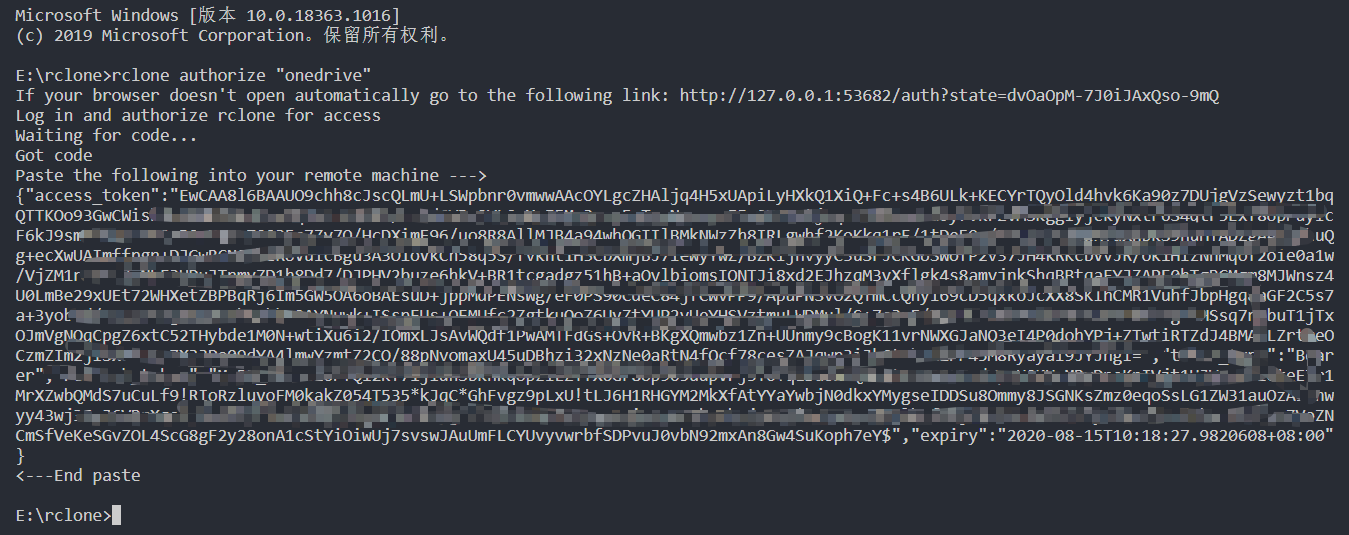
配置
rclone config
设置步骤如下:
root@localhost:~# rclone config

No remotes found - make a new one

n) New remote

s) Set configuration password

q) Quit config

n/s/q> n  #新建一个挂载

name> onedrive  #设置挂载的名称onedrive

Type of storage to configure.

Enter a string value. Press Enter for the default ("").

Choose a number from below, or type in your own value

 1 / 1Fichier

   \ "fichier"

 2 / Alias for an existing remote

   \ "alias"

 3 / Amazon Drive

   \ "amazon cloud drive"

 4 / Amazon S3 Compliant Storage Provider (AWS, Alibaba, Ceph, Digital Ocean, Dreamhost, IBM COS, Minio, etc)

   \ "s3"

 5 / Backblaze B2

   \ "b2"

 6 / Box

   \ "box"

 7 / Cache a remote

   \ "cache"

 8 / Citrix Sharefile

   \ "sharefile"

 9 / Dropbox

   \ "dropbox"

10 / Encrypt/Decrypt a remote

   \ "crypt"

11 / FTP Connection

   \ "ftp"

12 / Google Cloud Storage (this is not Google Drive)

   \ "google cloud storage"

13 / Google Drive

   \ "drive"

14 / Google Photos

   \ "google photos"

15 / Hubic

   \ "hubic"

16 / In memory object storage system.

   \ "memory"

17 / Jottacloud

   \ "jottacloud"

18 / Koofr

   \ "koofr"

19 / Local Disk

   \ "local"

20 / Mail.ru Cloud

   \ "mailru"

21 / Mega

   \ "mega"

22 / Microsoft Azure Blob Storage

   \ "azureblob"

23 / Microsoft OneDrive

   \ "onedrive"

24 / OpenDrive

   \ "opendrive"

25 / OpenStack Swift (Rackspace Cloud Files, Memset Memstore, OVH)

   \ "swift"

26 / Pcloud

   \ "pcloud"

27 / Put.io

   \ "putio"

28 / QingCloud Object Storage

   \ "qingstor"

29 / SSH/SFTP Connection

   \ "sftp"

30 / Sugarsync

   \ "sugarsync"

31 / Tardigrade Decentralized Cloud Storage

   \ "tardigrade"

32 / Transparently chunk/split large files

   \ "chunker"

33 / Union merges the contents of several upstream fs

   \ "union"

34 / Webdav

   \ "webdav"

35 / Yandex Disk

   \ "yandex"

36 / http Connection

   \ "http"

37 / premiumize.me

   \ "premiumizeme"

38 / seafile

   \ "seafile"

Storage> 23  #选择第23项的onedrive

** See help for onedrive backend at: https://rclone.org/onedrive/ **

Microsoft App Client Id

Leave blank normally.

Enter a string value. Press Enter for the default ("").

client_id>   #跳过

Microsoft App Client Secret

Leave blank normally.

Enter a string value. Press Enter for the default ("").

client_secret>  #跳过

Edit advanced config? (y/n)

y) Yes

n) No (default)

y/n>  #跳过

Remote config

Use auto config?

 * Say Y if not sure

 * Say N if you are working on a remote or headless machine

y) Yes (default)

n) No

y/n> n  #选择n

For this to work, you will need rclone available on a machine that has

a web browser available.

For more help and alternate methods see: https://rclone.org/remote_setup/

Execute the following on the machine with the web browser (same rclone

version recommended):

        rclone authorize "onedrive"

Then paste the result below:

result> {"access_token":"xxxxxxxx"}  #输入授权码

Choose a number from below, or type in an existing value

 1 / OneDrive Personal or Business

   \ "onedrive"

 2 / Root Sharepoint site

   \ "sharepoint"

 3 / Type in driveID

   \ "driveid"

 4 / Type in SiteID

   \ "siteid"

 5 / Search a Sharepoint site

   \ "search"

Your choice> 1   #选择1,onedrive

Found 1 drives, please select the one you want to use:

0:  (personal) id=xxxxxxxx

Chose drive to use:> 0  #选择挂载的onedrive网盘

Found drive 'root' of type 'personal', URL: https://onedrive.live.com/?cid=xxxxxxxx

Is that okay?

y) Yes (default)

n) No

y/n>  #跳过

--------------------

[myone]

type = onedrive

token = {"access_token":"xxxxxxxx"}

drive_id = xxxxxx

drive_type = personal

--------------------

y) Yes this is OK (default)

e) Edit this remote

d) Delete this remote

y/e/d> y  #跳过

Current remotes:

Name                 Type

====                 ====

onedrive                onedrive

e) Edit existing remote

n) New remote

d) Delete remote

r) Rename remote

c) Copy remote

s) Set configuration password

q) Quit config

e/n/d/r/c/s/q>
2.3 配置谷歌网盘
运行命令:
rclone config
设置步骤如下:
$ ./rclone.exe config

Current remotes:

Name                 Type

====                 ====

onedrive             onedrive

e) Edit existing remote

n) New remote

d) Delete remote

r) Rename remote

c) Copy remote

s) Set configuration password

q) Quit config

e/n/d/r/c/s/q> n #新建

name> gdrive  #名称

Type of storage to configure.

Enter a string value. Press Enter for the default ("").

Choose a number from below, or type in your own value

 1 / 1Fichier

   \ "fichier"

 2 / Alias for an existing remote

   \ "alias"

 3 / Amazon Drive

   \ "amazon cloud drive"

 4 / Amazon S3 Compliant Storage Provider (AWS, Alibaba, Ceph, Digital Ocean, Dreamhost, IBM COS,

 Minio, etc)

   \ "s3"

 5 / Backblaze B2

   \ "b2"

 6 / Box

   \ "box"

 7 / Cache a remote

   \ "cache"

 8 / Citrix Sharefile

   \ "sharefile"

 9 / Dropbox

   \ "dropbox"

10 / Encrypt/Decrypt a remote

   \ "crypt"

11 / FTP Connection

   \ "ftp"

12 / Google Cloud Storage (this is not Google Drive)

   \ "google cloud storage"

13 / Google Drive

   \ "drive"

14 / Google Photos

   \ "google photos"

15 / Hubic

   \ "hubic"

16 / In memory object storage system.

   \ "memory"

17 / Jottacloud

   \ "jottacloud"

18 / Koofr

   \ "koofr"

19 / Local Disk

   \ "local"

20 / Mail.ru Cloud

   \ "mailru"

21 / Mega

   \ "mega"

22 / Microsoft Azure Blob Storage

   \ "azureblob"

23 / Microsoft OneDrive

   \ "onedrive"

24 / OpenDrive

   \ "opendrive"

25 / OpenStack Swift (Rackspace Cloud Files, Memset Memstore, OVH)

   \ "swift"

26 / Pcloud

   \ "pcloud"

27 / Put.io

   \ "putio"

28 / QingCloud Object Storage

   \ "qingstor"

29 / SSH/SFTP Connection

   \ "sftp"

30 / Sugarsync

   \ "sugarsync"

31 / Tardigrade Decentralized Cloud Storage

   \ "tardigrade"

32 / Transparently chunk/split large files

   \ "chunker"

33 / Union merges the contents of several upstream fs

   \ "union"

34 / Webdav

   \ "webdav"

35 / Yandex Disk

   \ "yandex"

36 / http Connection

   \ "http"

37 / premiumize.me

   \ "premiumizeme"

38 / seafile

   \ "seafile"

Storage>     13  #第13选谷歌网盘

** See help for drive backend at: https://rclone.org/drive/ **

Google Application Client Id

Setting your own is recommended.

See https://rclone.org/drive/#making-your-own-client-id for how to create your own.

If you leave this blank, it will use an internal key which is low performance.

Enter a string value. Press Enter for the default ("").

client_id>

Google Application Client Secret

Setting your own is recommended.

Enter a string value. Press Enter for the default ("").

client_secret>

Scope that rclone should use when requesting access from drive.

Enter a string value. Press Enter for the default ("").

Choose a number from below, or type in your own value

 1 / Full access all files, excluding Application Data Folder.

   \ "drive"

 2 / Read-only access to file metadata and file contents.

   \ "drive.readonly"

   / Access to files created by rclone only.

 3 | These are visible in the drive website.

   | File authorization is revoked when the user deauthorizes the app.

   \ "drive.file"

   / Allows read and write access to the Application Data folder.

 4 | This is not visible in the drive website.

   \ "drive.appfolder"

   / Allows read-only access to file metadata but

 5 | does not allow any access to read or download file content.

   \ "drive.metadata.readonly"

scope>     1  #输入1赋予访问权限

ID of the root folder

Leave blank normally.

Fill in to access "Computers" folders (see docs), or for rclone to use

a non root folder as its starting point.

Enter a string value. Press Enter for the default ("").

root_folder_id>

Service Account Credentials JSON file path

Leave blank normally.

Needed only if you want use SA instead of interactive login.

Enter a string value. Press Enter for the default ("").

service_account_file>

Edit advanced config? (y/n)

y) Yes

n) No (default)

y/n>   #跳过

Remote config

Use auto config?

 * Say Y if not sure

 * Say N if you are working on a remote or headless machine

y) Yes (default)

n) No

y/n>  #跳过
2.4 获取配置文件
搜索 ,windows下正常都在 C:\Users\你的用户名\\.config\rclone目录下,Linux正常都在 ./.config/rclone/目录下
3. 使用教程
常用命令:
rclone config - 以控制会话的形式添加rclone的配置,配置保存在.rclone.conf文件中。

rclone copy - 将文件从源复制到目的地址,跳过已复制完成的。

rclone sync - 将源数据同步到目的地址,只更新目的地址的数据。

rclone move - 将源数据移动到目的地址。

rclone delete - 删除指定路径下的文件内容。

rclone purge - 清空指定路径下所有文件数据。

rclone mkdir - 创建一个新目录。

rclone rmdir - 删除空目录。

rclone check - 检查源和目的地址数据是否匹配。

rclone ls - 列出指定路径下所有的文件以及文件大小和路径。

rclone lsd - 列出指定路径下所有的目录/容器/桶。

rclone lsl - 列出指定路径下所有文件以及修改时间、文件大小和路径。

rclone md5sum - 为指定路径下的所有文件产生一个md5sum文件。

rclone sha1sum - 为指定路径下的所有文件产生一个sha1sum文件。

rclone size - 获取指定路径下,文件内容的总大小。.

rclone version - 查看当前版本。

rclone cleanup - 清空remote。

rclone dedupe - 交互式查找重复文件,进行删除/重命名操作。
显示网盘上的目录
rclone lsd onedrive:   #onedrive是上面设置的名称

rclone lsd gdrive:    #gdrive是上面设置的名称
拷贝谷歌网盘上的文件到Onedrive
!rclone copy gdrive:music onedrive:音乐 --ignore-existing --config ./music/rclone.conf

# --config xxxx.conf 表示指定配置文件

# --ignore-existing表示跳过已存在的文件

# 此命令表示将谷歌网盘下的music目录复制到Onedrive网盘下的音乐目录
挂在Onedrive
rclone mount onedrive:音乐 music --copy-links --no-gzip-encoding --no-check-certificate --allow-other --allow-non-empty --umask 000 --config /content/gdrive/My\ Drive/music/rclone.conf
4. Linux上挂载网盘
新建Linux下的文件夹
rm -rf /root/music  #删除已有的目录

mkdir /root/music  #新建目录
挂载磁盘
下载脚本
wget -N --no-check-certificate https://raw.githubusercontent.com/x91270/Centos/master/rcloned
使用
vim rcloned修改脚本项NAME="myone" #创建的rclone名,本文此处填ojbk
REMOTE="音乐" #远程挂载地址对应的文件夹,是你OneDrive对应的具体目录
LOCAL="/root/music" #在本机上的挂载地址
启动脚本
rcloned start挂载成功后,输入
df -h命令查看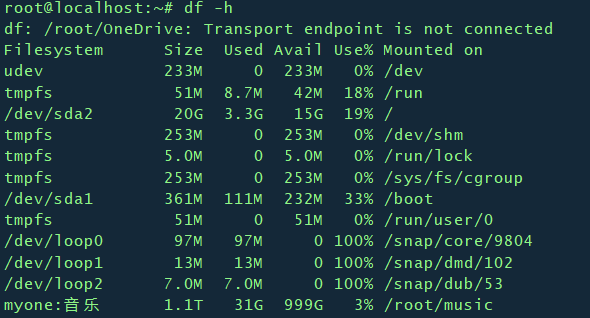
设置开机启动
mv rcloned /etc/init.d/rcloned    #移动rcloned到init(开机启动目录)下

chmod +x /etc/init.d/rcloned      #给rcloned可执行权限

chkconfig rcloned on                   #设置自启动

bash /etc/init.d/rcloned start       #启动rclone
Rclone使用教程 - 挂载Onedrive和谷歌网盘的更多相关文章
- 使用Rclone将Onedirve挂载到Linux本地
1. centos挂载onedrive时, 需要安装fuse. # 安装fuse yum -y install fuse 2. 安装完fuse后使用rclone进行挂载 #创建挂载目录 mkdir - ...
- Linux学习之挂载光盘和U盘(六)
Linux下挂载光盘和U盘 挂载 linux下硬盘.U盘.软盘.移动硬盘都必须挂载后才能使用,不过硬盘的挂载是系统自动进行的. linux中每一个硬件都有一个设备文件名,就是将U盘什么的设备文件名与挂 ...
- Linux 挂载和卸载U盘
一般的U盘挂载方法: mount [-fnrsvw] [-t vfstype] [-o options] device dir 参数:device表示要挂载的设备,dir表示挂载点 -t 指定设备的 ...
- Ubuntu12.04 挂载exFat格式U盘的方法(转)
原文链接:Ubuntu12.04 挂载exFat格式U盘的方法 首先关于exFAT ,这里就不多作解释了, 再介绍一个软件fuse-exfat, https://code.google.com ...
- Linux 系统挂载阿里云数据盘
适用系统:Linux(Redhat , CentOS,Debian,Ubuntu) * Linux的云服务器数据盘未做分区和格式化,可以根据以下步骤进行分区以及格式化操作. 下面的操作将会把数据盘划 ...
- Google Colab 免费GPU服务器使用教程 挂载云端硬盘
一.前言二.Google Colab特征三.开始使用3.1在谷歌云盘上创建文件夹3.2创建Colaboratory3.3创建完成四.设置GPU运行五.运行.py文件5.1安装必要库5.2 挂载云端硬盘 ...
- 使用Rclone和WinFsp挂载FTP为磁盘
介绍 Rclone:是一款的命令行工具,支持在不同对象存储.网盘间同步.上传.下载数据.官网网址:rclone.org WinFsp:是一款Windows平台下的文件系统代理软件(Windows Fi ...
- [CentOS 7]挂载ntfs格式U盘
在我们将U盘插入装有CentOS的系统时,经常会出现如图所示的错误提示.这是因为linux系统并不能兼容NTFS的文件系统.其解决方法如下(建议先进入root模式): 1.首先下载"ntfs ...
- linux udev 自动挂载 SD卡/U盘
本文记录使用udev自动挂载SD卡和U盘的方法. 参考链接 http://blog.chinaunix.net/uid-26119896-id-5211736.html 添加udev规则 创建文件/e ...
随机推荐
- 前端 | 页面触底自动加载 Vue 组件
不管是 web 端还是移动端,信息流都是现在很流行的信息展示方式.信息流经常搭配自动加载一起使用以获得更好的使用体验. 最近在使用 Vue 开发过程中也遇到了首页信息流自动加载的需求.大致了解了一下几 ...
- Redis(三):新数据类型
配置文件redis.conf详解 bind=127.0.0.1 # 表示只能在本机中访问redis,将该行注释掉,即可接收任何IP地址的访问 protected-mode # 设置为no,表示关闭保护 ...
- n, n+1, ..., 2n 中的 5 数环初探
本篇是 IMO 2021 第一题题解及相关拓展问题分析 和 IMO 2021 第 1 题拓展问题的两个极值的编程求解 的延伸篇. 从上两篇的分析,可知: 当 n < 48 时,n, n+1, . ...
- Git最强总结!
本文已经收录到Github仓库,欢迎大家围观.star.此仓库用于分享Java核心知识,包括Java基础.MySQL.SpringBoot.Mybatis.Redis.RabbitMQ等等,面试必备. ...
- IO流学习笔记(二)之BufferedWriter与BufferedReader及实例Demo
在之前的学习笔记(http://blog.csdn.net/megustas_jjc/article/details/72853059)中,FileWriter与FileReader的Demo使用的中 ...
- pip 源的问题
pip install -i https://pypi.doubanio.com/simple/ --trusted-host pypi.douban.com some-package
- Java程序中使用Spire Jar包报java.lang.NoSuchMethodError类型错误的解决方法
Jar包功能概述 使用Spire系列的Jar包可以操作Word.Excel.PPT.PDF.Barcode等格式的文件,分别对应使用的jar包是Spire.Doc for Java.Spire.XLS ...
- K8S最小硬件配置
- VUE003. 解决data中使用vue-i18n不更新视图问题(computed属性)
案例 在国际化开发中,有一部分需要国际化的文字是由数据驱动的储存在data中,然而VUE的data存在很多无法实时更新视图的问题,比如v-for循环的标签,当数据层次过深,通过源数据数组的索引改变它的 ...
- 事务保存点savepoint
一.