
java使用SSH连接Linux系统
SSH连接linux系统使我们在开发项目中常用到的,现在留下来,做个记录
 package com.log;

 import java.io.BufferedReader;

 import java.io.IOException;

 import java.io.InputStream;

 import java.io.InputStreamReader;

 import java.io.PrintWriter;

 import ch.ethz.ssh2.Connection;

 import ch.ethz.ssh2.Session;

 import ch.ethz.ssh2.StreamGobbler;

 public class Test8 {

     /**

      * 连接linux系统

      * @param args

      */

     public static void main(String[] args) {

         try {

             Connection conn = new Connection("192.168.81.129");

             conn.connect();

             boolean isAuthenticated = conn.authenticateWithPassword("root",

             "123456");

             if (isAuthenticated == false) {

             throw new IOException("Authentication failed");

             }

             Session sess = conn.openSession();

             sess.requestPTY("bash");

             sess.startShell();

             InputStream stdout = new StreamGobbler(sess.getStdout());

             InputStream stderr = new StreamGobbler(sess.getStderr());

             BufferedReader stdoutReader = new BufferedReader(

             new InputStreamReader(stdout));

             BufferedReader stderrReader = new BufferedReader(

             new InputStreamReader(stderr));

             BufferedReader inputReader = new BufferedReader(

             new InputStreamReader(System.in));

             PrintWriter out = new PrintWriter(sess.getStdin());

             String temp = "";

             while (!temp.equals("exit")) {

             System.out.print("[root@vmone ~]#");

             temp = inputReader.readLine();

             out.println(temp);

             out.flush();

             String line = null;

             while ((line = stdoutReader.readLine()) != null) {

             if (line.length() == 0) {// line等于null从来不会发生,导致程序卡在这里

             continue;

             } else{

             System.out.println(line);

             }

             }

             System.out.println("Here is the output from stderr:");

             while (true) {

             line = stderrReader.readLine();

             if (line == null)

             break;

             System.out.println(line);

             }

             }

             System.out.println("ExitCode: " + sess.getExitStatus());

             sess.close();

             conn.close();

             System.out.println("close connection");

             } catch (IOException e) {

             e.printStackTrace(System.err);

             System.exit(2);

             }

     }

 }
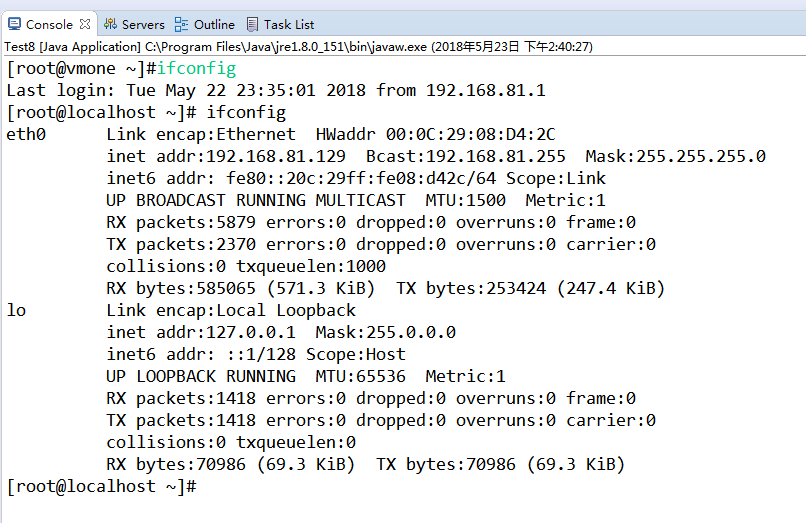
下面截图是次程序运行结果
java使用SSH连接Linux系统的更多相关文章
- java使用ssh连接Linux并执行命令
方式1:通过设置账号密码和链接地址 maven pom.xml配置: <dependency> <groupId>com.jcraft</groupId ...
- 解决ssh连接linux系统特别慢的问题
新安装的centos系统,发现ssh连接很慢,因为是测试环境,对安全的要求不高,所以完全可以更快的连接,下面一起来解决这个问题. 一.分析主要原因: 1.SSH的反向DNS解析会消耗大量时间 2.GS ...
- root用户无法通过ssh连接Linux系统
ssh协议为了安全,有些版本默认禁止root用户的登陆 cd /etc/ssh 编辑sshd_config文件 cat sshd_config | grep PermitRootLogin Permi ...
- ssh连接linux服务器只显示-bash-4.1#不显示路径解决方法
ssh连接linux服务器只显示-bash-4.1#不显示路径时,我们只需要修改 ~/.bash_profile文件,如果不存在这个文件,那么新建一个,增加内容 export PS1='[\u@\ ...
- 烂泥:【解决】Ubuntu下使用SSH连接centos系统很慢
本文由秀依林枫提供友情赞助,首发于烂泥行天下. 这几天在Ubuntu下使用SSH连接centos系统,发现连接很慢.建议一个连接大约需要30s.很是坑爹,如下: 后来查询相关资料,发现这个是Ubunt ...
- Notepad++远程连接Linux系统
首先在官网下载 https://notepad-plus-plus.org/news/notepad-7.6.4-released.html 在命令行数输入ifconfig 查看自己的Linux的ip ...
- Python ssh连接Linux服务器报Incompatible ssh peer (no acceptable kex algorithm) 解决方法
python通过ssh连接linux服务器,部分服务器出现如下异常 03:50:48.725 FAIL ftp operation failed, Incompatible ssh peer (no ...
- SSH连接Linux的Server超时
SSH连接Linux的Server超时 http://blog.csdn.net/cheng830306/article/details/21796865
- Xshell远程连接Linux系统
一般来说我们连接Linux,会使用到一些远程连接工具 比如:Xshell和Xftp Xshell:远程连接linux系统 Xftp:远程在Linux系统中上传或下载文件 Xshell和Xftp百度云链 ...
随机推荐
- Java bean和json互转时,屏蔽某个属性
有的时候我们把java bean 转换成json的时候,希望屏蔽掉某个属性,这时可以在java bean的属性上加上@JsonIgnore注解,在com.fasterxml.jackson.annot ...
- JFrame图形界面 ----绝对布局和按钮
开始 绝对布局应该是最简单的一种布局方式了,只需要确定好大小和位置就可以固定不变 代码 ` package window; import java.awt.Color; import java.awt ...
- Spring Boot 使用 AOP 实现页面自适应
鉴于复杂页面自适应的难度,一般会做几套模板分别适应手机.平板.电脑等设备.使用 Spring Boot 开发单体应用时,一般会使用 Thymeleaf 模板,那么可以使用 AOP 技术来实现页面自适应 ...
- Mongo 专题
什么是MongoDB ? MongoDB 是由C++语言编写的,是一个基于分布式文件存储的开源数据库系统. 在高负载的情况下,添加更多的节点,可以保证服务器性能. MongoDB 旨在为WEB应用提供 ...
- react,react native,webpack,ES6,node.js----------今天上午学了一下node.js
http://www.yiibai.com/nodejs/node_install.html---node.js具体入门资料在此 Node JS事件循环 Node JS是单线程应用程序,但它通过事件和 ...
- 陌陌架构分享 – Apple Push Notification Service
http://blog.latermoon.com/?p=878 先描述下基本概念,标准的iPhone应用是没有后台运行的,要实现实时推送消息到手机,需要借助Apple提供的APNS服务. iPhon ...
- nrpe参数传递
如果需要nrpe进行参数传递需要主要一下几个方面: 1.编译nrpe的时候需要增加参数--enable-command-args 2.修改nrpe.cfg文件中参数dont_blame_nrpe=1 ...
- Python 字符串大小写转换
以下代码演示了如何将字符串转换为大写字母,或者将字符串转为小写字母等: # Filename : test.py # author by : www.runoob.com str = "ww ...
- 【UOJ】67 新年的毒瘤 &【BZOJ】1123 BLO
[UOJ 67] 题目链接: 传送门 题解: 第一眼很懵逼……这什么鬼. 思考什么点复合条件……(o(>﹏<)o 1.树,也就是说还剩n-2条边,等价于要删去一个度数为m-n+2的点. 2 ...
- kmspico_setup.exe运行提示系统资源不足,无法完成请求的服务
在使用KMSpico激活office时,windows下运行exe会提示系统资源不足,无法完成请求的服务. 我的解决方法是:卸载电脑上的wps...