
Flashing Back a Failed Primary Database into a Physical Standby Database(闪回FAILOVER失败的物理备库)
文档操作依据来自官方网址:https://docs.oracle.com/cd/E11882_01/server.112/e41134/scenarios.htm#SBYDB4888
闪回FAILOVER失败的物理备库的前提:
1、物理备库FAILOVER前设置db_recovery_file_dest_size足够大
2、物理备库AILOVER前设置db_recovery_file_dest路径
3、开启物理备库闪回数据库
The following steps assume that a failover has been performed to a physical standby database and that Flashback Database was enabled on the old primary database at the time of the failover. This procedure brings the old primary database back into the Data Guard configuration as a physical standby database.
查看主备库状态:
set lin 200
set pages 50
select inst_id,db_unique_name,database_role,open_mode,protection_mode,protection_level,switchover_status,force_logging,flashback_on from gv$database;
主:

备:

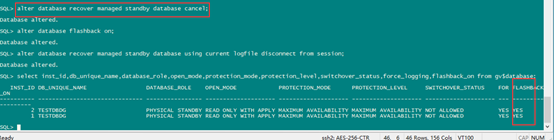
开启主备库闪回:(主库可以不用开启)
需要设置reco
show parameter recov;
alter system set db_recovery_file_dest_size=1g scope=both;
alter system set db_recovery_file_dest='+data' scope=both;
alter database flashback on;
主:

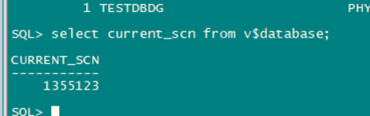
查看主库SCN(可以直接查看备库SCN,不用看主库SCN,如果DG是同步状态):
select current_scn from v$database;

Step 1 Determine the SCN at which the old standby database became the primary database.
On the new primary database, issue the following query to determine the SCN at which the old standby database became the new primary database:
select current_scn from v$database;
查看备库SCN:
SQL> SELECT TO_CHAR(STANDBY_BECAME_PRIMARY_SCN) FROM V$DATABASE;
Step 2 Flash back the failed primary database.
备库failover 之后:

Shut down the old primary database (if necessary), mount it, and flash it back
Shut down the old primary database (if necessary), mount it, and flash it back to the value for STANDBY_BECAME_PRIMARY_SCN that was determined in Step 1.
SQL> SHUTDOWN IMMEDIATE;

建议只开启节点1,后面转换成备库需要关闭节点2
SQL> STARTUP MOUNT;--只开启节点1,节点2开启了后面也需要shutdown
SQL> FLASHBACK DATABASE TO SCN standby_became_primary_scn;

Step 3 Convert the database to a physical standby database.
Perform the following steps on the old primary database:
- Issue the following statement on the old primary database:
建议只开启节点1,关闭节点2,如果不关闭其他节点,后续报错如后图(step 4)。
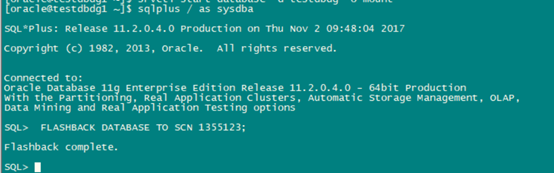
SQL> ALTER DATABASE CONVERT TO PHYSICAL STANDBY; 闪回后,执行如下语句。
This statement will dismount the database after successfully converting the control file to a standby control file.
- Shut down and restart the database:
SQL> SHUTDOWN IMMEDIATE;
SQL> STARTUP MOUNT;
Step 4 Start transporting redo to the new physical standby database.
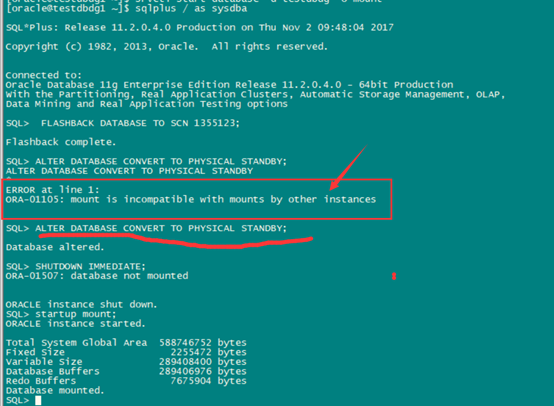
上图中需要关闭节点2实例,节点1mount 状态,convert成功后,后执行应用日志即可(Step 5 ):
Perform the following steps on the new primary database:
- Issue the following query to see the current state of the archive destinations:
SQL> SELECT DEST_ID, DEST_NAME, STATUS, PROTECTION_MODE, DESTINATION, ERROR,SRL FROM V$ARCHIVE_DEST_STATUS;
- If necessary, enable the destination:
SQL> ALTER SYSTEM SET LOG_ARCHIVE_DEST_STATE_n=ENABLE;
- Perform a log switch to ensure the standby database begins receiving redo data from the new primary database, and verify it was sent successfully. Issue the following SQL statements on the new primary database:
SQL> ALTER SYSTEM SWITCH LOGFILE;
SQL> SELECT DEST_ID, DEST_NAME, STATUS, PROTECTION_MODE, DESTINATION,ERROR,SRL FROM V$ARCHIVE_DEST_STATUS;
On the new standby database, you may also need to change the LOG_ARCHIVE_DEST_n initialization parameters so that redo transport services do not transmit redo data to other databases.
Step 5 Start Redo Apply on the new physical standby database.
Issue the following SQL statement on the new physical standby database:
SQL> ALTER DATABASE RECOVER MANAGED STANDBY DATABASE USING CURRENT LOGFILE DISCONNECT;
Redo Apply automatically stops each time it encounters a redo record that is generated as the result of a role transition, so Redo Apply will need to be restarted one or more times until it has applied beyond the SCN at which the new primary database became the primary database. Once the failed primary database is restored and is running in the standby role, you can optionally perform a switchover to transition the databases to their original (pre-failure) roles. See Section 8.2.1, "Performing a Switchover to a Physical Standby Database" for more information.
闪回并转换为物理备库后后应用日志,并做同步测试

闪回后 备库追日志初始化一会儿后:
SQL> ALTER DATABASE RECOVER MANAGED STANDBY DATABASE USING CURRENT LOGFILE DISCONNECT;


附带几句查看主备库状态以及同步语句:
查看主备库状态
set lines 150;
col db_unique_name for a10
select inst_id,db_unique_name,database_role,open_mode,protection_mode,protection_level,switchover_status,force_logging from gv$database;
查看日志序列号:
set lin 200
select thread#,max(sequence#) from v$archived_log group by thread#;
select pid,process,client_process,client_pid,thread#,sequence#,status,DELAY_MINS from v$managed_standby;
查看备库STANDBY REDO LOG状态
set pages 100
set lines 200
select group#,thread#,sequence#,bytes/1024/1024,archived,used,status,first_change#,last_change# from v$standby_log;
Flashing Back a Failed Primary Database into a Physical Standby Database(闪回FAILOVER失败的物理备库)的更多相关文章
- 【原】Configuring Oracle Data Guard In Physical Standby Database
作者:david_zhang@sh [转载时请以超链接形式标明文章] http://www.cnblogs.com/david-zhang-index/p/5042640.html参照文档:https ...
- Physical Standby Database Failover
1.物理standby failover 切换 故障转移时在一些糟糕的事情发生时执行的计划外事件,需要将生产库移动到DR站点.有意思的是,这时候人们通常忙来忙去,试图弄明白发生了什么,需要做些什么才能 ...
- 转 Logs are not shipped to the physical standby database
http://www.oracle-ckpt.com/dataguard_troubleshoot_snapper/ ######sample primay scripts: spool dg_Pri ...
- Oracle_Data_Gard Create a physical standby database
创建之前要对DG的环境有一个总体的规划和了解. 规划 IP 192.168.3.161 192.16 ...
- Oracle Database 12c Using duplicate standby database from active database Created Active DataGuard
primary database db_name=zwc, db_unique_name=zwc standby database db_name=zwc, db_unique_name=standb ...
- Creating a Physical Standby Database 11g
1.Environment Item Primary database standby database Platform Redhat 5.4 Redhat 5.4 Hostname gc1 gc2 ...
- 聊聊Oracle 11g的Snapshot Standby Database(下)
3.Snapshot Standby行为研究 下面我们分析一下Snapshot Standby的工作性质和行为性质.我们在主库方向研究当前状态. --主库日志情况 SQL> select gro ...
- snapshot standby database
快照备库接收和归档主库发送来的redo,但是不会应用:切换成physical standby之后会自动开启redo apply.快照standby不可以参加主备切换:在最大保护性模式下,如果只有一个备 ...
- 使用RMAN DUPLICATE...FROM ACTIVE DATABASE创建物理standby database
Applies to: Oracle Server - Enterprise Edition - Version 11.1.0.6 to 11.2.0.4 [Release 11.1 to 11.2] ...
随机推荐
- mysql数据库相关基本术语和概念
1.DDL:Data Definition Language,即数据定义语言,定义数据库涉及的各种对象,定义数据的完整性约束.保密限制等约束. 2.DML:Data Manipulation Lang ...
- Java报SQLException
Java报SQLException 具体错误如下: java.sql.SQLException:Column count doesn't match value count at row 1
- Flex中对表格中某列的值进行数字格式化并求百分比
1.问题背景 一般的,需要对表格中某列的数值进行格式化,对该数值乘以100,并保留两位小数,添加"%" 2.实现实例 <?xml version="1.0" ...
- 一款PHP环境整合工具—VertrigoServ介绍
Vertrigo简介 VertrigoServ 是一个Windows平台下的非常专业的.易于安装的免费网络开发环境,它集成了Apache, PHP, MySQL, SQLite, SQLiteMana ...
- canvas动画:自由落体运动
经过前面的文章,我们已经能够在canvas画布上画出各种炫酷的图形和画面,但是这些画面都是禁止的,怎么样才能让他们动起来呢? 如何绘制基本图形可以参考:canvas基本图形绘制 如何对基本图形移动旋转 ...
- systemd 编写服务管理脚本
我们运行 linux 服务器的主要目的是通过运行程序提供服务,比如 mysql.web server等.因此管理 linux 服务器主要工作就是配置并管理上面运行的各种服务程序.在 linux 系统中 ...
- Struts2(五)常量的配置
Struts2 常量大多在 默认的配置文件中已经配置好,但根据用户的需求不同,开发的要求不同,需要修改这些常量值,修改的方法就是在配置的文件对常量进行重新配置 在struts.xml 文件中使用< ...
- 你该怎么选Offer
原文出处:http://www.360doc.com/content/15/1223/07/1209677_522436084.shtml 记录目的:自勉.分享 摘要 一段时间无数公司.无数投资人蜂拥 ...
- Latex基础__如何用latex编写矩阵、矩阵等式、方程组、等式左对齐
数学矩阵和方程组是数学工作者经常遇到的,那么如何用latex书写处漂亮的方程组.矩阵.多个等式呢,下面将对这个问题一一做介绍.1. 写矩阵. 代码: \begin{equation} \left[ \ ...
- Keras官方中文文档:常见问题与解答
所属分类:Keras Keras FAQ:常见问题 如何引用Keras? 如何使Keras调用GPU? 如何在多张GPU卡上使用Keras "batch", "epoch ...