
handler method 参数绑定
handler method 参数绑定常用的注解,我们根据他们处理的Request的不同内容部分分为四类:(主要讲解常用类型)
A、处理requet uri 部分(这里指uri template中variable,不含queryString部分)的注解: @PathVariable;
B、处理request header部分的注解: @RequestHeader, @CookieValue;
C、处理request body部分的注解:@RequestParam, @RequestBody;
D、处理attribute类型是注解: @SessionAttributes, @ModelAttribute;
1、 @PathVariable
当使用@RequestMapping URI template 样式映射时, 即 someUrl/{paramId}, 这时的paramId可通过 @Pathvariable注解绑定它传过来的值到方法的参数上。
@Controller

@RequestMapping("/owners/{ownerId}")

public class RelativePathUriTemplateController {

  @RequestMapping("/pets/{petId}")

  public void findPet(@PathVariable String ownerId,@PathVariable String petId, Model model) {

    // implementation omitted

  }

}
上面代码把URI template 中变量 ownerId的值和petId的值,绑定到方法的参数上。若方法参数名称和需要绑定的uri template中变量名称不一致,需要在@PathVariable("name")指定uri template中的名称。
2、 @RequestHeader、@CookieValue
@RequestHeader 注解,可以把Request请求header部分的值绑定到方法的参数上。
这是一个Request 的header部分:
Host                    localhost:8080

Accept                  text/html,application/xhtml+xml,application/xml;q=0.9

Accept-Language         fr,en-gb;q=0.7,en;q=0.3

Accept-Encoding         gzip,deflate

Accept-Charset          ISO-8859-1,utf-8;q=0.7,*;q=0.7

Keep-Alive              300
@RequestMapping("/displayHeaderInfo.do")

public void displayHeaderInfo(@RequestHeader("Accept-Encoding") String encoding,

                              @RequestHeader("Keep-Alive")long keepAlive)  {

  //...

}
上面的代码,把request header部分的 Accept-Encoding的值,绑定到参数encoding上了, Keep-Alive header的值绑定到参数keepAlive上。
@CookieValue 可以把Request header中关于cookie的值绑定到方法的参数上。如:
JSESSIONID=415A4AC178C59DACE0B2C9CA727CDD84
参数绑定的代码:
@RequestMapping("/displayHeaderInfo.do")

public void displayHeaderInfo(@CookieValue("JSESSIONID") String cookie)  {

  //...

}
3、@RequestParam, @RequestBody
@RequestParam
A) 常用来处理简单类型的绑定,通过Request.getParameter() 获取的String可直接转换为简单类型的情况( String--> 简单类型的转换操作由ConversionService配置的转换器来完成);因为使用request.getParameter()方式获取参数,所以可以处理get 方式中queryString的值,也可以处理post方式中 body data的值;
B)用来处理Content-Type: 为 application/x-www-form-urlencoded编码的内容,提交方式GET、POST;
C) 该注解有两个属性: value、required; value用来指定要传入值的id名称,required用来指示参数是否必须绑定;
@Controller

@RequestMapping("/pets")

@SessionAttributes("pet")

public class EditPetForm {

    @RequestMapping(method = RequestMethod.GET)

    public String setupForm(@RequestParam("petId")int petId, ModelMap model) {

        Pet pet = this.clinic.loadPet(petId);

        model.addAttribute("pet", pet);

        return "petForm";

    }
@RequestBody
该注解常用来处理Content-Type: 不是application/x-www-form-urlencoded编码的内容,例如application/json, application/xml等;
它是通过使用HandlerAdapter 配置的HttpMessageConverters来解析post data body,然后绑定到相应的bean上的。
因为配置有FormHttpMessageConverter,所以也可以用来处理 application/x-www-form-urlencoded的内容,处理完的结果放在一个MultiValueMap<String, String>里,这种情况在某些特殊需求下使用,详情查看FormHttpMessageConverter api;
@RequestMapping(value ="/something", method = RequestMethod.PUT)

public void handle(@RequestBody String body, Writer writer)throws IOException {

  writer.write(body);

}
接收一个数组的参数,如:
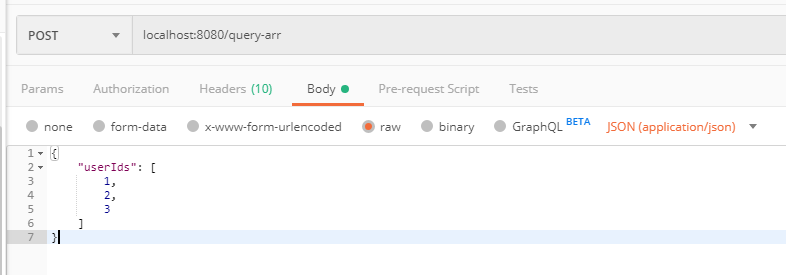
@RequestMapping(value="/query-arr")

    public Object queryArr( @RequestBody String userIds){

        System.out.println(1111);

        System.out.println(userIds);

        //对象转化

        JSONObject jsonObject = JSONObject.parseObject(userIds);

        JSONArray jsonArray = jsonObject.getJSONArray("userIds");

        System.out.println(jsonArray);//[1,2,3]

        @SuppressWarnings("static-access")

        List<Integer> list = jsonObject.parseArray(jsonObject.getString("userIds"), Integer.class);

        System.out.println(list);//[1, 2, 3]

        return 1;

    }
或者用实体类接收
4、@SessionAttributes, @ModelAttribute

@SessionAttributes:

该注解用来绑定HttpSession中的attribute对象的值,便于在方法中的参数里使用。

该注解有value、types两个属性,可以通过名字和类型指定要使用的attribute 对象;
4、@SessionAttributes, @ModelAttribute
@SessionAttributes: 该注解用来绑定HttpSession中的attribute对象的值,便于在方法中的参数里使用。 该注解有value、types两个属性,可以通过名字和类型指定要使用的attribute 对象;
@ModelAttribute
该注解有两个用法,一个是用于方法上,一个是用于参数上;
用于方法上时: 通常用来在处理@RequestMapping之前,为请求绑定需要从后台查询的model;
用于参数上时: 用来通过名称对应,把相应名称的值绑定到注解的参数bean上;要绑定的值来源于:
A) @SessionAttributes 启用的attribute 对象上;
B) @ModelAttribute 用于方法上时指定的model对象;
C) 上述两种情况都没有时,new一个需要绑定的bean对象,然后把request中按名称对应的方式把值绑定到bean中。
用到方法上@ModelAttribute的示例代码:
@ModelAttribute

public Account addAccount(@RequestParam String number) {

    return accountManager.findAccount(number);

}
这种方式实际的效果就是在调用@RequestMapping的方法之前,为request对象的model里put(“account”, Account);
用在参数上的@ModelAttribute示例代码:
@RequestMapping(value="/owners/{ownerId}/pets/{petId}/edit", method = RequestMethod.POST)

public String processSubmit(@ModelAttribute Pet pet) {

}
首先查询 @SessionAttributes有无绑定的Pet对象,若没有则查询@ModelAttribute方法层面上是否绑定了Pet对象,若没有则将URI template中的值按对应的名称绑定到Pet对象的各属性上。
补充讲解:
问题: 在不给定注解的情况下,参数是怎样绑定的?
通过分析AnnotationMethodHandlerAdapter和RequestMappingHandlerAdapter的源代码发现,方法的参数在不给定参数的情况下:
若要绑定的对象时简单类型: 调用@RequestParam来处理的。
若要绑定的对象时复杂类型: 调用@ModelAttribute来处理的。
这里的简单类型指Java的原始类型(boolean, int 等)、原始类型对象(Boolean, Int等)、String、Date等ConversionService里可以直接String转换成目标对象的类型;
AnnotationMethodHandlerAdapter中绑定参数的部分源代码:
private Object[] resolveHandlerArguments(Method handlerMethod, Object handler,

            NativeWebRequest webRequest, ExtendedModelMap implicitModel)throws Exception {

        Class[] paramTypes = handlerMethod.getParameterTypes();

        Object[] args = new Object[paramTypes.length];

        for (int i =0; i < args.length; i++) {

            MethodParameter methodParam = new MethodParameter(handlerMethod, i);

            methodParam.initParameterNameDiscovery(this.parameterNameDiscoverer);

            GenericTypeResolver.resolveParameterType(methodParam, handler.getClass());

            String paramName = null;

            String headerName = null;

            boolean requestBodyFound =false;

            String cookieName = null;

            String pathVarName = null;

            String attrName = null;

            boolean required =false;

            String defaultValue = null;

            boolean validate =false;

            Object[] validationHints = null;

            int annotationsFound =0;

            Annotation[] paramAnns = methodParam.getParameterAnnotations();

            for (Annotation paramAnn : paramAnns) {

                if (RequestParam.class.isInstance(paramAnn)) {

                    RequestParam requestParam = (RequestParam) paramAnn;

                    paramName = requestParam.value();

                    required = requestParam.required();

                    defaultValue = parseDefaultValueAttribute(requestParam.defaultValue());

                    annotationsFound++;

                }

                else if (RequestHeader.class.isInstance(paramAnn)) {

                    RequestHeader requestHeader = (RequestHeader) paramAnn;

                    headerName = requestHeader.value();

                    required = requestHeader.required();

                    defaultValue = parseDefaultValueAttribute(requestHeader.defaultValue());

                    annotationsFound++;

                }

                else if (RequestBody.class.isInstance(paramAnn)) {

                    requestBodyFound = true;

                    annotationsFound++;

                }

                else if (CookieValue.class.isInstance(paramAnn)) {

                    CookieValue cookieValue = (CookieValue) paramAnn;

                    cookieName = cookieValue.value();

                    required = cookieValue.required();

                    defaultValue = parseDefaultValueAttribute(cookieValue.defaultValue());

                    annotationsFound++;

                }

                else if (PathVariable.class.isInstance(paramAnn)) {

                    PathVariable pathVar = (PathVariable) paramAnn;

                    pathVarName = pathVar.value();

                    annotationsFound++;

                }

                else if (ModelAttribute.class.isInstance(paramAnn)) {

                    ModelAttribute attr = (ModelAttribute) paramAnn;

                    attrName = attr.value();

                    annotationsFound++;

                }

                else if (Value.class.isInstance(paramAnn)) {

                    defaultValue = ((Value) paramAnn).value();

                }

                else if (paramAnn.annotationType().getSimpleName().startsWith("Valid")) {

                    validate = true;

                    Object value = AnnotationUtils.getValue(paramAnn);

                    validationHints = (value instanceof Object[] ? (Object[]) value :new Object[] {value});

                }

            }

            if (annotationsFound > 1) {

                throw new IllegalStateException("Handler parameter annotations are exclusive choices - " +

                        "do not specify more than one such annotation on the same parameter: " + handlerMethod);

            }

            if (annotationsFound ==0) {// 若没有发现注解

                Object argValue = resolveCommonArgument(methodParam, webRequest);   //判断WebRquest是否可赋值给参数

                if (argValue != WebArgumentResolver.UNRESOLVED) {

                    args[i] = argValue;

                }

                else if (defaultValue !=null) {

                    args[i] = resolveDefaultValue(defaultValue);

                }

                else {

                    Class<?> paramType = methodParam.getParameterType();

                    if (Model.class.isAssignableFrom(paramType) || Map.class.isAssignableFrom(paramType)) {

                        if (!paramType.isAssignableFrom(implicitModel.getClass())) {

                            thrownew IllegalStateException("Argument [" + paramType.getSimpleName() +"] is of type " +

                                    "Model or Map but is not assignable from the actual model. You may need to switch " +

                                    "newer MVC infrastructure classes to use this argument.");

                        }

                        args[i] = implicitModel;

                    }

                    elseif (SessionStatus.class.isAssignableFrom(paramType)) {

                        args[i] = this.sessionStatus;

                    }

                    else if (HttpEntity.class.isAssignableFrom(paramType)) {

                        args[i] = resolveHttpEntityRequest(methodParam, webRequest);

                    }

                    elseif (Errors.class.isAssignableFrom(paramType)) {

                        throw new IllegalStateException("Errors/BindingResult argument declared " +

                                "without preceding model attribute. Check your handler method signature!");

                    }

                    elseif (BeanUtils.isSimpleProperty(paramType)) {// 判断是否参数类型是否是简单类型,若是在使用@RequestParam方式来处理,否则使用@ModelAttribute方式处理

                        paramName = "";

                    }

                    else {

                        attrName = "";

                    }

                }

            }

            if (paramName != null) {

                args[i] = resolveRequestParam(paramName, required, defaultValue, methodParam, webRequest, handler);

            }

            else if (headerName != null) {

                args[i] = resolveRequestHeader(headerName, required, defaultValue, methodParam, webRequest, handler);

            }

            else if (requestBodyFound) {

                args[i] = resolveRequestBody(methodParam, webRequest, handler);

            }

            else if (cookieName != null) {

                args[i] = resolveCookieValue(cookieName, required, defaultValue, methodParam, webRequest, handler);

            }

            else if (pathVarName !=null) {

                args[i] = resolvePathVariable(pathVarName, methodParam, webRequest, handler);

            }

            else if (attrName != null) {

                WebDataBinder binder =

                        resolveModelAttribute(attrName, methodParam, implicitModel, webRequest, handler);

                boolean assignBindingResult = (args.length > i +1 && Errors.class.isAssignableFrom(paramTypes[i +1]));

                if (binder.getTarget() !=null) {

                    doBind(binder, webRequest, validate, validationHints, !assignBindingResult);

                }

                args[i] = binder.getTarget();

                if (assignBindingResult) {

                    args[i + 1] = binder.getBindingResult();

                    i++;

                }

                implicitModel.putAll(binder.getBindingResult().getModel());

            }

        }

        return args;

    }
RequestMappingHandlerAdapter中使用的参数绑定,代码稍微有些不同,有兴趣的同仁可以分析下,最后处理的结果都是一样的。
示例:
    @RequestMapping ({"/","/home"})

    public String showHomePage(String key){

        logger.debug("key="+key);

        return "home";

    }
这种情况下,就调用默认的@RequestParam来处理。
@RequestMapping (method = RequestMethod.POST)

public String doRegister(User user){

    if(logger.isDebugEnabled()){

        logger.debug("process url[/user], method[post] in "+getClass());

        logger.debug(user);

    }

    return "user";

}
这种情况下,就调用@ModelAttribute来处理。
原文:https://blog.csdn.net/truong/article/details/28097837#
handler method 参数绑定的更多相关文章
- Springmvc的handler method参数绑定常用的注解
转自:http://blog.longjiazuo.com/archives/1149 1. 简介: handler method参数绑定常用的注解,我们根据他们处理的Request的不同内容部分 ...
- handler method 参数绑定常用注解
handler method 参数绑定常用的注解,我们根据他们处理的Request的不同内容部分分为四类: A.处理requet uri 部分(这里指uri template中variable,不含q ...
- @RequestParam @RequestBody @PathVariable 等参数绑定注解详解
文章主要讲解request 数据到handler method 参数数据的绑定所用到的注解和什么情形下使用. 简介: handler method 参数绑定常用的注解,我们根据他们处理的Request ...
- spring 参数绑定
部分资料来源: @RequestParam @RequestBody @PathVariable 等参数绑定注解详解 spring学习之@ModelAttribute运用详解 Spring MVC @ ...
- 11.@RequestParam @RequestBody @PathVariable 等参数绑定注解详解
对@RequestMapping进行地址映射讲解之后,该篇主要讲解request 数据到handler method 参数数据的绑定所用到的注解和什么情形下使用: 简介: handler method ...
- @RequestParam @RequestBody @PathVariable 等参数绑定注解详解(转)
引言: 接上一篇文章,对@RequestMapping进行地址映射讲解之后,该篇主要讲解request 数据到handler method 参数数据的绑定所用到的注解和什么情形下使用: 简介: han ...
- (转)@RequestParam @RequestBody @PathVariable 等参数绑定注解详解
引言: 接上一篇文章,对@RequestMapping进行地址映射讲解之后,该篇主要讲解request 数据到handler method 参数数据的绑定所用到的注解和什么情形下使用: 简介: han ...
- 【转】@RequestParam @RequestBody @PathVariable 等参数绑定注解详解
@RequestParam @RequestBody @PathVariable 等参数绑定注解详解 2014-06-02 11:24 23683人阅读 评论(2) 收藏 举报 目录(?)[+] 引言 ...
- @PathVariable @RequestParam @RequestBody等参数绑定注解详解
一.分类 handler method 参数绑定常用的注解,我们根据他们处理的Request的内容不同分为四类: 处理request uri 部分的注解: @PathVariable;(这里指ur ...
随机推荐
- Autocorrelation in Time Series Data
Why Time Series Data Is Unique A time series is a series of data points indexed in time. The fact th ...
- PCB主线布线规范—高速线之DDR2
一.DDR2时钟线走线规则a)时钟线包括 MEM_CLKOUT#0.MEM_CLKOUT0.MEM_CLKOUT#1.MEM_CLKOUT1,MEM_CLKOUT#2.MEM_CLKOUT2: MEM ...
- Unable to connect to a repository at URL
缓存问题: 1. 右键点击本地副本,TortoiseSVN -> Settings -> Saved Data, 2.点击“Clear”按钮,把本地缓存都清除了,点击“确定”: 3. 再重 ...
- 时间日期转换工具类,获取当前时间YYYYMMDD24HHMISS、YYYYMMDDHHMISS
YYYYMMDD24HHMISS:24小时制时间(显示上只是比YYYYMMDDHHMISS中间多了一个24),例:2018102224112440 YYYYMMDDHHMISS:12小时制时间,例20 ...
- CSS遮罩层简易写法
现在很多站点弹出框,都需要一个遮罩层.写法很多,以下是我比较喜欢的一种: .box{ position:absolute; top:0; bottom:0; left:0; right:0; ba ...
- word文档巧替换(空行替换、空格替换、软回车替换成硬回车)
一.空行替换 在日常工作中,我们经常从网上下载一些文字材料,往往因空行多使得页数居高不下.一般方法是:在“编辑”菜单中打开“查找和替换”对话框(或按ctrl+H),在“查找内容”中输入“^p^p”“替 ...
- 屏蔽tips
在屏蔽的地方打上记号,这样解屏蔽时就容易找到屏蔽的地方了
- CompletableFuture--给future调用增加回调或聚合操作
CompletableFuture--增大内存节省时间.整合多个future调用,来减少时间 例如:第一个future 返回时1s,第二个返回时2s,第三个返回是3s CompletableFut ...
- 1.rest之@Get和@Post请求的区别:
区别: (1)@Get 一般用于查询或获取资源信息, @Post一般是用于更新资源信息. (2)Url不同, @Get 请求的url: http://localhost:8080/imeter-cms ...
- 题解【洛谷P2513/CJOJ1345】[HAOI2009]逆序对数列
P1345 - [HAOI2009]逆序对数列 Description 对于一个数列{ai},如果有i<j且ai>aj,那么我们称ai与aj为一对逆序对数.若对于任意一个由1~n自然数组成 ...