
SQL Server 对比数据库差异
一、视图和存储过程比较
【原理】利用系统表“sysobjects"和系统表“syscomments”,将数据库中的视图和存储过程进行对比。系统表"sysobjects"之前有详细介绍过,有兴趣可以看看:SQL Server系统表sysobjects介绍与使用
【代码】
/*--调用示例 exec p_compdb 'DBNAME1','DBNAME2' exec p_compdb 'DBNAME2','DBNAME3' --*/CREATE proc p_compdb @db1 sysname, --第一个库 @db2 sysname --第二个库 asexec(' select 类型=case isnull(a.xtype,b.xtype) when ''V'' then ''视图'' else ''存储过程'' end ,匹配情况=case when a.name is null then ''库 ['+@db1+'] 中无'' when b.name is null then ''库 ['+@db2+'] 中无'' else ''结构不同'' end ,对象名称=isnull(a.name,b.name),a.text as atext, b.text as btextfrom( select a.name,a.xtype,b.colid,b.text from ['+@db1+']..sysobjects a,['+@db1+']..syscomments b where a.id=b.id and a.xtype in(''V'',''P'') and a.status>=0 )a full join( select a.name,a.xtype,b.colid,b.text from ['+@db2+']..sysobjects a,['+@db2+']..syscomments b where a.id=b.id and a.xtype in(''V'',''P'') and a.status>=0 )b on a.name=b.name and a.xtype=b.xtype and a.colid=b.colid where a.name is null or b.name is null or isnull(a.text,'''') <>isnull(b.text,'''') --group by a.name,b.name,a.xtype,b.xtype --order by 类型,匹配情况,对象名称') |
【执行结果】

二、数据表结构比较
【原理】利用系统表“sysobjects"、"sysindexes"、"sysindexkeys"、“syscomments”、"sysclumns"、"systypes"、"extended_properties",将数据库中的表结构进行对比。(涉及到系统表比较多。就不一一介绍。直接上代码。)
【代码】
/*--比较两个数据库的表结构差异--*/ /*--调用示例 exec p_comparestructure 'DBNAME1','DBNAME2' exec p_comparestructure 'DBNAME2','DBNAME3' --*/create proc p_comparestructure @dbname1 varchar(250),--要比较的数据库名1 @dbname2 varchar(250) --要比较的数据库名2 ascreate table #tb1(表名1 varchar(250),字段名 varchar(250),序号 int,标识 bit,主键 bit,类型 varchar(250), 占用字节数 int,长度 int,小数位数 int,允许空 bit,默认值 sql_variant,字段说明 sql_variant) create table #tb2(表名2 varchar(250),字段名 varchar(250),序号 int,标识 bit,主键 bit,类型 varchar(250), 占用字节数 int,长度 int,小数位数 int,允许空 bit,默认值 sql_variant,字段说明 sql_variant) --得到数据库1的结构 exec('insert into #tb1 SELECT 表名=d.name,字段名=a.name,序号=a.colid, 标识=case when a.status=0x80 then 1 else 0 end, 主键=case when exists(SELECT 1 FROM '+@dbname1+'..sysobjects where xtype=''PK'' and parent_obj=a.id and name in ( SELECT name FROM '+@dbname1+'..sysindexes WHERE indid in( SELECT indid FROM '+@dbname1+'..sysindexkeys WHERE id = a.id AND colid=a.colid ))) then 1 else 0 end, 类型=b.name,占用字节数=a.length,长度=a.prec,小数位数=a.scale,允许空=a.isnullable, 默认值=isnull(e.text,''''),字段说明=isnull(g.[value],'''') FROM '+@dbname1+'..syscolumns a left join '+@dbname1+'..systypes b on a.xtype=b.xusertype inner join '+@dbname1+'..sysobjects d on a.id=d.id and d.xtype=''U'' and d.name <>''dtproperties'' left join '+@dbname1+'..syscomments e on a.cdefault=e.id left join sys.extended_properties g ON a.ID=g.major_id AND a.COLID=g.minor_idorder by a.id,a.colorder') --得到数据库2的结构 exec('insert into #tb2 SELECT 表名=d.name,字段名=a.name,序号=a.colid, 标识=case when a.status=0x80 then 1 else 0 end, 主键=case when exists(SELECT 1 FROM '+@dbname2+'..sysobjects where xtype=''PK'' and parent_obj=a.id and name in ( SELECT name FROM '+@dbname2+'..sysindexes WHERE indid in( SELECT indid FROM '+@dbname2+'..sysindexkeys WHERE id = a.id AND colid=a.colid ))) then 1 else 0 end, 类型=b.name,占用字节数=a.length,长度=a.prec,小数位数=a.scale,允许空=a.isnullable, 默认值=isnull(e.text,''''),字段说明=isnull(g.[value],'''') FROM '+@dbname2+'..syscolumns a left join '+@dbname2+'..systypes b on a.xtype=b.xusertype inner join '+@dbname2+'..sysobjects d on a.id=d.id and d.xtype=''U'' and d.name <>''dtproperties'' left join '+@dbname2+'..syscomments e on a.cdefault=e.id left join sys.extended_properties g ON a.ID=g.major_id AND a.COLID=g.minor_id order by a.id,a.colorder') --and not exists(select 1 from #tb2 where 表名2=a.表名1) select 比较结果=case when a.表名1 is null and b.序号=1 then '库1缺少表:'+b.表名2 when b.表名2 is null and a.序号=1 then '库2缺少表:'+a.表名1 when a.字段名 is null and exists(select 1 from #tb1 where 表名1=b.表名2) then '库1 ['+b.表名2+'] 缺少字段:'+b.字段名 when b.字段名 is null and exists(select 1 from #tb2 where 表名2=a.表名1) then '库2 ['+a.表名1+'] 缺少字段:'+a.字段名 when a.标识 <>b.标识 then '标识不同'when a.主键 <>b.主键 then '主键设置不同'when a.类型 <>b.类型 then '字段类型不同'when a.占用字节数 <>b.占用字节数 then '占用字节数'when a.长度 <>b.长度 then '长度不同'when a.小数位数 <>b.小数位数 then '小数位数不同'when a.允许空 <>b.允许空 then '是否允许空不同'when a.默认值 <>b.默认值 then '默认值不同'when a.字段说明 <>b.字段说明 then '字段说明不同'else '' end, * from #tb1 a full join #tb2 b on a.表名1=b.表名2 and a.字段名=b.字段名 where a.表名1 is null or a.字段名 is null or b.表名2 is null or b.字段名 is nullor a.标识 <>b.标识 or a.主键 <>b.主键 or a.类型 <>b.类型 or a.占用字节数 <>b.占用字节数 or a.长度 <>b.长度 or a.小数位数 <>b.小数位数 or a.允许空 <>b.允许空 or a.默认值 <>b.默认值 or a.字段说明 <>b.字段说明 order by isnull(a.表名1,b.表名2),isnull(a.序号,b.序号)--isnull(a.字段名,b.字段名) go |
【执行结果】
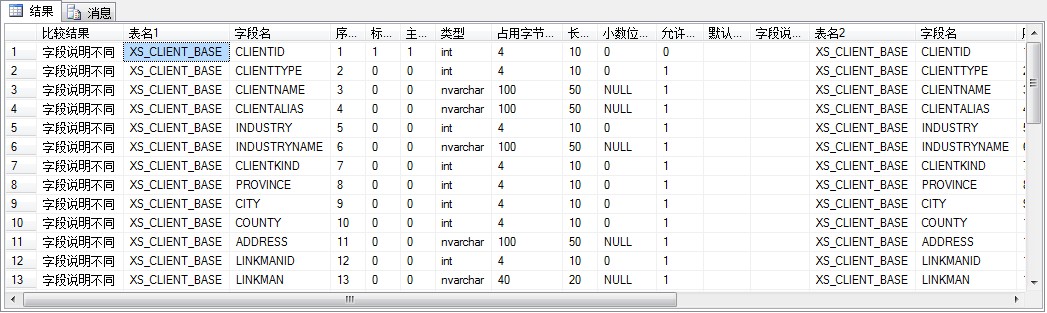
ps:以上SQL执行请采用系统管理员(sysadmin)角色账号。其他角色我没有试过,有时间可以尝试一下。当我采用只映射了库”owner"权限的账号测试时,报如下错误:拒绝了对对象 'p_compdb' (数据库 'master',架构 'dbo')的 EXECUTE 权限。
SQL Server 对比数据库差异的更多相关文章
- [SQL SERVER 2005]数据库差异备份及还原
因为之前遇到还原差异备份,最开始遇到SQLServer报错:”无法还原日志备份或差异备份,因为没有文件可用于前滚“.查阅很多资料后,终于得到解决.收集整理成这篇随笔. 问题原因:出现这种错误绝大多数是 ...
- SQL SERVER 2008数据库各版本功能对比
微软SQL SERVER 2008数据库有6个版本,分别是数据中心版.企业版.标准版.Web版.工作组版.简易版,有时候购买的时候或需要使用某项功能时,需要了解各个版本的区别,功能差异,很多时候,大部 ...
- SQL Server 2012 数据库各个版本功能对比
作为这篇SQL SERVER 2008数据库各版本功能对比 的姊妹篇,就写点SQL Server 2012 各个版本的区别以及物理以及逻辑上的限制. 个部分来分http://technet.micro ...
- 如何转换SQL Server 2008数据库到SQL Server 2005
背景介绍: 公司一套系统使用的是SQL SERVER 2008数据库,突然一天收到邮件,需要将这套系统部署到各个不同地方(海外)的工厂,需要在各个工厂部署该数据库,等我将准备工作做好,整理文档 ...
- JDBC连接SQL server与ADO.NET连接Sql Server对比
JDBC连接SQL server与ADO.NET连接Sql Server对比 1.JDBC连接SQL server 1)java方面目前有很多驱动能够驱动连接SQL servernet. 主流的有 ...
- 微软ASP.NET网站部署指南(2):部署SQL Server Compact数据库
1. 综述 对于数据库訪问,Contoso University程序要求以下的软件必须随程序一起部署.由于不属于.NET Framework: SQL Server Compact (数据库引擎) A ...
- Sql Server 2008R2 数据库发布与订阅
背景描述: 发布服务器A: (远程端) , 数据库服务名: GUANWANG1 订阅服务器B: (本机) , 数据库服务名: PC-LLRDBA 需要从服务器A中数据库发布,然后在B中订阅A发布 ...
- Data Base sql server 备份数据库
sql server 备份数据库 1.维护计划向导: 右键维护计划-维护计划向导-然后安装提示: 勾选自己要干的事,比如:完整备份数据库.差异备份数据库等等 2.作业计划: 如下图: SQL Serv ...
- SQL Server远程数据库操作(备份、还原等)
· SQL Server远程数据库备份到本地: exp sauser/sapassword@192.168.8.233:1433/DBName file=d:/backup.dmp OWNER=sum ...
随机推荐
- 解决Navicat Premium 12 连接oracle数据库出现ORA-28547的问题
1. 出现的问题... 下午工作时想连接Oracle数据库,使用的是Navicat Premium 12 . 数据库地址.用户名.密码.端口号都没有问题,但出现了ORA-28547:connectio ...
- ZooKeeper参数调优
zookeeper的默认配置文件为zookeeper/conf/zoo_sample.cfg,需要将其修改为zoo.cfg.其中各配置项的含义,解释如下: 1.tickTime:Client-Serv ...
- python工具
目录 Python工具 1. argparse 2. tqdm 3. os, shutil 4. csv Python工具 1. argparse import argparse parser = a ...
- 软件测试&安全测试高峰论坛
Nubia测试以及介绍 基于Cucumber的自动化测试平台 常见Web漏洞之XSS,主要HTML与JS基础.XSS的基础知识与挖掘方法.XSS的利用 自动化测试框架以及测试思路
- .NET反射的优化
写在前面 1)本篇博客并非原创,而是我针对.NET反射相关知识的总结.本篇内容来源汇总于3篇博客.在后面的介绍中会在开头给出对应的链接,方便读者自行学习.2)本篇博客主要针对表达式树代码进行详细讲解. ...
- sublime text3 (Mac) 快捷键
符号说明 符号 说明 ⌘ command ⌃ control ⌥ option ⇧ shift ↩ enter ⌫ delete 打开/关闭/前往 快捷键 功能 ⌘⇧N 打开一个新的sublime窗口 ...
- 《剑指offer》第三_一题(找出数组中重复的数字,可改变数组)
// 面试题3(一):找出数组中重复的数字 // 题目:在一个长度为n的数组里的所有数字都在0到n-1的范围内.数组中某些数字是重复的,但不知道有几个数字重复了, // 也不知道每个数字重复了几次.请 ...
- Contiguous Array with Equal Number of 0 & 1
2018-07-08 13:24:31 问题描述: 问题求解: 问题规模已经给出是50000量级,显然只能是O(n),至多O(nlogn)的复杂度.本题使用DP和滑动数组都比较棘手,这里给出的方案是p ...
- Rspec: feature spec 功能测试 测试JavaScript.
我们要把应用各组件放在一起做集成 测试,这样才能保证模型和控制器之间能够良好契合. 在 RSpec 中,这种测试称为功能测试(feature spec),有时也称为验收测试(acceptance te ...
- 大年三十。让字母在屏幕上奔跑:(sleep , system"clear")
system "clear",ruby清屏(osk系统上,window上用system "cls"). https://stackoverflow.com/qu ...