
【转】Android项目使用Ant打包,生成build.xml
记不住,于是原帖转过来,请看原帖:http://blog.csdn.net/ms03001620/article/details/8490238
一、生成build.xml
Eclipse中使用Ant为Android打包并且签名
SDK自带文件 在<sdk>tools/ant目录下这3个文件

其中build.xml和uibuild.xml中定义了大量基础构建方法和打包策略。我们只需要建立我们自己的build.xml并且存放在项目的根目录下,然后引用一下<sdk>tools/ant/build.xml即可。当然也可以拷贝它然后直接操作。
那么如何。以项目AntForAndroid为例。生成一个针对该项目的build.xml呢?
这里需要一个工具。就是SDK自带的android.bat .所在目录<sdk>tools/android.bat
然后通过命令行执行“android update project --path .”即可。完毕后即可通过android命令在当前项目目录下生成一个build.xml文件

新生成的3个文件 build.xml,local.properties,proguard-project.exe
二、配置ant.properties
在项目根目录新建一个ant.properties文件(不要去改变他的名字,因为<sdk>\tools\ant\build.xml会引用到这个名字)
并且在里面写入一下数据:
#keystore文件的目录,因为在根目录下所以直接写名字了
key.store=android.keystore
#这个名字就是在生成keystore时那个alias字段的值
key.alias=android
#两个密码分别写建立keystore时的两个密码
key.store.password=(your pwd)
key.alias.password=(your pwd)
三、实现自动打签名apk
右键点击项目中的build.xml->run as... 先查看下有多少种任务,当然这些任务都是来自<sdk>\tools\ant\build.xml,项目里的只是引用了它

窗口打开

默认的选择在help上。打签名包的时候执行release这个任务即可。
按照以上的步骤配置好之后就能生成签名apk。并且大家可以通过学习<sdk>\tools\ant\build.xml来理解ant的基本奥妙。
最后在项目跟目录\bin下生成apk包
Ant是非常强大的。可以实现一下功能
例如
1.在生成apk的文件名里加上日期。
2.把apk文件自动通过邮件发给其他人。
3.apk文件上传服务器
等等
第二篇:http://www.xmumu.com/post/2011-11-22/7022215
通过Android命令自动编译出build.xml文件
用途: 做自动集成编译环境.
环境搭配我就不说了(SDK/环境变量等).
进入cmd界面.
进入项目目录.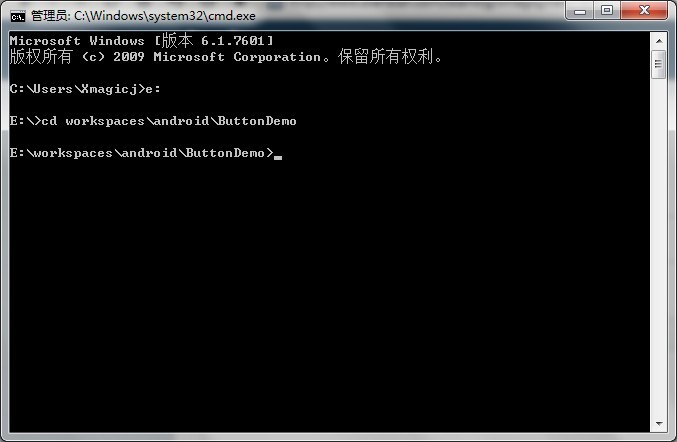
输入: android.bat list target 来查询我们现有的版本list有哪些.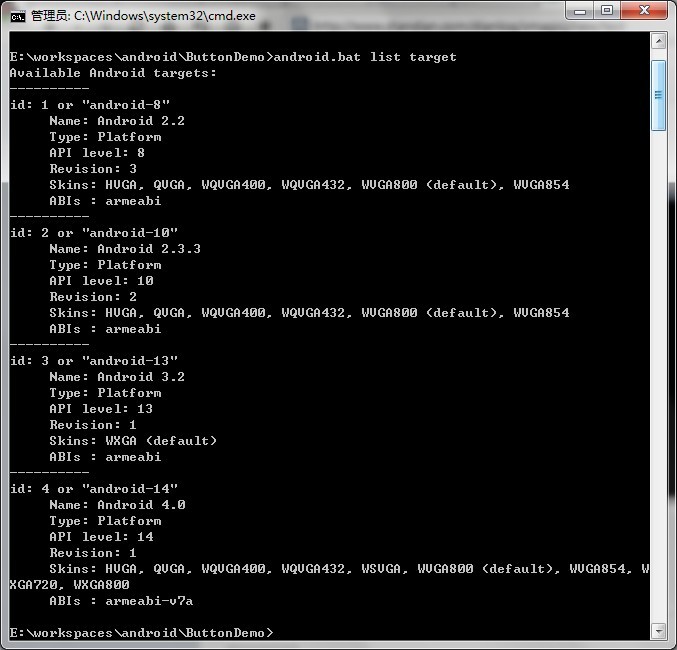
记住这个ID号码,下的代码面会用到.
输入: android update project -n ButtonDemo -t 1 -p E:\workspace\android\ButtonDemo
-n 对应的是项目名称
-t 就是我们之前查询的SDK版本对应的ID,大家根据自己的项目版本做出选择即可,我这个是android-8 所以用ID 1 .
-p就是生成的路径
成功后显示: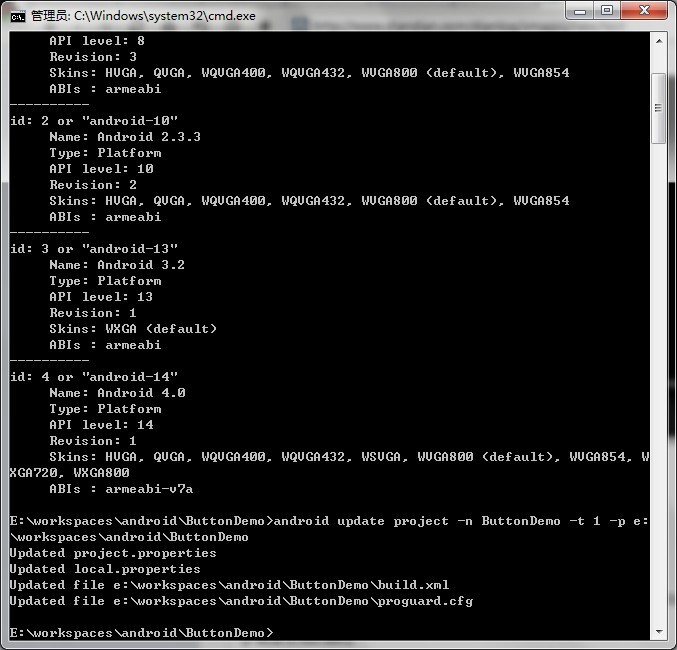
好了以下是生成的build.xml代码段:
<?xml version="1.0" encoding="UTF-8"?>
<project name="ButtonDemo" default="help">
<!-- The local.properties file is created and updated by the 'android' tool.
It contains the path to the SDK. It should *NOT* be checked into
Version Control Systems. -->
<loadproperties srcFile="local.properties" />
<!-- The ant.properties file can be created by you. It is only edited by the
'android' tool to add properties to it.
This is the place to change some Ant specific build properties.
Here are some properties you may want to change/update:
source.dir
The name of the source directory. Default is 'src'.
out.dir
The name of the output directory. Default is 'bin'.
For other overridable properties, look at the beginning of the rules
files in the SDK, at tools/ant/build.xml
Properties related to the SDK location or the project target should
be updated using the 'android' tool with the 'update' action.
This file is an integral part of the build system for your
application and should be checked into Version Control Systems.
-->
<property file="ant.properties" />
<!-- The project.properties file is created and updated by the 'android'
tool, as well as ADT.
This contains project specific properties such as project target, and library
dependencies. Lower level build properties are stored in ant.properties
(or in .classpath for Eclipse projects).
This file is an integral part of the build system for your
application and should be checked into Version Control Systems. -->
<loadproperties srcFile="project.properties" />
<!-- quick check on sdk.dir -->
<fail
message="sdk.dir is missing. Make sure to generate local.properties using 'android update project'"
unless="sdk.dir"
/>
<!-- extension targets. Uncomment the ones where you want to do custom work
in between standard targets -->
<!--
<target name="-pre-build">
</target>
<target name="-pre-compile">
</target>
/* This is typically used for code obfuscation.
Compiled code location: ${out.classes.absolute.dir}
If this is not done in place, override ${out.dex.input.absolute.dir} */
<target name="-post-compile">
</target>
-->
<!-- Import the actual build file.
To customize existing targets, there are two options:
- Customize only one target:
- copy/paste the target into this file, *before* the
<import> task.
- customize it to your needs.
- Customize the whole content of build.xml
- copy/paste the content of the rules files (minus the top node)
into this file, replacing the <import> task.
- customize to your needs.
***********************
****** IMPORTANT ******
***********************
In all cases you must update the value of version-tag below to read 'custom' instead of an integer,
in order to avoid having your file be overridden by tools such as "android update project"
-->
<!-- version-tag: 1 -->
<import file="${sdk.dir}/tools/ant/build.xml" />
</project>
【转】Android项目使用Ant打包,生成build.xml的更多相关文章
- Android 自动编译、打包生成apk文件 3 - 使用SDK Ant方式
相关文章列表: < Android 自动编译.打包生成apk文件 1 - 命令行方式> < Android 自动编译.打包生成apk文件 2 - 使用原生Ant方式> &l ...
- Android 自动编译、打包生成apk文件 2 - 使用原生Ant方式
from://http://blog.csdn.net/androiddevelop/article/details/11100109 相关文章列表: <Android 自动编译.打包生成apk ...
- Android项目使用Ant多渠道打包(最新sdk)
参考文章: http://blog.csdn.net/liuhe688/article/details/6679879 http://www.eoeandroid.com/thread-323111- ...
- Android 自动编译、打包生成apk文件 4 - 多渠道批量打包
相关文章列表: < Android 自动编译.打包生成apk文件 1 - 命令行方式> < Android 自动编译.打包生成apk文件 2 - 使用原生Ant方式 > < ...
- android 用命令行打包生成 apk
android 用 ant 进行 build. android sdk 下面的 tools/ant 下面的 build.xml 就是 build 的整个过程. 其中的 build 参数可在 ant.p ...
- vue项目通过webpack打包生成的dist文件放到express环境里运行(vue+webpack+express)
1.首先需要的原料肯定是vue打包生成的dist文件 在vue项目目录下运行:npm run build,等待运行结束,会在项目目录下生成一个dist文件夹,里面会生成一些文件(如下图示) 小的项目文 ...
- 自动生成build.xml文件
使用Eclipse 自动生成 Ant的Build.xml 配置文件,选择要生成Build.xml文件的项目,鼠标右键, Export-> General -> Ant Buildfiles ...
- [转]使用ant让Android自动打包的build.xml,自动生成签名的apk文件(支持android4.0以上的版本)
在android4.0以后的sdk里那个脚本就失效了,主要是因为 apkbuilder这个程序不见了: 人家sdk升级,我们的脚本也要跟上趟,修改一下喽. 上网一查,大家的文章还停留在我去年的脚本程度 ...
- 项目打包文件build.xml
Make命令其实就是一个项目管理工具,而Ant所实现功能与此类似.像make,gnumake和nmake这些编译工具都有一定的缺陷,但是Ant却克服了这些工具的缺陷.最初Ant开发者在开发跨平台的应用 ...
随机推荐
- Iterm2的一些好用法
今天把mac带到公司办公了,爽歪歪啊. 1,如何脱离鼠标拷贝屏幕中的内容 1) Command+f 调出选择框,并在其中输入要复制的字符,可以使用Tab补全 2) 按 Command + c复制字符 ...
- iOS设置圆角的四种方法
小小圆角问题,正常情况下,我们不需要过多关心,但当屏幕内比较多的时候,还是有必要了解下性能问题的 一.设置CALayer的cornerRadius 这是最常用的,也是最简单的. cornerRadiu ...
- JavaScript调用App原生代码(iOS、Android)通用解决方案
实际场景 场景:现在有一个H5活动页面,上面有一个登陆按钮,要求点击登陆按钮以后,唤出App内部的登录界面,当登录成功以后将用户的手机号返回给H5页面,显示出来.这个场景应该算是比较完整的一次H5中的 ...
- Word2Vec中文语料实战
http://blog.csdn.net/gnehcuoz/article/details/52136371
- Redis踩过的坑
现象:在使用redis云提供的redis服务后,经常出现connect timeout: redis.clients.jedis.exceptions.JedisConnectionException ...
- Oracle 12C -- Invisible Columns
在12C中,当一个列被定义为"不可见"的时候,没有直接访问该列的sql语句是无法看到"不可见列"的,显式引用"不可见列"的语句是可以访问和操 ...
- mac 上运行cassandra出现的java.net.MalformedURLException: Local host name unknown: java.net.UnknownHostException: : : unknown error错误解决方法
mac 上运行cassandra出现的java.net.MalformedURLException: Local host name unknown: java.net.UnknownHostExce ...
- 容错处理库Polly使用文档
Design For Failure1. 一个依赖服务的故障不会严重破坏用户的体验.2. 系统能自动或半自动处理故障,具备自我恢复能力. 以下是一些经验的服务容错模式 超时与重试(Timeout an ...
- mysql错误号代表的含义
1005:创建表失败1006:创建数据库失败1007:数据库已存在,创建数据库失败1008:数据库不存在,删除数据库失败1009:不能删除数据库文件导致删除数据库失败1010:不能删除数据目录导致删除 ...
- echarts 认知笔记
0.echarts.setOption的核心认知 请注意,它是合并对象,而不是替换对象. 举个简单的例子,如果你第一次setOption时在series中配置了10个对象. 那么你下一次你意图使用只有 ...