
iOS: 控制UIView的外形
#import <UIKit/UIKit.h>

#import <QuartzCore/QuartzCore.h>

@interface UIView (Shape)

- (void)setShape:(CGPathRef)shape;

@end
#import "UIView+Shape.h"

@implementation UIView (Shape)

- (void)setShape:(CGPathRef)shape

{

    if (shape == nil) {

        self.layer.mask = nil;

    }

    CAShapeLayer* maskLayer = [CAShapeLayer layer];

    maskLayer.path = shape;

    self.layer.mask = maskLayer;

}

@end
@interface UIBezierPath (BasicShape)

+ (UIBezierPath *)cutCorner:(CGRect)originalFrame length:(CGFloat)length;

@end
#import "UIBezierPath+BasicShape.h"

@implementation UIBezierPath (BasicShape)

+ (UIBezierPath *)cutCorner:(CGRect)originalFrame length:(CGFloat)length

{

    CGRect rect = originalFrame;

    UIBezierPath *bezierPath = [UIBezierPath bezierPath];

    [bezierPath moveToPoint:CGPointMake(, length)];

    [bezierPath addLineToPoint:CGPointMake(length, )];

    [bezierPath addLineToPoint:CGPointMake(rect.size.width - length, )];

    [bezierPath addLineToPoint:CGPointMake(rect.size.width, length)];

    [bezierPath addLineToPoint:CGPointMake(rect.size.width, rect.size.height - length)];

    [bezierPath addLineToPoint:CGPointMake(rect.size.width - length, rect.size.height)];

    [bezierPath addLineToPoint:CGPointMake(length, rect.size.height)];

    [bezierPath addLineToPoint:CGPointMake(, rect.size.height - length)];

    [bezierPath closePath];

    return bezierPath;

}

@end
在[UIView viewWillAppear:]方法中加入下面代码
[self.view setShape:[UIBezierPath cutCorner:self.view.bounds length:].CGPath];
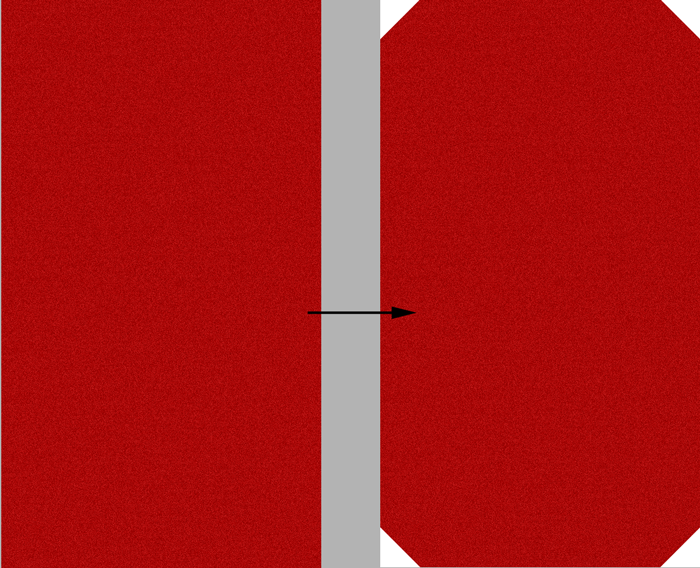
效果:
################
让自定义 Button 响应自定义 Shape 内的点击事件
#import <UIKit/UIKit.h>

#import "UIView+Shape.h"

#import "UIBezierPath+BasicShape.h"

@interface RFButton : UIButton{

    CGPathRef path;

}

@end
//

//  RFButton.m

//  ChristApp

//

//  Created by Haozhen Li on 13-12-6.

//

//

#import "RFButton.h"

@implementation RFButton

- (id)initWithFrame:(CGRect)frame

{

    self = [super initWithFrame:frame];

    if (self) {

        // Initialization code

    }

    return self;

}

- (void)setShape:(CGPathRef)shape

{

    [super setShape:shape];

    path = shape;

}

- (BOOL)pointInside:(CGPoint)point withEvent:(UIEvent *)event

{

    if (CGPathIsEmpty(path)) {

        return YES;

    }

    //判断触发点是否在规定的 Shape 内

    if (CGPathContainsPoint(path, nil, point, nil)) {

        return YES;

    }

    return NO;

}

@end
iOS: 控制UIView的外形的更多相关文章
- iOS 控制单个控制器旋转
iOS 控制单个控制器旋转 控制单个ViewController 的旋转 //不旋转,保持竖屏 //iOS 5 - (BOOL) shouldAutorotateToInterfaceOrientat ...
- 荼菜的iOS笔记--UIView的几个Block动画
前言:我的第一篇文章荼菜的iOS笔记–Core Animation 核心动画算是比较详细讲了核心动画的用法,但是如你上篇看到的,有时我们只是想实现一些很小的动画,这时再用coreAnimation就会 ...
- ios 关于UIView 的multipleTouchEnabled 和 exclusiveTouch
做项目时发现,在一个界面上的2个button竟然可以同时点击,依次push进去了2个 controller!我就产生了疑问,一个view的multipleTouchEnabled属性默认是false啊 ...
- iOS学习——UIView的研究
在iOS开发中,我们知道有一个共同的基类——NSObject,但是对于界面视图而言,UIView是非常重要的一个类,UIView是很多视图控件的基类,因此,对于UIView的学习闲的非常有必要.在iO ...
- iOS开发UIView.h简介
1.UICoordinateSpace不同坐标空间的坐标切换 @protocol UICoordinateSpace <NSObject> //将当前的坐标空间点转换到指定的坐标空间 - ...
- iOS 使用UIView的一种有效方法
在一个典型的MVC结构 中,Model部分负责保存目标数据,View部分主要负责实现数据的界面以及将数据显示出来,二者在Controller的操作下协同工作.在iOS应用中,View的实现主要由UIV ...
- iOS之UIview动画
一.UIView动画(首尾) 1.简单说明 UIKit直接将动画集成到UIView类中,当内部的一些属性发生改变时,UIView将为这些改变提供动画支持 执行动画所需要的工作由UIView类自动完成, ...
- IOS自定义UIView
IOS中一般会用到几种方式自定义UIView 1.继承之UIView的存代码的自定义View 2.使用xib和代码一起使用的自定义View 3.存xib的自定义View(不需要业务处理的那种) 本文主 ...
- OpenGL ES: iOS 自定义 UIView 响应屏幕旋转
iOS下使用OpenGL 如果使用GLKit View 那么不用担心屏幕旋转的问题,说明如下: If you change the size, scale factor, or drawable pr ...
随机推荐
- Namespace declaration statement has to be the very first statement or after any declare call in the script
0x00缘起 代码部署在windows上,出现了一个bug,临时用记事本打开修改了一下,于是出现了500错误 0x01排错 查看log,提示如下 "Namespace declaration ...
- C#中使用Buffer.BlockCopy()方法将string转换为byte array的方法:
public static void BlockCopy(Array src, int srcOffset, Array dst, int dstOffset, int count); 将指定数目的字 ...
- RabbitMQ安装 ubuntu12.04LTS
RabbitMQ安装需要安装较多的依赖包,之前如果安装过RabbitMQ-server必须要先彻底删除. 重装的ubuntu系统(ubuntu server)的开发环境几乎是裸的,再重新编译安装erl ...
- Chrome 调用vue.js 记录
一.今晚遇到一个问题,就是不能直接在 html 直接调用 js 代码的问题 二.会出现如下错误: Refused to execute inline script because it violate ...
- JMX超详细解读<转>
一.JMX的定义 JMX(Java Management Extensions)是一个为应用程序植入管理功能的框架.JMX是一套标准的代理和服务,实际上,用户可以在任何Java应用程序中使用这些代理和 ...
- Android ——Toolbar开发实践总结(转)
过年前发了一篇介绍 Translucent System Bar 特性的文章 Translucent System Bar 的最佳实践 ,收到很多开发者的关注和反馈.今天开始写第二篇,全面的介绍一下 ...
- Android7.0 Doze模式分析(一)Doze介绍 & DeviceIdleController
參考:http://blog.csdn.net/gaugamela/article/details/52981984 在Android M中.Google就引入了Doze模式.它定义了一种全新的 ...
- WebRTC 源码分析(五):安卓 P2P 连接过程和 DataChannel 使用
从本篇起,我们将迈入新的领域:网络传输.首先我们看看 P2P 连接的建立过程,以及 DataChannel 的使用,最终我们会利用 DataChannel 实现一个 P2P 的文字聊天功能. P2P ...
- MFC——CDC
CDC类定义的是设备上下文对象的类,有称设备环境对象类. Windows使用与设备无关的图形设备环境(DC:Device Context)进行显示. 说到CDC类就不能不提一下GdiObject——图 ...
- jPlayer 视频播放
在网页中播放MP4格式视频代码:显示效果如下图,缺陷是不能自动适应页面大小,只能全屏 <!DOCTYPE html> <html> <head> <meta ...