
Android登录等待效果
上一篇为大家分享了关于AsyncTask的使用,本篇结合AsyncTask为大家介绍一个我们经常看到的一个效果,就是当我们点击登录后,会弹出一个请等待的小窗体,这个效果是如何实现的呢?本篇我就带大家简单实现一下。
首先请看效果图:
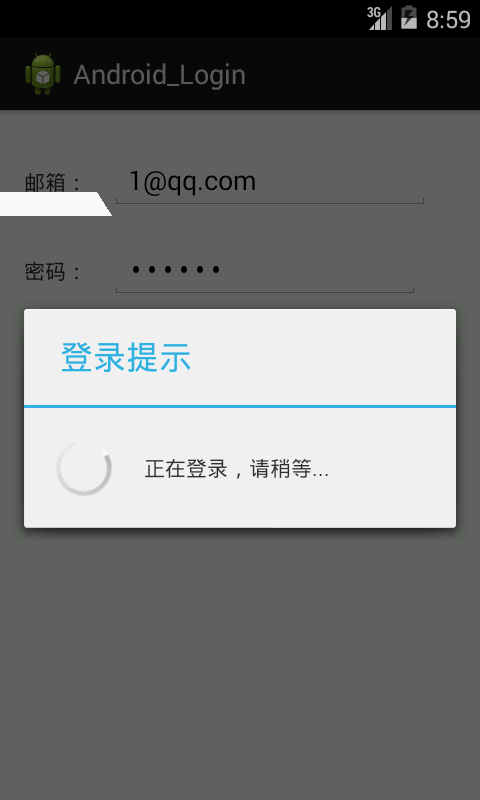
就是当我们填写好个人信息后,点击登录,然后就进入了这个界面,好了,下面我们一起来实现一下。
第一步:布局文件:activity_main.xml
<RelativeLayout xmlns:android="http://schemas.android.com/apk/res/android"

    xmlns:tools="http://schemas.android.com/tools"

    android:layout_width="match_parent"

    android:layout_height="match_parent"

    android:paddingBottom="@dimen/activity_vertical_margin"

    android:paddingLeft="@dimen/activity_horizontal_margin"

    android:paddingRight="@dimen/activity_horizontal_margin"

    android:paddingTop="@dimen/activity_vertical_margin"

    tools:context=".MainActivity" >

    <TextView

        android:id="@+id/textView1"

        android:layout_width="wrap_content"

        android:layout_height="wrap_content"

        android:layout_alignParentLeft="true"

        android:layout_alignParentTop="true"

        android:layout_marginTop="22dp"

        android:text="邮箱:" />

    <EditText

        android:id="@+id/editText1"

        android:layout_width="wrap_content"

        android:layout_height="wrap_content"

        android:layout_alignBaseline="@+id/textView1"

        android:layout_alignBottom="@+id/textView1"

        android:layout_marginLeft="15dp"

        android:layout_toRightOf="@+id/textView1"

        android:ems=""

        android:inputType="textEmailAddress" />

    <TextView

        android:id="@+id/textView2"

        android:layout_width="wrap_content"

        android:layout_height="wrap_content"

        android:layout_below="@+id/editText1"

        android:layout_marginTop="40dp"

        android:layout_toLeftOf="@+id/editText1"

        android:text="密码:" />

    <EditText

        android:id="@+id/editText2"

        android:layout_width="wrap_content"

        android:layout_height="wrap_content"

        android:layout_alignBaseline="@+id/textView2"

        android:layout_alignBottom="@+id/textView2"

        android:layout_alignLeft="@+id/editText1"

        android:ems=""

        android:inputType="textPassword" />

    <Button

        android:id="@+id/button1"

        android:layout_width="wrap_content"

        android:layout_height="wrap_content"

        android:layout_below="@+id/editText2"

        android:layout_marginTop="43dp"

        android:layout_toRightOf="@+id/textView2"

        android:text="登录" />

    <Button

        android:id="@+id/button2"

        android:layout_width="wrap_content"

        android:layout_height="wrap_content"

        android:layout_alignBaseline="@+id/button1"

        android:layout_alignBottom="@+id/button1"

        android:layout_marginLeft="34dp"

        android:layout_toRightOf="@+id/button1"

        android:text="注册" />

</RelativeLayout>
第二步:主Activity:
public class MainActivity extends Activity implements OnClickListener{

    private EditText mEditText1;

    private EditText mEditText2;

    private Button mButton1;

    private Button mButton2;

    private String email;

    private String password;

    private myAsyncTast tast;

    private ProgressDialog dialog = null;

    @Override

    protected void onCreate(Bundle savedInstanceState) {

        super.onCreate(savedInstanceState);

        setContentView(R.layout.activity_main);

        init();//对控件进行初始化

    }

    private void init() {

        mEditText1 = (EditText) findViewById(R.id.editText1);

        mEditText2 = (EditText) findViewById(R.id.editText2);

        mButton1 = (Button) findViewById(R.id.button1);

        mButton2 = (Button) findViewById(R.id.button2);

        mButton1.setOnClickListener(this);

        mButton2.setOnClickListener(this);

    }

    @Override

    public void onClick(View arg0) {

        switch (arg0.getId()) {

        case R.id.button1:

            getEditTextValue();//获得用户的输入

            tast = new myAsyncTast();//创建AsyncTask

            tast.execute();//启动AsyncTask

            break;

        case R.id.button2:

            Toast.makeText(MainActivity.this, "注册", Toast.LENGTH_SHORT).show();

            break;

        }

    }

    private void getEditTextValue() {

        email = mEditText1.getText().toString();

        password = mEditText2.getText().toString();

    }

    class myAsyncTast extends AsyncTask<Void, Integer, Void>{

        @Override

        protected void onPreExecute() {

            super.onPreExecute();

            dialog = ProgressDialog.show(MainActivity.this, "登录提示", "正在登录,请稍等...", false);//创建ProgressDialog

        }

        @Override

        protected Void doInBackground(Void... arg0) {

            Http http = new Http();

            int n = http.send(email, password);//发送给服务器

            publishProgress(n);

            return null;

        }

        @Override

        protected void onProgressUpdate(Integer... values) {

            super.onProgressUpdate(values);

            dialog.dismiss();//关闭ProgressDialog

            if(values[]==){

                Toast.makeText(MainActivity.this, "登录成功", Toast.LENGTH_SHORT).show();

            }else{

                Toast.makeText(MainActivity.this, "登录失败", Toast.LENGTH_SHORT).show();

            }

        }

    }

}
第三步:服务器端(简单起见,仅仅是模拟)
/*

 * 模拟服务器端

 */

public class Http {

    private int n = ;

    public int send(String email, String password){

        try {

            Thread.sleep();//模拟网络加载

        } catch (InterruptedException e) {

            e.printStackTrace();

        }

        if(email.equals("1@qq.com")&&password.equals("")){

            n=;

        }

        return n;

    }

}
在这里需要说明的时,当我们真正开发时,需要向服务器发送数据时,我们需要在:AndroidManifest.xml文件中声明访问网络权限。
对于上面的内容,AsyncTask上一篇已经为大家进行了详细的介绍,如果看本篇博客你赶脚有些吃力,请仔细研究一下上一篇的博客,这里就不再赘述,对于ProgressDialog本人也是初次使用,不过可以为大家推荐一篇博客:http://blog.csdn.net/caesardadi/article/details/11982721,这里介绍的非常的详细,有兴趣的童鞋可以好好研究一下。
Android登录等待效果的更多相关文章
- Android 仿 窗帘效果 和 登录界面拖动效果 (Scroller类的应用) 附 2个DEMO及源码
在android学习中,动作交互是软件中重要的一部分,其中的Scroller就是提供了拖动效果的类,在网上,比如说一些Launcher实现滑屏都可以通过这个类去实现.下面要说的就是上次Scroller ...
- Android 仿 窗帘效果 和 登录界面拖动效果 (Scroller类的应用) 附 2个DEMO及源代码
在android学习中,动作交互是软件中重要的一部分.当中的Scroller就是提供了拖动效果的类,在网上.比方说一些Launcher实现滑屏都能够通过这个类去实现.以下要说的就是上次Scroller ...
- 易Android登录Demo
上一页介绍Android项目简单的页面跳转实例,算是对开发环境的熟悉,这一篇将在此基础上增加一些简单的逻辑,实现登录的效果. 登录之前: 登录成功: watermark/2/text/aHR0cDov ...
- 【Android源代码下载】收集整理android界面UI效果源码
在Android开发中,Android界面UI效果设计一直都是很多童鞋关注的问题,今天给大家分享下大神收集整理的多个android界面UI效果,都是源码,都是干货,贡献给各位网友! 话不多说,直接上效 ...
- C#.Net网页加载等待效果漂亮并且简单
最近网页加载数据比较多,点击后给用户就是白板很不友好,想了很久找了些资料,在网页加载中显示等待画面给客户,页面加载完成自动隐藏等待效果. 在网页后台cs代码: protected void Pa ...
- WPF 实现的等待效果界面
这个界面的效果是从WinForm 转变过来,可以实现等待的效果,操作完成以后就自动关掉. 效果图如下 有一个动态的手机等待效果的样式,中间的文字可以自己定义,提供了方法可以修改中间"正在加载 ...
- JQuery+CSS3实现封装弹出登录框效果
原文:JQuery+CSS3实现封装弹出登录框效果 上次发了一篇使用Javascript来实现弹出层的效果,这次刚好用了JQuery来实现,所以顺便记录一下: 因为这次使用了Bootstrap来做一个 ...
- 手机站全局的html+css加载等待效果
本文只提供思路,CSS神马的自己定制吧,JS是可以优化的,比如,输出图片的JS也可以放到showdiv()里面,我没有做优化,只是实现,别笑话我,我比较懒... 基本思路:由于Html的解析是从上到下 ...
- js加载等待效果
demo01: 加载首页的时候,可能会很缓慢,放一张等待图片. <!DOCTYPE HTML PUBLIC "-//W3C//DTD HTML 4.0 Transitional//EN ...
随机推荐
- 做WP程序时遇到的一些问题及解决方法
问题1:Type 'JDBYSJ.Data.NewsChannel' cannot be serialized. Consider marking it with the DataContractAt ...
- 《Linux内核分析》之第四章读书笔记
4.1多任务 多任务操作系统:同时并发地交互执行多个进程的操作系统 多任务操作系统会使多个进程处于堵塞或者睡眠状态.这些任务尽管位于内存,但是并不处于可运行状态.这些进程利用内核堵塞自己,直到某一事件 ...
- Java学习笔记七——数组工具类Arrays
数组工具类Arrays Java提供的Arrays类里包含的一些static修饰的方法可以直接操作数组.若将里面的方法用熟的话,那开发效率会大大提高.下面介绍其中的方法. List<T> ...
- rlwrap-0.37.tar.gz实现sqlplus上下翻页
1.上传rlwrap-0.37.tar.gz到linux 2.解压rlwrap-0.37.tar.gz [root@node1 mnt]# tar zxvf rlwrap-0.37.tar.gz [r ...
- 手Q兴趣号的价值在哪里
拥有5.21亿月活跃用户,如果不做点什么东西出来,实在是浪费至极.如此庞大的用户量,如果能够将内容贡献出来,那将是恐怖的,QQ空间产品就是很好的佐证. QQ群让个体用户能够连接在一起,单个的用户关系链 ...
- 首届Ignite China微软技术大会见闻
10.26-10.28,有幸参加微软在中国北京举办的首届Ignite China技术大会.世界那么大,技术那么多,我想去看看. 为期三天的技术大会在小汤山九华山庄举办,吐槽一下,太特么远了,每天要跑3 ...
- Javascript aop(面向切面编程)之around(环绕)
Aop又叫面向切面编程,其中“通知”是切面的具体实现,分为before(前置通知).after(后置通知).around(环绕通知),用过spring的同学肯定对它非常熟悉,而在js中,AOP是一个被 ...
- (文摘)彻底理解webservice SOAP WSDL
WebServices特点介绍 WebServices 提供一个建立分布式应用的平台,使得运行在不同操作系统和不同设备上的软件,或者是用不同的程序语言和不同厂商的软件开发工具开发的软件,所有可能的已开 ...
- redis(二)高级用法
redis(二)高级用法 事务 redis的事务是一组命令的集合.事务同命令一样都是redis的最小执行单元,一个事务中的命令要么执行要么都不执行. 首先需要multi命令来开始事务,用exec命令来 ...
- [异常解决] 安卓6.0权限问题导致老蓝牙程序出现异常解决办法:Need ACCESS_COARSE_LOCATION or ACCESS_FINE_LOCATION permission...
一.问题: 之前写的一款安卓4.4的应用程序,用来连接蓝牙BLE,而现在拿出来用新的AS编译(此时SDK为6.0,手机也是6.0)应用程序并不能搜索到蓝牙,查看log总是报权限错误: Need ACC ...