
Delphi JCL JEDI使用 jclDebug
开源
https://github.com/project-jedi/jcl
jclDebug
下载jcl,还要下载https://github.com/project-jedi/jedi里的2个inc文件
放到jcl-master\jcl\source\include\jedi目录里。
运行jcl\install.bat 安装。没有dpk工程文件。

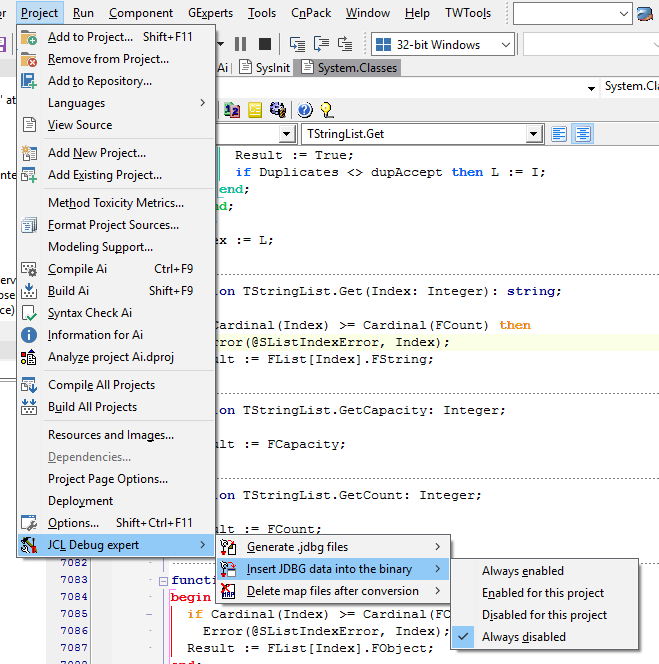
JclDebug

unit StackTrackDemoMain;

interface

uses

  Windows, Messages, SysUtils, Classes, Graphics, Controls, Forms, Dialogs,

  StdCtrls, AppEvnts, ActnList;

type

  TMainForm = class(TForm)

    ExceptionLogMemo: TMemo;

    Button1: TButton;

    Button2: TButton;

    Button3: TButton;

    ListBox1: TListBox;

    Button4: TButton;

    ApplicationEvents: TApplicationEvents;

    Label1: TLabel;

    ActionList1: TActionList;

    procedure Button1Click(Sender: TObject);

    procedure Button2Click(Sender: TObject);

    procedure Button3Click(Sender: TObject);

    procedure Button4Click(Sender: TObject);

    procedure ApplicationEventsException(Sender: TObject; E: Exception);

  private

    { Private declarations }

  public

    { Public declarations }

  end;

var

  MainForm: TMainForm;

implementation

{$R *.DFM}

uses

  JclDebug;

{ TMainForm }

//--------------------------------------------------------------------------------------------------

// Simulation of various unhandled exceptions

//--------------------------------------------------------------------------------------------------

procedure TMainForm.Button1Click(Sender: TObject);

begin

  PInteger(nil)^ := ;

end;

procedure TMainForm.Button2Click(Sender: TObject);

begin

  ListBox1.Items[] := 'a';

end;

procedure AAA;

begin

  PInteger(nil)^ := ;

end;

procedure TMainForm.Button3Click(Sender: TObject);

begin

  AAA;

end;

procedure TMainForm.Button4Click(Sender: TObject);

begin

  ActionList1.Actions[].Execute;

end;

//--------------------------------------------------------------------------------------------------

// Simple VCL application unhandled exception handler using JclDebug

//--------------------------------------------------------------------------------------------------

procedure TMainForm.ApplicationEventsException(Sender: TObject; E: Exception);

begin

  // Log time stamp

  ExceptionLogMemo.Lines.Add(DateTimeToStr(Now));

  // Log unhandled exception stack info to ExceptionLogMemo

  JclLastExceptStackListToStrings(ExceptionLogMemo.Lines, False, True, True, False);

  // Insert empty line

  ExceptionLogMemo.Lines.Add('');

  // Display default VCL unhandled exception dialog

  Application.ShowException(E);

end;

//--------------------------------------------------------------------------------------------------

// JclDebug initialization and finalization for VCL application

//--------------------------------------------------------------------------------------------------

initialization

  // Enable raw mode (default mode uses stack frames which aren't always generated by the compiler)

  Include(JclStackTrackingOptions, stRawMode);

  // Disable stack tracking in dynamically loaded modules (it makes stack tracking code a bit faster)

  Include(JclStackTrackingOptions, stStaticModuleList);

  // Initialize Exception tracking

  JclStartExceptionTracking;

finalization

  // Uninitialize Exception tracking

  JclStopExceptionTracking;

end.
获取当前过程函数的名称
记得把上面的jcl debug的选项打开。
self.Caption:= JclDebug.GetLocationInfoStr(Caller(1));
http://delphi.wikia.com/wiki/JEDI_Code_Library
unit u_JclDebugTest;

interface

function CurrentFunctionName: string;

type

  TSomeClass = class

  private

  public

    constructor Create;

    destructor Destroy; override;

    procedure Test;

  end;

implementation

uses

  JclDebug;

{ TSomeClass }

constructor TSomeClass.Create;

begin

  WriteLn(CurrentFunctionName);

end;

destructor TSomeClass.Destroy;

begin

  WriteLn(CurrentFunctionName);

  inherited;

end;

procedure TSomeClass.Test;

begin

  WriteLn(CurrentFunctionName);

end;

{$W+}

function CurrentFunctionName: string;

begin

  Result := jcldebug.GetLocationInfoStr(Caller());

end;

end.

program jcldebugtest;

{$APPTYPE console}

uses

  u_JclDebugTest;

procedure SomeProcedure;

begin

  WriteLn(CurrentFunctionName);

  with TSomeClass.Create do begin

    Test;

    Free;

  end;

end;

begin

  WriteLn(CurrentFunctionName);

  SomeProcedure;

  WriteLn(CurrentFunctionName);

end.

This program will output:

[0042362D] jcldebugtest.jcldebugtest (Line , "jcldebugtest.dpr")

[004223A7] jcldebugtest.SomeProcedure (Line , "jcldebugtest.dpr")

[0042226C] u_JclDebugTest.TSomeClass.Create (Line , "u_JclDebugTest.pas")

[] u_JclDebugTest.TSomeClass.Test (Line , "u_JclDebugTest.pas")

[004222E5] u_JclDebugTest.TSomeClass.Destroy (Line , "u_JclDebugTest.pas")

[] jcldebugtest.jcldebugtest (Line , "jcldebugtest.dpr")
http://stackoverflow.com/questions/19450140/combining-log4delphi-and-jcl-debug
http://stackoverflow.com/questions/19496046/get-name-of-the-previous-calling-method
Delphi JCL JEDI使用 jclDebug的更多相关文章
- Delphi与字符编码(实战篇)(MultiByteToWideChar会返回转换后的宽字符串长度)
本文目标: 了解Delphi的字符串类型 字符编码的检测与转换 简体繁体转换 0. 导言 看完“.Net与字符编码(理论篇)”,我们明白了字符是自然语言中的最小单位,在存储和传输的过程中可以使用三种编 ...
- Delphi:基于jcl的Bugsplat Crash收集单元
//BugSplat Crash模拟.net数据封装 unit uBugSplat; interface uses Windows, SysUtils, Classes, StrUtils, Shel ...
- Jedi项目,还真得好好看看,有许多控件和新封装的API(Delphi里面没有)
以前没有重视 http://www.delphi-jedi.org/ https://github.com/project-jedi https://sourceforge.net/projects/ ...
- delphi代码实现创建dump文件
I used a "watchdog" thread for this, which checks if the mainform is responding, and make ...
- Delphi:Exception输出堆栈信息
起源: 用习惯了c#之Exception的StackTrace,在程序出异常crash时候能够以其定位出问题的模块及行号,用回Delphi 2009,发现没有这东西. 显然,在编译环境日新月异的今天, ...
- Delphi 控件大全
delphi 控件大全(确实很全) delphi 控件查询:http://www.torry.net/ http://www.jrsoftware.org Tb97 最有名的工具条(ToolBar ...
- delphi 控件大全(确实很全)
delphi 控件查询:http://www.torry.net/ http://www.jrsoftware.org Tb97 最有名的工具条(ToolBar)控件库,仿Office97,如TDoC ...
- Delphi经验总结(2)
Q: 怎么来改变ListBox的字体呢?就修改其中的一行. A: 先把ListBox1.Style 设成lbOwnerDrawFixed 然后在 OnDrawItem 事件下写下如下代码 proced ...
- DLL Injection with Delphi(转载)
原始链接 I had recently spent some time playing around with the simple to use DelphiDetours package from ...
随机推荐
- github上传本地项目
github上传本地项目,分为两个部分: 1.如果建立了ssh key的,直接看第二部分的上传部分就行了 2.如果没有建立ssh key的,就从头开始看吧 ——————————————————我是快乐 ...
- MyBatis入门学习教程-解决字段名与实体类属性名不相同的冲突
在平时的开发中,我们表中的字段名和表对应实体类的属性名称不一定都是完全相同的,下面来演示一下这种情况下的如何解决字段名与实体类属性名不相同的冲突. 一.准备演示需要使用的表和数据 CREATE TAB ...
- bzoj4730: Alice和Bob又在玩游戏
Description Alice和Bob在玩游戏.有n个节点,m条边(0<=m<=n-1),构成若干棵有根树,每棵树的根节点是该连通块内编号最 小的点.Alice和Bob轮流操作,每回合 ...
- mysql_fetch_row,mysql_fetch_array,mysql_fetch_object,mysql_fetch_assoc的区别!
php从mysql中访问数据库并取得数据,取得结果的过程中用到好几个类似的方法,区别及用法值得区分一下,看下面的代码 代码如下: <?php $link=mysql_connect('loc ...
- 设置树莓派3 B+的静态IP
修改/etc/dhcpcd.conf 文件 sudo vim /etc/dhcpcd.conf interface eth0 static ip_address= static routers=192 ...
- centos 安装rmagick 2.13.4出错
因为安装redmine,缺少rmagick,使用bundle install安装依赖的gem,报错如下: 然后,网上查询一下,都是ubuntu系统下的解决方案. centos下正确的解决方法如下: y ...
- parse output
if ((line = br.readLine()).contains("PID")){ TestResultDTO t = new TestResultDTO(); t.pid ...
- 【转】Oracle AWR 配置查看
源地址:http://blog.sina.com.cn/s/blog_439628be0101d7l3.html
- 80、Android Support v4、v7、v13的区别以及应用场景
一.简介 在 Android 开发中,为了使用高版本API的新特性,需要添加额外的包来使用这些新特性,这就是 Android Support 包 二.分类 Android Support v4: 这个 ...
- ADXL3xx: 读取 ADXL3xx 加速度传感器
原文链接:https://www.arduino.cc/en/Tutorial/ADXL3xx ADXL3xx加速度传感器 本教程将为你展示如何读取Analog Devices的ADXL3xx系列加速 ...