
Android使用Fragment来实现TabHost的功能(解决切换Fragment状态不保存)以及各个Fragment之间的通信
以下内容为原创,转载请注明:http://www.cnblogs.com/tiantianbyconan/p/3360938.html

如新浪微博下面的标签切换功能,我以前也写过一篇博文(http://www.cnblogs.com/tiantianbyconan/archive/2012/02/24/2366237.html),可以实现,用的是TabHost。但是android发展比较迅速,TabHost这玩意现在已经被弃用了,虽说用现在也能用,但是被弃用的东西还是少用为妙。
官方有个FragmentTabHost这么一个替代品,于是试了一下,发现每次切换tab,都会调用onCreateView()方法,控件被重新加载,也就是说你从tab1切换到别的tab后,再切换回来,tab1的状态并没有保存,重新加载了控件。
搞了半天,暂时没有好的解决办法(有朋友知道解决办法的话,希望联系我,赐教下哈)
于是,怒了,自己实现一个吧- -
先来看看整个demo的结构:

TabAFm到TabEFm都是Fragment,并且每个Fragment对应一个布局文件。
TabAFm.java:
 package com.wangjie.fragmenttabhost;

 import android.app.Activity;

 import android.os.Bundle;

 import android.support.v4.app.Fragment;

 import android.view.LayoutInflater;

 import android.view.View;

 import android.view.ViewGroup;

 /**

  * Created with IntelliJ IDEA.

  * Author: wangjie  email:tiantian.china.2@gmail.com

  * Date: 13-6-14

  * Time: 下午2:39

  */

 public class TabAFm extends Fragment{

     @Override

     public void onAttach(Activity activity) {

         super.onAttach(activity);

         System.out.println("AAAAAAAAAA____onAttach");

     }

     @Override

     public void onCreate(Bundle savedInstanceState) {

         super.onCreate(savedInstanceState);

         System.out.println("AAAAAAAAAA____onCreate");

     }

     @Override

     public View onCreateView(LayoutInflater inflater, ViewGroup container, Bundle savedInstanceState) {

         System.out.println("AAAAAAAAAA____onCreateView");

         return inflater.inflate(R.layout.tab_a, container, false);

     }

     @Override

     public void onActivityCreated(Bundle savedInstanceState) {

         super.onActivityCreated(savedInstanceState);

         System.out.println("AAAAAAAAAA____onActivityCreated");

     }

     @Override

     public void onStart() {

         super.onStart();

         System.out.println("AAAAAAAAAA____onStart");

     }

     @Override

     public void onResume() {

         super.onResume();

         System.out.println("AAAAAAAAAA____onResume");

     }

     @Override

     public void onPause() {

         super.onPause();

         System.out.println("AAAAAAAAAA____onPause");

     }

     @Override

     public void onStop() {

         super.onStop();

         System.out.println("AAAAAAAAAA____onStop");

     }

     @Override

     public void onDestroyView() {

         super.onDestroyView();

         System.out.println("AAAAAAAAAA____onDestroyView");

     }

     @Override

     public void onDestroy() {

         super.onDestroy();

         System.out.println("AAAAAAAAAA____onDestroy");

     }

     @Override

     public void onDetach() {

         super.onDetach();

         System.out.println("AAAAAAAAAA____onDetach");

     }

 }
如上述代码所示,TabAFm是一个Fragment,对应的布局文件是tab_a.xml,并实现了他的所有的生命周期回调函数并打印,便于调试
tab_a.xml布局中有个EditText
其他的Fragment大同小异,这里就不贴出代码了
现在来看MainActivity:
 package com.wangjie.fragmenttabhost;

 import android.os.Bundle;

 import android.support.v4.app.Fragment;

 import android.support.v4.app.FragmentActivity;

 import android.widget.RadioGroup;

 import java.util.ArrayList;

 import java.util.List;

 public class MainActivity extends FragmentActivity {

     /**

      * Called when the activity is first created.

      */

     private RadioGroup rgs;

     public List<Fragment> fragments = new ArrayList<Fragment>();

     public String hello = "hello ";

     @Override

     public void onCreate(Bundle savedInstanceState) {

         super.onCreate(savedInstanceState);

         setContentView(R.layout.main);

         fragments.add(new TabAFm());

         fragments.add(new TabBFm());

         fragments.add(new TabCFm());

         fragments.add(new TabDFm());

         fragments.add(new TabEFm());

         rgs = (RadioGroup) findViewById(R.id.tabs_rg);

         FragmentTabAdapter tabAdapter = new FragmentTabAdapter(this, fragments, R.id.tab_content, rgs);

         tabAdapter.setOnRgsExtraCheckedChangedListener(new FragmentTabAdapter.OnRgsExtraCheckedChangedListener(){

             @Override

             public void OnRgsExtraCheckedChanged(RadioGroup radioGroup, int checkedId, int index) {

                 System.out.println("Extra---- " + index + " checked!!! ");

             }

         });

     }

 }
MainActivity上述代码所示
MainActivity是包含Fragment的Activity(也就是这里的5个Fragment)
他继承了FragmentActivity(因为我这里用的是android-support-v4.jar)
用一个List<Fragment>去维护5个Fragment,也就是5个tab
main布局中有一个id为tab_content的FrameLayout,用来存放要显示的Fragment。底部有一个RadioGroup,用于tab的切换,如下:
 <?xml version="1.0" encoding="utf-8"?>

 <LinearLayout xmlns:android="http://schemas.android.com/apk/res/android"

               android:orientation="vertical"

               android:layout_width="fill_parent"

               android:layout_height="fill_parent"

               android:background="@android:color/white"

         >

     <LinearLayout

             android:layout_width="fill_parent"

             android:layout_height="fill_parent"

             android:orientation="vertical"

         >

     <FrameLayout

             android:id="@+id/tab_content"

             android:layout_width="fill_parent"

             android:layout_height="0dp"

             android:layout_weight="1.0"

             android:background="#77557799"

             />

     <RadioGroup

             android:id="@+id/tabs_rg"

             android:layout_width="fill_parent"

             android:layout_height="wrap_content"

             android:orientation="horizontal"

             android:gravity="center"

             android:paddingTop="7dp"

             android:paddingBottom="7dp"

             >

         <RadioButton

                 android:id="@+id/tab_rb_a"

                 android:layout_width="0dp"

                 android:layout_height="wrap_content"

                 android:drawableTop="@drawable/tablatestalert"

                 android:button="@null"

                 android:text="Tab1"

                 android:textColor="#000000"

                 android:textSize="13sp"

                 android:layout_weight="1.0"

                 android:gravity="center"

                 android:singleLine="true"

                 android:checked="true"

                 android:background="@drawable/selector_tab"

                 />

         <RadioButton

                 android:id="@+id/tab_rb_b"

                 android:layout_width="0dp"

                 android:layout_height="wrap_content"

                 android:drawableTop="@drawable/tabsearch"

                 android:button="@null"

                 android:text="Tab2"

                 android:textColor="#000000"

                 android:textSize="13sp"

                 android:layout_weight="1.0"

                 android:gravity="center"

                 android:singleLine="true"

                 android:background="@drawable/selector_tab"

                 />

         <RadioButton

                 android:id="@+id/tab_rb_c"

                 android:layout_width="0dp"

                 android:layout_height="wrap_content"

                 android:drawableTop="@drawable/tabrecommd"

                 android:button="@null"

                 android:text="Tab3"

                 android:textColor="#000000"

                 android:textSize="13sp"

                 android:layout_weight="1.0"

                 android:gravity="center"

                 android:singleLine="true"

                 android:background="@drawable/selector_tab"

                 />

         <RadioButton

                 android:id="@+id/tab_rb_d"

                 android:layout_width="0dp"

                 android:layout_height="wrap_content"

                 android:drawableTop="@drawable/tabconfigicon"

                 android:button="@null"

                 android:text="Tab4"

                 android:textColor="#000000"

                 android:textSize="13sp"

                 android:layout_weight="1.0"

                 android:gravity="center"

                 android:singleLine="true"

                 android:background="@drawable/selector_tab"

                 />

         <RadioButton

                 android:id="@+id/tab_rb_e"

                 android:layout_width="0dp"

                 android:layout_height="wrap_content"

                 android:drawableTop="@drawable/tababoutus"

                 android:button="@null"

                 android:text="Tab5"

                 android:textColor="#000000"

                 android:textSize="13sp"

                 android:layout_weight="1.0"

                 android:gravity="center"

                 android:singleLine="true"

                 android:background="@drawable/selector_tab"

                 />

     </RadioGroup>

     </LinearLayout>

 </LinearLayout>
现在回到MainActivity中,下面这个FragmentTabAdapter类是关键,是我自己编写的用于绑定和处理fragments和RadioGroup之间的逻辑关系
FragmentTabAdapter tabAdapter = new FragmentTabAdapter(this, fragments, R.id.tab_content, rgs);
现在看下FragmentTabAdapter:
 package com.wangjie.fragmenttabhost;

 import android.support.v4.app.Fragment;

 import android.support.v4.app.FragmentActivity;

 import android.support.v4.app.FragmentTransaction;

 import android.widget.RadioGroup;

 import java.util.List;

 /**

  * Created with IntelliJ IDEA.

  * Author: wangjie  email:tiantian.china.2@gmail.com

  * Date: 13-10-10

  * Time: 上午9:25

  */

 public class FragmentTabAdapter implements RadioGroup.OnCheckedChangeListener{

     private List<Fragment> fragments; // 一个tab页面对应一个Fragment

     private RadioGroup rgs; // 用于切换tab

     private FragmentActivity fragmentActivity; // Fragment所属的Activity

     private int fragmentContentId; // Activity中所要被替换的区域的id

     private int currentTab; // 当前Tab页面索引

     private OnRgsExtraCheckedChangedListener onRgsExtraCheckedChangedListener; // 用于让调用者在切换tab时候增加新的功能

     public FragmentTabAdapter(FragmentActivity fragmentActivity, List<Fragment> fragments, int fragmentContentId, RadioGroup rgs) {

         this.fragments = fragments;

         this.rgs = rgs;

         this.fragmentActivity = fragmentActivity;

         this.fragmentContentId = fragmentContentId;

         // 默认显示第一页

         FragmentTransaction ft = fragmentActivity.getSupportFragmentManager().beginTransaction();

         ft.add(fragmentContentId, fragments.get(0));

         ft.commit();

         rgs.setOnCheckedChangeListener(this);

     }

     @Override

     public void onCheckedChanged(RadioGroup radioGroup, int checkedId) {

         for(int i = 0; i < rgs.getChildCount(); i++){

             if(rgs.getChildAt(i).getId() == checkedId){

                 Fragment fragment = fragments.get(i);

                 FragmentTransaction ft = obtainFragmentTransaction(i);

                 getCurrentFragment().onPause(); // 暂停当前tab

 //                getCurrentFragment().onStop(); // 暂停当前tab

                 if(fragment.isAdded()){

 //                    fragment.onStart(); // 启动目标tab的onStart()

                     fragment.onResume(); // 启动目标tab的onResume()

                 }else{

                     ft.add(fragmentContentId, fragment);

                 }

                 showTab(i); // 显示目标tab

                 ft.commit();

                 // 如果设置了切换tab额外功能功能接口

                 if(null != onRgsExtraCheckedChangedListener){

                     onRgsExtraCheckedChangedListener.OnRgsExtraCheckedChanged(radioGroup, checkedId, i);

                 }

             }

         }

     }

     /**

      * 切换tab

      * @param idx

      */

     private void showTab(int idx){

         for(int i = 0; i < fragments.size(); i++){

             Fragment fragment = fragments.get(i);

             FragmentTransaction ft = obtainFragmentTransaction(idx);

             if(idx == i){

                 ft.show(fragment);

             }else{

                 ft.hide(fragment);

             }

             ft.commit();

         }

         currentTab = idx; // 更新目标tab为当前tab

     }

     /**

      * 获取一个带动画的FragmentTransaction

      * @param index

      * @return

      */

     private FragmentTransaction obtainFragmentTransaction(int index){

         FragmentTransaction ft = fragmentActivity.getSupportFragmentManager().beginTransaction();

         // 设置切换动画

         if(index > currentTab){

             ft.setCustomAnimations(R.anim.slide_left_in, R.anim.slide_left_out);

         }else{

             ft.setCustomAnimations(R.anim.slide_right_in, R.anim.slide_right_out);

         }

         return ft;

     }

     public int getCurrentTab() {

         return currentTab;

     }

     public Fragment getCurrentFragment(){

         return fragments.get(currentTab);

     }

     public OnRgsExtraCheckedChangedListener getOnRgsExtraCheckedChangedListener() {

         return onRgsExtraCheckedChangedListener;

     }

     public void setOnRgsExtraCheckedChangedListener(OnRgsExtraCheckedChangedListener onRgsExtraCheckedChangedListener) {

         this.onRgsExtraCheckedChangedListener = onRgsExtraCheckedChangedListener;

     }

     /**

      *  切换tab额外功能功能接口

      */

     static class OnRgsExtraCheckedChangedListener{

         public void OnRgsExtraCheckedChanged(RadioGroup radioGroup, int checkedId, int index){

         }

     }

 }
这里解决Fragment切换重新加载布局的办法,用的是把几个Fragment全部Add,然后根据要显示的哪个Fragment设置show或者hide
效果输出:
10-10 11:55:41.168: INFO/System.out(18368): AAAAAAAAAA____onAttach // 第一次进入,显示TabA
10-10 11:55:41.168: INFO/System.out(18368): AAAAAAAAAA____onCreate
10-10 11:55:41.168: INFO/System.out(18368): AAAAAAAAAA____onCreateView
10-10 11:55:41.175: INFO/System.out(18368): AAAAAAAAAA____onActivityCreated
10-10 11:55:41.179: INFO/System.out(18368): AAAAAAAAAA____onStart
10-10 11:55:41.179: INFO/System.out(18368): AAAAAAAAAA____onResume
10-10 11:55:44.980: INFO/System.out(18368): AAAAAAAAAA____onPause // 从TabA切换到TabB(TabA调用onPause)
10-10 11:55:44.980: INFO/System.out(18368): Extra---- 1 checked!!!
10-10 11:55:44.996: INFO/System.out(18368): BBBBBBBBBBB____onAttach
10-10 11:55:44.996: INFO/System.out(18368): BBBBBBBBBBB____onCreate
10-10 11:55:44.996: INFO/System.out(18368): BBBBBBBBBBB____onCreateView
10-10 11:55:45.004: INFO/System.out(18368): BBBBBBBBBBB____onActivityCreated
10-10 11:55:45.004: INFO/System.out(18368): BBBBBBBBBBB____onStart
10-10 11:55:45.004: INFO/System.out(18368): BBBBBBBBBBB____onResume
10-10 11:55:52.062: INFO/System.out(18368): BBBBBBBBBBB____onPause // 从TabB切换到TabC(TabB调用onPause)
10-10 11:55:52.062: INFO/System.out(18368): Extra---- 2 checked!!!
10-10 11:55:52.082: INFO/System.out(18368): CCCCCCCCCC____onAttach
10-10 11:55:52.082: INFO/System.out(18368): CCCCCCCCCC____onCreate
10-10 11:55:52.086: INFO/System.out(18368): CCCCCCCCCC____onCreateView
10-10 11:55:52.090: INFO/System.out(18368): CCCCCCCCCC____onActivityCreated
10-10 11:55:52.090: INFO/System.out(18368): CCCCCCCCCC____onStart
10-10 11:55:52.090: INFO/System.out(18368): CCCCCCCCCC____onResume
10-10 11:56:06.535: INFO/System.out(18368): CCCCCCCCCC____onPause // 从TabC切换到TabB(TabC调用onPause)
10-10 11:56:06.535: INFO/System.out(18368): BBBBBBBBBBB____onResume // 从TabC切换到TabB(TabB调用onResume)
10-10 11:56:06.535: INFO/System.out(18368): Extra---- 1 checked!!!
好了,到此为止,我们已经用Fragment实现了类似TabHost的功能了,下面来看下各个Fragment之间的通信
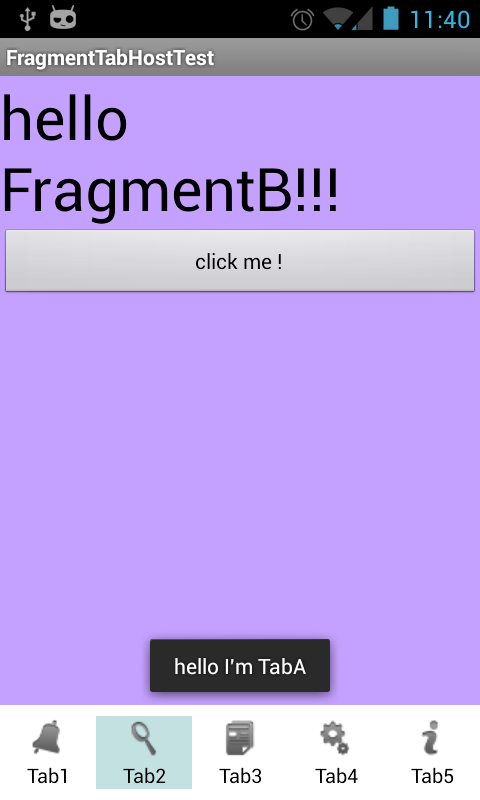
现在的情况是TabAFm中有个EditText,TabBFm中有个Button,MainActivity中有个变量“hello”
要做的是,切换到TabA,输入“I'm TabA”,切换到B,点击Button后,Toast显示“hello I'm TabA”
MainActivity中没什么好说的,就一个hello变量:
public String hello = "hello ";
TabAFm在布局文件tab_a.xml中加个EditText,设置个id就可以了
TabBFm中:
 @Override

     public void onActivityCreated(Bundle savedInstanceState) {

         super.onActivityCreated(savedInstanceState);

         System.out.println("BBBBBBBBBBB____onActivityCreated");

         this.getView().findViewById(R.id.clickme).setOnClickListener(new View.OnClickListener() {

             @Override

             public void onClick(View view) {

                 // 获得绑定的FragmentActivity

                 MainActivity activity = ((MainActivity)getActivity());

                 // 获得TabAFm的控件

                 EditText editText = (EditText) activity.fragments.get(0).getView().findViewById(R.id.edit);

                 Toast.makeText(activity, activity.hello + editText.getText(), Toast.LENGTH_SHORT).show();

             }

         });

     }
// 获得绑定的FragmentActivity

MainActivity activity = ((MainActivity)getActivity());
通过getActivity()即可得到Fragment所在的FragmentActivity
最终效果图:
demo下载地址:http://pan.baidu.com/s/1wxsIX
Android使用Fragment来实现TabHost的功能(解决切换Fragment状态不保存)以及各个Fragment之间的通信的更多相关文章
- Android使用Fragment来实现TabHost的功能
http://www.cnblogs.com/tiantianbyconan/p/3360938.html 好了,到此为止,我们已经用Fragment实现了类似TabHost的功能了,下面来看下各个F ...
- Android使用Fragment来实现ViewPager的功能(解决切换Fragment状态不保存)以及各个Fragment之间的通信
以下内容为原创,转载请注明:http://www.cnblogs.com/tiantianbyconan/p/3364728.html 我前两天写过一篇博客<Android使用Fragment来 ...
- 使用Fragment实现类似TabHost标签栏的效果
在前几天,我写了篇<Android TabHost的使用>简单的介绍了其使用的方法,但是在实现的时候发现TabHost已经被官方遗弃了.虽然我觉得TabHost还是多好用的(可能因为我这种 ...
- Android系列之Fragment(三)----Fragment和Activity之间的通信(含接口回调)
[声明] 欢迎转载,但请保留文章原始出处→_→ 生命壹号:http://www.cnblogs.com/smyhvae/ 文章来源:http://www.cnblogs.com/smyhvae/p/ ...
- Android 摇一摇之双甩功能
Android 摇一摇之双甩功能 最近做一个摇一摇的功能 网上相关代码很多 但是这次的需求有点奇葩 要求是摇两次才生效 看起来好像很简单 但真正要做遇到的问题还是很多 时间限制 机型灵敏性 摇动的方式 ...
- Android:简单实现ViewPager+TabHost+TabWidget实现导航栏导航和滑动切换
viewPager是v4包里的一个组件,可以实现滑动显示多个界面. android也为viewPager提供了一个adapter,此adapter最少要重写4个方法: public int getCo ...
- Android - Fragment (三)不同Fragment之间的通信
在Fragment的java文件中,可以使用getActivity()来获得调用它的activity, 然后再找到另一个Fragment,进行通信 getActivity().getFragmentM ...
- Android端IM应用中的@人功能实现:仿微博、QQ、微信,零入侵、高可扩展
本文由“猫爸iYao”原创分享,感谢作者. 1.引言 最近有个需求:评论@人(没错,就是IM聊天或者微博APP里的@人功能),就像下图这样: ▲ 微信群聊界面里的@人功能 ▲ QQ群聊界面里 ...
- android开发(35) fragment和actionbar组合使用。解决不触发onOptionsItemSelected的问题,获得actionbar 的默认 get icon
先说说我的使用场景: 我写了一个activity,使用了actionbar. 在这个activity中,有fragment,默认先打开一个 homeFragment,点击某个按钮会进入 detailF ...
随机推荐
- [New Portal]Windows Azure Virtual Machine (23) 使用Storage Space,提高Virtual Machine磁盘的IOPS
<Windows Azure Platform 系列文章目录> 注意:如果使用Azure Virtual Machine,虚拟机所在的存储账号建议使用Local Redundant.不建议 ...
- JAVA 设计模式 模板方法模式
定义 模板方法模式 (Template Method) 定义了一个操作中的算法的骨架,而将部分步骤的实现在子类中完成. 模板方法模式使得子类可以不改变一个算法的结构即可重定义该算法的某些特定步骤. 模 ...
- nagios监控流量脚本
需求是我们需要对服务器上的流量进行监控,网络上有个流传的check_traffic.sh,它需要被监控机开启snmp.但是感觉都使用上了nagios还要开snmp...有点斧子剪刀一起用的感觉,所以就 ...
- C#--静态函数成员
- 解决MVC EF Code First错误:Model compatibility cannot be checked because the EdmMetadata type was not included in the model.
Model compatibility cannot be checked because the EdmMetadata type was not included in the model. En ...
- 关于Response.Redirect和Server.Execute的区别
Server.Transfer("path")内部重定向请求,是服务器内部的接管,浏览器无法意识到这个接管的发生,浏览器地址栏也不会发生变化.而Response.Redirect( ...
- C# ~ 从 XML 到 Linq 到 Linq to XML
.XML 可扩展标记语言 (Extensible Markup Language), 标记 (markup) 是关键部分,是标准通用标记语言 (Standard Generalized Markup ...
- MongoDB管理工具的插件系统
MongoDB管理工具 MongoCola的开发已经进入第三个年头了. 官方对于C#驱动的投入不够导致了很多东西都必须自己实现,但是不管怎么样,工具现在已经很强大了. 最近准备着手插件系统的开发,简 ...
- 孙鑫MFC学习笔记7:对话框编程(上)
1.DoModal创建模态对话框 2.Create创建非模态对话框(需要用ShowWindow显示出来) 模态:对话框显示,程序会暂停,直到对话框关闭 非模态:对话框显示,程序继续执行 3.对于模态对 ...
- 获取Android版本信息和电话信息
Android的版本信息可以通过android.os.Build获得,电话信息可以通过TelephonyManager获得,代码如下: private void get_infor(){ sd ...