
分布式学习系列【dubbo入门实践】
分布式学习系列【dubbo入门实践】
dubbo架构
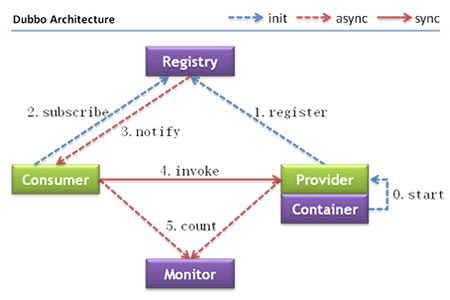
组成部分:provider,consumer,registry,monitor; provider,consumer注册,订阅类似于消息队列的注册订阅
一、环境安装
1、dubbo admin 管理控制台安装(Windows环境)
#下载dubbo-admin-2.5.3.war,部署到tomcat下,根据需要编辑WEB-INF/dubbo.properties文件:
dubbo.registry.address=zookeeper://127.0.0.1:2181
dubbo.admin.root.password=root
dubbo.admin.guest.password=guest
#dubbo admin 部署问题:版本2.5.3启动报错:Bean property 'URIType' is not writable or has an invalid
原因:使用了JDK1.8;
解决方法:将环境变量JAVA_HOME设置为JDK1.7;
2、zookeeper 安装
dubbo对注册中心实现了抽象,实现的注册中心有:ZooKeeper,Redis,Multicast;这里采用zookeeper进行演示。
下载zookeeper解压,在zookeeper->conf目录下复制一份zoo_sample.cfg为zoo.cfg,修改配置
添加配置:(默认不会自动创建,需要手动添加)
dataDir=D:\\zookeeper\\data
dataLogDir=D:\\zookeeper\\log
下载后windows下直接进入doc,进入zookeeper->bin目录运行zkServer.cmd命令;
可以用netstat -ano|findstr "2181"检查是否启动成功
   TCP 0.0.0.0: 0.0.0.0: LISTENING

  TCP 127.0.0.1: 127.0.0.1: ESTABLISHED

  TCP 127.0.0.1: 127.0.0.1: ESTABLISHED

  TCP [::]: [::]: LISTENING
也可用JPS查看:
 SmartGit

   Jps

   QuorumPeerMain

   Bootstrap
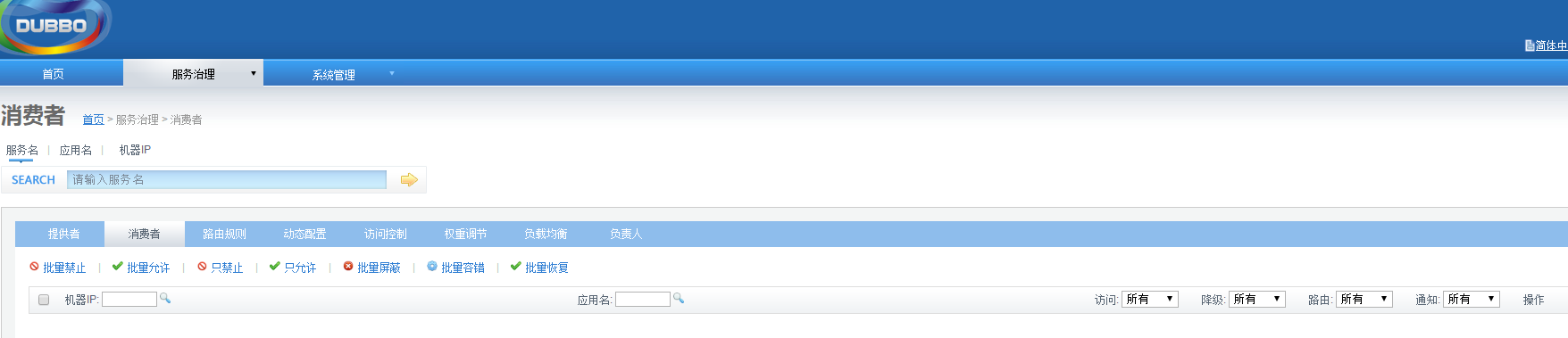
3、启动tomcat访问:localhost:8080
二、实践步骤
#创建服务接口
public interface DemoService {

    String sendMessage(String message);

}
#创建接口实现
public class DemoServiceImpl implements DemoService {

    @Override

    public String sendMessage(String message){

        System.out.println("this demoService get message:"+message);

        return "provirder return message success";

    }

}
#创建提供方spring配置文件provider.xml
<?xml version="1.0" encoding="UTF-8"?>

<beans xmlns="http://www.springframework.org/schema/beans"

       xmlns:xsi="http://www.w3.org/2001/XMLSchema-instance"

       xmlns:dubbo="http://code.alibabatech.com/schema/dubbo"

       xsi:schemaLocation="http://www.springframework.org/schema/beans        http://www.springframework.org/schema/beans/spring-beans.xsd        http://code.alibabatech.com/schema/dubbo        http://code.alibabatech.com/schema/dubbo/dubbo.xsd">

    <!-- 消费方应用名,用于计算依赖关系,不是匹配条件,不要与提供方一样 -->

    <dubbo:application name="dubbo-demo-test"  />

    <!-- 使用zookeeper注册中心暴露服务地址 -->

    <dubbo:registry address="zookeeper://127.0.0.1:2181" />

    <!-- 生成远程服务代理,可以和本地bean一样使用demoService -->

    <dubbo:reference id="demoService" interface="com.demo.DemoService" />

</beans>
#创建提供方启动程序:DemoProvider
public class DemoProvider {

    public static void main(String[] args) throws IOException {

        ClassPathXmlApplicationContext context = new ClassPathXmlApplicationContext("provider.xml");

        context.start();

        System.out.println("provider started ...");

        System.in.read();

    }

}
#创建消费方spring配置文件consumer.xml
<?xml version="1.0" encoding="UTF-8"?>

<beans xmlns="http://www.springframework.org/schema/beans"

       xmlns:xsi="http://www.w3.org/2001/XMLSchema-instance"

       xmlns:dubbo="http://code.alibabatech.com/schema/dubbo"

       xsi:schemaLocation="http://www.springframework.org/schema/beans        http://www.springframework.org/schema/beans/spring-beans.xsd        http://code.alibabatech.com/schema/dubbo        http://code.alibabatech.com/schema/dubbo/dubbo.xsd">

    <!-- 消费方应用名,用于计算依赖关系,不是匹配条件,不要与提供方一样 -->

    <dubbo:application name="dubbo-demo-test"  />

    <!-- 使用zookeeper注册中心暴露服务地址 -->

    <dubbo:registry address="zookeeper://127.0.0.1:2181" />

    <!-- 生成远程服务代理,可以和本地bean一样使用demoService -->

    <dubbo:reference id="demoService" interface="com.demo.DemoService" />

</beans>
#创建消费方方启动程序:DemoConsumer
public class DemoConsumer {

    public static void main(String[] args) {

        ClassPathXmlApplicationContext context = new ClassPathXmlApplicationContext("consumer.xml");

        context.start();

        DemoService demoService = (DemoService) context.getBean("demoService");

        String returnMessage = demoService.sendMessage("consumer send message: hello my first dubbo service");

        System.out.println("provider return message:"+returnMessage);

    }

}
#添加项目maven依赖:
分别加入spring IOC,zkClient,dubbo依赖
<dependency>

    <groupId>org.springframework</groupId>

    <artifactId>spring-core</artifactId>

    <version>3.0.5.RELEASE</version>

</dependency>

<dependency>

    <groupId>org.springframework</groupId>

    <artifactId>spring-context</artifactId>

    <version>3.0.5.RELEASE</version>

</dependency>

<dependency>

    <groupId>com.alibaba</groupId>

    <artifactId>dubbo</artifactId>

    <version>2.5.3</version>

</dependency>

<dependency>

    <groupId>com.github.sgroschupf</groupId>

    <artifactId>zkclient</artifactId>

    <version>0.1</version>

</dependency>
#启动提供方服务,消费方进行调用
运行启动提供方DemoProvider,启动后进入待服务状态

观察dubbo admin发现已经刚才的启动服务在zookeepr成功注册
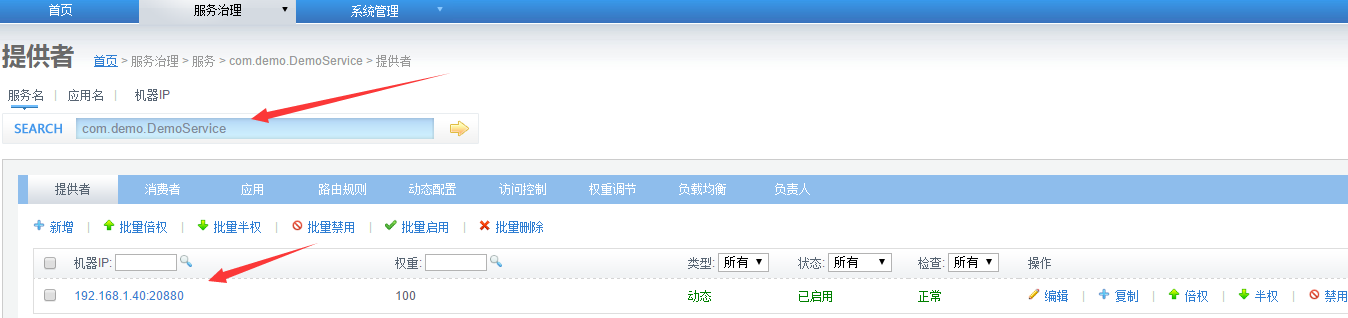
这时消费方可以进行调用,运行DemoConsumer
此时服务端收到请求:

调用方收到响应:

附上示例代码: http://files.cnblogs.com/files/yuxuan/dubbo-demo.rar
分布式学习系列【dubbo入门实践】的更多相关文章
- 分布式服务框架dubbo入门实例
dubbo是一个分布式的服务架构,可直接用于生产环境作为SOA服务框架. 官网首页:http://dubbo.io/ ,官方用户指南 http://dubbo.io/User+Guide-zh.htm ...
- 最火的分布式 HTAP 数据库 TiDB - 入门实践教程
偶然在某篇博客看到了 TiDB,一个融合 OLTP 和 OLAP 的分布式开源数据库, GitHub 上 Star 很多,然后 watch 了,发现 commit 和 pull request 一直都 ...
- 阿里分布式开源框架DUBBO 入门+ 进阶+ 项目实战视频教程
史诗级Java/JavaWeb学习资源免费分享 欢迎关注我的微信公众号:"Java面试通关手册"(坚持原创,分享各种Java学习资源,面试题,优质文章,以及企业级Java实战项目回 ...
- 分布式服务框架Dubbo入门案例和项目源码
本项目源代码:http://download.csdn.net/detail/fansunion/9498406 Dubbo是一个分布式服务框架,致力于提供高性能和透明化的RPC远程服务调用方案, 是 ...
- MongoDB学习系列(1)--入门介绍
MongoDB是一款为Web应用程序设计的面向文档结构的数据库系统. MongoDB贡献者是10gen公司.地址:http://www.10gen.com 1.MongoDB主要特性: 1.1文档数据 ...
- shell脚本学习系列之一---入门
参考:http://me.52fhy.com/shell-book/ 待后续整理...
- SpringCloud系列之分布式配置中心极速入门与实践
SpringCloud系列之分布式配置中心极速入门与实践 @ 目录 1.分布式配置中心简介 2.什么是SpringCloud Config? 3.例子实验环境准备 4.Config Server代码实 ...
- Dubbo学习系列之八(分布式事务之MQ方案)
自从小王玩起了微服务,发现微服务果然很强大,好处真是太多,心中暗喜,然而,却也遇到了分布式中最棘手的问题:分布式事务.小王遍访各路神仙,也无个完美开源解决方案,当然,也有些实际可行的手法,虽不算完美, ...
- Dubbo学习系列之十五(Seata分布式事务方案TCC模式)
上篇的续集. 工具: Idea201902/JDK11/Gradle5.6.2/Mysql8.0.11/Lombok0.27/Postman7.5.0/SpringBoot2.1.9/Nacos1.1 ...
随机推荐
- Asp.net Core中使用Session
前言 2017年就这么悄无声息的开始了,2017年对我来说又是特别重要的一年. 元旦放假在家写了个Asp.net Core验证码登录, 做demo的过程中遇到两个小问题,第一是在Asp.net Cor ...
- 闲来无聊,研究一下Web服务器 的源程序
web服务器是如何工作的 1989年的夏天,蒂姆.博纳斯-李开发了世界上第一个web服务器和web客户机.这个浏览器程序是一个简单的电话号码查询软件.最初的web服务器程序就是一个利用浏览器和web服 ...
- 这些.NET开源项目你知道吗?.NET平台开源文档与报表处理组件集合(三)
在前2篇文章这些.NET开源项目你知道吗?让.NET开源来得更加猛烈些吧 和这些.NET开源项目你知道吗?让.NET开源来得更加猛烈些吧!(第二辑)中,大伙热情高涨.再次拿出自己的私货,在.NET平台 ...
- Android性能优化之巧用软引用与弱引用优化内存使用
前言: 从事Android开发的同学都知道移动设备的内存使用是非常敏感的话题,今天我们来看下如何使用软引用与弱引用来优化内存使用.下面来理解几个概念. 1.StrongReference(强引用) 强 ...
- Android探索之AIDL实现进程间通信
前言: 前面总结了程序间共享数据,可以使用ContentProvider也可以使用SharedPreference,那么进程间怎么共享内存呢?Android系统中的进程之间不能共享内存,因此,需要提供 ...
- 谈谈一些有趣的CSS题目(九)-- 巧妙的实现 CSS 斜线
开本系列,谈谈一些有趣的 CSS 题目,题目类型天马行空,想到什么说什么,不仅为了拓宽一下解决问题的思路,更涉及一些容易忽视的 CSS 细节. 解题不考虑兼容性,题目天马行空,想到什么说什么,如果解题 ...
- RabbitMq应用一的补充(RabbitMQ的应用场景)
直接进入正题. 一.异步处理 场景:发送手机验证码,邮件 传统古老处理方式如下图 这个流程,全部在主线程完成,注册->入库->发送邮件->发送短信,由于都在主线程,所以要等待每一步完 ...
- Android手机相册的布局
实现类似下面的这种布局的方法
- git init和git init -bare区别
1 Git init 和 git init –bare 的区别 用"git init"初始化的版本库用户也可以在该目录下执行所有git方面的操作.但别的用户在将更新push上来的 ...
- 真正的汉化-PowerDesigner 16.5 汉化
一.背景 经常使用PowerDesigner,之前使用15版本,后来16出来后,就一直在使用16,不过一直是英文.一些同事对使用英文版总显示有些吃力. 遍寻百度.必应,都没有找到真正的针对版本16的汉 ...