
Matlab 进阶学习记录
Matlab 进阶学习记录
1. conf_proposal = proposal_config('image_means', model.mean_image, 'feat_stride', model.feat_stride);
function conf = proposal_config(varargin)

% conf = proposal_config(varargin)

% --------------------------------------------------------

% Faster R-CNN

% Copyright (c) 2015, Shaoqing Ren

% Licensed under The MIT License [see LICENSE for details]

% --------------------------------------------------------

    ip = inputParser ;

    %% training

    ip.addParamValue('use_gpu',         gpuDeviceCount > 0, ...

                                                        @islogical);

    % whether drop the anchors that has edges outside of the image boundary

    ip.addParamValue('drop_boxes_runoff_image', ...

                                        true,           @islogical);

    % Image scales -- the short edge of input image

    ip.addParamValue('scales',          600,            @ismatrix);

    % Max pixel size of a scaled input image

    ip.addParamValue('max_size',        1000,           @isscalar);

    % Images per batch, only supports ims_per_batch = 1 currently

    ip.addParamValue('ims_per_batch',   1,              @isscalar);

    % Minibatch size

    ip.addParamValue('batch_size',      256,            @isscalar);

    % Fraction of minibatch that is foreground labeled (class > 0)

    ip.addParamValue('fg_fraction',     0.5,           @isscalar);

    % weight of background samples, when weight of foreground samples is

    % 1.0

    ip.addParamValue('bg_weight',       1.0,            @isscalar);

    % Overlap threshold for a ROI to be considered foreground (if >= fg_thresh)

    ip.addParamValue('fg_thresh',       0.7,            @isscalar);

    % Overlap threshold for a ROI to be considered background (class = 0 if

    % overlap in [bg_thresh_lo, bg_thresh_hi))

    ip.addParamValue('bg_thresh_hi',    0.3,            @isscalar);

    ip.addParamValue('bg_thresh_lo',    0,              @isscalar);

    % mean image, in RGB order

    ip.addParamValue('image_means',     128,            @ismatrix);

    % Use horizontally-flipped images during training ?

    ip.addParamValue('use_flipped',     true,           @islogical);

    % Stride in input image pixels at ROI pooling level (network specific)

    % 16 is true for {Alex,Caffe}Net, VGG_CNN_M_1024, and VGG16

    ip.addParamValue('feat_stride',     16,             @isscalar);

    % train proposal target only to labled ground-truths or also include

    % other proposal results (selective search, etc.)

    ip.addParamValue('target_only_gt',  true,           @islogical);

    % random seed

    ip.addParamValue('rng_seed',        6,              @isscalar);

    %% testing

    ip.addParamValue('test_scales',     600,            @isscalar);

    ip.addParamValue('test_max_size',   1000,           @isscalar);

    ip.addParamValue('test_nms',        0.3,            @isscalar);

    ip.addParamValue('test_binary',     false,          @islogical);

    ip.addParamValue('test_min_box_size',16,            @isscalar);

    ip.addParamValue('test_drop_boxes_runoff_image', ...

                                        false,          @islogical);

    ip.parse(varargin{:});

    conf = ip.Results;

    assert(conf.ims_per_batch == 1, 'currently rpn only supports ims_per_batch == 1');

    % if image_means is a file, load it...

    if ischar(conf.image_means)

        s = load(conf.image_means);

        s_fieldnames = fieldnames(s);

        assert(length(s_fieldnames) == 1);

        conf.image_means = s.(s_fieldnames{1});

    end

end
The inputParser object allows you to manage inputs to a function by creating an input scheme. To check the input, you can define validation functions for required arguments, optional arguments, and name-value pair arguments. Optionally, you can set properties to adjust the parsing behavior, such as handling case sensitivity, structure array inputs, and inputs that are not in the input scheme.
After calling the parse method to parse the inputs, the inputParser saves names and values of inputs that match the input scheme (stored in Results), names of inputs that are not passed to the function and, therefore, are assigned default values (stored in UsingDefaults), and names and values of inputs that do not match the input scheme (stored in Unmatched).
Check the validity of required and optional function inputs.

Create a custom function with required and optional inputs in the file findArea.m.

function a = findArea(width,varargin)

   p = inputParser;

   defaultHeight = 1;

   defaultUnits = 'inches';

   defaultShape = 'rectangle';

   expectedShapes = {'square','rectangle','parallelogram'};

   addRequired(p,'width',@isnumeric);

   addOptional(p,'height',defaultHeight,@isnumeric);

   addParameter(p,'units',defaultUnits);

   addParameter(p,'shape',defaultShape,...

                 @(x) any(validatestring(x,expectedShapes)));

   parse(p,width,varargin{:});

   a = p.Results.width .* p.Results.height;

The input parser checks whether width and height are numeric, and whether the shape matches a string in cell array expectedShapes. @ indicates a function handle, and the syntax @(x) creates an anonymous function with input x.

Call the function with inputs that do not match the scheme. For example, specify a nonnumeric value for the width input:

findArea('text')

Error using findArea (line 14)

The value of 'width' is invalid. It must satisfy the function: isnumeric.

Specify an unsupported value for shape:

findArea(4,'shape','circle')

Error using findArea (line 14)

The value of 'shape' is invalid. Expected input to match one of these strings:

square, rectangle, parallelogram

The input, ''circle'', did not match any of the valid strings.
http://www.cnblogs.com/heleifz/p/matlab-function-handle.html
2. assert 语句的使用:
assert: Generate an error when a condition is violated.
assert(EXPRESSION, ERRMSG) evaluates EXPRESSION and, if it is false, displays the string contained in ERRMSG. When ERRMSG is the last input to assert, MATLAB displays it literally, without performing any substitutions on the characters in ERRMSG.
例如:如果 contion 不成立,则会输出对应的:提示错误信息。
    assert(mod(conf.batch_size, num_images) == 0, ...

        sprintf('num_images %d must divide BATCH_SIZE %d', num_images, conf.batch_size));
3. permute 函数:
Permute array dimensions.
B = permute(A,ORDER) rearranges the dimensions of A so that they
are in the order specified by the vector ORDER.
  重新安排矩阵的x,y,z , 在二维中就相当于把x,y 对换,在三维中相当于可以把三个坐标的位置互换。

比如A =

A(:,:,1)=repmat(1,3,3);

A(:,:,2)=repmat(2,3,3);

A(:,:,3)=repmat(3,3,3);

disp(A);

A(:,:,1) =

     1     1     1

     1     1     1

     1     1     1

A(:,:,2) =

     2     2     2

     2     2     2

     2     2     2

A(:,:,3) =

     3     3     3

     3     3     3

     3     3     3

At = permute(A,[3,2,1]);

disp(At);

At(:,:,1) =

     1     1     1

     2     2     2

     3     3     3

At(:,:,2) =

     1     1     1

     2     2     2

     3     3     3

At(:,:,3) =

     1     1     1

     2     2     2

     3     3     3

permute(A,[3,2,1])
4. cellfun 函数:
cellfun: Apply a function to each cell of a cell array. A = cellfun(FUN, C) applies the function specified by FUN to the contents of each cell of cell array C, and returns the results in the array A.
5. 从列表 A 中去搜索列表 B 中是否存在有相交元素,即:求 A and B 的差。
select = importdata('/home/wangxiao/Documents/Sun-80-dataset/VGG_16/iter_1/SUN80_50%_selected_without_HD.txt');

Unlabel = importdata('/home/wangxiao/Documents/Sun-80-dataset/iter_1/Sun_100_UnLabel_Train_0.5_.txt');

fid = fopen('/home/wangxiao/Documents/Sun-80-dataset/VGG_16/iter_1/SUN80_50%_Unselected_data.txt', 'a') ;

selected_list = [] ;

unselected_list = [] ;

for i = 1:size(Unlabel.data, 1)

    disp(['deal with: ', num2str(i) , '/' , num2str(size(Unlabel.data, 1))]) ;

    unlabel_name = Unlabel.textdata{i, 1};  % Unlabel image name

    unlabel_label = Unlabel.data(i, 1) ;    % Unlabel image label

    count = 0;

    for j = 1:size(select.textdata, 1)

        select_name = select.textdata{j, 1};  % selected image name

        if strcmp(unlabel_name, select_name) % if have selected, jump it.

            selected_list = [selected_list; unlabel_name];

            % break;

        else

            count = count + 1;

        end

        if count == size(select.textdata, 1)

            fprintf(fid, '%s ', num2str(unlabel_name));

            fprintf(fid, '%s \n', num2str(unlabel_label));

        end

    end

end
6. containers.Map() 的用法
matlab中的containers.Map()有点类似于C++ STL中的map容器,具有key/value映射的功能.
num = containers.Map({1, 2, 3}, {'one', 'two', 'three'})
myMap = containers.Map(KEYS, VALUES) constructs a Map object myMap that contains one or more keys and a value for each of these keys, as specified in the KEYS and VALUES arguments.
例如:从 Map 上提取一个值:myValue = myMap(key) ;
修改键值对 (key-values pairs): myMap(key) = newValue ;
增加一个新的键值对:myMap(key) = newValue ;
可以通过 remove 的方法将 values 删除掉。
7. try catch end 机制:
该机制可以防止由于程序中可能出现的错误而终止运行的情况:
try
ld = load(anchor_cache_file) ;
anchors = ld.anchors ;
catch
base_anchor = [1, 1, opts.base_size, opts.base_size] ;
ratio_anchors = ratio_jitter(base_anchor, opts.ratios) ;
end
8. About change the gray image into 3 channel RGB image:
 clc; close all; clear all;

 image = imread('/home/wangxiao/Documents/mnist_dataset/mnist_0_.png');

 image = im2double(image);

 image = double(image);

 width = size(image, ); height = size(image, );

 synthetic = zeros([, ]);

 for i = :size(image, )

 for j = :size(image, )

 synthetic(i, j) = image(i, j);

 synthetic(i, j) = image(i, j);

 synthetic(i, j) = image(i, j);

 end

 end

 synthetic = im2uint8(synthetic);

 imshow(synthetic);

 figure; imshow(image);

 %%

 synthetic2 = zeros([, , ]);

 for i = :size(image, )

 for j = :size(image, )

 synthetic2(i, j, ) = image(i, j, );

 synthetic2(i, j, ) = image(i, j, );

 synthetic2(i, j, ) = image(i, j, );

 end

 end

 synthetic2 = im2uint8(synthetic2);

 imshow(synthetic2);
synthetic is a single channel image, and synthetic2 is a three channel image.
Another Solution is:
% if grayscale repeat one channel to match filters size
if(size(im, 3)==1)
im = repmat(im, [1 1 3]);
end
9. Divided the image into specific patches using matlab function: mat2cell
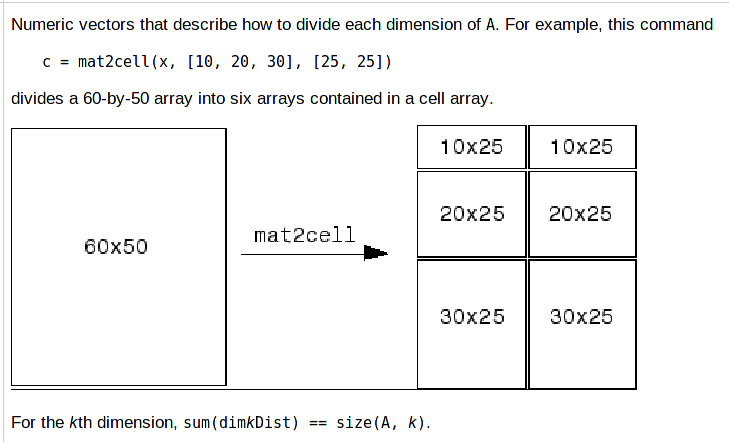
This is a really cool function. For example, you read one image and divide it into 3*3 = 9 patches, and we assume the resolution of the image is: 100*100, you just need set the vectors M = [20, 30, 50]; N = [20, 20, 60] ;
Actually, as long as the sum of three values you set equal to 100 (here is 20, 30, 50), it will be ok. The other vector N have the same reason.
10. Read images from disks and save these frames into avi video files.
 %% change the frame to videos to save.

 clc; close all; clear all;

 path = '/home/wangxiao/Downloads/files/Visual_Tracking/MDNet-CVPR2016/saved_tracking_results_MDNet_OTB100/Biker/';

 files = dir([path, '*.png']);

 count = ;

 for i=:size(files, )

     xxx =  strtok(files(i).name, 'M');

     name = xxx(:end-);

     image = imread([path, files(i).name]);

     index = sprintf('%04d', str2double(name));

     newName = [ index,'.jpg'];

 %    a = sprintf('%04d',i);

     imwrite(image, [path, newName]);

 end

 disp('==>> deal with image done !')

 jpgFiles = dir([path, '*.jpg']);

 videoName = '/home/wangxiao/Videos/Biker_MDNet_OTB100.avi';

 fps = ; %帧率

 startFrame = ; %从哪一帧开始

 endFrame = size(jpgFiles, ); %哪一帧结束

 %生成视频的参数设定

 aviobj=VideoWriter(videoName);  %创建一个avi视频文件对象,开始时其为空

 aviobj.FrameRate=fps;

 open(aviobj);%Open file for writing video data

 for i=startFrame:endFrame

     frames = imread([path, jpgFiles(i).name]);

     frames = im2frame(frames);

     writeVideo(aviobj, frames);

 end

 close(aviobj);

 disp('==>> saved the video !')
11. Matlab中save实现保存数据到mat文件的正确使用 参考:http://blog.csdn.net/fx677588/article/details/52836348
 . 普通保存在当前文件夹下

   save matPath.mat A B;   % A B都是生成的数据矩阵

   需要注意这种方式只能将数据保存在当前文件夹下的第一个参数文件中,下面这样写并不能将数据保存到你想要的文件夹中的。

   saldir = './result/';

   savePath = [saldir imnames(len).name(:end-) '_KSD'];

   save savePath A;

   上面程序也只能实现在当前文件夹下生成savePath.mat文件,然后数据保存到该文件中。并不能保存到需要的文件夹中。正确的写法是下面的方式。

 . 保留数据到其他文件夹下

   saldir = './result/';

   savePath = [saldir imnames(len).name(:end-) '_KSD' '.mat'];

   save(savePath,'A');  % 保存到其他文件夹的写法

     这里也需要注意,保存的数据矩阵,即save函数的第二个参数不可以忘记单引号。
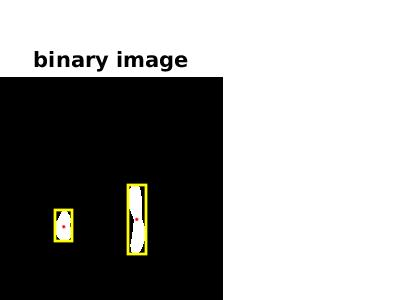
12. 根据 attention maps 置信度的高低,生成对应的 bounding box :
clc;close all;clear all;

Img=imread('/home/wangxiao/Documents/files/Visual_Tracking/MDNet-CVPR2016/MDNet-master/attentionMap/Basketball/0001.png');

if ndims(Img)==

    I=rgb2gray(Img);

else

    I=Img;

end

I=im2bw(I,graythresh(I));

[m,n]=size(I);

imshow(I);title('binary image');

txt=get(gca,'Title');

set(txt,'fontsize',);

L=bwlabel(I);

stats=regionprops(L,'all');

set(gcf,'color','w');

set(gca,'units','pixels','Visible','off');

q=get(gca,'position');

q()=;%设置左边距离值为零

q()=;%设置右边距离值为零

set(gca,'position',q);

for i=:length(stats)

    hold on;

    rectangle('position',stats(i).BoundingBox,'edgecolor','y','linewidth',);

    temp = stats(i).Centroid;

    plot(temp(),temp(),'r.');

    drawnow;

end

frame=getframe(gcf,[,,n,m]);

im=frame2im(frame);

imwrite(im,'a.jpg','jpg');%可以修改保存的格式
Python Implementation: (from: https://www.jianshu.com/p/7693222523c0 )
import numpy as np

import scipy.ndimage as ndi

from skimage import measure,color

import matplotlib.pyplot as plt

#编写一个函数来生成原始二值图像

def microstructure(l=256):

    n = 5

    x, y = np.ogrid[0:l, 0:l]  #生成网络

    mask = np.zeros((l, l))

    generator = np.random.RandomState(1)  #随机数种子

    points = l * generator.rand(2, n**2)

    mask[(points[0]).astype(np.int), (points[1]).astype(np.int)] = 1

    mask = ndi.gaussian_filter(mask, sigma=l/(4.*n)) #高斯滤波

    return mask > mask.mean()

data = microstructure(l=128)*1 #生成测试图片

labels=measure.label(data,connectivity=2)  #8连通区域标记

dst=color.label2rgb(labels)  #根据不同的标记显示不同的颜色

print('regions number:',labels.max()+1)  #显示连通区域块数(从0开始标记)

fig, (ax1, ax2) = plt.subplots(1, 2, figsize=(8, 4))

ax1.imshow(data, plt.cm.gray, interpolation='nearest')

ax1.axis('off')

ax2.imshow(dst,interpolation='nearest')

ax2.axis('off')

fig.tight_layout()

plt.show()
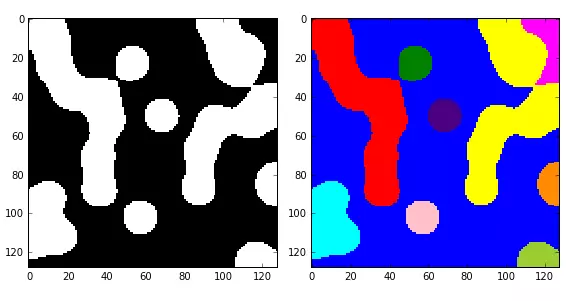
如果想分别对每一个连通区域进行操作,比如计算面积、外接矩形、凸包面积等,则需要调用measure子模块的regionprops()函数。该函数格式为:
skimage.measure.regionprops(label_image)
返回所有连通区块的属性列表,常用的属性列表如下表:
属性名称    类型  描述

area    int     区域内像素点总数

bbox    tuple   边界外接框(min_row, min_col, max_row, max_col)

centroid    array       质心坐标

convex_area     int     凸包内像素点总数

convex_image    ndarray     和边界外接框同大小的凸包

coords  ndarray     区域内像素点坐标

Eccentricity    float   离心率

equivalent_diameter     float   和区域面积相同的圆的直径

euler_number    int     区域欧拉数

extent      float   区域面积和边界外接框面积的比率

filled_area     int     区域和外接框之间填充的像素点总数

perimeter   float   区域周长

label   int     区域标记
13. 将 video 切割为 frame:
%% Input 2 videos and divide it into frames

clc; clear all; close all;

infraredvideo = 'C:\Users\王逍\Desktop\跟踪数据集\videos\';

savePath = 'C:\Users\王逍\Desktop\跟踪数据集\frames\';

% devide the infrared video into infrared images

videoList1=dir(fullfile(infraredvideo,'*.mp4'));

video_num=length(videoList1);

for j=1:video_num

    infraredOutPath = [savePath, videoList1(j).name, '\'];

    mkdir(infraredOutPath);

    frames = VideoReader([strcat(infraredvideo,videoList1(j).name)]);

    numFrames =frames.NumberOfFrames;

    for k = 1 : numFrames

        disp(['==>> processing video ',num2str(k),' frames, please waiting....']);

        frame = read(frames,k);

        frame = imresize(frame, [480, 640]);

        % figure(1); imshow(frame);

        imwrite(frame, [infraredOutPath, sprintf('%08d.png',k)]);

    end

end
14. divide the total attention maps according to given video frames such as TC128.
 %%

 clc; close all; clear all;

 path = '/media/wangxiao/E1F171026416B63F/tracking_benchmark/Temple-color-128/predicted_attentionMaps-v1/';

 attentionfiles = dir([path, '*.png']);

 videoPath = '/media/wangxiao/E1F171026416B63F/tracking_benchmark/Temple-color-128/videos/';

 videoFiles = dir(videoPath);

 videoFiles = videoFiles(:end);

 total = ;

 savepath = '/media/wangxiao/E1F171026416B63F/tracking_benchmark/Temple-color-128/attentionMaps_per_video-v1/';

 for i=:size(videoFiles, )

     numCount = ;

     videoName = videoFiles(i).name;

     newVideoPath = [videoPath videoName '/img/'];

     videoframes = dir([newVideoPath, '*.jpg']);

     savePath = [savepath videoName '/'];

     mkdir(savePath);

     disp(['==>> deal with video file: ', num2str(i)]);

 %     total = total + size(videoframes, );

     for j=:size(videoframes, )

         if numCount < size(videoframes, )

             total = total + ;

             numCount = numCount + ;

             img = imread([path attentionfiles(total).name]);

             % figure(); imshow(img);

             temp = sprintf('%04d', numCount);

             saveName = [temp '.png'];

             imwrite(img, [savePath saveName]);

         else

             break;

         end

     end

 end
15. count the image list into txt files.
 %%

 market1501_path = '/home/wangxiao/Downloads/person-ReID/open-reid/examples/data/market1501/';

 txtsavePath = '/home/wangxiao/Downloads/person-ReID/open-reid/examples/data/market1501/image_txt_list/';

 bounding_box_test = [market1501_path 'bounding_box_test/'];

 bounding_box_train = [market1501_path 'bounding_box_train/'];

 gt_bbox = [market1501_path 'gt_bbox/'];

 gt_query = [market1501_path 'gt_query/'];

 images = [market1501_path 'images/'];

 query = [market1501_path 'query/'];

 % #####################

 bounding_box_test_files = dir([bounding_box_test, '*.jpg']);

 bounding_box_train_files = dir([bounding_box_train, '*.jpg']);

 gt_bbox_files = dir([gt_bbox, '*.jpg']);

 gt_query_files = dir([gt_query, '*.jpg']);

 images_files = dir([images, '*.jpg']);

 query_files = dir([query, '*.jpg']);

 %% image files I

 fid = fopen([txtsavePath 'bounding_box_test_files_image_list.txt'], 'w');

 for i=:size(bounding_box_test_files, )

     imgName = bounding_box_test_files(i).name;

     fprintf(fid, '%s \n', imgName);

 end

 fclose(fid);

 disp('==>> done I');

 %% image files II

 fid = fopen([txtsavePath 'bounding_box_train_files_image_list.txt'], 'w');

 for i=:size(bounding_box_train_files, )

     imgName = bounding_box_train_files(i).name;

     fprintf(fid, '%s \n', imgName);

 end

 fclose(fid);

 disp('==>> done II');

 %% image files III

 fid = fopen([txtsavePath 'gt_bbox_files_image_list.txt'], 'w');

 for i=:size(gt_bbox_files, )

     imgName = gt_bbox_files(i).name;

     fprintf(fid, '%s \n', imgName);

 end

 fclose(fid);

 disp('==>> done III');

 %% image files IV

 fid = fopen([txtsavePath 'gt_query_files_image_list.txt'], 'w');

 for i=:size(gt_query_files, )

     imgName = gt_query_files(i).name;

     fprintf(fid, '%s \n', imgName);

 end

 fclose(fid);

 disp('==>> done IV');

 %% image files V

 fid = fopen([txtsavePath 'images_files_image_list.txt'], 'w');

 for i=:size(images_files, )

     imgName = images_files(i).name;

     fprintf(fid, '%s \n', imgName);

 end

 fclose(fid);

 disp('==>> done V');

 %% image files VI

 fid = fopen([txtsavePath 'query_files_image_list.txt'], 'w');

 for i=:size(query_files, )

     imgName = query_files(i).name;

     fprintf(fid, '%s \n', imgName);

 end

 fclose(fid);

 disp('==>> done VI');
16. load json files using matlab code.
this used package from: http://blog.csdn.net/sophia_xw/article/details/70141208
unzip this file and add path to matlab like this:
clear all; clc

addpath('/home/wangxiao/jsonlab-1.5/jsonlab-1.5');

fname='results.json';

jsonData=loadjson(fname);
17. 伪彩色图像的生成:
%%

clc; close all; clear all;

path = '\MotorRolling\';

files = dir([path, '*.png']);

savePath = '\fakeColor_MotorRolling\';

ori_img_path = '\Benchmark\MotorRolling\img\';

ori_img = imread([ori_img_path, '0001.jpg']);

oriFiles = dir([ori_img_path, '*.jpg']);

height = size(ori_img, );

width = size(ori_img, );

for img_idex =:length(files)

    im = imread([path, files(img_idex).name]);

    originalImage = imread([ori_img_path, oriFiles(img_idex).name]);

%     for idx =:size(im, )

%         for jdx = :size(im, )

%                if im(idx, jdx) <= ;

%                    im(idx, jdx) = ;

%                end

%         end

%     end

    I=double(im);

    [m,n]=size(I);

    L=;

    for i=:m

        for j=:n

            if I(i,j)<=L/

                R(i,j)=;

                G(i,j)=*I(i,j);

                B(i,j)=L;

            else if I(i,j)<=L/

                    R(i,j)=;

                    G(i,j)=L;

                    B(i,j)=-*I(i,j)+*L;

                else if I(i,j)<=*L/

                        R(i,j)=*I(i,j)-*L;

                        G(i,j)=L;

                        B(i,j)=;

                    else

                        R(i,j)=L;

                        G(i,j)=-*I(i,j)+*L;

                        B(i,j)=;

                    end

                end

            end

        end

    end

    for i=:m

        for j=:n

            rgbim(i,j,)=R(i,j);

            rgbim(i,j,)=G(i,j);

            rgbim(i,j,)=B(i,j);

        end

    end

    rgbim=rgbim/;

%     figure;

%     subplot(,,);

%     imshow(gray);

%     subplot(,,);

    fake_color_img = imresize(rgbim, [height, width]);

    imshow(fake_color_img);

    imwrite(fake_color_img, [savePath, oriFiles(img_idex).name]);

    img_idex

end

18. frame to video transformation
%%

clc; close all; clear all;

videoPath='\demo_videos\demo_Skater2\';

salVideo = '\Benchmark\Skater2\img\';

resultsPath = '\saved_figure_tracking_results\Skater2\v\';

file=dir([videoPath,'*.jpg']);

file_=dir([salVideo,'*.jpg']);

resultsFiles = dir([resultsPath, '*.jpg']);

writerObject = VideoWriter('OUR_Skater2.avi');

writerObject.FrameRate =25; %writerObject.Quality = 50;

open( writerObject );

Num= length(file);

for k =1 : Num

    trackingResults = imread([resultsPath, resultsFiles(k).name]);

    disp(['processing the ',num2str(k),'/',num2str(Num),' frames, please waiting....']);

    frame_1 = imread([videoPath,file(k).name]);

    frame_222 = imread([salVideo,file_(k).name]);

    frame_2 = zeros(size(frame_222, 1), size(frame_222, 2), 3);

    if size(frame_222, 3) == 1

        frame_2(:,:,1) =  frame_222;

        frame_2(:,:,1) =  frame_222;

        frame_2(:,:,1) =  frame_222;

    end

    frame_2 = uint8(frame_2);

    frame_3 = frame_1*0.5+frame_2*0.5;

    trackingResults = imresize(trackingResults, [size(frame_2, 1), size(frame_2, 2)]);

    fullframe = [ frame_2, frame_3, trackingResults ];

    writeVideo( writerObject, fullframe );

end

close( writerObject );
19. video to frame transformation:
clear all;close all;

%% video

videoPath='.\2\';

outPath='.\2\';

T=[1.72844 0.0692766 -293

    -0.0692766 1.72844 -94

    0 0 1];

tform = maketform('affine', T');

videoList=dir(fullfile(videoPath,'*.avi'));

video_num=length(videoList);

for j=1:video_num

    frames = VideoReader (strcat(videoPath,videoList(j).name));

    numFrames =frames.NumberOfFrames;

    for k = 1 : numFrames

        disp(['processing the ',num2str(k),' frames, please waiting....']);

        frame = read(frames,k);

        transformFrame = imtransform(frame,tform,'XData',[1 320], 'YData',[1 240]);

        %             frame=imresize(frame,[288,384]);

        imwrite(transformFrame,[outPath,sprintf('%08d.png',k)]);

    end

end
20. Matlab load json files and save it into txt file:
%%

clc; close all; clear all; warning off;

addpath('E:\Matlab2018\jsonlab-1.5\jsonlab-1.5');

oriVideoPath = 'I:\Tracking-Dataset\Video_Labeled_set\';

savePath = 'E:\dataset_processsed_data\';

videoFiles = dir(oriVideoPath);

videoFiles = videoFiles(:end);

for videoIDX =:size(videoFiles, )

    videoName = videoFiles(videoIDX).name;

    videoPath = [oriVideoPath videoName '\'];

    video_imgPath = [videoPath '*.png'];

    video_imgFiles = dir(video_imgPath);

    saveImage_path = [savePath videoName '\imgs\'];

    mkdir(saveImage_path);

    anno_files = dir(videoPath);

    anno_name = anno_files( length(anno_files)).name;

    anno_path = [videoPath anno_name '\'];

    annoFiles = dir(anno_path);

    annoFiles = annoFiles(:end);

    gt_txtFiles = fopen([savePath videoName '\groundtruth.txt'], 'w');

    for imgIDX =:size(video_imgFiles, )

        disp(['==>> video ', num2str(videoIDX), '\', num2str(size(videoFiles, 1)), ' img ', num2str(imgIDX), '\', num2str(size(video_imgFiles, 1))]);

        image = imread([videoPath video_imgFiles(imgIDX).name]);

        imageIndex = sprintf('%05d', imgIDX);

        newImgName = [num2str(imageIndex) '.png'] ;

        imwrite(image, [saveImage_path newImgName]);

        jsonFIle_path = [anno_path  annoFiles(imgIDX).name];

        json2data = loadjson(jsonFIle_path);

        BBox = json2data.outputs.object{, }.bndbox;

        x1 = BBox.xmin;

        y1 = BBox.ymin;

        w = BBox.xmax - BBox.xmin;

        h = BBox.ymax - BBox.ymin;

        fprintf(gt_txtFiles, '%s', num2str(x1));

        fprintf(gt_txtFiles, ',');

        fprintf(gt_txtFiles, '%s', num2str(y1));

        fprintf(gt_txtFiles, ',');

        fprintf(gt_txtFiles, '%s', num2str(w));

        fprintf(gt_txtFiles, ',');

        fprintf(gt_txtFiles, '%s', num2str(h));

        fprintf(gt_txtFiles, '\n');

    end

    fclose(gt_txtFiles);

end
Matlab 进阶学习记录的更多相关文章
- 【MATLAB】学习记录2-数组与向量
1-数组 A=[1,2,3;4,5,6]%创建数组 [r,c]=size(A)%返回行列数 b=size(A) c=length(A)%返回最大的维数值 2-创建数组 先创建A数组 B=zeros(2 ...
- 【Matlab】学习记录1-简单的函数介绍
sind(30) %正弦函数,以角度为单位 ans =0.5000 exp(2) %以e为底的指数函数,即e^x ans =7.3891 log10(10) ans =1log(exp(1)) ...
- (一)《SQL进阶教程》学习记录--CASE
背景:最近用到统计之类的复杂Sql比较多,有种"提笔忘字"的感觉,看书练习,举一反三,巩固加强. (一) <SQL进阶教程>学习记录--CASE (二) <SQL ...
- java后端学习记录2019
学习计划 2019年计划 1.学习计算机基础,并加以实践.包括LeetCode刷题.数据库原理(索引和锁.Sql优化等).网络协议(Http.Tcp).操作系统(加深Linux).<Http权威 ...
- HTML与CSS学习记录
title: HTML与CSS学习记录 toc: true date: 2018-09-10 14:04:59 <HTML与CSS进阶教程读书笔记> HTML基础知识 HTML与XHTML ...
- Python全栈工程师系列学习之学习记录
@ 目录 前言 Day 01 一.python的历史和种类 二.安装python解释器以及配置环境变量 三.变量.常量和注释 Day 02 Day 03 Day 04 Day 05 Day 06 一. ...
- 【C++】近期C++特性进阶学习总结(一)
前言 C++的特性多的数不胜数,语言标准也很多,所以不定期对近期所学的C++知识进行总结,是对自身知识体系检查的良好机会,顺便锻炼一下写博客的文笔 三/五/零之法则 三之法则:如果某个类需要用户定义的 ...
- Quartz 学习记录1
原因 公司有一些批量定时任务可能需要在夜间执行,用的是quartz和spring batch两个框架.quartz是个定时任务框架,spring batch是个批处理框架. 虽然我自己的小玩意儿平时不 ...
- Java 静态内部类与非静态内部类 学习记录.
目的 为什么会有这篇文章呢,是因为我在学习各种框架的时候发现很多框架都用到了这些内部类的小技巧,虽然我平时写代码的时候基本不用,但是看别人代码的话至少要了解基本知识吧,另外到底内部类应该应用在哪些场合 ...
随机推荐
- Total Commander 8.52 Beta 1
Total Commander 8.52 Beta 1http://www.ghisler.com/852_b1.php 10.08.15 Release Total Commander 8.52 b ...
- 关于JavaScript和html的随笔
最近听了一些关于JavaScript和html的讲课和读了一些书籍.因为我是给项目做网站知道的,所以要特别的注意和努力.JavaScript是一门挺好用的脚本语言,比较简单灵活,在这上面我深有体会,因 ...
- js操作dom---创建一个域来输出调试信息
<!DOCTYPE HTML PUBLIC "-//W3C//DTD HTML 4.01 Transitional//EN" "http://www.w3.org/ ...
- ObjC宏定义小细节
Macros A definition that takes arguments, particularly more than one, is often known as a macro: #de ...
- JAVA vo pojo javabean dto区别
JavaBean 是一种JAVA语言写成的可重用组件.为写成JavaBean,类必须是具体的和公共的,并且具有无参数的构造器.JavaBean 通过提供符合一致性设计模式的公共方法将内部域暴露成员属性 ...
- C# OOP 重要部分全解
如果你有耐心,那就请你慢慢的往下看,肯定有你用的到的地方,请你相信我! 现在你看到的只是其中一部分后面,还有,还没更新出来,待续.... 类对象的定义 类是现实世界或思维世界中的实体在计算机中的反映, ...
- 初探NIOS II之hello_world
平台背景: 操作系统:win7 64bit 开发板:DE2-115 Quartus ii:15.0及配套的NIOS ii开发平台 一.硬件系统的建立 1.在Quartus里新建工程,这是很基本的就不 ...
- ad画fpc
得到新技能 后记: 实际情况,复杂很多pin的fpc 都是用cad画的.我明天学...
- MyEclipse中直接打开class文件的方法
安装步骤: 1>下载jad.exe(这是一个class文件的反编译工具,但是是命令行运行编译,使用起来不是很方便:), 将其拷贝到%JAVA_HOME%/bin目录下(其他目录也可). 2> ...
- Ubuntu gcc缺失问题
在安装redis过程中,需要使用make编译源码,但发现linux中缺失gcc,系统为Ubuntu12. 一般情况下,可使用sudo apt-get install gcc或者sudo apt-get ...