
46-wxpython 4 使用 grid 展示表格
转载:https://blog.csdn.net/soslinken/article/details/79024938#%E4%BD%BF%E7%94%A8%E6%A0%B7%E4%BE%8B
wxpython 4 使用 grid 展示表格
文章导航
wx.grid.Grid
Grid这个控件主要是用于显示和编辑表格数据。 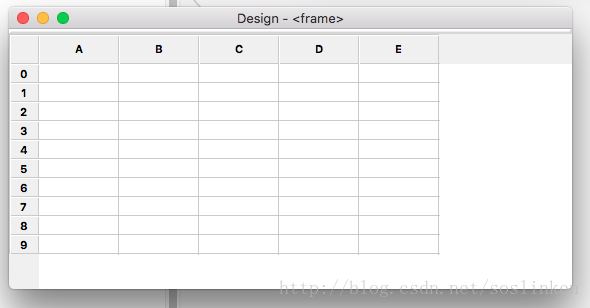
控件样式在OS X 系统下显示样式
使用样例
import wx

import wx.grid

class GridFrame(wx.Frame):

    def __init__(self, parent):

        wx.Frame.__init__(self, parent)

        # Create a wxGrid object

        grid = wx.grid.Grid(self, -1)

        # Then we call CreateGrid to set the dimensions of the grid

        # (100 rows and 10 columns in this example)

        grid.CreateGrid(100, 10)

        # We can set the sizes of individual rows and columns

        # in pixels

        grid.SetRowSize(0, 60)

        grid.SetColSize(0, 120)

        # And set grid cell contents as strings

        grid.SetCellValue(0, 0, 'wxGrid is good')

        # We can specify that some cells are read.only

        grid.SetCellValue(0, 3, 'This is read.only')

        grid.SetReadOnly(0, 3)

        # Colours can be specified for grid cell contents

        grid.SetCellValue(3, 3, 'green on grey')

        grid.SetCellTextColour(3, 3, wx.GREEN)

        grid.SetCellBackgroundColour(3, 3, wx.LIGHT_GREY)

        # We can specify the some cells will store numeric

        # values rather than strings. Here we set grid column 5

        # to hold floating point values displayed with width of 6

        # and precision of 2

        grid.SetColFormatFloat(5, 6, 2)

        grid.SetCellValue(0, 6, '3.1415')

        self.Show()

if __name__ == '__main__':

    app = wx.App(0)

    frame = GridFrame(None)

    app.MainLoop()
这个demo 是从官方文档中摘取的
英语好的亲们 ,直接看代码上的注释就好了,在此只把一些关键方法提出来说明一下。
CreateGrid 方法
可以使用该方法初始化一个固定行数、列数的Grid界面。行列数创建后仍可以使用方法增加行列。
grid.CreateGrid(100, 10)- 1
SetCellValue 方法
可以使用SetCellValue 将指定行列的单元格内的值进行设置。
grid.SetCellValue(0, 0, 'wxGrid is good')- 1
SetRowLabelValue 、 SetColLabelValue
可以用于改变行标签、列标签。样例界面中,行标签 1、2、3等, 列标签A、B、C等。
SetRowLabelValue第一个参数代表的是当前第几行
SetColLabelValue第一个参数代表的是当前第几列
grid.SetRowLabelValue(0,"1") //第一行标签 1

grid.SetColLabelValue(0,"A") //第一列标签 A- 1
- 2
以上几个方法就可以做一个简单的数据展示grid了!
事件
关于grid有几个关键的事件说明一下
| 事件 | 说明 |
|---|---|
| EVT_GRID_CELL_CHANGING | 单元格内数据发生变化中 |
| EVT_GRID_CELL_CHANGED | 单元格内数据发生变化后 |
| EVT_GRID_CELL_LEFT_CLICK | 左键单击单元格 |
| EVT_GRID_CELL_LEFT_DCLICK | 左键双击单元格 |
| EVT_GRID_CELL_RIGHT_CLICK | 右键单击单元格 |
| EVT_GRID_CELL_RIGHT_DCLICK | 右键双击单元格 |
| EVT_GRID_SELECT_CELL | 选中单元格事件 |
绑定事件代码
self.Bind(wx.EVT_GRID_CELL_CHANGED,self.cellChanged,self.grid)- 1
第一个参数:事件
第二个参数:响应方法
第三个参数:事件对象
响应方法需要特别提示一下:
方法必须有一个event 参数 不然无法响应。
def cellChanged(self , event) :

//todo write event response code - 1
- 2
疑问
在文档中,有个说明,就是在大型数据展示的时候,可以使用setTable(),方法设置一个wx.grid.GridTableBase的自定义子类。这样就可以做到数据与界面逻辑分离。
但是我写了一个GridTableBase的子类,setTable后并没有什么反应。不知道是怎么回事。只能是使用setCellValue 方法 循环将数据放置在grid上。
有大牛知道这个东西在 wxPython 4 中怎么使用吗。可以给小弟一个demo参考一下吗?
46-wxpython 4 使用 grid 展示表格的更多相关文章
- ExtJs 学习之开篇(三)Ext.grid.Panel表格中的处理
Ext.grid.Panel Ext.create('Ext.grid.Panel',{ title:'测试表格', width:400, height:20 ...
- C# listview展示表格格式
有时候我们需要展示表格格式的数据,首先想到的是用datagridview控件,比如更改datagridview某一行的数据,这样操作起来就比较麻烦,而listview属于轻量级,刷新和更改相对来说效率 ...
- kendo ui - grid 数据表格系列
kendo-ui 官网:https://www.telerik.com/documentation 初始化 grid: 引入文件: <link rel="stylesheet" ...
- extjs grid禁止表格头部使用鼠标拖拽改变宽度
extjs6 经典版 表格头部使用鼠标拖动 禁止改变列的宽度 只需要给grid 设置属性enableColumnResize:false就可以啦 xtype:'grid', enableColumnR ...
- Ext.grid.Panel表格分页存储过程
/*首先需要引入两个Extjs插件类 Ext.ux.data.PagingMemoryProxy和Ext.ux.ProgressBarPager这两个类*/ /*下面是控制弹出窗体放大缩小时窗体居中的 ...
- ext grid 子表格
Ext.define('app.view.main.biz.customer.receipt.followup.FollowUpActionPanel', { extend: 'Ext.grid.Pa ...
- Repeater展示表格
1.可以不用table展示数据 <asp:Repeater ID="Repeater1" runat="server"> <ItemTempl ...
- Ext.grid.Panel表格分页
转载:http://www.cnblogs.com/libingql/archive/2012/04/22/2464994.html cshtml @{ Layout = null; } <!D ...
- dojo中的dojox/grid/EnhancedGrid表格报错
1.错误截图 2.错误出处 <body class="claro"> <div id="gridContainer"> <span ...
随机推荐
- 2018SDIBT_国庆个人第二场
A.codeforces1038A You are given a string ss of length nn, which consists only of the first kk letter ...
- MySQL null与not null和null与空值''的区别
参考连接:https://segmentfault.com/a/1190000009540449 相信很多用了MySQL很久的人,对这两个字段属性的概念还不是很清楚,一般会有以下疑问: 我字段类型是n ...
- 利用nginx搭建RTMP视频点播、直播、HLS服务器(转)
开发环境 Ubuntu 14.04 server nginx-1.8.1 nginx-rtmp-module nginx的服务器的搭建 安装nginx的依赖库 sudo apt-get update ...
- NAT与FULL NAT的区别
LVS 当前应用主要采用 DR 和 NAT 模式,但这 2 种模式要求 RealServer 和 LVS在同一个 vlan中,导致部署成本过高:TUNNEL 模式虽然可以跨 vlan,但RealSer ...
- Notepad++好用的功能和插件
Notepad++是一款Windows环境下免费开源的代码编辑器,支持Python,shell,Java等主流语言编写.本文主要描述Notepad++一些好用但是容易忽视的功能. 1.根据文件内容查找 ...
- SSL和TLS协议的区别
SSL:(Secure Socket Layer,安全套接字层),位于可靠的面向连接的网络层协议和应用层协议之间的一种协议层.SSL通过互相认证.使用数字签名确保完整性.使用加密确保私密性,以实现客户 ...
- [Shell]Bash基本功能:多命令顺序执行与管道符
/*----------------------------------------------------------------------------------------------- @黑 ...
- postmessage/cors跨域postMessage、xhr2和xmldomain
一.h5 postMessage node http-server配置服务器 有关配置:请参考我的http://www.cnblogs.com/leee/p/5502727.html 我把文件夹a配置 ...
- python 多重继承 深度优先还是广度优先
我们常说,python2 是深度优先,python3 是广度优先, 其实具体来说是 python2.2 及其以前是深度优先 python2.3及其以后就是广度优先了 python官网 讲解1 以及su ...
- CMake Error at cmake/OpenCVModule.cmake:295 (message): No extra modules found in folder:Please provide path to 'opencv_contrib/modules' folder
其实,我们使用的opencv中要用的contrib/modules 是需要额外下载并在cmakelists.txt中指定的 git clone https://github.com/opencv/ ...