
Android之一种很有趣的界面跳动提示动画
上一个效果图:
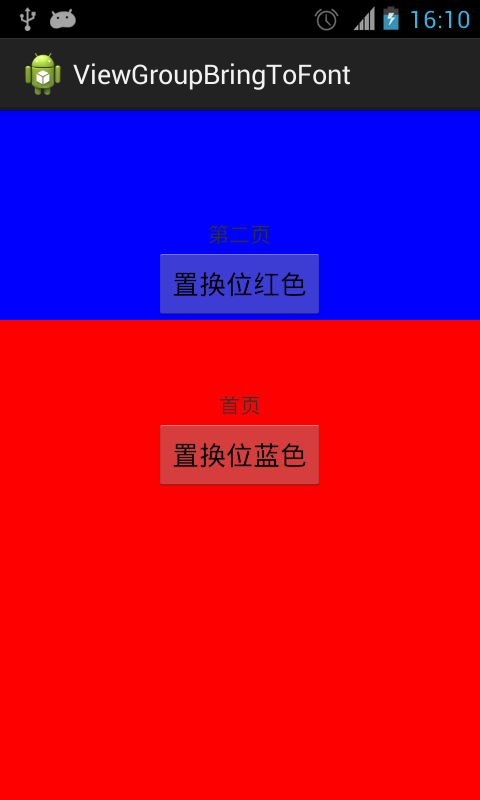
====================================
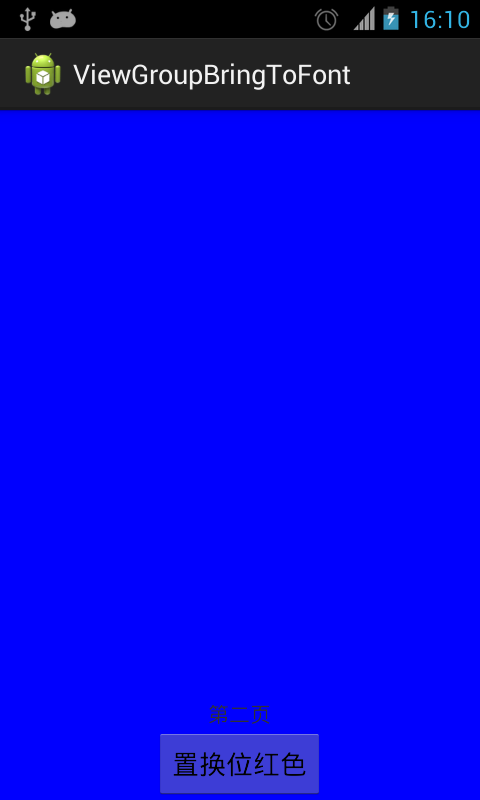
先上布局:
<RelativeLayout xmlns:android="http://schemas.android.com/apk/res/android"

    xmlns:tools="http://schemas.android.com/tools"

    android:layout_width="match_parent"

    android:layout_height="match_parent" >

    <RelativeLayout

        android:id="@+id/red"

        android:layout_width="match_parent"

        android:layout_height="match_parent"

        android:background="#ff0000" >

        <TextView

            android:layout_width="wrap_content"

            android:layout_height="wrap_content"

            android:layout_above="@+id/switch2blue"

            android:layout_centerHorizontal="true"

            android:text="首页" />

        <Button

            android:id="@+id/switch2blue"

            android:layout_width="wrap_content"

            android:layout_height="wrap_content"

            android:layout_centerInParent="true"

            android:text="置换位蓝色" />

    </RelativeLayout>

    <RelativeLayout

        android:id="@+id/blue"

        android:layout_width="match_parent"

        android:layout_height="match_parent"

        android:background="#0000ff" >

        <TextView

            android:layout_width="wrap_content"

            android:layout_height="wrap_content"

            android:layout_above="@+id/switch2red"

            android:layout_centerHorizontal="true"

            android:text="第二页" />

        <Button

            android:id="@+id/switch2red"

            android:layout_width="wrap_content"

            android:layout_height="wrap_content"

            android:layout_alignParentBottom="true"

            android:layout_centerHorizontal="true"

            android:text="置换位红色" />

    </RelativeLayout>

</RelativeLayout>
代码:
import java.lang.reflect.Field;

import android.app.Activity;

import android.os.Bundle;

import android.os.Handler;

import android.util.DisplayMetrics;

import android.view.GestureDetector;

import android.view.MotionEvent;

import android.view.View;

import android.view.GestureDetector.OnGestureListener;

import android.view.View.OnClickListener;

import android.view.View.OnTouchListener;

import android.view.animation.AccelerateDecelerateInterpolator;

import android.view.animation.AccelerateInterpolator;

import android.view.animation.Animation;

import android.view.animation.AnimationSet;

import android.view.animation.TranslateAnimation;

import android.view.animation.Animation.AnimationListener;

import android.widget.Button;

import android.widget.RelativeLayout;

public class MainActivity extends Activity implements OnClickListener,

        OnTouchListener, OnGestureListener {

    private RelativeLayout red, blue;

    private Button switch2blue, switch2red;

    private float thisDelta = 0.05f;

    private static boolean hasEverPulled = false;

    private boolean pulled = false;

    private static int height;

    private GestureDetector gestureDetector;

    private static int statusHeight = 0;

    @Override

    protected void onCreate(Bundle savedInstanceState) {

        super.onCreate(savedInstanceState);

        setContentView(R.layout.activity_main);

        DisplayMetrics metrics = getResources().getDisplayMetrics();

        height = metrics.heightPixels;

        statusHeight = getStatusHeight();

        initView();

        // 跳动提示可以上拉

        final Handler handler = new Handler();

        handler.postDelayed(new Runnable() {

            @Override

            public void run() {

                jump(thisDelta);

                // handler.postDelayed(this, 3000);

            }

        }, 3000);

    }

    private void initView() {

        red = (RelativeLayout) findViewById(R.id.red);

        blue = (RelativeLayout) findViewById(R.id.blue);

        switch2blue = (Button) findViewById(R.id.switch2blue);

        switch2red = (Button) findViewById(R.id.switch2red);

        switch2blue.setOnClickListener(this);

        switch2red.setOnClickListener(this);

        blue.setOnTouchListener(this);

        blue.setLongClickable(true);

        gestureDetector = new GestureDetector(this, this);

    }

    @Override

    public void onClick(View arg0) {

        // TODO Auto-generated method stub

        switch (arg0.getId()) {

        case R.id.switch2blue:

            red2BlueUI();

            break;

        case R.id.switch2red:

            blue2RedUI();

            break;

        }

    }

    // 从红页面转到蓝页面

    private void red2BlueUI() {

        blue.bringToFront();

        blue.requestLayout();

        blue.invalidate();

    }

    // 从蓝页面转到红页面

    private void blue2RedUI() {

        red.bringToFront();

        red.requestLayout();

        red.invalidate();

    }

    // 获取状态栏的高度

    private int getStatusHeight() {

        Class<?> c = null;

        Object obj = null;

        Field field = null;

        int x = 0;

        int height = 0;

        try {

            c = Class.forName("com.android.internal.R$dimen");

            obj = c.newInstance();

            field = c.getField("status_bar_height");

            x = Integer.parseInt(field.get(obj).toString());

            height = getResources().getDimensionPixelSize(x);

        } catch (Exception e) {

            e.printStackTrace();

        }

        return height;

    }

    // 主页面跳动

    private void jump(float delta) {

        if (thisDelta - 0.03f < 0.001f) {

            thisDelta = 0.05f;

            return;

        }

        thisDelta = delta;

        if (hasEverPulled) {

            return;

        }

        playJumpAnimation(thisDelta);

    }

    // 上拉/下拉主页面

    private void pull(boolean upward) {

        if (upward && pulled) {

            return;

        }

        if (!upward && !pulled) {

            return;

        }

        float originalY;

        float finalY;

        if (!pulled) {

            originalY = 0;

            finalY = (float) (0 - height + 0.4 * height);

        } else {

            originalY = (float) (0 - height + 0.4 * height);

            finalY = 0;

        }

        pulled = !pulled;

        AnimationSet animationSet = new AnimationSet(true);

        animationSet.addAnimation(new TranslateAnimation(0, 0, originalY,

                finalY));

        animationSet.setDuration(300);

        animationSet.setInterpolator(new AccelerateDecelerateInterpolator());

        animationSet.setFillAfter(true);

        animationSet.setAnimationListener(new AnimationListener() {

            @Override

            public void onAnimationStart(Animation animation) {

                if (!pulled) {

                    red2BlueUI();

                }

            }

            @Override

            public void onAnimationRepeat(Animation animation) {

            }

            @Override

            public void onAnimationEnd(Animation animation) {

                // if (pulled) {

                // blue2RedUI();

                // }

            }

        });

        blue.startAnimation(animationSet);

        hasEverPulled = true;

    }

    // 跳起动画

    private void playJumpAnimation(final float delta) {

        float originalY = 0;

        float finalY = 0 - height * delta;

        AnimationSet animationSet = new AnimationSet(true);

        animationSet.addAnimation(new TranslateAnimation(0, 0, originalY,

                finalY));

        animationSet.setDuration(300);

        animationSet.setInterpolator(new AccelerateDecelerateInterpolator());

        animationSet.setFillAfter(true);

        animationSet.setAnimationListener(new AnimationListener() {

            @Override

            public void onAnimationStart(Animation animation) {

            }

            @Override

            public void onAnimationRepeat(Animation animation) {

            }

            @Override

            public void onAnimationEnd(Animation animation) {

                playLandAnimation(delta);

            }

        });

        blue.startAnimation(animationSet);

    }

    // 落下动画

    private void playLandAnimation(final float delta) {

        float originalY = 0 - height * delta;

        float finalY = 0;

        AnimationSet animationSet = new AnimationSet(true);

        animationSet.addAnimation(new TranslateAnimation(0, 0, originalY,

                finalY));

        animationSet.setDuration(200);

        animationSet.setInterpolator(new AccelerateInterpolator());

        animationSet.setFillAfter(true);

        animationSet.setAnimationListener(new AnimationListener() {

            @Override

            public void onAnimationStart(Animation animation) {

            }

            @Override

            public void onAnimationRepeat(Animation animation) {

            }

            @Override

            public void onAnimationEnd(Animation animation) {

                jump(0.03f);

            }

        });

        blue.startAnimation(animationSet);

    }

    @Override

    public boolean onDown(MotionEvent e) {

        pull(false);

        return false;

    }

    @Override

    public boolean onFling(MotionEvent e1, MotionEvent e2, float velocityX,

            float velocityY) {

        // 手势滑动达到100才触发

        if (e1.getY() - e2.getY() > 100) {

            pull(true);

        } else if (e2.getY() >= e1.getY()) {

            pull(false);

        }

        return false;

    }

    @Override

    public void onLongPress(MotionEvent e) {

    }

    @Override

    public boolean onScroll(MotionEvent e1, MotionEvent e2, float distanceX,

            float distanceY) {

        return false;

    }

    @Override

    public void onShowPress(MotionEvent e) {

    }

    @Override

    public boolean onSingleTapUp(MotionEvent e) {

        return false;

    }

    @Override

    public boolean onTouch(View v, MotionEvent event) {

        if (pulled) {

            // 首张页可触控点

            if (event.getY() > height * 0.4 - statusHeight) {

                return false;

            }

        }

        return gestureDetector.onTouchEvent(event);

    }

}
Android之一种很有趣的界面跳动提示动画的更多相关文章
- Android学习系列(23)--App主界面实现
在上篇文章<Android学习系列(22)--App主界面比较>中我们浅略的分析了几个主界面布局,选了一个最大众化的经典布局.今天我们就这个经典布局,用代码具体的实现它. 1.预览图先看下 ...
- Android系统编程入门系列之界面Activity绘制展示
上篇文章介绍了界面Activity的启动方式和生命周期,本篇将继续介绍在界面Activity中的内容是如何绘制展示给用户的. 在Android系统上运行新创建的界面Activtiy,给用户展示的是空白 ...
- Android 三种动画详解
[工匠若水 http://blog.csdn.net/yanbober 转载请注明出处.点我开始Android技术交流] 1 背景 不能只分析源码呀,分析的同时也要整理归纳基础知识,刚好有人微博私信让 ...
- Android五种数据存储方式
android 五种数据存储 :SharePreferences.SQLite.Contert Provider.File.网络存储 Android系统提供了四种存储数据方式.分别为:SharePre ...
- (转) 机器学习很有趣Part6:怎样使用深度学习进行语音识别
本文转自:http://www.jiqizhixin.com/article/2321 机器学习很有趣Part6:怎样使用深度学习进行语音识别 2017-02-19 13:20:47 机器学习 ...
- iOS中三种方式实现登录界面播放视频或gif效果
现在app都做的越来越炫酷,各种动画效果,各种特效很好的提高了用户的体验.很多app在登录界面都使用了动画效果,比如Uber,Keep,QQ等等.这些动画效果基本都是使用gif或者MP4来实现的. 效 ...
- Android studio 开发一个用户登录界面
Android studio 开发一个用户登录界面 activity_main.xml <?xml version="1.0" encoding="utf-8&qu ...
- Android 四种加载方式详解(standard singleTop singleTask singleInstance) .
Android之四种加载方式 (http://marshal.easymorse.com/archives/2950 图片) 在多Activity开发中,有可能是自己应用之间的Activity跳转,或 ...
- Android系统编程入门系列之界面Activity响应丝滑的传统动画
上篇文章介绍了应用程序内对用户操作响应的相关方法位置,简单的响应逻辑可以是从一个界面Activity跳转到另一个界面Activity,也可以是某些视图View的相对变化.然而不管是启动一个界面执行新界 ...
随机推荐
- 20165330《网络对抗技术》Exp0 Kali安装
Kali安装 下载地址 Kali官网 VMware 安装步骤 参考在虚拟机中安装kali linux 安装Kali Linux的镜像和VMware 打开VMware,选择文件-新建虚拟机,出现对话框选 ...
- python的mock功能,感觉入门了~~~
主要实现语法有patch, patch.object, Mock(). 下面的测试太赤裸裸了,只是为了熟悉语法. import unittest from unittest.mock import p ...
- ORACLE 表空间扩展方法
ORACLE 表空间扩展方法 环境: linux系统 工具:PL/SQL DEVELOPER 第一步:查看表空间的名字及文件所在位置: select tablespace_name, file_id, ...
- zabbix3.4+grafana5.0.1数据可视化
转自:https://blog.csdn.net/xiaoying5191/article/details/79530280
- word2013 如何设置从第三页开始编码 或 如何设置封面页和正文页页码不连续
首先说明一下 “分节符”作用,它就是用来将整个文档分节的,添加一个分节符,文档就分成1.2两节:添加两个分节符,文档就分成1.2.3节. 当前页面具体是第几节,可以通过点击页眉页脚来查看: 从第三页开 ...
- CentOS和Windows下配置MySQL远程访问的教程
CentOS和Windows下配置MySQL远程访问的教程 一.前言 由于实验在云服务器上跑的结果不是很理想.所以,现在切换到局域网服务器.因此,需要重新配置 Windows 服务器和 CentO ...
- BZOJ.5312.冒险(线段树)
题目链接 \(Description\) 维护一个序列,支持区间and/or一个数.区间查询最大值. \(Solution\) 维护区间最大值?好像没什么用,修改的时候和暴力差不多. 我们发现有时候区 ...
- bzoj 4036 集合幂级数
集合幂级数其实就是一种集合到数的映射,并且我们针对集合的一些操作(or xor and specil or )为这种映射定义运算.其中一些东西可以通过某些手段将其复杂度降低. orz vfk /** ...
- springmvc学习总结(一) -- 从零搭建,基础入门
1.新建maven项目 参考mybatis学习笔记(五) -- maven+spring+mybatis从零开始搭建整合详细过程(上)第一部分,修改配置 2.修改pom.xml 文件 <proj ...
- Struts2 高危漏洞修复方案 (S2-016/S2-017)
近期Struts2被曝重要漏洞,此漏洞影响struts2.0-struts2.3所有版本,可直接导致服务器被远程控制从而引起数据泄漏,影响巨大,受影响站点以电商.银行.门户.政府居多. 官方描述:S2 ...