
[WPF 容易忽视的细节] —— x:Name与Name属性
一、前言
WPF使用XAML来对界面进行编写,界面与后台逻辑分离。我们也可以写Style、Trigger来实现一些界面效果,
这些都是通过Name来定位控件的,例如Setter.TargetName、Trigger.SourceName和Binding的ElementName等。
而这些Name都是通过设置控件的x:Name来定义的,如<Button x:Name="Button1" />
但是,XAML中有x:Name和Name这两个属性,究竟它们有什么区别呢?
本专题就来探究一下x:Name和Name的区别,它们的本质又是什么?
二、XAML与Code-Behind
在编写WPF程序时,通常需要分别编写前台XAML代码和后台Code-Behind代码(不使用MVVM时)。
WPF通过一个partial关键字,将一个类的定义切分为两部分:XAML和Code-Behind。
其中XAML交给设计师设计,Code-Behind交给程序员写业务逻辑,从而实现分离(虽然大部分时候全部都是程序员完成的)。
我们在XAML上写标签,其实与后台写代码是等效的。只要你想,完全可以只使用XAML或者只是用Code-Behind来写程序。
示例:
<!-- 只使用xaml编写一个窗体 -->
<!-- 只使用一个单独的xaml文件 -->
<Window x:Class="Cnblog.OnlyXaml"
xmlns="http://schemas.microsoft.com/winfx/2006/xaml/presentation"
xmlns:x="http://schemas.microsoft.com/winfx/2006/xaml"
Title="OnlyXaml"
Width="300"
Height="300">
<Grid>
<Button Width="100"
Height="100"
Click="ButtonClick">
Button
</Button>
</Grid>
<x:Code>
private void ButtonClick(object sender, RoutedEventArgs e)
{
MessageBox.Show("Button Click");
}
</x:Code>
</Window>
只使用xaml编写一个窗体
namespace Cnblog

{

    // 只使用Code-Behind编写一个窗体

    // 只使用一个单独的OnlyCode.cs文件

    public class OnlyCode :Window

    {

        public OnlyCode()

        {

            // button

            var button = new Button { Content = "Button",Width = , Height = };

            button.Click += ButtonClick;

            // grid

            var grid = new Grid();

            grid.Children.Add(button);

            this.Width = ;

            this.Height = ;

            this.Title = "OnlyCode";

            this.Content = grid;

        }

        void ButtonClick(object sender, RoutedEventArgs e)

        {

            MessageBox.Show("Button Click");

        }

    }

}
只使用Code-Behind编写一个窗体
上面例子,分别只使用XAML和Code-Behind来定义一个窗体,但是最终的效果都是一样的。
当然,如果单独使用其中一种,必然让编程变得很痛苦,这里我只是想表明有这个可能性(因为下面会用到),实际中不会这么做。
结论:虽然编码方式不一样,但是效果是一样的,编译器其实对XAML进行编译生成BAMP,根据标签创建相应对象。
这个与本专题无关,但是下面要将要用到相关内容,先说明一下。
三、XAML中x:Name和Name最终效果相同
如果你在xaml中创建一个控件,并同时对x:Name和Name两个属性进行赋值,那么编译器就会提醒你:Name被设置了多次。

当然,如果你觉得这个不够有说服力,那么下面这段程序可能也能够佐证:
<!-- 两个Button分别使用x:Name和Name -->

<Window x:Class="Cnblog.SetName"

        xmlns="http://schemas.microsoft.com/winfx/2006/xaml/presentation"

        xmlns:x="http://schemas.microsoft.com/winfx/2006/xaml"

        Title="SetName"

        Width="300"

        Height="300">

    <StackPanel>

        <Button x:Name="Button1" Loaded="ButtonLoaded" />

        <Button Name="Button2" Loaded="ButtonLoaded" />

    </StackPanel>

    <x:Code>

        private void ButtonLoaded(object sender, RoutedEventArgs e)

        {

        var button = (Button)sender;

        button.Content = button.Name;

        }

    </x:Code>

</Window>
两个Button分别使用x:Name和Name
效果图:
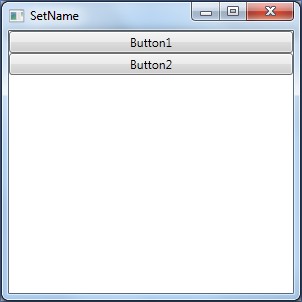
下面是用IL的截图,两者无区别。
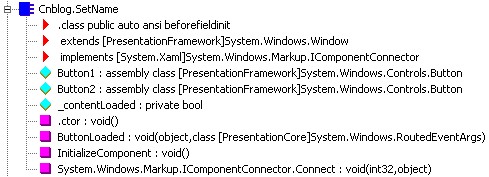
结论:
XAML中使用Name其实被映射到了x:Name,x:Name才是XAML中唯一的标识,所以它们效果相同。
四、不同于控件的Name属性
在WPF中,很多控件拥有Name属性,例如上面我们使用Button的Name来设置Content,button.Content=button.Name。
是因为它们的父类FrameworkElement中都定义了Name属性,以下用SomeWpfType来代替这些类型(便于表述)。
下面,我们不使用XAML和x:Name,使用Code-Behind和SomeWpfType.Name来测试一下。
namespace Cnblog

{

    // 使用Button的Name属性

    public class SetNameByCodeBehind : Window

    {

        public SetNameByCodeBehind()

        {

            // Buttons

            var button1 = new Button { Name = "Button1" };

            button1.Loaded += ButtonLoaded;

            var button2 = new Button { Name = "Button2" };

            button2.Loaded += ButtonLoaded;

            // StackPanel

            var contentPanel = new StackPanel();

            contentPanel.Children.Add(button1);

            contentPanel.Children.Add(button2);

            // Window

            this.Title = "Set Name By Code-Behind";

            this.Height = ;

            this.Width = ;

            this.Content = contentPanel;

        }

        void ButtonLoaded(object sender, RoutedEventArgs e)

        {

            var button = (Button)sender;

            button.Content = button.Name;

        }

    }

}
使用Button的Name属性
效果图:
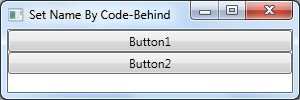
下面,区别终于有了,我们再来看IL的内容:

因为不是使用XAML书写的,所以缺少一些函数和对象,但是更重要的是:缺少两个Button对象的定义。
如果我们修改一下代码,再来看一下,就能清楚的知道原因了!
namespace Cnblog

{

    public class SetNameByCodeBehind : Window

    {

        // 修改为internal的对象,取代之前的局部变量

        internal Button Button1;

        internal Button Button2;

        public SetNameByCodeBehind()

        {

            // Buttons

            Button1 = new Button { Name = "Button1" };

            Button1.Loaded += ButtonLoaded;

            Button2 = new Button { Name = "Button2" };

            Button2.Loaded += ButtonLoaded;

            // StackPanel

            var contentPanel = new StackPanel();

            contentPanel.Children.Add(Button1);

            contentPanel.Children.Add(Button2);

            // Window

            this.Title = "Set Name By Code-Behind";

            this.Height = ;

            this.Width = ;

            this.Content = contentPanel;

        }

        void ButtonLoaded(object sender, RoutedEventArgs e)

        {

            var button = (Button)sender;

            button.Content = button.Name;

        }

    }

}
使用Button的Name属性2
再来看一下IL的内容:

结论:
x:Name不是SomeWpfType.Name,当我们设置了x:Name后(假设为ElementName),
其实做了两件事情:
1. 创建一个internal的对象,对象名字为ElementName,它其实是一个对此SomeWpfType类型对象的引用;
internal SomeWpfType ElementName = new SomeWpfType();// 假设SomeWpfType为我们定义的类型。
2. 设置此对象的Name属性,
ElementName.Name = "ElementName";。
五、为什么XAML中Name与x:Name效果相同
上面,我们分析SomeWpfType.Name和x:Name有很大区别,而且XAML中的设置Name不就是SomeWpfType.Name吗?
同Width,在XAML中设置Width,就是设置SomeWpfType.Width。
那么我们就去翻一下FrameworkElement的源码看看吧。
namespace System.Windows

{

[StyleTypedProperty(Property = "FocusVisualStyle", StyleTargetType = typeof(Control))]

    [XmlLangProperty("Language")]

    [UsableDuringInitialization(true)]

    public partial class FrameworkElement : UIElement, IFrameworkInputElement, ISupportInitialize, IHaveResources, IQueryAmbient

    { /// <summary>

        ///     The DependencyProperty for the Name property.

        /// </summary>

        [CommonDependencyProperty]

        public static readonly DependencyProperty NameProperty =

                    DependencyProperty.Register(

                                "Name",

                                typeof(string),

                                _typeofThis,

                                new FrameworkPropertyMetadata(

                                    string.Empty,                           // defaultValue

                                    FrameworkPropertyMetadataOptions.None,  // flags

                                    null,                                   // propertyChangedCallback

                                    null,                                   // coerceValueCallback

                                    true),                                  // isAnimationProhibited

                                new ValidateValueCallback(System.Windows.Markup.NameValidationHelper.NameValidationCallback));

        /// <summary>

        ///     Name property.

        /// </summary>

        [Localizability(LocalizationCategory.NeverLocalize)]

        [MergableProperty(false)]

        [DesignerSerializationOptions(DesignerSerializationOptions.SerializeAsAttribute)]

        public string Name

        {

            get { return (string) GetValue(NameProperty); }

            set { SetValue(NameProperty, value);  }

        }

         // a lot of code

    }

}

namespace System.Windows

{

    [RuntimeNamePropertyAttribute("Name")]

    public partial class FrameworkElement

    {

          // a lot of code...

    }

}
FrameworkElement
Name属性上貌似没有什么特别,但是另外一个局部类的定义中找到了个名为RuntimeNameProperty的特性。
我们就来看下它的代码吧。
namespace System.Windows.Markup

{

  [AttributeUsage(AttributeTargets.Class)]

  [TypeForwardedFrom("WindowsBase, Version=4.0.0.0, Culture=neutral, PublicKeyToken=31bf3856ad364e35")]

  public sealed class RuntimeNamePropertyAttribute : Attribute

  {

    private string _name;

    public string Name

    {

      [TargetedPatchingOptOut("Performance critical to inline this type of method across NGen image boundaries")] get

      {

        return this._name;

      }

    }

    [TargetedPatchingOptOut("Performance critical to inline this type of method across NGen image boundaries")]

    public RuntimeNamePropertyAttribute(string name)

    {

      this._name = name;

    }

  }

}
RuntimeNamePropertyAttribute
可以看出来这个特性使用在Class上面的,也就是这个特性,使得XAML处理Name时,映射到了x:Name,才有了前面的结论。
我们再来查看以下还有哪些类使用了这个特性。
在4个Assembly中找到了13个,比较眼熟的有:
Timeline、BeginStoryboard、FrameworContentElement、FramewordElement、VisualState、VisualStateGroup,
这些也基本都是WPF中很多常用类型的基类了。
结论:RuntimeNameProperty特性,使得XAML中使用Name和x:Name效果一样,当编译器遇到此特性后,
就将Name映射到x:Name,执行一样的操作。
六、XAML中x:Name与Name并不完全等价。
不是所有类型都可以使用Name,但是任何类型都可以使用x:Name。
只有拥有Name属性,才可以在XAML中使用Name。不同于x:Name,因为这个是附加属性。
并且该类型、或者其父类型标记了RuntimeNameProperty特性,才拥有与x:Name一样的效果。
例如:<SolidColorBrush Color="Transparent" Name="ddd"/>便会报错,因为SolidColorBrush没有Name属性。
只能使用x:Name。<SolidColorBrush Color="Transparent" x:Name="ddd"/>
七、其他
1、分析为什么要有x:Name
前面提到,XAML中经常需要通过名字来定位某个控件或对象,而SomeWpfType的Name属性,只是一个DP,我们可以设置两个控件拥有相同的Name属性。
那么这样就非常不利于定位控件,因为Name不是一个唯一的标识了。
使用对象的引用有两个好处:
1.在特定的范围域内,能够保证它的唯一性;
2.在视图树中查找某个对象时,通过引用对象的名称比查找Name属性更加简单。
2. MSDN上对着几个名词的定义
FrameworkElement.Name - Gets or sets the identifying name of the element. The name provides a reference so that code-behind, such as event handler code, can refer to a markup element after it is constructed during processing by a XAML processor.
Remark:
The most common usage of this property is to specify a XAML element name as an attribute in markup.
This property essentially provides a WPF framework-level convenience property to set the XAML x:Name Directive.
Names must be unique within a namescope. For more information, see WPF XAML Namescopes.
x:Name Directive - Uniquely identifies XAML-defined elements in a XAML namescope. XAML namescopes and their uniqueness models can be applied to the instantiated objects, when frameworks provide APIs or implement behaviors that access the XAML-created object graph at run time.
Remark:
The value of an x:Name directive usage must be unique within a XAML namescope. By default when used by .NET Framework XAML Services API, the primary XAML namescope is defined at the XAML root element of a single XAML production, and encompasses the elements that are contained in that XAML production. Additional discrete XAML namescopes that might occur within a single XAML production can be defined by frameworks to address specific scenarios. For example, in WPF, new XAML namescopes are defined and created by any template that is also defined on that XAML production. For more information about XAML namescopes (written for WPF but relevant for many XAML namescope concepts), see WPF XAML Namescopes.
希望对大家有帮助。
[WPF 容易忽视的细节] —— x:Name与Name属性的更多相关文章
- [WPF 容易忽视的细节] —— Exception in WPF's Converter
前言: 在WPF中,Converter是我们经常要用到的一个工具,因为XAML上绑定的数据不一定是我们需要的数据. 问题: 在Converter中抛出一个异常导致程序崩溃,而且是在对未捕获异常进行集中 ...
- C语言easy忽视的细节(第四部分)
前言:本文的目的是记录C这些语言easy忽视的细节.我会每天花一点时间来阅读整理,坚持下去,今天是第一章.也许今天是下个月的第二,明年,今天是第几?--我坚信,,记性不如烂笔头.第四篇了.fight~ ...
- android studio你可能忽视的细节——启动白屏?drawable和mipmap出现的意义?这里都有!!!
android studio用了很久了,也不知道各位小伙伴有没有还在用eclipse的,如果还有,楼主真心推荐转到android studio来吧,毕竟亲儿子,你会知道除了启动速度稍微慢些,你找不到一 ...
- ajax容易忽视的细节
用了很长时间的ajax,自己也写过原生ajax请求,但是发现自己对于ajax理解仍然非常肤浅. 1.ajax请求后,服务器会返回数据,返回头中content-type直接影响responseXML,r ...
- C#中容易被忽视的细节整理
(有空更新系列) 1.params可变长度参数,默认值是长度为0的数组,而不是空 2.事件和委托默认值都是null 3.bool返回值的事件调用之后,其内部的合并方式是取最后一个合并对象的返回值
- 学习vue容易忽视的细节
1.对于自定义标签名(组件名称),Vue.js 不强制要求遵循 W3C 规则 (小写,并且包含一个短杠),尽管遵循这个规则比较好.HTML 特性是不区分大小写的.所以,当使用的不是字符串模板,came ...
- javascript那些不应该忽视的细节
1.null与Object.prototype使用typeof操作符结果都是object,但他们都不是Object的实例. typeof null // object null instanceof ...
- JavaScript 被忽视的细节
语句/表达式 换个角度理解语句(statemaents)和表达式(expressions):表达式不会改变程序的运行状态,而语句会.还有一种叫做表达式语句,可以理解为表达式和语句的交集,如({a:1} ...
- ubuntu 1604升级到ubuntu 1804无法忽视的细节问题(亲测有效)
升级ubuntu系统,遇到很多问题,可能你在升级的时候也会碰到,希望对你有所帮助: 文章目录 1 常规升级过程 2 更改过源 3 无法全部更新 4 其他的问题 5 升级成功 6 无法进入gnome 6 ...
随机推荐
- python解析json数据
现在的API接口多为xml或json,json解析更简洁相对xml来说 以豆瓣的API接口为例,解析返回的json数据: https://api.douban.com/v2/book/1220562 ...
- web工程迁移---在一个jboss5或jboss6中运行多个实例
在工作中遇到的,如何在一个jboss中运行多个节点(segment). 我使用的环境是win7.jboss5.jboss6.JDK6 1.jboss5下运行多个实例 第一步不用说,首先要在环境变量中设 ...
- Vue + Element UI 实现权限管理系统 前端篇(四):优化登录流程
完善登录流程 1. 丰富登录界面 1.1 从 Element 指南中选择组件模板丰富登录界面,放置一个登录界面表单,包含账号密码输入框和登录重置按钮. <template> <el- ...
- 系统启动时队列自动下单--ServletContextListener
package com.liying.pear.queue; import javax.servlet.ServletContextEvent; import javax.servlet.Servle ...
- 走进javascript——被忽视的DOM方法和属性
isEqualNode() isEqualNode方法可以用来判断两个DOM节点是否相同,给我的第一感觉是没用,因为两个DOM的比较很容易让人想成是字符串的比较,心想直接用两个等号不就可以了吗,但马上 ...
- SSM事务——事务回滚如何拿到返回值
MySQL数据库一共向用户提供了包括BDB.HEAP.ISAM.MERGE.MyISAM.InnoDB以及Gemeni这7种Mysql表类型.其中BDB.InnoDB属于事务安全类表,而其他属于事务非 ...
- linux查看系统的硬件信息【转】
linux查看系统的硬件信息,并不像windows那么直观,这里我罗列了查看系统信息的实用命令,并做了分类,实例解说. cpu lscpu命令,查看的是cpu的统计信息. blue@blue-pc:~ ...
- Selenium3自动化问题二:各chrome版本对应的chromedriver版本
一:问题说明 最近用到selenium3在火狐浏览器中执行自动化脚本,遇到了一些问题,最后解决方案中占比最多的就是浏览器和驱动版本不一致导致的,故这里给出chrome.firefox驱动的不同版本对应 ...
- C# 例子1
using System; using System.Collections.Generic; using System.Linq; using System.Text; using System.T ...
- Python后端相关技术/工具栈
编辑器 最常见: vim / SublimeText2 / PyCharm Vim有兴趣可以看看 k-vim 适合Python/Golang开发 本地环境 pip/easy_install 包管理 v ...