
Git标签与别名
code[class*="language-"], pre[class*="language-"] { color: rgba(51, 51, 51, 1); font-family: Consolas, "Liberation Mono", Menlo, Courier, monospace; text-align: left; white-space: pre; word-spacing: normal; word-break: normal; word-wrap: normal; line-height: 1.4; -moz-tab-size: 8; -o-tab-size: 8; tab-size: 8; -webkit-hyphens: none; -moz-hyphens: none; -ms-hyphens: none; hyphens: none }
pre[class*="language-"] { padding: 0.8em; overflow: auto; border-radius: 3px; background: rgba(245, 245, 245, 1) }
:not(pre)>code[class*="language-"] { padding: 0.1em; border-radius: 0.3em; white-space: normal; background: rgba(245, 245, 245, 1) }
.token.comment, .token.blockquote { color: rgba(150, 152, 150, 1) }
.token.cdata { color: rgba(24, 54, 145, 1) }
.token.doctype, .token.punctuation, .token.variable, .token.macro.property { color: rgba(51, 51, 51, 1) }
.token.operator, .token.important, .token.keyword, .token.rule, .token.builtin { color: rgba(167, 29, 93, 1) }
.token.string, .token.url, .token.regex, .token.attr-value { color: rgba(24, 54, 145, 1) }
.token.property, .token.number, .token.boolean, .token.entity, .token.atrule, .token.constant, .token.symbol, .token.command, .token.code { color: rgba(0, 134, 179, 1) }
.token.tag, .token.selector, .token.prolog { color: rgba(99, 163, 92, 1) }
.token.function, .token.namespace, .token.pseudo-element, .token.class, .token.class-name, .token.pseudo-class, .token.id, .token.url-reference .token.variable, .token.attr-name { color: rgba(121, 93, 163, 1) }
.token.entity { cursor: help }
.token.title, .token.title .token.punctuation { font-weight: bold; color: rgba(29, 62, 129, 1) }
.token.list { color: rgba(237, 106, 67, 1) }
.token.inserted { background-color: rgba(234, 255, 234, 1); color: rgba(85, 165, 50, 1) }
.token.deleted { background-color: rgba(255, 236, 236, 1); color: rgba(189, 44, 0, 1) }
.token.bold { font-weight: bold }
.token.italic { font-style: italic }
.language-json .token.property { color: rgba(24, 54, 145, 1) }
.language-markup .token.tag .token.punctuation { color: rgba(51, 51, 51, 1) }
code.language-css, .language-css .token.function { color: rgba(0, 134, 179, 1) }
.language-yaml .token.atrule { color: rgba(99, 163, 92, 1) }
code.language-yaml { color: rgba(24, 54, 145, 1) }
.language-ruby .token.function { color: rgba(51, 51, 51, 1) }
.language-markdown .token.url { color: rgba(121, 93, 163, 1) }
.language-makefile .token.symbol { color: rgba(121, 93, 163, 1) }
.language-makefile .token.variable { color: rgba(24, 54, 145, 1) }
.language-makefile .token.builtin { color: rgba(0, 134, 179, 1) }
.language-bash .token.keyword { color: rgba(0, 134, 179, 1) }
pre[data-line] { position: relative; padding: 1em 0 1em 3em }
pre[data-line] .line-highlight-wrapper { position: absolute; top: 0; left: 0; background-color: rgba(0, 0, 0, 0); display: block; width: 100% }
pre[data-line] .line-highlight { position: absolute; left: 0; right: 0; margin-top: 1em; background: linear-gradient(90deg, rgba(153, 122, 102, 0.1) 70%, rgba(153, 122, 102, 0)); pointer-events: none; line-height: inherit; white-space: pre }
pre[data-line] .line-highlight:before, pre[data-line] .line-highlight[data-end]:after { content: attr(data-start); position: absolute; top: 0.4em; left: 0.6em; min-width: 1em; padding: 0 0.5em; background-color: rgba(153, 122, 102, 0.4); color: rgba(245, 242, 240, 1); font: bold 65% / 1.5 sans-serif; text-align: center; vertical-align: 0.3em; border-radius: 999px; text-shadow: none; box-shadow: 0 1px rgba(255, 255, 255, 1) }
pre[data-line] .line-highlight[data-end]:after { content: attr(data-end); top: auto; bottom: 0.4em }
html body { font-family: "Helvetica Neue", Helvetica, "Segoe UI", Arial, freesans, sans-serif; font-size: 16px; line-height: 1.6; color: rgba(51, 51, 51, 1); background-color: rgba(255, 255, 255, 1); overflow: initial; box-sizing: border-box; word-wrap: break-word }
html body>:first-child { margin-top: 0 }
html body h1, html body h2, html body h3, html body h4, html body h5, html body h6 { line-height: 1.2; margin-top: 1em; margin-bottom: 16px; color: rgba(0, 0, 0, 1) }
html body h1 { font-size: 2.25em; font-weight: 300; padding-bottom: 0.3em }
html body h2 { font-size: 1.75em; font-weight: 400; padding-bottom: 0.3em }
html body h3 { font-size: 1.5em; font-weight: 500 }
html body h4 { font-size: 1.25em; font-weight: 600 }
html body h5 { font-size: 1.1em; font-weight: 600 }
html body h6 { font-size: 1em; font-weight: 600 }
html body h1, html body h2, html body h3, html body h4, html body h5 { font-weight: 600 }
html body h5 { font-size: 1em }
html body h6 { color: rgba(92, 92, 92, 1) }
html body strong { color: rgba(0, 0, 0, 1) }
html body del { color: rgba(92, 92, 92, 1) }
html body a:not([href]) { color: inherit; text-decoration: none }
html body a { color: rgba(0, 136, 204, 1); text-decoration: none }
html body a:hover { color: rgba(0, 163, 245, 1); text-decoration: none }
html body img { max-width: 100% }
html body>p { margin-top: 0; margin-bottom: 16px; word-wrap: break-word }
html body>ul, html body>ol { margin-bottom: 16px }
html body ul, html body ol { padding-left: 2em }
html body ul.no-list, html body ol.no-list { padding: 0; list-style-type: none }
html body ul ul, html body ul ol, html body ol ol, html body ol ul { margin-top: 0; margin-bottom: 0 }
html body li { margin-bottom: 0 }
html body li.task-list-item { list-style: none }
html body li>p { margin-top: 0; margin-bottom: 0 }
html body .task-list-item-checkbox { margin: 0 0.2em 0.25em -1.8em; vertical-align: middle }
html body .task-list-item-checkbox:hover { cursor: pointer }
html body blockquote { margin: 16px 0; font-size: inherit; padding: 0 15px; color: rgba(92, 92, 92, 1); border-left: 4px solid rgba(214, 214, 214, 1) }
html body blockquote>:first-child { margin-top: 0 }
html body blockquote>:last-child { margin-bottom: 0 }
html body hr { height: 4px; margin: 32px 0; background-color: rgba(214, 214, 214, 1); border: 0 none }
html body table { margin: 10px 0 15px; border-collapse: collapse; border-spacing: 0; display: block; width: 100%; overflow: auto; word-break: keep-all }
html body table th { font-weight: bold; color: rgba(0, 0, 0, 1) }
html body table td, html body table th { border: 1px solid rgba(214, 214, 214, 1); padding: 6px 13px }
html body dl { padding: 0 }
html body dl dt { padding: 0; margin-top: 16px; font-size: 1em; font-style: italic; font-weight: bold }
html body dl dd { padding: 0 16px; margin-bottom: 16px }
html body code { font-family: Menlo, Monaco, Consolas, "Courier New", monospace; font-size: 0.85em !important; color: rgba(0, 0, 0, 1); background-color: rgba(240, 240, 240, 1); border-radius: 3px; padding: 0.2em 0 }
html body code::before, html body code::after { letter-spacing: -0.2em; content: " " }
html body pre>code { padding: 0; margin: 0; font-size: 0.85em !important; word-break: normal; white-space: pre; background: rgba(0, 0, 0, 0); border: 0 }
html body .highlight { margin-bottom: 16px }
html body .highlight pre, html body pre { padding: 1em; overflow: auto; font-size: 0.85em !important; line-height: 1.45; border: rgba(214, 214, 214, 1); border-radius: 3px }
html body .highlight pre { margin-bottom: 0; word-break: normal }
html body pre code, html body pre tt { display: inline; max-width: initial; padding: 0; margin: 0; overflow: initial; line-height: inherit; word-wrap: normal; background-color: rgba(0, 0, 0, 0); border: 0 }
html body pre code:before, html body pre tt:before, html body pre code:after, html body pre tt:after { content: normal }
html body p, html body blockquote, html body ul, html body ol, html body dl, html body pre { margin-top: 0; margin-bottom: 16px }
html body kbd { color: rgba(0, 0, 0, 1); border-top: 1px solid rgba(214, 214, 214, 1); border-right: 1px solid rgba(214, 214, 214, 1); border-bottom: 2px solid rgba(199, 199, 199, 1); border-left: 1px solid rgba(214, 214, 214, 1); padding: 2px 4px; background-color: rgba(240, 240, 240, 1); border-radius: 3px }
@media print { html body { background-color: rgba(255, 255, 255, 1) } html body h1, html body h2, html body h3, html body h4, html body h5, html body h6 { color: rgba(0, 0, 0, 1); page-break-after: avoid } html body blockquote { color: rgba(92, 92, 92, 1) } html body pre { page-break-inside: avoid } html body table { display: table } html body img { display: block; max-width: 100%; max-height: 100% } html body pre, html body code { word-wrap: break-word; white-space: pre } }
.markdown-preview { width: 100%; height: 100%; box-sizing: border-box }
.markdown-preview .pagebreak, .markdown-preview .newpage { page-break-before: always }
.markdown-preview pre.line-numbers { position: relative; padding-left: 3.8em; counter-reset: linenumber 0 }
.markdown-preview pre.line-numbers>code { position: relative }
.markdown-preview pre.line-numbers .line-numbers-rows { position: absolute; pointer-events: none; top: 1em; font-size: 100%; left: 0; width: 3em; letter-spacing: -1px; border-right: 1px solid rgba(153, 153, 153, 1); -webkit-user-select: none; -moz-user-select: none; -ms-user-select: none; user-select: none }
.markdown-preview pre.line-numbers .line-numbers-rows>span { pointer-events: none; display: block; counter-increment: linenumber 1 }
.markdown-preview pre.line-numbers .line-numbers-rows>span:before { content: counter(linenumber); color: rgba(153, 153, 153, 1); display: block; padding-right: 0.8em; text-align: right }
.markdown-preview .mathjax-exps .MathJax_Display { text-align: center !important }
.markdown-preview:not([for="preview"]) .code-chunk .btn-group { display: none }
.markdown-preview:not([for="preview"]) .code-chunk .status { display: none }
.markdown-preview:not([for="preview"]) .code-chunk .output-div { margin-bottom: 16px }
{ width: 8px }
{ border-radius: 10px; background-color: rgba(0, 0, 0, 0) }
{ border-radius: 5px; background-color: rgba(150, 150, 150, 0.66); border: 4px solid rgba(150, 150, 150, 0.66); background-clip: content-box }
html body[for="html-export"]:not([data-presentation-mode]) { position: relative; width: 100%; height: 100%; top: 0; left: 0; margin: 0; padding: 0; overflow: auto }
html body[for="html-export"]:not([data-presentation-mode]) .markdown-preview { position: relative; top: 0 }
@media screen and (min-width: 914px) { html body[for="html-export"]:not([data-presentation-mode]) .markdown-preview { padding: 2em calc(50% - 457px + 2em) } }
@media screen and (max-width: 914px) { html body[for="html-export"]:not([data-presentation-mode]) .markdown-preview { padding: 2em } }
@media screen and (max-width: 450px) { html body[for="html-export"]:not([data-presentation-mode]) .markdown-preview { font-size: 14px !important; padding: 1em } }
@media print { html body[for="html-export"]:not([data-presentation-mode]) #sidebar-toc-btn { display: none } }
html body[for="html-export"]:not([data-presentation-mode]) #sidebar-toc-btn { position: fixed; bottom: 8px; left: 8px; font-size: 28px; cursor: pointer; color: inherit; z-index: 99; width: 32px; text-align: center; opacity: 0.4 }
html body[for="html-export"]:not([data-presentation-mode])[html-show-sidebar-toc] #sidebar-toc-btn { opacity: 1 }
html body[for="html-export"]:not([data-presentation-mode])[html-show-sidebar-toc] .md-sidebar-toc { position: fixed; top: 0; left: 0; width: 300px; height: 100%; padding: 32px 0 48px; font-size: 14px; box-shadow: 0 0 4px rgba(150, 150, 150, 0.33); box-sizing: border-box; overflow: auto; background-color: inherit }
{ width: 8px }
{ border-radius: 10px; background-color: rgba(0, 0, 0, 0) }
{ border-radius: 5px; background-color: rgba(150, 150, 150, 0.66); border: 4px solid rgba(150, 150, 150, 0.66); background-clip: content-box }
html body[for="html-export"]:not([data-presentation-mode])[html-show-sidebar-toc] .md-sidebar-toc a { text-decoration: none }
html body[for="html-export"]:not([data-presentation-mode])[html-show-sidebar-toc] .md-sidebar-toc ul { padding: 0 1.6em; margin-top: 0.8em }
html body[for="html-export"]:not([data-presentation-mode])[html-show-sidebar-toc] .md-sidebar-toc li { margin-bottom: 0.8em }
html body[for="html-export"]:not([data-presentation-mode])[html-show-sidebar-toc] .md-sidebar-toc ul { list-style-type: none }
html body[for="html-export"]:not([data-presentation-mode])[html-show-sidebar-toc] .markdown-preview { left: 300px; width: calc(100% - 300px); padding: 2em calc(50% - 457px - 150px); margin: 0; box-sizing: border-box }
@media screen and (max-width: 1274px) { html body[for="html-export"]:not([data-presentation-mode])[html-show-sidebar-toc] .markdown-preview { padding: 2em } }
@media screen and (max-width: 450px) { html body[for="html-export"]:not([data-presentation-mode])[html-show-sidebar-toc] .markdown-preview { width: 100% } }
html body[for="html-export"]:not([data-presentation-mode]):not([html-show-sidebar-toc]) .markdown-preview { left: 50%; transform: translateX(-50%) }
html body[for="html-export"]:not([data-presentation-mode]):not([html-show-sidebar-toc]) .md-sidebar-toc { display: none }
标签
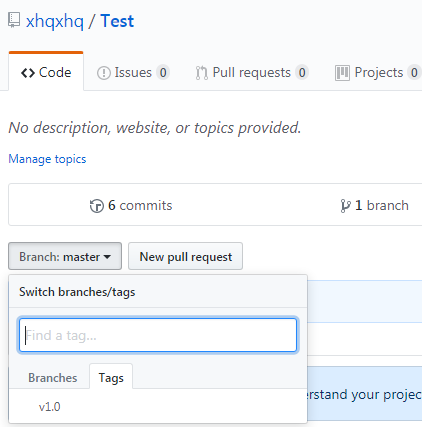
直观感受下github的标签:
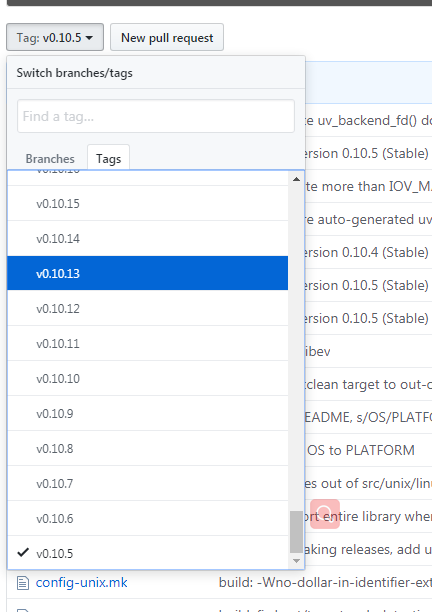
标签的作用是标记某次比较有意义的提交,比如这次提交的代码添加了新功能,我们可以使用标签来标记本次的发布节点
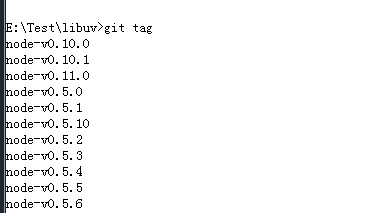
列出标签
git tag
例:
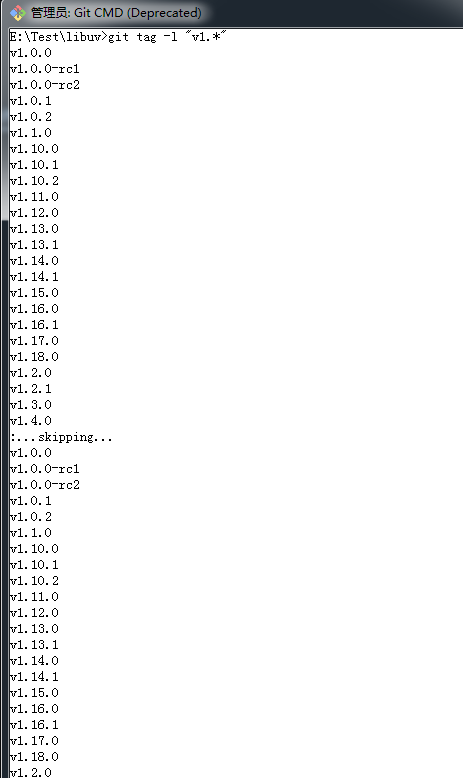
也可以查找特定模式的标签,例如查找v1.系列的:
创建标签
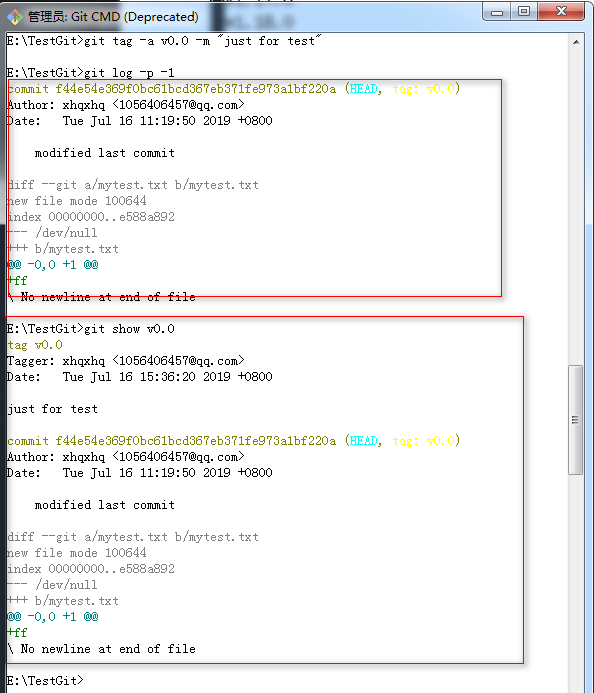
附注标签:带有标签信息
git tag -a 标签名称 -m 标签信息
例:
轻量标签:不带有标签信息
git tag 标签名称
例:
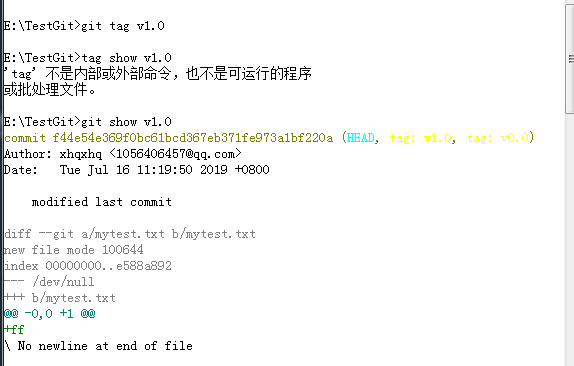
注意:标签总是和commit相关,如果git tag命令不带有commit id时,则标签默认打在上次提交上,可以指定commit id为那一次
提交打上标签
例:为指定的commit id打一个附注标签
先列出提交历史:
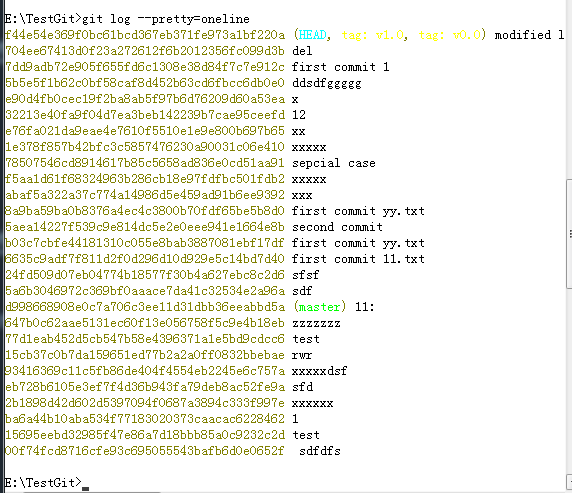
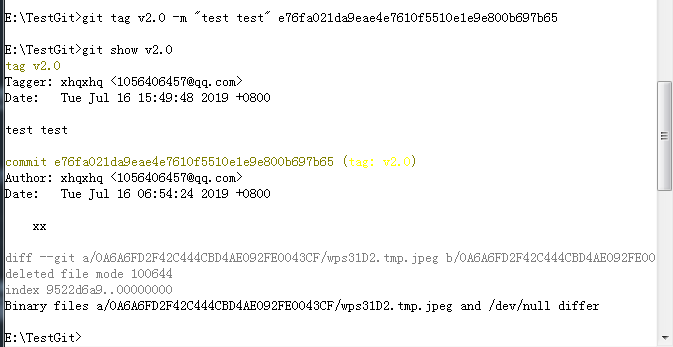
为这次e76fa021da9eae4e7610f5510e1e9e800b697b65提交打上标签:
推送标签到远程仓库
使用git push命令时只会将提交的内容推送到远程仓库,但是标签不会被推送,可以使用命令:git push 简单名称 标签名称
这里的简单名称就是前面提到的指定远程仓库中项目的url
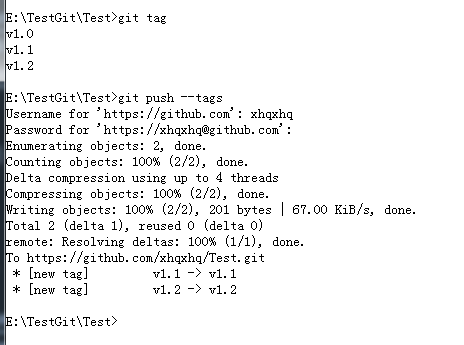
例:
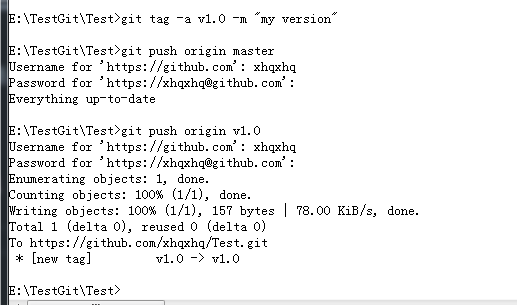
也可以git push --tags推送所有标签到远程仓库:
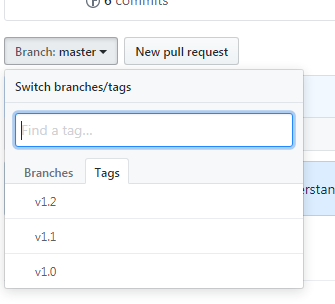
当标签推送到远程仓库后,其他人也可以通过克隆或拉取来获得这些标签
为Git命令设置别名
Git命令行并不具备命令自动不齐功能,每次只能输入完整的git命令,但是git提供了别名,可以简化命令,
git config --global alias.shortcmd fullcmd
这里--global参数配置的是全局别名,在这台电脑上任意位置都有效
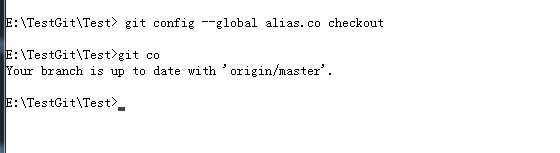
例:为checout 配置全局别名
Git标签与别名的更多相关文章
- Git应用详解第八讲:Git标签、别名与Git gc
前言 前情提要:Git应用详解第七讲:Git refspec与远程分支的重要操作 这一节主要介绍Git标签.别名与Git的垃圾回收机制. 一.Git标签(tag) 1.标签的实质 标签与分支十分相似, ...
- Git标签和别名管理
一.Git标签管理 标签类似于快照功能,可以给版本库打一个标签,记录某个时刻库的状态,也可以随时恢复到该状态 例如给master打一个v1.0的标签 先切换到master分支上去git checkou ...
- git标签
git标签 如果你达到一个重要的阶段,并希望永远记住那个特别的提交快照,你可以使用 git tag 给它打上标签.-a 选项意为"创建一个带注解的标签". 添加标签命令: $ gi ...
- git初体验(四)git标签
1.git 标题(tag) 关于git标签的描述,参考这里 2.标题管理 创建: 切换到需要打标签的分支上,如: git checkout master git tag v1.0 # 默认标签是打在最 ...
- Git标签管理
一般我们发布一个新版本到线上服务器时都会在版本库中打一个标签,这时就确定了某个版本将发布到线上.我们可以随时可以查看这个打标签的版本,也就 是说标签其实呢,就是版本库中一个快照.简单说标签就是指向某个 ...
- 自定义Git之配置别名
有没有经常敲错命令?比如git status?status这个单词真心不好记. 如果敲git st就表示git status那就简单多了,当然这种偷懒的办法我们是极力赞成的. 我们只需要敲一行命令,告 ...
- 极光推送设置标签和别名无效的解决办法:JPush设置别名不走成功回调
极光推送设置标签和别名无效的解决办法 JPush设置别名不走成功回调的解决办法 http://www.cnblogs.com/chenqitao/p/5506023.html 主要是网络加载过快导致的 ...
- Git-Runoob:Git 标签
ylbtech-Git-Runoob:Git 标签 1.返回顶部 1. Git 标签 如果你达到一个重要的阶段,并希望永远记住那个特别的提交快照,你可以使用 git tag 给它打上标签. 比如说,我 ...
- 【第九篇】- Git 标签之Spring Cloud直播商城 b2b2c电子商务技术总结
Git 标签 如果你达到一个重要的阶段,并希望永远记住那个特别的提交快照,你可以使用 git tag 给它打上标签. 比如说,我们想为我们的 xxx 项目发布一个"1.0"版本. ...
随机推荐
- go modules——HelloWorld示例
go modules--HelloWorld示例 go modules 存在的意义是方便代码的共享(虽然这会使自己开发过程中有一些小小的麻烦) 开发第一步,创建一个github仓库,然后克隆到本地 首 ...
- How to get the real screen size(screen resolution) by using js
How to get the real screen size(screen resolution) by using js 获取用户屏幕的真实像素分辨率, 屏幕实际尺寸 window.deviceP ...
- Linux bash fi
Linux bash fi if..else..fi allows to make choice based on the success or failure of a command. if..e ...
- Emmet & VSCode
Emmet & VSCode Emmet - the essential toolkit for web-developers https://emmet.io/ https://emmet. ...
- macOS 录屏 gif
macOS 录屏 gif LICEcap bug 授权问题? 如何在 Mac 上录制屏幕 https://support.apple.com/zh-cn/HT208721 Command + Shif ...
- ES-Next classes static properties
ES-Next classes static properties https://developer.mozilla.org/en-US/docs/Web/JavaScript/Reference/ ...
- js & class & init
js & class & init how to call class init method in js when create an instance 在初始化类实例的时候调用,类 ...
- 为什么说NGK的去中心化预言机越来越受欢迎?
2020年区块链市场非常火热,从年初的交易所杠杆,到Defi热潮,一波连着一波,风向不断切换,很多人无奈感叹跟不上时代,很多人欢欣雀跃登上了早班车.随着Defi的不断火热,预言机也进入了大众视野.NG ...
- CPU使用率原理及计算方式
本文转载自CPU使用率原理及计算方式 CPU:超线程和多核 超线程(Hyper-Threading ) 超线程是Intel最早提出一项技术,最早出现在2002年的Pentium4上.单个采用超线程的C ...
- Java中的CPU占用高和内存占用高的问题排查
下面通过模拟实例分析排查Java应用程序CPU和内存占用过高的过程.如果是Java面试,这2个问题在面试过程中出现的概率很高,所以我打算在这里好好总结一下. 1.Java CPU过高的问题排查 举个例 ...