
.Net Core — 依赖注入
在.NET Core 中 依赖注入Dependency-Injection)作为基础知识,在.Net Core中无处不在;这么重要的知识接下来就了解和在.Net Core中使用。
一、依赖注入
说到依赖注入(Dependency Injection,以下简称DI),就必须说IoC(Inverse of Control);这两个概念很容易搞混。
IoC:主要体现了这样一种设计思想:通过将一组通用流程的控制从应用转移到框架之中以实现对流程的复用,同时采用“好莱坞原则”是应用程序以被动的方式实现对流程的定制。
DI:服务的消费者利用一个独立的容器(Container)来获取所需的服务对象,容器自身在提供服务对象的过程中会自动完成依赖的解析与注入
核心功能:服务注册和服务提供
二、DI在.Net Core中实现
在.Net Core中主要 Microsoft.Extensions.DependencyInjection 中实现DI相关功能,可以在你的项目中单独使用它
核心分为两个组件:IServiceCollection和 IServiceProvider
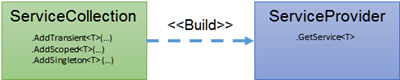
IServiceCollection:负责服务的注册;主要扩展方法如下:
public static class ServiceCollectionServiceExtensions

{

    public static IServiceCollection AddScoped(this IServiceCollection services, Type serviceType, Type implementationType);

    public static IServiceCollection AddSingleton(this IServiceCollection services, Type serviceType, Type implementationType);

    public static IServiceCollection AddTransient(this IServiceCollection services, Type serviceType, Type implementationType);

    ……

}
ServiceCollectionServiceExtensions扩展类中包含了这三个方法的多种重载方法,那么这三个方法分别什么含义呢?
IServiceProvider:负责服务的获取;主要方法:
public interface IServiceProvider

{

    //获取服务

    object GetService(Type serviceType);

}
在IServiceCollection中我们看到了主要到三个方法这些方法的意义是什么呢?
生命周期:
.NET Core DI 为我们提供的实例生命周其包括三种:
- Transient: 每一次GetService都会创建一个新的实例
- Scoped: 在同一个Scope内只初始化一个实例 ,可以理解为( 每一个request级别只创建一个实例,同一个http request会在一个 scope内)
- Singleton: 整个应用程序生命周期以内只创建一个实例(单例)
三、Asp.Net Core 中应用
以上一篇审计日志源码作为示例:
- 添加日志仓储接口和实现:
//仓储接口

public interface IRepository<T>

{

    T Save(T entity);

}

//审计日志仓储实现

public class AuditLogRepository : IRepository<AuditInfo>

{

    AuditLogDBContent _auditLogDB;

    public AuditLogRepository(AuditLogDBContent auditLogDB)

    {

        _auditLogDB = auditLogDB;

    }

    public AuditInfo Save(AuditInfo entity)

    {

        var retEntity = _auditLogDB.AuditInfos.Add(entity);

        _auditLogDB.SaveChanges();

        return retEntity.Entity;

    }

} - 实现定义服务接口和实现
//审计日志服务接口

public interface IAuditLogService

{

    Task SaveAsync(AuditInfo auditInfo);

}

//审计日志服务实现

public class AuditLogService : IAuditLogService

{

    IRepository<AuditInfo> _repository;

    //依赖注入:IRepository<AuditInfo>

    public AuditLogService(IRepository<AuditInfo> repository)

    {

        _repository = repository;

    }

    public async Task SaveAsync(AuditInfo auditInfo)

    {

        _repository.Save(auditInfo);

    }

} - 在Startup中注入定义的相关服务:
public void ConfigureServices(IServiceCollection services)

    {

        //审计日志存储数据库

        services.AddDbContext<AuditLogDBContent>(options =>

        {

            string conn = Configuration.GetConnectionString("LogDB");

            options.UseSqlite(conn, options =>

            {

                options.MigrationsAssembly("AuditLogDemo");

            });

        });

        //依赖注入:审计日志仓储和审计日志服务

        services.AddScoped<IRepository<AuditInfo>, AuditLogRepository>();

        services.AddScoped<IAuditLogService, AuditLogService>();

        services.AddControllers(options =>

        {

            options.Filters.Add(typeof(AuditLogActionFilter));

        });

    }
可以看出当前注入服务不多,相对简单还好,但项目中仓储和服务数量肯定比示例数量多,不可能每个都像这样手工注入。
那么有什么好的解决办法呢?接着往下看
四、批量注入实现方式
- 自己实现批量注入
public static class DIHelper

{

    /// <summary>

    /// 注入服务

    /// </summary>

    /// <param name="services"></param>

    /// <param name="interfaceAssembly"></param>

    /// <param name="implementAssembly"></param>

    public static void AddScoped(this IServiceCollection services, Assembly interfaceAssembly, Assembly implementAssembly)

    {

        var interfaces = interfaceAssembly.GetTypes().Where(t => t.IsInterface);

        var implements = implementAssembly.GetTypes();

        foreach (var item in interfaces)

        {

            var type = implements.FirstOrDefault(x => item.IsAssignableFrom(x));

            if (type != null)

            {

                services.AddScoped(item, type);

            }

        }

    }

    /// <summary>

    /// 注入服务

    /// </summary>

    /// <param name="services"></param>

    /// <param name="interfaceAssembly"></param>

    /// <param name="implementAssembly"></param>

    public static void AddSingleton(this IServiceCollection services, Assembly interfaceAssembly, Assembly implementAssembly)

    {

        var interfaces = interfaceAssembly.GetTypes().Where(t => t.IsInterface);

        var implements = implementAssembly.GetTypes();

        foreach (var item in interfaces)

        {

            var type = implements.FirstOrDefault(x => item.IsAssignableFrom(x));

            if (type != null)

            {

                services.AddSingleton(item, type);

            }

        }

    }

    /// <summary>

    /// 注入服务

    /// </summary>

    /// <param name="services"></param>

    /// <param name="interfaceAssembly"></param>

    /// <param name="implementAssembly"></param>

    public static void AddTransient(this IServiceCollection services, Assembly interfaceAssembly, Assembly implementAssembly)

    {

        var interfaces = interfaceAssembly.GetTypes().Where(t => t.IsInterface);

        var implements = implementAssembly.GetTypes();

        foreach (var item in interfaces)

        {

            var type = implements.FirstOrDefault(x => item.IsAssignableFrom(x));

            if (type != null)

            {

                services.AddTransient(item, type);

            }

        }

    }

}
使用方式:
services.AddScoped(Assembly.Load("xxxx.IService"), Assembly.Load("xxxx.Service"));

services.AddScoped(Assembly.Load("xxxx.IService"), Assembly.Load("xxxx.Service"));
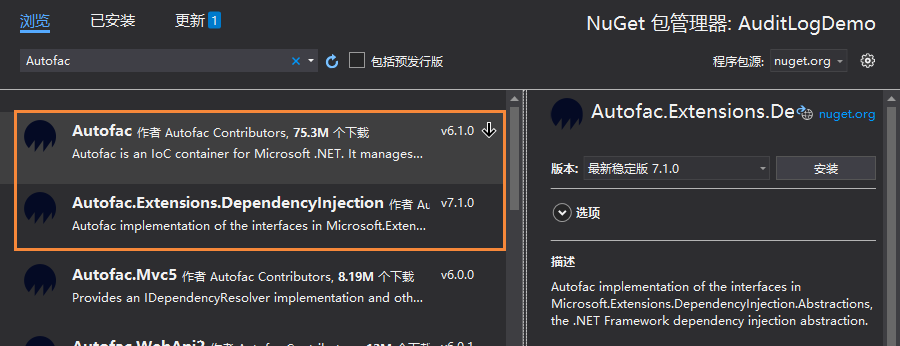
- Autofac实现批量注入
添加Nuget包:
1、添加Autofac模型实现:
/// <summary>

/// 注册Autofac模块

/// </summary>

public class AutofacModuleRegister : Autofac.Module

{

    /// <summary>

    /// 重写Autofac管道Load方法,在这里注册注入

    /// </summary>

    protected override void Load(ContainerBuilder builder)

    {

        builder.RegisterAssemblyTypes(GetAssemblyByName("AuditLog.EF"))

            .Where(a => a.Name.EndsWith("Repository"))

            .AsImplementedInterfaces();

        builder.RegisterAssemblyTypes(GetAssemblyByName("AuditLog.Application"))

            .Where(a => a.Name.EndsWith("Service"))

            .AsImplementedInterfaces();

        //注册MVC控制器(注册所有到控制器,控制器注入,就是需要在控制器的构造函数中接收对象)

        builder.RegisterAssemblyTypes(GetAssemblyByName("AuditLogDemo"))

            .Where(a => a.Name.EndsWith("Controller"))

            .AsImplementedInterfaces();

    }

    /// <summary>

    /// 根据程序集名称获取程序集

    /// </summary>

    /// <param name="assemblyName">程序集名称</param>

    public static Assembly GetAssemblyByName(string assemblyName)

    {

        return Assembly.Load(assemblyName);

    }

}
2、使用Autofac来实现依赖注入
public class Program

{

    public static void Main(string[] args)

    {

        CreateHostBuilder(args).Build().Run();

    }

    public static IHostBuilder CreateHostBuilder(string[] args) =>

        Host.CreateDefaultBuilder(args)

            //改用Autofac来实现依赖注入

            .UseServiceProviderFactory(new AutofacServiceProviderFactory())

            .ConfigureWebHostDefaults(webBuilder =>

            {

                webBuilder.UseStartup<Startup>();

            });

}
3、调整Statup文件:
public class Startup

{

    public Startup(IConfiguration configuration)

    {

        Configuration = configuration;

    }

    /// <summary>

    /// autofac容器

    /// </summary>

    public ILifetimeScope AutofacContainer { get; private set; }

    public IConfiguration Configuration { get; }

    // This method gets called by the runtime. Use this method to add services to the container.

    public void ConfigureServices(IServiceCollection services)

    {

        //审计日志存储

        services.AddDbContext<AuditLogDBContent>(options =>

        {

            string conn = Configuration.GetConnectionString("LogDB");

            options.UseSqlite(conn, options =>

            {

                options.MigrationsAssembly("AuditLogDemo");

            });

        });

        //依赖注入

        //Scoped:一个请求创建一个

        //services.AddScoped<IRepository<AuditInfo>, AuditLogRepository>();

        ////每次创建一个

        //services.AddTransient<IAuditLogService, AuditLogService>();

        services.AddControllers(options =>

        {

            options.Filters.Add(typeof(AuditLogActionFilter));

        });

    }

    /// <summary>

    /// 配置容器:在ConfigureServices后执行

    /// </summary>

    /// <param name="builder"></param>

    public void ConfigureContainer(ContainerBuilder builder)

    {

        // 直接用Autofac注册我们自定义的

        builder.RegisterModule(new AutofacModuleRegister());

    }

  // This method gets called by the runtime. Use this method to configure the HTTP request pipeline.

    public void Configure(IApplicationBuilder app, IWebHostEnvironment env)

    {

        if (env.IsDevelopment())

        {

            app.UseDeveloperExceptionPage();

        }

        //autofac 新增 可选

        this.AutofacContainer = app.ApplicationServices.GetAutofacRoot();

        app.UseRouting();

        app.UseAuthorization();

        app.UseEndpoints(endpoints =>

        {

            endpoints.MapControllers();

        });

    }

}
到此Autofac批量实现注入服务完成。
参考:
https://github.com/cwsheng/AuditLogDemo
https://docs.microsoft.com/zh-cn/aspnet/core/fundamentals/dependency-injection
https://www.cnblogs.com/artech/p/di-4-asp-net-core.html
.Net Core — 依赖注入的更多相关文章
- # ASP.NET Core依赖注入解读&使用Autofac替代实现
标签: 依赖注入 Autofac ASPNETCore ASP.NET Core依赖注入解读&使用Autofac替代实现 1. 前言 2. ASP.NET Core 中的DI方式 3. Aut ...
- net core 依赖注入问题
net core 依赖注入问题 最近.net core可以跨平台了,这是一个伟大的事情,为了可以赶上两年以后的跨平台部署大潮,我也加入到了学习之列.今天研究的是依赖注入,但是我发现一个问题,困扰我很久 ...
- NET Core依赖注入解读&使用Autofac替代实现
NET Core依赖注入解读&使用Autofac替代实现 标签: 依赖注入 Autofac ASPNETCore ASP.NET Core依赖注入解读&使用Autofac替代实现 1. ...
- 实现BUG自动检测 - ASP.NET Core依赖注入
我个人比较懒,能自动做的事绝不手动做,最近在用ASP.NET Core写一个项目,过程中会积累一些方便的工具类或框架,分享出来欢迎大家点评. 如果以后有时间的话,我打算写一个系列的[实现BUG自动检测 ...
- [译]ASP.NET Core依赖注入深入讨论
原文链接:ASP.NET Core Dependency Injection Deep Dive - Joonas W's blog 这篇文章我们来深入探讨ASP.NET Core.MVC Core中 ...
- asp.net core 依赖注入几种常见情况
先读一篇注入入门 全面理解 ASP.NET Core 依赖注入, 学习一下基本使用 然后学习一招, 不使用接口规范, 直接写功能类, 一般情况下可以用来做单例. 参考https://www.cnblo ...
- ASP.NET Core依赖注入——依赖注入最佳实践
在这篇文章中,我们将深入研究.NET Core和ASP.NET Core MVC中的依赖注入,将介绍几乎所有可能的选项,依赖注入是ASP.Net Core的核心,我将分享在ASP.Net Core应用 ...
- 自动化CodeReview - ASP.NET Core依赖注入
自动化CodeReview系列目录 自动化CodeReview - ASP.NET Core依赖注入 自动化CodeReview - ASP.NET Core请求参数验证 我个人比较懒,能自动做的事绝 ...
- ASP.NET Core 依赖注入最佳实践——提示与技巧
在这篇文章,我将分享一些在ASP.NET Core程序中使用依赖注入的个人经验和建议.这些原则背后的动机如下: 高效地设计服务和它们的依赖. 预防多线程问题. 预防内存泄漏. 预防潜在的BUG. 这篇 ...
- ASP.NET Core依赖注入最佳实践,提示&技巧
分享翻译一篇Abp框架作者(Halil İbrahim Kalkan)关于ASP.NET Core依赖注入的博文. 在本文中,我将分享我在ASP.NET Core应用程序中使用依赖注入的经验和建议. ...
随机推荐
- Python中字符串使用单引号、双引号标识和三引号标识,什么是三引号?什么情况下用哪种标识?
一.三引号是指三个单引号或者三个双引号: 二.Python中字符串如果以单引号.双引号标识和三引号标识开头,则字符串结尾也必须是对应的标识,不能变更: 三.三者的异同: 1.三者都是字符串,大部分情况 ...
- PyQt(Python+Qt)学习随笔:工具箱(QToolBox)编程使用的步骤及示例代码
老猿Python博文目录 专栏:使用PyQt开发图形界面Python应用 老猿Python博客地址 使用toolBox开发应用时,通过Designer设计ui界面时,只能在Designer中设计too ...
- RSA简单实践
RSA公钥文件解密密文的原理分析 前言 最近在学习 RSA 加解密过程中遇到一个这样的难题:假设已知 publickey 公钥文件和加密后的密文 flag ,如何对其密文进行解密,转换成明文~~ 分析 ...
- ThreadLocal原理记录,别被坑了!!
简介 ThreadLocal的用处 ThreadLocal是为了将数据记录一份到某个线程里,确保该数据线程安全 例如数据库的Connection放入ThreadLocal,一个事务会用到很多DAO,但 ...
- 【杂记】CSP-S 2020 游记 &反思
考场经历 吐槽:为什么这个 Enter 的位置怎么诡异啊老是打错.要是考挂了就怪你 开场当然先看了 T1,发现是个日期转换,果然是个百出不厌的模拟题类型,估价细节多到爆炸.看了几分钟题目,对这些规则云 ...
- 【Codeforces 1037H】Security(SAM & 线段树合并)
Description 给出一个字符串 \(S\). 给出 \(Q\) 个操作,给出 \(L, R, T\),求字典序最小的 \(S_1\),使得 \(S^\prime\) 为\(S[L..R]\) ...
- memcached session会话共享
1 安装依赖包yum install libevent livevent-devel nc -y 2 yum 安装memcachedyum install -y memcached 3 启动memec ...
- 小兔子有颗玻璃心A版【转】
作者:诸君平身链接:https://www.zhihu.com/question/49179166/answer/116926446来源:知乎著作权归作者所有.商业转载请联系作者获得授权,非商业转载请 ...
- Spark-2-性能监控方式
1 Spark Web UI Spark提供了一些基本的Web监控页面,对于日常监控十分有用. 通过http://master:4040(默认端口是4040,可以通过spark.ui.port修改)我 ...
- openstack高可用集群16-ceph介绍和部署
Ceph Ceph是一个可靠.自动重均衡.自动恢复的分布式存储系统,根据场景划分可以将Ceph分为三大块,分别是对象存储.块设备和文件系统服务.块设备存储是Ceph的强项. Ceph的主要优点是分布式 ...