
solr 文档一
[在此处输入文章标题]
参考博客:
http://blog.csdn.net/matthewei6/article/details/50620600
基础环境搭建
solr版本5.5.5:
一、solr5.5.5可以独立部署,使用默认的Jetty启动
1、准备条件:
环境:JDK需要1.7以上,最好是1.8
下载软件包:
使用清华大学的镜像包:
https://mirrors.tuna.tsinghua.edu.cn/apache/lucene/solr/5.5.5/solr-5.5.5.tgz
命令:curl https://mirrors.tuna.tsinghua.edu.cn/apache/lucene/solr/5.5.5/solr-5.5.5.tgz
或者wget https://mirrors.tuna.tsinghua.edu.cn/apache/lucene/solr/5.5.5/solr-5.5.5.tgz
2、解压:
tar -zxvf solr-5.5.5.tgz
3、启动服务器:
bin/solr start
4、验证服务是否启动:
在浏览器中输入:http://IP:8983/solr/ 端口默认是8983 要想修改的话,启动的时候加上参数 -p 8983
5、创建core:
bin/solr create -c mycore
bin/solr delete -c testcore -------删除已创建的core
5、添加中文分词器:
这里采用的是IK分词器,添加分词器是在刚刚创建的core中添加:
位置:${PATH}\server\solr\mycore\conf\managed-schema
添加下面的内容:
<!-- 中文分词 -->
<fieldType name="text_ik" class="solr.TextField">
<analyzer type="index" useSmart="false" class="org.wltea.analyzer.lucene.IKAnalyzer"/>
<analyzer type="query" useSmart="true" class="org.wltea.analyzer.lucene.IKAnalyzer"/>
</fieldType>
并且把jar包添加到:(注意这里的jar一定要版本对应)
${PATH}\server\solr-webapp\webapp\WEB-INF\lib 目录下

验证IK是否安装成功。没有安装成功的话会提示mycore 的core有问题。也可以查看solr的日志。
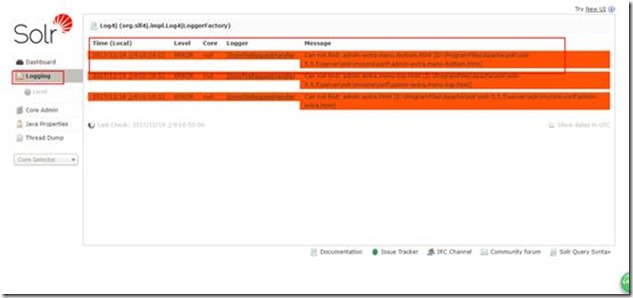
重启服务器:
bin/solr restart -p 8983 注意重启要指定端口要不然报错
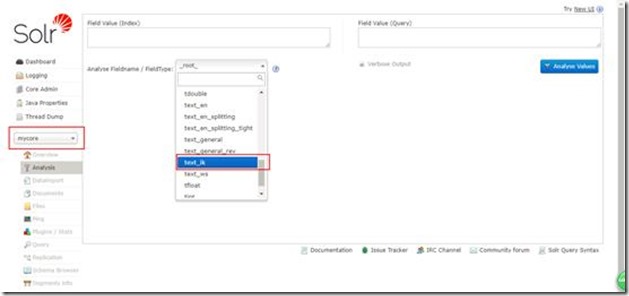
然后看看分词效果:
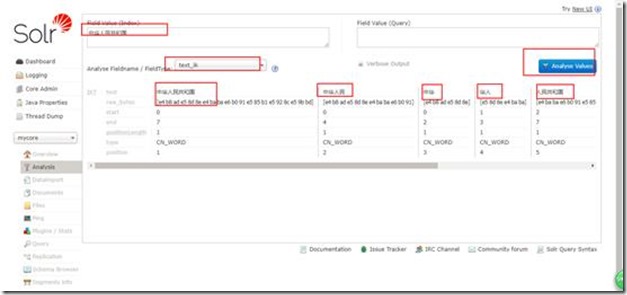
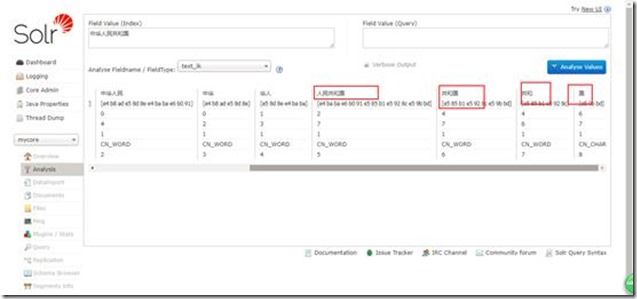
效果还是不错的。
建立数据库连接并对数据表字段建索引分词
http://blog.csdn.net/u011518678/article/details/51871925 基础说明参考
6、copy一个oracle驱动包到E:\solr\solr-5.5.5\server\solr-webapp\webapp\WEB-INF\lib下,
并在E:\solr\solr-5.5.5\server\solr\liukuncore\conf (liukuncor为我自己新建的一个core)下创建data-config.xml文件,添加内容如下:
<dataConfig>
<dataSource name="testSource1" driver="oracle.jdbc.driver.OracleDriver"
url="jdbc:oracle:thin:@192.168.4.229:1521:orcl" password="hermes" user="hermes_rc" />
<document>
<entity name="goods1" pk="BID" transformer="DateFormatTransformer" dataSource="testSource1"
query="select id,name,url,price,to_date(to_char(addtime,'yyyy-MM-dd HH24:mi:ss'),'yyyy-MM-dd HH24:mi:ss') addtime from lksolrtest"
deltaQuery="select id BID from lksolrtest where to_char(addtime,'yyyy-MM-dd HH24:mi:ss')>'${dataimporter.last_index_time}'"
deltaImportQuery="select id,name,url,price,to_date(to_char(addtime,'yyyy-MM-dd HH24:mi:ss'),'yyyy-MM-dd HH24:mi:ss') addtime from lksolrtest where id = '${dataimporter.delta.BID}'">
<field column="BID" name="id"/>
<field column="price" name="price" />
<field column="name" name="name" />
<field column="url" name="url" />
<field column="addtime" name="addtime" dateTimeFormat="yyyy-MM-dd HH24:mi:ss" />
</entity>
</document>
</dataConfig>
有点乱,在文本中如图所示:
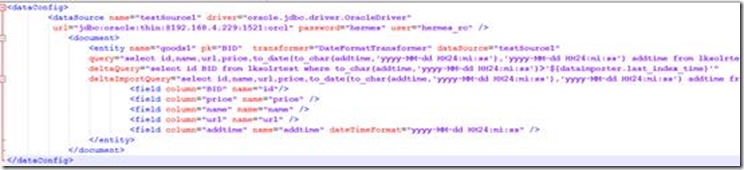
这里面有几点需要注意的地方:
(1) .pk尽量使用deltaQuery中查询出的主键重命名后的名称,否则会有问题(索引建成功,查询不到内容)
(2) .${dataimporter.last_index_time}代表上次创建完索引的时间,是一个字符串,这个值可以在E:\solr\solr-5.5.5\server\solr\liukuncore\conf\dataimport.properties文件中看到
(3) .${dataimporter.delta.BID}是deltaQuery中查询到的主键值
(4) dateTimeFormat="yyyy-MM-dd HH24:mi:ss"是对数据库中日期格式的转换(转成solr中的日期格式)
7、添加solr-dataimporthandler-5.5.5.jar、solr-dataimporthandler-extras-5.5.5.jar和
mydataimportscheduler.jar三个到E:\solr\solr-5.5.5\server\solr-webapp\webapp\WEB-INF\lib下
并在E:\solr\solr-5.5.5\server\solr\liukuncore\conf\solrconfig.xml对应位置添加
<lib dir="./lib" regex=".*\.jar" />
<requestHandler name="/dataimport" class="solr.DataImportHandler">
<lst name="defaults">
<str name="config">data-config.xml</str>
</lst>
</requestHandler>
接着注释掉下面的内容,防止id默认为String类型
<!--
<searchComponent name="elevator" class="solr.QueryElevationComponent" >
<str name="queryFieldType">string</str>
<str name="config-file">elevate.xml</str>
</searchComponent>
-->
8、在E:\solr\solr-5.5.5\server\solr\liukuncore\conf\managed-schema文件中定义与数据库对应的字段变量
<field name="id" type="int" indexed="true" stored="true" required="true" multiValued="false" />
<field name="name" type = "text_ik" indexed="true" stored="true" />
<field name="price" type = "float" indexed="true" stored="true" />
<field name="url" type = "text_ik" indexed="true" stored="true" />
<field name="addtime" type = "date" indexed="true" stored="true" />
<uniqueKey>id</uniqueKey>
9、E:\solr\solr-5.5.5\server\solr\下创建文件夹conf,并新建文件dataimport.properties,添加如下内容:(这是设置定时增量更新的配置)
#################################################
# #
# dataimport scheduler properties #
# #
#################################################
# to sync or not to sync
# 1 - active; anything else - inactive
syncEnabled=1
# which cores to schedule
# in a multi-core environment you can decide which cores you want syncronized
# leave empty or comment it out if using single-core deployment
#syncCores=liukuncore,liukuncore1
syncCores=liukuncore
# solr server name or IP address
# [defaults to localhost if empty]
server=localhost
# solr server port
# [defaults to 80 if empty]
port=8983
# application name/context
# [defaults to current ServletContextListener's context (app) name]
webapp=solr
# URL params [mandatory]
# remainder of URL
#params=/deltaimport?command=delta-import&clean=false&commit=true
params=/dataimport?command=delta-import&clean=false&commit=true
# schedule interval
# number of minutes between two runs
# [defaults to 30 if empty]
interval=1
# 重做索引的时间间隔,单位分钟,默认7200,即1天;
# 为空,为0,或者注释掉:表示永不重做索引
reBuildIndexInterval=7200
# 重做索引的参数
#reBuildIndexParams=/deltaimport?command=full-import&clean=true&commit=true
reBuildIndexParams=/dataimport?command=full-import&clean=true&commit=true
# 重做索引时间间隔的计时开始时间,第一次真正执行的时间#=reBuildIndexBeginTime+reBuildIndexInterval*60*1000;
# 两种格式:2012-04-11 03:10:00 或者 03:10:00,后一种会自动补全日期部分为服务启动时的日期
reBuildIndexBeginTime=18:50:00
10、在E:\solr\solr-5.5.5\server\solr-webapp\webapp\WEB-INF\web.xml文件中添加监听器
<listener>
<listener-class>
org.apache.solr.handler.dataimport.scheduler.ApplicationListener
</listener-class>
</listener>
到此数据库和定时增量更新索引配置的东西已全部完成
多表关联定时更新索引
1. 多表关联索引说明以及场景
上面说到单表索引定时增量更新是针对一张表的数据发生变化的时候更新或者增量添加索引,对于多表而言类似(具体需求为人口库法人库后台检索),多表关联可以理解为用一张主表去关联多个子表,当主表或者子表中的数据发生变化(即数据更改或者数据添加---这里先不做删除,因为删除需要表中有一个字段来表示数据是否为删除状态),需要对索引进行更新。
这里存在两种情况:1.数据修改;2.数据增加。---(这两者都需要表中存在更新时间字段)。 数据修改是由于solr内部的实现机制,当数据发生修改时,我们需要更新修改这部分数据的索引,实质上是直接生成新的索引,在solr内部生成索引时需要指定一个主键id来表示索引的唯一,当下一次生成一个重复的索引时会自动覆盖掉上次生成的索引,保证索引出的数据与数据库数据相同。
数据增加指主表增加了数据或者其子表数据增加再或者两张表数据同时增加,这时需要生成新的索引(不生成新索引,新添加的数据查询不到),下面提供两种方式来生成。
2. 主要配置文件data-config.xml
配置文件内容如下:
<dataConfig>
<dataSource name="testSource1" driver="oracle.jdbc.driver.OracleDriver"
url="jdbc:oracle:thin:@192.168.4.229:1521:orcl" password="hermes" user="hermes_rc" />
<document>
<entity name="goods3" pk="BID" dataSource="testSource1"
query="select id BID,name,url,price from lksolrtest"
deltaQuery="select id BID from lksolrtest where to_char(addtime,'yyyy-MM-dd HH24:mi:ss')>'${dataimporter.last_index_time}'"
deltaImportQuery="select id BID,name,url,price from lksolrtest where id = '${dataimporter.delta.BID}'">
<field column="BID" name="id"/>
<field column="name" name="name" />
<field column="url" name="url" />
<field column="price" name="price" />
<entity name="goods3_son1" pk="SID"
query="select id SID,address,produce_man,telephone from lksolrtest1 where id = '${goods3.BID}'"
deltaQuery="select id SID from lksolrtest1 where to_char(addtime,'yyyy-MM-dd HH24:mi:ss')>'${dataimporter.last_index_time}'"
parentDeltaQuery="select id BID from lksolrtest where id = '${goods3_son1.SID}'"
>
<field column="address" name="address" />
<field column="produce_man" name="produce_man" />
<field column="telephone" name="telephone" />
</entity>
</entity>
</document>
</dataConfig>
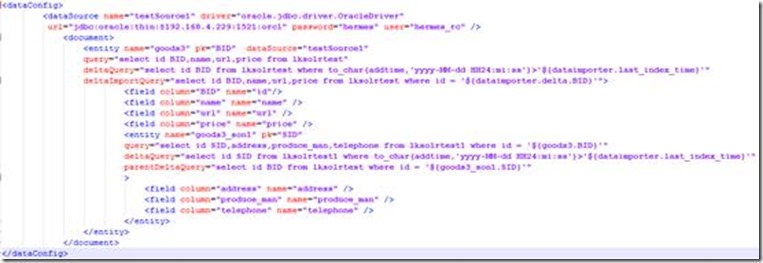
这里主要解释一下增量更新部分的属性:
query是获取全部数据的SQL
deltaImportQuery是获取增量数据时使用的SQL
deltaQuery是获取增量pk的SQL
parentDeltaQuery是获取父Entity的pk的SQL
Full Import工作原理:
执行本Entity的Query,获取所有数据;
针对每个行数据Row,获取pk,组装子Entity的Query;
执行子Entity的Query,获取子Entity的数据。
Delta Import工作原理:
查找子Entity,直到没有为止;
执行Entity的deltaQuery,获取变化数据的pk;
合并子Entity parentDeltaQuery得到的pk;
针对每一个pk Row,组装父Entity的parentDeltaQuery;
执行parentDeltaQuery,获取父Entity的pk;
执行deltaImportQuery,获取自身的数据;
如果没有deltaImportQuery,就组装Query
限制:
子Entity的query必须引用父Entity的pk
子Entity的parentDeltaQuery必须引用自己的pk
子Entity的parentDeltaQuery必须返回父Entity的pk
deltaImportQuery引用的必须是自己的pk
文件索引创建
文件索引创建未能在界面上成功操作,是通过程序创建,查询结果可以在界面看到,也可以通过程序实现。
1. 创建一个自定义的core--------怎样创建在上面已经提到过
2. 在新生成的core/conf/managed-schema文件中添加IK分词器,
<fieldType name="text_ik" class="solr.TextField">
<analyzer type="index" useSmart="false" class="org.wltea.analyzer.lucene.IKAnalyzer"/>
<analyzer type="query" useSmart="true" class="org.wltea.analyzer.lucene.IKAnalyzer"/>
</fieldType>
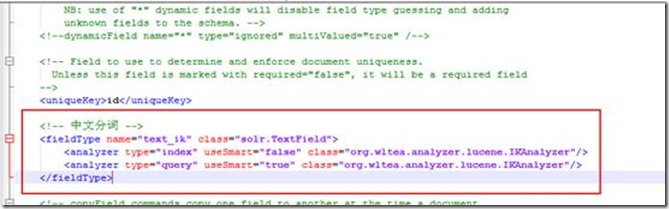
并将
<dynamicField name="attr_*" type="text_general" indexed="true" stored="true" multiValued="true"/>中的type改为text_ik,

3. 程序创建文件索引并查询
package com.boco.lk;
import java.io.File;
import java.io.IOException;
import org.apache.solr.client.solrj.SolrQuery;
import org.apache.solr.client.solrj.SolrServerException;
import org.apache.solr.client.solrj.request.AbstractUpdateRequest;
import org.apache.solr.client.solrj.impl.HttpSolrClient;
import org.apache.solr.client.solrj.request.ContentStreamUpdateRequest;
import org.apache.solr.client.solrj.response.QueryResponse;
import org.apache.solr.common.SolrDocument;
import org.apache.solr.common.SolrDocumentList;
public class DocumentSolr {
private static String URL = "http://localhost:8983/solr/liukuncore3";//指定core的访问路径
/**
* 创建索引方法
*/
public static void createIndex(){
HttpSolrClient client = null;
try {
client = new HttpSolrClient(URL);
ContentStreamUpdateRequest up = new ContentStreamUpdateRequest("/update/extract");
up.addFile(new File("E:\\solr文档--刘坤\\solr-word.pdf"),"application/pdf");
up.setParam("literal.id", "E:\\solr文档--刘坤\\solr-word.pdf");
up.setParam("fmap.content", "attr_test");//attr_*,只要是以attr_开头即可
up.setParam("fmap.content_type", "documentFormat");//这个content_type在managed-schema文件中有,此行意思是给content_type重命名
up.setAction(AbstractUpdateRequest.ACTION.COMMIT,true,true);
client.request(up);
client.commit();
} catch (Exception e) {
// TODO Auto-generated catch block
e.printStackTrace();
} finally {
try {
client.close();
} catch (IOException e) {
// TODO Auto-generated catch block
e.printStackTrace();
}
}
}
public static void queryIndex(){
HttpSolrClient client = null;
try {
client = new HttpSolrClient(URL);
SolrQuery query = new SolrQuery();
query.setParam("q", "*:*");
// query.setParam("df", "attr_content");
// query.setParam("fl","id","attr_content","documentFormat");
QueryResponse rsp = client.query(query);
SolrDocumentList results = rsp.getResults();
System.out.println("查询到记录:"+results.getNumFound()+"条");
for (SolrDocument solrDocument : results) {
System.out.println(solrDocument.getFieldNames());
System.out.println(solrDocument.get("id"));
System.out.println(solrDocument.get("attr_test"));
System.out.println(solrDocument.get("documentFormat"));
System.out.println("**********************");
}
} catch (Exception e) {
// TODO Auto-generated catch block
e.printStackTrace();
} finally {
try {
client.close();
} catch (IOException e) {
// TODO Auto-generated catch block
e.printStackTrace();
}
}
}
public static void deletePlan(String id) {
HttpSolrClient server = null;
try {
server = new HttpSolrClient(URL);
server.deleteById(id);
server.commit();
} catch (SolrServerException | IOException e) {
e.printStackTrace();
} finally {
try {
server.close();
} catch (IOException e) {
// TODO Auto-generated catch block
e.printStackTrace();
}
}
}
public static void main(String[] args) {
deletePlan("E:\\solr文档--刘坤\\solr-word.pdf");
createIndex();
queryIndex();
}
}
solr 文档一的更多相关文章
- Solr记录-solr文档xml
Solr添加文档(XML) 在上一章中,我们学习解释了如何向Solr中添加JSON和.CSV文件格式的数据.在本章中,将演示如何使用XML文档格式在Apache Solr索引中添加数据. 示例数据 假 ...
- solr 文档二
SOLR 5.5.5文档 参考博文: http://blog.csdn.net/matthewei6/article/details/50620600 作者:毛平 时间:2018年1月15日 17:3 ...
- PHP搜索Solr文档(含高亮)
<?php $options = array ( 'hostname' => 'localhost', 'port' => '8080', 'path' => 'solr/he ...
- PHP删除Solr文档
<?php $options = array ( 'hostname' => 'localhost', 'port' => '8080', 'path'=>'solr/help ...
- Solr 18 - 通过SolrJ局部更新Solr中的文档 (原子操作、非覆盖操作)
目录 1 需求分析 2 需求实现 2.1 pom.xml依赖 2.2 Java代码示例 3 补充说明 3.1 关于文档中_version_的取值说明 3.2 store=true/false的区别 1 ...
- solr schema.xml文档节点配置
首先,讲解一下/usr/local/solr/collection1/conf/schema.xml的配置,此文档功能类似于配置索引数据库. Field:类似于数据库字段的属性(此文统一使用用“字段” ...
- JSON方式提交文档时SOLR报:AtomicUpdateDocumentMerger Unknown operation for the an atomic update, operation ignored
文档是数组转成的json 原数组: array( 0 =>3, 1 =>3, 2 =>4, 3 =>5, 4 =>5, 5 =>6) 用array_unique去掉 ...
- Solr开发参考文档(转)
Solr开发文档 Solr 是一种可供企业使用的.基于 Lucene 的搜索服务器,它支持层面搜索.命中醒目显示和多种输出格式.在这篇文章中,将介绍 Solr 并展示如何轻松地将其表现优异的全文本搜索 ...
- Solr 15 - Solr添加和更新索引的过程 (文档的路由细节)
目录 1 添加文档的细节 1.1 注册观察者 - watcher 1.2 文档的路由 - document route 1.2.1 路由算法 1.2.2 Solr路由的实现类 1.2.3 implic ...
随机推荐
- 059 01 Android 零基础入门 01 Java基础语法 06 Java一维数组 06 增强型for循环
059 01 Android 零基础入门 01 Java基础语法 06 Java一维数组 06 增强型for循环 本文知识点:增强型for循环 增强型for循环格式 案例练习增强型for循环 数组名字 ...
- Java知识系统回顾整理01基础06数组02初始化数组
一.分配空间与赋值分步进行 分配空间与赋值分步进行 public class HelloWorld { public static void main(String[] args) { int[] a ...
- 01 How does C Programming work ? C语言如何工作?
where is C used ? C 语言的应用场景 C is widely used C语言被广泛应用于: For creating desktop applications 用于创建桌面应用程序 ...
- error C2491: 不允许 dllimport 函数 的定义
转载:https://blog.csdn.net/gaofeidongdong/article/details/7781345 在工程属性中 预编译宏中加上 DLL_EXPORT为了减少使用dll时候 ...
- 南方IT比赛项目
注意: 出现以下提示点击否就可以了 导入工作台: 导入模型 安装 安装到工作台上 修改模型位置 更新工具位置 点击是 改角度 九十度 添加组件 改一下名字,方便记忆 把工具移到组件 拆除后将工具移到S ...
- .NET Standard 系列
.NET Standard 是一套正式的 .NET API 规范,有望在所有 .NET 实现中推出. 推出 .NET Standard 的背后动机是要提高 .NET 生态系统中的一致性. ECMA 3 ...
- CSS精灵图与字体图标
CSS精灵图与字体图标 1. 精灵图 当用户访问一个网站时,需要向服务器发送请求,网页上的每张图像都要经过一次请求才能展现给用户.然而,一个网页中往往会应用很多小的背景图像作为修饰,当网页中的图像过多 ...
- Redis 字典结构细谈
Redis 字典底层基于哈希表实现. 一.哈希表结构 1.dictht: typedef struct dictht { dictEntry **table; //哈希表数组,存储具体的键值对元素,对 ...
- apache自带的ab测试失败请求原因
只要出现 Failed requests 就会多出现一行要求失败的各原因的数据统计,分别有 Connect, Length, 与 Exception 三种,分别代表的意义为:Connect ...
- Python之包的相关
包的产生: 由于模块不断更新,越写越大,仅用单个py文件会使模块逻辑不够清晰,所以需要将模块的不同功能放入不同的py文件,然后将所有py文件放在一个目录内,这个目录就是包 包就是一个包含用__init ...