
Nginx 学习笔记(七)如何解决nginx: [emerg] bind() to [::]:80 failed (98: Address already in use)
出现:nginx: [emerg] bind() to [::]:80 failed (98: Address already in use) 错误,有以下两种情况
1、80端口被占用
2、ipv4端口和ipv6端口冲突的问题
今天服务器安装了NodeJs,服务器实在卡的不行,就重启了,结果重启后,Nginx没有自动重启。果断的手动重启,结果问题来了
在ubuntu16.04上面尝试启动nginx,使用命令:
sudo /etc/init.d/nginx start
启动不了啊!出错了哎!提示的错误信息:
www@TinywanAliYun:~$ sudo /usr/local/openresty/nginx/sbin/nginx

nginx: [warn] could not build optimal variables_hash, you should increase either variables_hash_max_size:  or variables_hash_bucket_size: ; ignoring variables_hash_bucket_size

nginx: [emerg] bind() to 0.0.0.0: failed (: Address already in use)

nginx: [emerg] bind() to 0.0.0.0: failed (: Address already in use)

nginx: [emerg] bind() to 0.0.0.0: failed (: Address already in use)

nginx: [emerg] bind() to 0.0.0.0: failed (: Address already in use)

nginx: [emerg] bind() to 0.0.0.0: failed (: Address already in use)

nginx: [emerg] still could not bind()
第一种情况,查看80端口是不是被占用了
www@TinywanAliYun:~$ netstat -anp |grep

(Not all processes could be identified, non-owned process info

 will not be shown, you would have to be root to see it all.)

tcp        0      0 0.0.0.0:80              0.0.0.0:*               LISTEN      -

tcp        0      0 内网IP:50852     外网IP:80      ESTABLISHED -

unix        [ ACC ]     STREAM     LISTENING         -                   /var/run/nscd/socket

unix        [ ]         STREAM     CONNECTED         -
问题上面怎么没有显示进程号

尽然没有仔细的看看这句话,要root权限啊!赶紧切换

这次看来是真有了,怎么是apache2,我都不知道什么时候安装的这个:ab 测试吗?
立马卸掉

重启Openresty,看看情况

果断没报错呀,访问:https://www.tinywan.com/ 一切正常
第二种情况
遇到这种问题我先用中文搜索了一下答案,发现大家都在装逼地说要杀nginx重复的进程。我试了下发现是扯淡,于是看了谷歌搜到的第一个英文页面,老外说是nginx先监听了ipv4的80端口之后又监听了ipv6的80端口,于是就重复占用了。更加坑人的是你去看了端口占用它又把80端口释放了,是不是很囧。 解决方案是编辑nginx的配置文件
我的配置
    # 配置HTTP请求重定向

    server {

        # 监听所有的ipv4的地址

        listen  default_server;

        # 监听所有的ipv6的地址

        listen [::]: default_server;

        server_name  _;

        # Redirect all HTTP requests to HTTPS with a  Moved Permanently response.

        return  https://$host$request_uri;

        # 过滤爬虫

        if ($http_user_agent ~* "python|curl|java|wget|httpclient|okhttp") {

            return ;

        }

    }
修改这一段
listen [::]: default_server;
修改后
listen [::]: ipv6only=on default_server;
果断重启后,正常
分析一下问题:
刚开始我是Nginx默认开机启动的,但是我今天又搞了个Openresty开启自启动,是不是冲突掉了
直接把Nginx启动脚本删掉 rm /etc/init.d/nginx ,又重启,结果还是不行
那就安装个sysv-rc-conf 工具看看,该命令可以查看到当前系统开启机动服务的情况。

果不其然,任然在开启启动项中呀!!!
我们再来看看通启动相应的服务的脚本文件是否存在
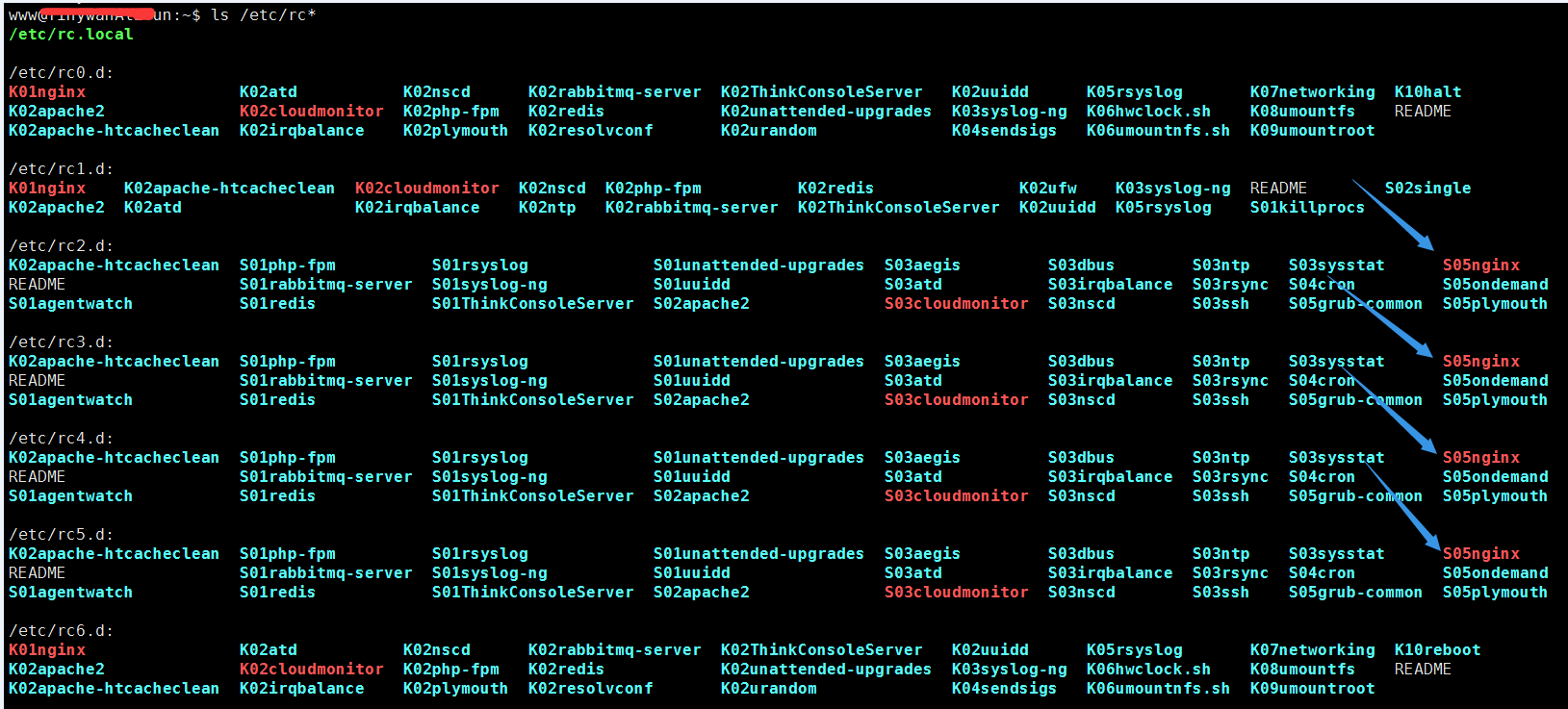
看到了吗!也在这里啊!啊哈
http://www.hankcs.com/appos/linux/fix-nginx-bind-err.html
Nginx 学习笔记(七)如何解决nginx: [emerg] bind() to [::]:80 failed (98: Address already in use)的更多相关文章
- 解决nginx: [emerg] bind() to [::]:80 failed (98: Address already in use)
nginx先监听了ipv4的80端口之后又监听了ipv6的80端口,于是就重复占用了.更加坑人的是你去看了端口占用它又把80端口释放了,是不是很囧. 解决方案是编辑nginx的配置文件 修改这一段:
- nginx: [emerg] bind() to 0.0.0.0:80 failed (98: Address already in use) 错误解决
今天在做LNMP的时候,启动nginx服务,无法开启,导致网页打不开.把服务从起一下发现提示错误如下: Starting nginx: nginx: [emerg] bind() to 0.0.0.0 ...
- nginx: [emerg] bind() to 0.0.0.0:80 failed (98: Address already in use)解决
nginx: [emerg] bind() to 0.0.0.0:80 failed (98: Address already in use) 报错信息 nginx: [emerg] bind() t ...
- nginx: [emerg] bind() to 0.0.0.0:80 failed (98: Address
http://blog.csdn.net/ownfire/article/details/7966645 今天在做LNMP的时候,启动nginx服务,无法开启,导致网页打不开.把服务从起一下发现提示错 ...
- Linux教程之:Nginx [emerg]: bind() to 0.0.0.0:80 failed (98: Address already in use)
Nginx [emerg]: bind() to 0.0.0.0:80 failed (98: Address already in use) 使用命令关闭占用80端口的程序 sudo fuser - ...
- 修改nignx报错Nginx [emerg]: bind() to 0.0.0.0:80 failed (98: Address already in use)
Nginx [emerg]: bind() to 0.0.0.0:80 failed (98: Address already in use) 这个错误是修改了nginx的配置时出现,表名80端口被程 ...
- nginx: [emerg] bind() to 0.0.0.0:80 failed (98: Address already in use)解决方案
前提:已经配置好静态IP以防万一,先安装好iptables服务(不管你装没装,先执行,免得后面添乱)[root@localhost ~]# yum install iptables-services[ ...
- Nginx学习笔记(三) Nginx基本数据结构
Nginx基本数据结构 话说学习一种编程语言,例如C语言,我们首先学的也是数据结构,这是以后开发程序的关键.为了更好更方便的开发Nginx,Nginx自己实现了很多适合nginx的数据结构. Ngin ...
- 【转】Nginx 学习笔记(十一)nginx下安装配置naxsi waf防火墙(附完整编译、配置)
原文地址:http://f2ex.cn/nginx-installed-configuration-naxsi-waf/ Naxsi 是第三方 nginx 模块 ,它和 Modsecurity 都是开 ...
随机推荐
- OBS源码解析(3)OBSApp类介绍
OBSApp类有以下功能: 1.负责配置文件管理 2.版本信息管理 3.主界面OBSBasic对象管理 4.obs模块初始化 class OBSApp : public QApplication { ...
- springboot+thymeleaf(2)
操作步骤 (1)在pom.xml中引入thymeleaf; (2)如何关闭thymeleaf缓存 (3)编写模板文件.html (4)编写访问模板文件controller 1.在pom.xml中引入t ...
- Java内存管理(一)
好久没有写博客了,深感羞愧,今天聊一下Java的内存管理 简单介绍 Java相比传统语言(C,C++)的一个优势在于其能够自己主动管理内存.从而将开发人员管理内存任务剥离开来. 本文大体描写叙述了J2 ...
- mov指令具体解释
MOV指令能够在CPU内或CPU和存储器之间传送字或字节.它传送的信息能够从寄存器到寄存器,马上数到寄存器,马上数到存储单元,从存储单元到寄存器.从寄存器到存储单元,从寄存器或存储单元到除CS外的段寄 ...
- 第二十六天 蛰伏的Hibernate遇到春日的暖阳 —Spring MVC 集成Hibernate使用(一)
6月7日.晴."纷纷红紫已成尘,布谷声中夏令新. 夹路桑麻行不尽.始知身是太平人. " Hibernate和Spring的香艳相逢,不仅是Bean和Bean之间电光火 ...
- cxf,两个声明导致 ObjectFactory 类中发生冲突
说明先,这里不管是client还是server端都是用java语言编写,如有写得不好,望原谅! 问题 http://localhost:8080/WEB-SMVC/cxf/userService?ws ...
- java_多态
一.多态(对象的多种形态)1.引用的多态 父类的引用指向本类的对象 父类的引用指向子类的对象(引用多态) (不允许子类对象指向父类)2.方法多态 创建本类对象时调用的方法为本类的方法 创建子类对象时, ...
- Softmax多分类算法
List<double[]> inputs_x = new List<double[]>(); inputs_x.Add(new double[] { 0.2, 0.3 }); ...
- java 单例模式学习笔记
1.单例模式概述 单例模式就是确保类在内存中只有一个对象,该实例必须自动创建,并且对外提供. 2.优缺点 优点:在系统内存中只存在一个对象,因此可以节约系统资源,对于一些需要频繁创建和销毁的对象单例模 ...
- IntelliJ IDEA 热部署插件 JRebel 安装激活及使用
JRebel对个人用户免费使用,但是要使用Facebook账号把信息完整填写之后才能获取Lisense,登陆Facebook官网二种方案:①修改本地hosts文件:②使用VPNFQ 以下是二种方案的解 ...