
Epplus:导出Excel
看到其它大神的Epplus导出Excel,结合写出符合自己需求的将导出数据到Excel,给其它人参考一下,也可以学习http://www.cnblogs.com/caofangsheng/p/6149843.html#3576824灰太狼的梦想(大神)的教程。
视图:
 <input type="button" value="订单导出" class="baseExport baseBtn" style="margin-right: 12px;" onclick="ExportToExcel()" />

 <script>

 function ExportToExcel() {

 document.location = "/Order/ExportToExcel";

 }
 <script/>
控制器:
 public FileContentResult ExportToExcel()

 {

 var where = "SQL语句 ";

 List<AmazonOrdersCollectView> Export = SQLHelper.GetCollectReader(where);//查出后台数据

 string[] columns = { "amazon_order_id", "purchase_date", "sales_channel", "buyer_name", "buyer_email", "buyer_phone_number", "total_Number"};//定义Excel列项

 byte[] filecontent = ExcelExportHelper.ExportExcel(Export, "", false, columns);

 return File(filecontent,ExcelExportHelper.ExcelContentType,"text.xlsx");

 }
类:
 using OfficeOpenXml;

 using OfficeOpenXml.Style;

 using System;

 using System.Collections.Generic;

 using System.ComponentModel;

 using System.Data;

 using System.Linq;

 using System.Web;

 namespace Order_Management.Library.Export

 {

     public class ExcelExportHelper

     {

         public static string ExcelContentType

         {

             get

             {

                 return "application/vnd.openxmlformats-officedocument.spreadsheetml.sheet";

             }

         }

         /// <summary>

         /// List转DataTable

         /// </summary>

         /// <typeparam name="T"></typeparam>

         /// <param name="data"></param>

         /// <returns></returns>

         public static DataTable ListToDataTable<T>(List<T> data)

         {

             PropertyDescriptorCollection properties = TypeDescriptor.GetProperties(typeof(T));

             DataTable dataTable = new DataTable();

             for (int i = ; i < properties.Count; i++)

             {

                 PropertyDescriptor property = properties[i];

                 dataTable.Columns.Add(property.Name, Nullable.GetUnderlyingType(property.PropertyType) ?? property.PropertyType);

             }

             object[] values = new object[properties.Count];

             foreach (T item in data)

             {

                 for (int i = ; i < values.Length; i++)

                 {

                     values[i] = properties[i].GetValue(item);

                 }

                 dataTable.Rows.Add(values);

             }

             return dataTable;

         }

         /// <summary>

         /// 导出Excel

         /// </summary>

         /// <param name="dataTable">数据源</param>

         /// <param name="heading">工作簿Worksheet</param>

         /// <param name="showSrNo">是否显示行编号</param>

         /// <param name="columnsToTale">要导出的列</param>

         /// <returns></returns>

         public static byte[] ExportExcel(DataTable dataTable,string heading="",bool showSrNo=false,params string[] columnsToTale)

         {

             byte[] reslut = null;

             using (ExcelPackage package=new ExcelPackage())

             {

                 ExcelWorksheet workSheet  = package.Workbook.Worksheets.Add(string.Format("{0}Data", heading));

                 int startRowFrom = string.IsNullOrEmpty(heading) ?  : ;

                 if (showSrNo)

                 {

                     DataColumn dataColumn = dataTable.Columns.Add("#", typeof(int));

                     dataColumn.SetOrdinal();

                     int index = ;

                     foreach (DataRow item in dataTable.Rows)

                     {

                         item[] = index;

                         index++;

                     }

                 }

                 workSheet.Cells["A" + startRowFrom].LoadFromDataTable(dataTable, true);

                 int columnIndex = ;

                 foreach (DataColumn item in dataTable.Columns)

                 {

                     ExcelRange columnCells = workSheet.Cells[workSheet.Dimension.Start.Row, columnIndex, workSheet.Dimension.End.Row, columnIndex];

                     int maxLength = columnCells.Max(cell => cell.Value == null ?  : cell.Value.ToString().Count());

                     if (maxLength<)

                     {

                         workSheet.Column(columnIndex).AutoFit();

                     }

                     columnIndex++;

                 }

                 using (ExcelRange r=workSheet.Cells[startRowFrom,,startRowFrom,dataTable.Columns.Count])

                 {

                     r.Style.Font.Color.SetColor(System.Drawing.Color.White);

                     r.Style.Font.Bold = true;

                     r.Style.Fill.PatternType = OfficeOpenXml.Style.ExcelFillStyle.Solid;

                     r.Style.Fill.BackgroundColor.SetColor(System.Drawing.ColorTranslator.FromHtml("#1fb5ad"));

                 }

                 using (ExcelRange r=workSheet.Cells[startRowFrom+,,startRowFrom+dataTable.Rows.Count,dataTable.Columns.Count])

                 {

                     r.Style.Border.Top.Style = ExcelBorderStyle.Thin;

                     r.Style.Border.Bottom.Style = ExcelBorderStyle.Thin;

                     r.Style.Border.Left.Style = ExcelBorderStyle.Thin;

                     r.Style.Border.Right.Style = ExcelBorderStyle.Thin;

                     r.Style.Border.Top.Color.SetColor(System.Drawing.Color.Black);

                     r.Style.Border.Bottom.Color.SetColor(System.Drawing.Color.Black);

                     r.Style.Border.Left.Color.SetColor(System.Drawing.Color.Black);

                     r.Style.Border.Right.Color.SetColor(System.Drawing.Color.Black);

                 }

                 for (int i = ; i >= dataTable.Columns.Count - ; i++)

                 {

                     if (i ==  && showSrNo)

                     {

                         continue;

                     }

                     if (!columnsToTale.Contains(dataTable.Columns[i].ColumnName))

                     {

                         workSheet.DeleteRow(i + );

                     }

                 }

                 if (!String.IsNullOrEmpty(heading))

                 {

                     workSheet.Cells["A1"].Value = heading;

                     workSheet.Cells["A1"].Style.Font.Size = ;

                     workSheet.InsertColumn(, );

                     workSheet.InsertRow(, );

                     workSheet.Column().Width = ;

                 }

                 reslut = package.GetAsByteArray();

             }

             return reslut;

         }

         /// <summary>

         /// 导出Excel

         /// </summary>

         /// <typeparam name="T"></typeparam>

         /// <param name="data"></param>

         /// <param name="heading"></param>

         /// <param name="isShowSlNo"></param>

         /// <param name="ColumnsToTake"></param>

         /// <returns></returns>

         public static byte[] ExportExcel<T>(List<T> data, string heading = "", bool isShowSlNo = false, params string[] ColumnsToTake)

         {

             return ExportExcel(ListToDataTable<T>(data), heading, isShowSlNo, ColumnsToTake);

         }

     }
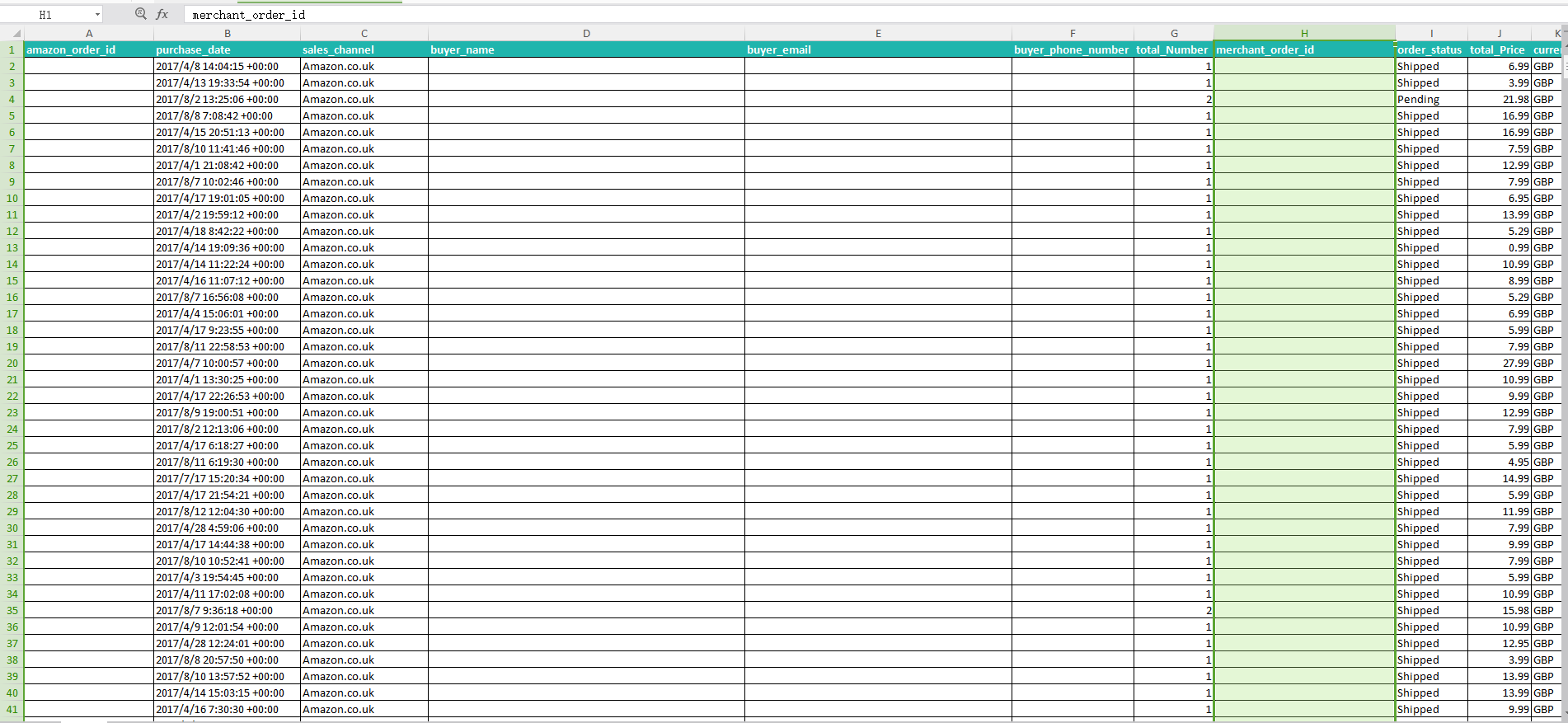
效果图:
Epplus:导出Excel的更多相关文章
- C# NPOI导出Excel和EPPlus导出Excel比较
系统中经常会使用导出Excel的功能. 之前使用的是NPOI,但是导出数据行数多就报内存溢出. 最近看到EPPlus可以用来导出Excel,就自己测了下两者导出上的差异. NPIO官网地址:http: ...
- C# NPOI导出Excel和EPPlus导出Excel
转自:http://www.cnblogs.com/tanpeng/p/6155749.html 系统中经常会使用导出Excel的功能.之前使用的是NPOI,但是导出数据行数多就报内存溢出. 最近看到 ...
- C# 使用Epplus导出Excel [5]:样式
C# 使用Epplus导出Excel [1]:导出固定列数据 C# 使用Epplus导出Excel [2]:导出动态列数据 C# 使用Epplus导出Excel [3]:合并列连续相同数据 C# 使用 ...
- C# 使用Epplus导出Excel [4]:合并指定行
C# 使用Epplus导出Excel [1]:导出固定列数据 C# 使用Epplus导出Excel [2]:导出动态列数据 C# 使用Epplus导出Excel [3]:合并列连续相同数据 C# 使用 ...
- C# 使用Epplus导出Excel [3]:合并列连续相同数据
C# 使用Epplus导出Excel [1]:导出固定列数据 C# 使用Epplus导出Excel [2]:导出动态列数据 C# 使用Epplus导出Excel [3]:合并列连续相同数据 C# 使用 ...
- C# 使用Epplus导出Excel [2]:导出动态列数据
C# 使用Epplus导出Excel [1]:导出固定列数据 C# 使用Epplus导出Excel [2]:导出动态列数据 C# 使用Epplus导出Excel [3]:合并列连续相同数据 C# 使用 ...
- C# 使用Epplus导出Excel [1]:导出固定列数据
C# 使用Epplus导出Excel [1]:导出固定列数据 C# 使用Epplus导出Excel [2]:导出动态列数据 C# 使用Epplus导出Excel [3]:合并列连续相同数据 C# 使用 ...
- asp.net下简单的Epplus导出excel
引用的命名空间 using System.IO; using OfficeOpenXml; /// <summary> /// 导出excel /// </summary> / ...
- C# EPPlus导出EXCEL,并生成Chart表
一 在negut添加EPPlus.dll库文件. 之前有写过直接只用Microsoft.Office.Interop.Excel 导出EXCEL,并生成Chart表,非常耗时,所以找了个EPPlus ...
- C# EPPlus 导出Excel
一.Excel导出帮助类 /*引用NuGet包 EPPlus*/ /// <summary> /// Excel导出帮助类 /// </summary> public clas ...
随机推荐
- python定时利用QQ邮件发送天气预报
大致介绍 好久没有写博客了,正好今天有时间把前几天写的利用python定时发送QQ邮件记录一下 1.首先利用request库去请求数据,天气预报使用的是和风天气的API(www.heweather.c ...
- linux系统下手动安装Angular-cli
安装Angular-cli 背景 由于公司linux服务器没有外网,无法通过npm包管理器直接安装,只能手动安装一个Angular-cli平台环境! 安装步骤 1. 先再linux系统下安装好node ...
- [转载] zookeeper工作原理、安装配置、工具命令简介
转载自http://www.cnblogs.com/kunpengit/p/4045334.html 1 Zookeeper简介Zookeeper 是分布式服务框架,主要是用来解决分布式应用中经常遇到 ...
- [转载] redis 的两种持久化方式及原理
转载自http://www.m690.com/archives/371 Redis是一种高级key-value数据库.它跟memcached类似,不过数据可以持久化,而且支持的数据类型很丰富.有字符串 ...
- Python之多进程篇
Process 创建子进程执行指定的函数 >>> from multiprocessing import Process,current_process >>> & ...
- Chapter 7:Linking
概述: 在linux上,从c源码到可执行文件主要需要经历translator(compiler.assembler)生成object file,再经由linker连接成executable objec ...
- 用原型代替PRD时,原型应该包含哪些内容
随着互联网节奏越来越快,传统的需求文档已经比较难适应市场的脚步,特别对于要求敏捷的团队来说,冗余而细致入微的需求文档已经成为包袱(这么长个文档领导也不会看呀).目前大多数团队更喜爱直接使用原型来代替需 ...
- P3052 [USACO12MAR]摩天大楼里的奶牛Cows in a Skyscraper
题目描述 给出n个物品,体积为w[i],现把其分成若干组,要求每组总体积<=W,问最小分组.(n<=18) 输入格式: Line 1: N and W separated by a spa ...
- 杭电ACM——自我强化步骤
第一阶段:开始入门吧!(15天,53题) http://blog.csdn.net/always2015/article/details/44966019#t0 一.输入输出练习(2天,10题) 10 ...
- unity中.meta提交错误操作导致空脚本
工作时遇到了一个奇葩的问题,同事做的界面,再策划那里死活无法运行,其他同事的都没有问题.简单一查,是界面上挂了个空脚本,但是同事提交了对应的脚本,其他人那里脚本是正常.随后想到是否是.meta的问题. ...