
open-falcon(v0.2)安装grafana部署
下载rpm
wget https://s3-us-west-2.amazonaws.com/grafana-releases/release/grafana-4.4.3-1.x86_64.rpm
本地安装
yum localinstall grafana-4.4.3-1.x86_64.rpm
编译配置文件
vim /etc/grafana/grafana.ini
#默认数据、插件、日志存放

[paths]

# Path to where grafana can store temp files, sessions, and the sqlite3 db (if that is used)

#

data = /var/lib/grafana

#

# Directory where grafana can store logs

#

logs = /var/log/grafana

#

# Directory where grafana will automatically scan and look for plugins

#

plugins = /var/lib/grafana/plugins

#选择数据库

[database]

# You can configure the database connection by specifying type, host, name, user and password

# as seperate properties or as on string using the url propertie.

# Either "mysql", "postgres" or "sqlite3", it's your choice

type = mysql

host = 127.0.0.1:3306

name = grafana

user = root

# If the password contains # or ; you have to wrap it with trippel quotes. Ex """#password;"""

password = 123456

#设置登陆

[security]

# default admin user, created on startup

admin_user = admin

# default admin password, can be changed before first start of grafana,  or in profile settings

admin_password = admin

#设置存放日志的方式

[log.file]

;level =

# log line format, valid options are text, console and json

;format = text

# This enables automated log rotate(switch of following options), default is true

log_rotate = true

# Max line number of single file, default is 1000000

max_lines = 1000000

# Max size shift of single file, default is 28 means 1 << 28, 256MB

max_size_shift = 28

# Segment log daily, default is true

daily_rotate = true

# Expired days of log file(delete after max days), default is 7

max_days = 7
如果有修改请修改启动文件里面的配置地址
PATH=/bin:/usr/bin:/sbin:/usr/sbin

NAME=grafana-server

DESC="Grafana Server"

GRAFANA_USER=grafana

GRAFANA_GROUP=grafana

GRAFANA_HOME=/usr/share/grafana

CONF_DIR=/etc/grafana

WORK_DIR=$GRAFANA_HOME

DATA_DIR=/var/lib/grafana

PLUGINS_DIR=/var/lib/grafana/plugins

LOG_DIR=/var/log/grafana

CONF_FILE=$CONF_DIR/grafana.ini

MAX_OPEN_FILES=10000

PID_FILE=/var/run/$NAME.pid

DAEMON=/usr/sbin/$NAME
启动granfana
service grafana-server start
访问granfana地址(ip+port)

增加datasources


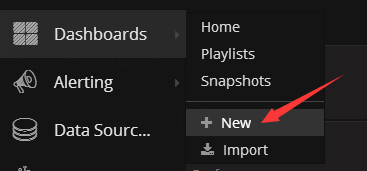
增加dashboard
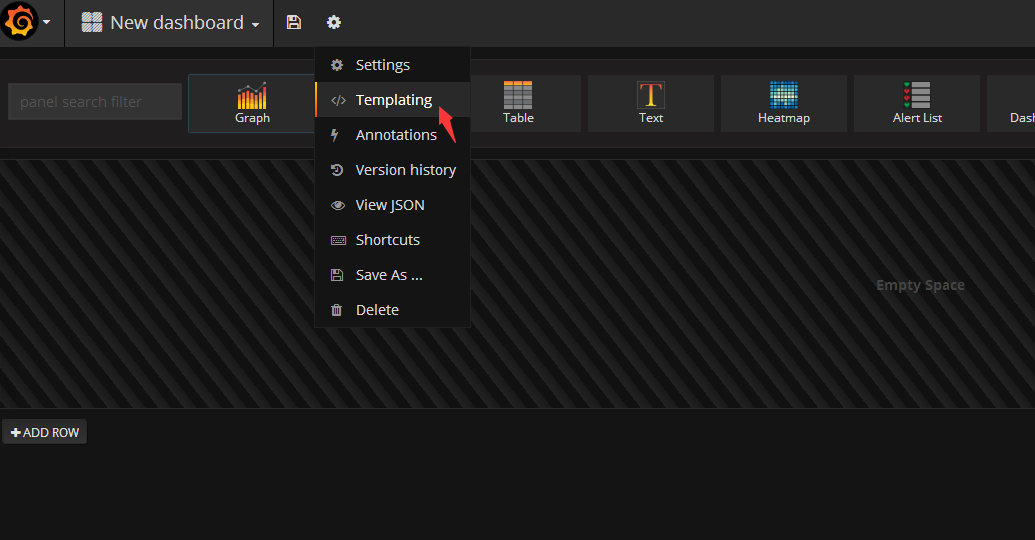
增加templating
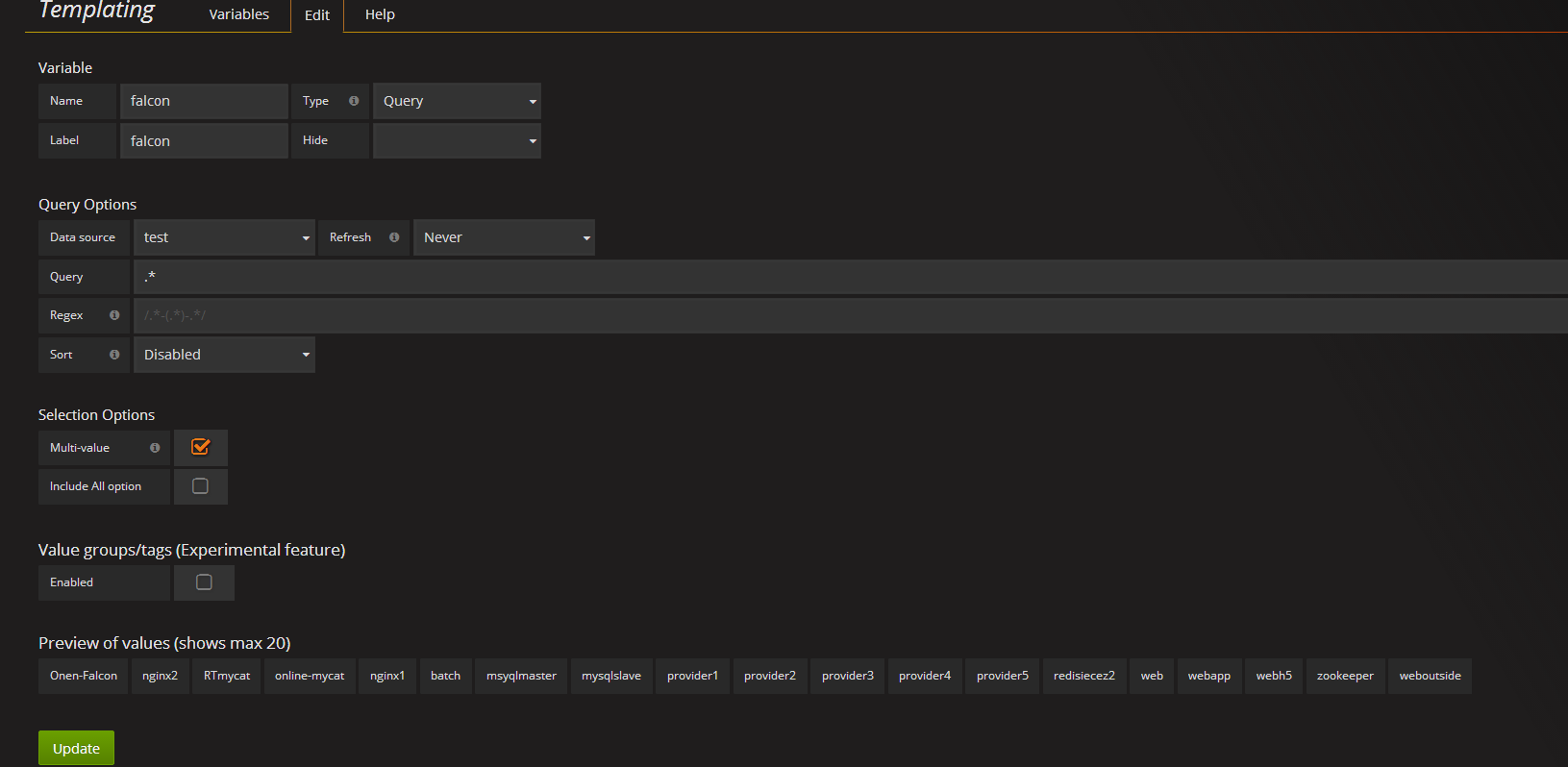
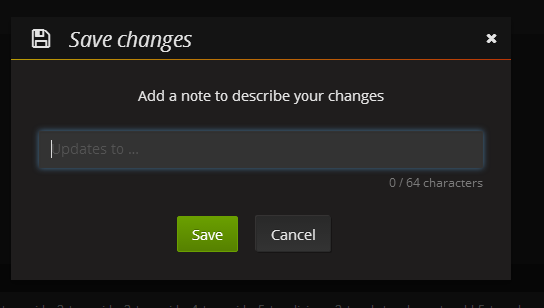
直接保存就行,默认我就是空
增加


点击 ADD ROW选择graph

在标题上点左键-点edit

增加展示名称

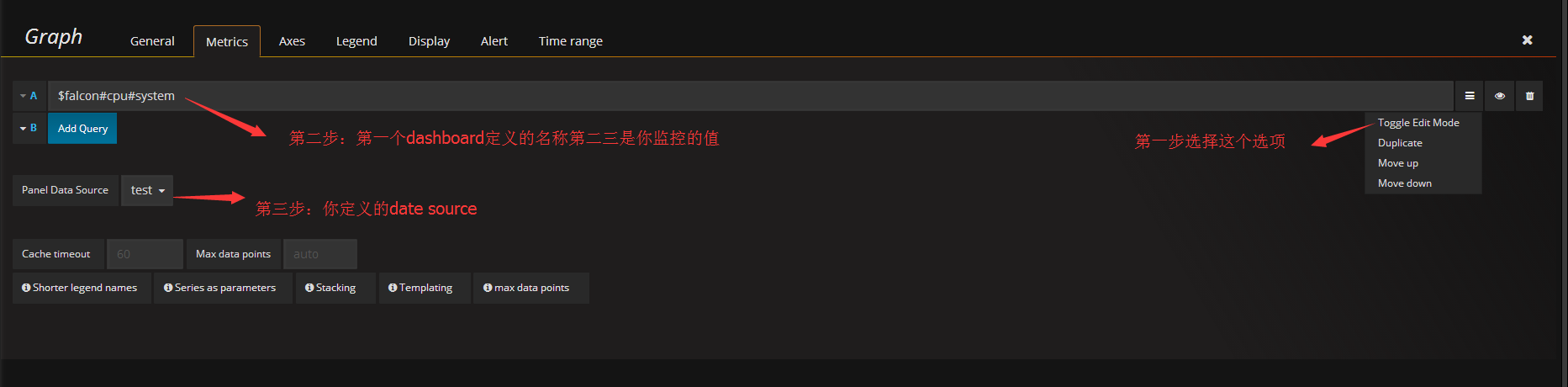
保存 我默认为空
点击这个下拉箭头可以选择你安装过agent的机器进行监控


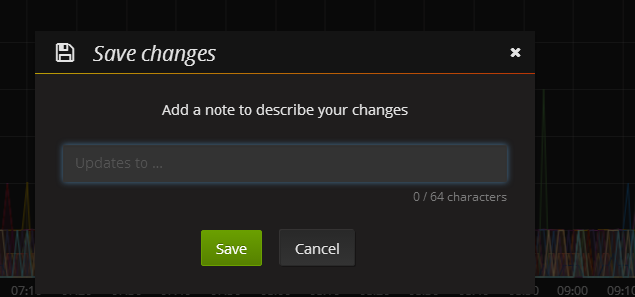
保存 我默认为空
open-falcon(v0.2)安装grafana部署的更多相关文章
- 容器编排系统K8s之Prometheus监控系统+Grafana部署
前文我们聊到了k8s的apiservice资源结合自定义apiserver扩展原生apiserver功能的相关话题,回顾请参考:https://www.cnblogs.com/qiuhom-1874/ ...
- Grafana部署监控docker服务
Grafana部署监控docker服务 一.使用InfluxDB+cAdvisor+Grafana配置Docker监控 1.1Docker监控组件 1.2cAdvisor: 1.3Docker监控安装 ...
- Windows Server 2012 虚拟化实战:SCVMM的安装和部署
本篇大概介绍一下在Windows Server 2012 R2上安装和部署SCVMM的过程及其注意事项.下图是我们数据中心SCVMM的基本架构,其中 SCVMM Database 是用于存储了所有配置 ...
- Linux下Redis的安装和部署
一.Redis介绍 Redis是当前比较热门的NOSQL系统之一,它是一个key-value存储系统.和Memcache类似,但很大程度补偿了Memcache的不足,它支持存储的value类型相对更多 ...
- 他山之石——vs2013 安装与部署及程序打包
C#打包需要这个:InstallShield 2013 Limited Edition for Visual Studio .下载地址: InstallShield 2013 Limited Edi ...
- 阿里云服务器Linux CentOS安装配置(六)resin多端口配置、安装、部署
阿里云服务器Linux CentOS安装配置(六)resin多端口配置.安装.部署 1.下载resin包 http://125.39.66.162/files/2183000003E08525/cau ...
- Kafka的安装和部署及测试
1.简介 大数据分析处理平台包括数据的接入,数据的存储,数据的处理,以及后面的展示或者应用.今天我们连说一下数据的接入,数据的接入目前比较普遍的是采用kafka将前面的数据通过消息的方式,以数据流的形 ...
- 日志分析 第七章 安装grafana
grafana依赖mysql存储数据,首先需要安装mysql 安装mysql 解压 # groupadd mysql # useradd -s /sbin/nologin -g mysql mysql ...
- Redis的安装与部署
为了解决公司产品数据增长过快,初始化太耗费时间的问题,决定使用redis作为缓存服务器. Windows下的安装与部署: 可以直接参考这个文章,我也是实验了一遍:http://www.runoob.c ...
随机推荐
- 《java.util.concurrent 包源码阅读》24 Fork/Join框架之Work-Stealing
仔细看了Doug Lea的那篇文章:A Java Fork/Join Framework 中关于Work-Stealing的部分,下面列出该算法的要点(基本是原文的翻译): 1. 每个Worker线程 ...
- TestLink使用
- 关于Unity里动态加载图片
Resources.Load 使用该方法可以动态加载资源 过程: 1.首先需要在Project面板里创建一个名为Resources的文件夹(名字必须是这个 不能写错啊) 2.把要加载的游戏对象放到该目 ...
- IOS 修改UIImage大小
在iOS中,uiimage没有用于修改大小的属性,要在代码中改变uiimage图片的大小,需要扩展UIImage类,如下: 头文件: #import<UIKit/UIKit.h> @int ...
- golang关于一些新手不注意会出现的小问题
前言 最近在整理之前写程序,学习时所记录的有道云笔记,发现一些有意思的小点跟大家分享一下.如有错误请大家给指出 一.闭包 defer 闭包(匿名函数) func test(){ i, n := ,; ...
- zoj 3195 Design the city LCA Tarjan
题目链接 : ZOJ Problem Set - 3195 题目大意: 求三点之间的最短距离 思路: 有了两点之间的最短距离求法,不难得出: 对于三个点我们两两之间求最短距离 得到 d1 d2 d3 ...
- python3 中encode 和decode的使用方法。
编码: 将文本转换成字节流的过程.即Unicode----------->特定格式的编码方式,产生特定的字节流保存在硬盘中(一般为utf-8格式). 解码: 将硬盘中的字节流转换成文本的过程.即 ...
- git学习资料包
1.廖雪峰老师的git教程:https://www.liaoxuefeng.com -----点击“GIT教程”开始学习 2.菜鸟教程git学习:http://www.runoob.com/gi ...
- Postgresql中的explain
PostgreSQL为每个收到的查询设计一个查询规划.选择正确的匹配查询结构和数据属性的规划对执行效率是至关重要要的,所以系统包含一个复杂的规划器来试图选择好的规划.你可以使用EXPLAIN命令查看查 ...
- Python2/3中的urllib库
urllib库对照速查表 Python2.X Python3.X urllib urllib.request, urllib.error, urllib.parse urllib2 urllib.re ...