
【CC2530入门教程-增强版】基础技能综合实训案例(基础版)-上位机源码
【CC2530入门教程-增强版】基础技能综合实训案例(基础版)-上位机源码
广东职业技术学院 欧浩源
一、需求分析
按照指定参数打开串口,与测控终端建立数据传输通道,并根据应用要求实现程序逻辑,具体需求详见《【CC2530入门教程-增强版】基础技能综合实训案例(基础版)-题目需求》。
二、界面设计
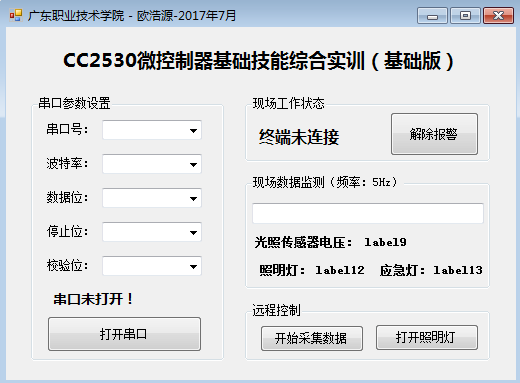
三、程序源码分析
using System;

using System.Collections.Generic;

using System.ComponentModel;

using System.Data;

using System.Drawing;

using System.Linq;

using System.Text;

using System.Threading.Tasks;

using System.Windows.Forms;

using System.Threading;

using System.IO.Ports;

namespace 基础技能综合实训_基础版_

{

    public partial class Form1 : Form

    {

        public Form1()

        {

            InitializeComponent();

        }

        SerialPort com = new SerialPort();          //实例化一个串口对象

        byte[] SendData = new byte[];              //定义一个8字节的发送数据缓存

        byte[] readBuffer = new byte[];            //实例化接收串口数据的数组

        private void Form1_Load(object sender, EventArgs e)

        {

            string[] ports = { "COM1", "COM2", "COM3", "COM4", "COM5" };

            foreach (string str in ports)

            {

                comboBox1.Items.Add(str);

            }

            comboBox1.SelectedIndex = ;

            string[] baudrate = { "", "", "", "", "", "" };

            foreach (string str in baudrate)

            {

                comboBox2.Items.Add(str);

            }

            comboBox2.SelectedIndex = ;

            comboBox3.Items.Add("");

            comboBox3.Items.Add("");

            comboBox3.Items.Add("");

            comboBox3.SelectedIndex = ;

            comboBox4.Items.Add("");

            comboBox4.Items.Add("1.5");

            comboBox4.Items.Add("");

            comboBox4.SelectedIndex = ;

            comboBox5.Items.Add("None");

            comboBox5.SelectedIndex = ;

            button2.Enabled = false;

            button3.Enabled = false;

            button4.Enabled = false;

            textBox1.ReadOnly = true;

            label14.Text = "终端未连接";

            label14.ForeColor = Color.Red;

            label9.Text = "0.00" + " V";

            label9.ForeColor = Color.Blue;

            label12.Text = "";

            label13.Text = "";

            label7.Text = "串口未连接!";

            label7.ForeColor = Color.Red;

            com.ReceivedBytesThreshold = ;   //设置串口接收到8个字节数据才触发DataReceived事件

            //为串口DataReceived事件添加处理方法

            com.DataReceived += new SerialDataReceivedEventHandler(DataReceivedHandler);

        }

        //串口数据接收DataReceived事件触发处理方法

        private void DataReceivedHandler(object sender, SerialDataReceivedEventArgs e)

        {

            string strRcv = "";

            int count = com.BytesToRead;                    //获取串口缓冲器的字节数

            if (count != )

            {

                return;

            }

            com.Read(readBuffer, , );                     //从串口缓冲区读出数据到数组

            com.DiscardInBuffer();

            for (int i = ; i < readBuffer.Length; i++)

            {

                strRcv += readBuffer[i].ToString("X2") + " ";   //16进制显示

            }

            this.BeginInvoke(new Action(() =>

            {

                textBox1.Text = strRcv;

            }));

            if (readBuffer[] == 0xAF && readBuffer[] == 0xFA) //判断数据的帧头和帧尾

            {

                this.BeginInvoke(new Action(() =>

                {

                    switch (readBuffer[])

                    {

                        case 0x10:

                            label14.Text = string.Format("{0}号终端在线", readBuffer[]);

                            label14.ForeColor = Color.Green;

                            button4.Enabled = false;

                            button2.Enabled = true;

                            button3.Text = "打开照明灯";

                            button2.Text = "开始采集数据";

                            label12.Text = "关闭";

                            label12.ForeColor = Color.Red;

                            label13.Text = "关闭";

                            label13.ForeColor = Color.Red;

                            break;

                        case 0x11:

                            Int32 ad = readBuffer[];

                            double advalue;

                            ad <<= ;

                            ad |= readBuffer[];                            //从数据帧中将电压数据取出

                            advalue = ad;

                            advalue = (advalue * 3.3) / ;              //将数据换算为实际的电压值

                            label9.Text = advalue.ToString("F2") + " V";

                            if ((readBuffer[] & 0x01) == 0x01)

                            {

                                label12.Text = "打开";

                                label12.ForeColor = Color.Blue;

                                button3.Text = "关闭照明灯";

                            }

                            else

                            {

                                label12.Text = "关闭";

                                label12.ForeColor = Color.Red;

                                button3.Text = "打开照明灯";

                            }

                            if ((readBuffer[] & 0x02) == 0x02)

                            {

                                label13.Text = "打开";

                                label13.ForeColor = Color.Blue;

                            }

                            else

                            {

                                label13.Text = "关闭";

                                label13.ForeColor = Color.Red;

                            }

                            break;

                        case 0x1f:

                            label14.Text = "现场报警!!!";

                            label14.ForeColor = Color.Red;

                            button4.Enabled = true;

                            button2.Enabled = false;

                            button3.Enabled = false;

                            break;

                      }

                   // com.DiscardInBuffer();

                }));

            }

        }

        private void button1_Click(object sender, EventArgs e)

        {

            if (button1.Text == "打开串口")

            {

                com.PortName = comboBox1.Text;                      //选择串口号

                com.BaudRate = int.Parse(comboBox2.Text);           //选择波特率

                com.DataBits = int.Parse(comboBox3.Text);           //选择数据位数

                com.StopBits = (StopBits)int.Parse(comboBox4.Text); //选择停止位数

                com.Parity = Parity.None;                           //选择是否奇偶校验

                try

                {

                    if (com.IsOpen)                                 //判断该串口是否已打开

                    {

                        com.Close();

                        com.Open();

                    }

                    else

                    {

                        com.Open();

                    }

                    label7.Text = "串口已成功连接!";

                    label7.ForeColor = Color.Blue;

                }

                catch (Exception ex)

                {

                    MessageBox.ReferenceEquals("错误:" + ex.Message, "串口通信");

                }

                button1.Text = "关闭串口";

            }

            else if (button1.Text == "关闭串口")

            {

                com.Close();                        //关闭串口

                label7.Text = "串口未连接!";

                label14.Text = "终端未连接";

                label14.ForeColor = Color.Red;

                label7.ForeColor = Color.Red;

                button1.Text = "打开串口";

                button2.Enabled = false;

                button3.Enabled = false;

                button4.Enabled = false;

                textBox1.Clear();

            }

        }

        private void SendUartData()

        {

            SendData[] = 0xAF;

            SendData[] = 0x00;

            SendData[] = 0x00;

            SendData[] = 0x00;

            SendData[] = 0x00;

            SendData[] = 0xFA;

            for (int i = ; i < ; i++)

            {

                SendData[] += SendData[i];

            }

            com.Write(SendData, , );

        }

        private void button2_Click(object sender, EventArgs e)

        {

            if (button2.Text == "开始采集数据")

            {

                button2.Text = "停止采集数据";

                button3.Enabled = true;

                SendData[] = 0x01;

                SendData[] = 0x01;

                SendUartData();

            }

            else

            {

                button2.Text = "开始采集数据";

                button3.Enabled = false;

                SendData[] = 0x01;

                SendData[] = 0x02;

                SendUartData();

            }

        }

        private void button3_Click(object sender, EventArgs e)

        {

            if (button3.Text == "打开照明灯")

            {

                button3.Text = "关闭照明灯";

                SendData[] = 0x01;

                SendData[] = 0x03;

                SendUartData();

            }

            else

            {

                button3.Text = "打开照明灯";

                SendData[] = 0x01;

                SendData[] = 0x04;

                SendUartData();

            }

        }

        private void button4_Click(object sender, EventArgs e)

        {

            SendData[] = 0x01;

            SendData[] = 0x0f;

            SendUartData();

        }

    }

}
【CC2530入门教程-增强版】基础技能综合实训案例(基础版)-上位机源码的更多相关文章
- 【CC2530入门教程-01】CC2530微控制器开发入门基础
[引言] 本系列教程就有关CC2530单片机应用入门基础的实训案例进行分析,主要包括以下6部分的内容:[1]CC2530微控制器开发入门基础.[2]通用I/O端口的输入和输出.[3]外部中断初步应用. ...
- 【CC2530入门教程-01】IAR集成开发环境的建立与项目开发流程
[引言] 本系列教程就有关CC2530单片机应用入门基础的实训案例进行分析,主要包括以下6部分的内容:1.CC2530单片机开发入门.2.通用I/O端口的输入和输出.3.外部中断初步应用.4.定时/计 ...
- 【CC2530入门教程-03】CC2530的中断系统及外部中断应用
第3课 CC2530的中断系统及外部中断应用 广东职业技术学院 欧浩源 一.中断相关的基础概念 内核与外设之间的主要交互方式有两种:轮询和中断. 轮询的方式貌似公平,但实际工作效率很低,且不能及 ...
- CC2530入门教程-02】CC2530的通用I/O端口输入和输出控制
第2课 CC2530的通用I/O端口输入和输出控制 广东职业技术学院 欧浩源 一.CC2530的引脚概述 CC2530微控制器采用QFN40封装,有40 个引脚.其中,有21个数字I/O端口,其中 ...
- 【CC2530入门教程-02】CC2530的通用I/O端口输入和输出控制
第2课 CC2530的通用I/O端口输入和输出控制 小蜜蜂科教 / 广东职业技术学院 欧浩源 [通用I/O端口视频教程:https://v.qq.com/x/page/x0793aol7us.ht ...
- 【专题教程第8期】基于emWin模拟器的USB BULK上位机开发,仅需C即可,简单易实现
说明:1.如果你会emWin话的,就可以轻松制作上位机.做些通信和控制类上位机,比使用C#之类的方便程度一点不差,而且你仅会C语言就可以.2.并且成功将emWin人性化,可以做些Windows系统上的 ...
- 【CC2530入门教程-06】CC2530的ADC工作原理与应用
第6课 CC2530的ADC工作原理与应用 广东职业技术学院 欧浩源 一.A/D转换的基本工作原理 将时间上连续变化的模拟量转化为脉冲有无的数字量,这一过程就叫做数字化,实现数字化的关键设备是AD ...
- 【CC2530入门教程-04】CC2530的定时/计数器原理与应用
第4课 CC2530的定时/计数器原理与应用 广东职业技术学院 欧浩源 一.定时/技术器的基本原理 定时/计数器,是一种能够对内部时钟信号或外部输入信号进行计数,当计数值达到设定要求时,向CPU提 ...
- 【CC2530入门教程-05】CC2530的串行接口原理与应用
第5课 CC2530的串行接口原理与应用 广东职业技术学院 欧浩源 一.并行通信与串行通信 微控制器与外设之间的数据通信,根据连线结构和传送方式的不同,可以分为两种:并行通信和串行通信. 并行通信 ...
随机推荐
- uptime 命令详解
作用: 打印系统总共运行了多长时间和系统的平均负载. uptime 命令可以显示的信息依次为: 现在时间, 系统已经运行时间, 目前登录用户个数, 系统1,5,15 分钟内的平均负载 实例: up ...
- CentOS7.2 使用Shell安装Oracle12c
一.操作系统说明 1.操作系统 版本 2.磁盘分区用量 二.安装必要的软件包 for pkg in 'binutils' 'compat-libcap1' 'compat-libstdc++-33' ...
- 通过js中的useragrent来判断设备是pc端还是移动端,跳转不同的地址
if(/AppleWebKit.*Mobile/i.test(navigator.userAgent) || (/MIDP|SymbianOS|NOKIA|SAMSUNG|LG|NEC|TCL|Alc ...
- [编织消息框架][JAVA核心技术]动态代理应用6-设计生成类
上篇介绍到rpc可以使用接口与实现类来约束书写 根据接口用javassist生成两个代理类 1.sendProxy 发送处理,调用方式可以是远程/本地 2.receiveProxy 接收处理,内部调用 ...
- AutoMapper 使用总结
初识AutoMapper 在开始本篇文章之前,先来思考一个问题:一个项目分多层架构,如显示层.业务逻辑层.服务层.数据访问层.层与层访问需要数据载体,也就是类.如果多层通用一个类,一则会暴露出每层的字 ...
- 【Java框架型项目从入门到装逼】第六节 - 用ajax请求后台数据
这一节我们来说一下如何用ajax提交请求? 我们先不讲ajax的原理,还是先以实战为主,看一下这个东西到底怎么用的? form表单: <!-- 采用post表单提交 --> <for ...
- 【读书笔记与思考】《python数据分析与挖掘实战》-张良均
[读书笔记与思考]<python数据分析与挖掘实战>-张良均 最近看一些机器学习相关书籍,主要是为了拓宽视野.在阅读这本书前最吸引我的地方是实战篇,我通读全书后给我印象最深的还是实战篇.基 ...
- Check whether a remote server port is open on Linux
链接:https://www.pixelstech.net/article/1514049471-Check-whether-a-remote-server-port-is-open-on-Linux
- iOS学习——UIAlertController详解
在开发中,弹出提示框是必不可少的.这两天项目中统一对已经被iOS API废弃的UIAlertView和UIActionSheet进行替换,我们知道,UIAlertView和UIActionSheet都 ...
- js和native交互方法浅析
一.背景 最近接触公司项目,需要和原生app做交互,由此业务需求,开始了学习探索之路. 二.解决方案之WebViewJavascriptBridge 想要和app交互,必须在app上先把bridge进 ...