
封装GCD以及介绍如何使用
研究GCD有一段时间,翻译了多篇文章,找了很多的资料,看了很多官方文档,看起来很难,实际上很简单,本人一一进行讲解怎么使用.
支持ARC以及非ARC,无论在ARC环境还是在非ARC环境,都需要调用dispatchRelease方法来释放init出的GCDGroup,GCDQueue,GCDSemaphore,以及GCDTimer.
1. 系统并发线程队列
    [[GCDQueue globalQueue] execute:^{

        // 在系统默认级别的线程队列中执行并发的操作

    }];
实际上是在这个线程队列中dispatch_get_global_queue(DISPATCH_QUEUE_PRIORITY_DEFAULT, 0)执行操作,官方文档如下
The well-known global concurrent queues cannot be modified. Calls to dispatch_suspend, dispatch_resume, dispatch_set_context, and the like have no effect when used with queues returned by this function.
Blocks submitted to these global concurrent queues may be executed concurrently with respect to each other.
这个妇孺皆知的的并发队列是不能更改的,所以,你调用方法dispatch_suspend,dispatch_resume以及dispatch_set_context等等,都是没有效果的.被提交到这个线程队列的block将会被并发的执行,不存在先后顺序.

请看如上结果,执行没有先后顺序,是同时执行的.
2. 系统串行线程队列
    [[GCDQueue mainQueue] execute:^{

        // 在系统主线程队列中执行串行操作

    }];
The main queue is automatically created by the system and associated with your application’s main thread.
主线程队列是被系统自动创建的,用来关联上你的应用的主线程.
As with the global concurrent queues, calls to dispatch_suspend, dispatch_resume, dispatch_set_context, and the like have no effect when used with queues returned by this function.
作为全局的并发队列,调用dispatch_suspend,dispatch_resume,dispatch_set_context类似的方法都将无效.
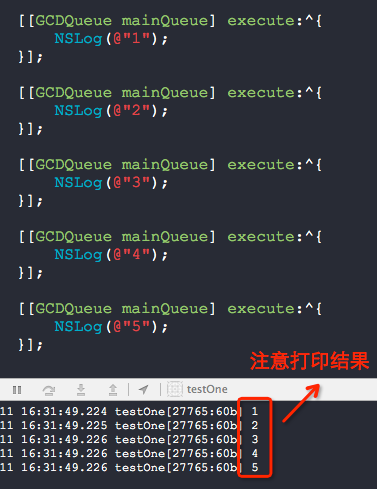
请看如上结果,执行有先后顺序.
问:既然有先后顺序,也有可能是先执行了第一个block,再执行了第二个block...,只是时间很短,打印出有顺序而已,也有可能是一起执行的,对吧?
先看看官方dispatch_async方法的文档:
This function is the fundamental mechanism for submitting blocks to a dispatch queue. Calls to this function always return immediately after the block has been submitted and never wait for the block to be invoked. The target queue determines whether the block is invoked serially or concurrently with respect to other blocks submitted to that same queue. Independent serial queues are processed concurrently with respect to each other.
这是个基础的提交block到一个指定queue的方法.只要提交了这个block,这个方法就会立即返回,根本就不会等待看这个block是否被调用了.这个指定的queue的类型决定了这个block是否是串行的执行抑或是并发的执行.独立的串行队列将会对每一个block按照顺序执行并发操作.
我测试了下系统主线程队列的执行情况,代码如下,结论是:必须是上一个串行的block执行完毕后才会执行下一个block.

    [[GCDQueue mainQueue] execute:^{

        NSLog(@"1");

        for (int i = 0; i < 1000000000; i++) {

            static int flag = 1;

            flag++;

        }

        NSLog(@"kkkkkk");

    }];

    [[GCDQueue mainQueue] execute:^{

        NSLog(@"2");

    }];

    [[GCDQueue mainQueue] execute:^{

        NSLog(@"3");

    }];

    [[GCDQueue mainQueue] execute:^{

        NSLog(@"4");

    }];

    [[GCDQueue mainQueue] execute:^{

        NSLog(@"5");

    }];
再测试了下自己创建的串行队列
    GCDQueue *queue = [[GCDQueue alloc] initSerial];

    [queue execute:^{

        NSLog(@"1");

        for (int i = 0; i < 1000000000; i++) {

            static int flag = 1;

            flag++;

        }

        NSLog(@"kkkkkk");

    }];

    [queue execute:^{

        NSLog(@"2");

    }];

    [queue execute:^{

        NSLog(@"3");

    }];

    [queue execute:^{

        NSLog(@"4");

    }];

    [queue execute:^{

        NSLog(@"5");

    }];
至少从打印结果处得知,是按照序列来执行block的,只有上一个block执行完毕了才会执行下一个block,认识这一点很重要哦.
    [[GCDQueue globalQueue] execute:^{

        // 并发线程执行阻塞操作

        [[GCDQueue mainQueue] execute:^{

            // 主线程更新UI

        }];

    }];
是最常用的一种方式,也是大家见得最多的方式.
3. 在某个指定的队列中执行延时操作
    [[GCDQueue globalQueue] execute:^{

        // 延时3秒后执行操作

    } afterDelay:3 * NSEC_PER_SEC];
-dispatch_after-
Enqueue a block for execution at the specified time.
This function waits until the specified time and then asynchronously adds block to the specified queue.
将一个要执行的并设定了时间block插入队列.
这个方法会等到指定的时间,异步的将block添加到指定的队列中.
从以下代码中的执行结果可以看出,即使提交了任务,如果出现了死循环,后面提交的任务也是无法执行的.
   [[GCDQueue mainQueue] execute:^{

        NSLog(@"1");

        while (1)

        {

        }

    } afterDelay:3 * NSEC_PER_SEC];

    [[GCDQueue mainQueue] execute:^{

        NSLog(@"2");

    } afterDelay:5 * NSEC_PER_SEC];
下面的这个例子,就能看出,只要一个提交的任务能够在时间点上完成,是不会影响后面的任务执行的,但是如果把sleep(1)改成sleep(3),就会影响后面提交的任务执行.
    [[GCDQueue mainQueue] execute:^{

        NSLog(@"1");

        sleep(1);

    } afterDelay:3 * NSEC_PER_SEC];

    [[GCDQueue mainQueue] execute:^{

        NSLog(@"2");

    } afterDelay:5 * NSEC_PER_SEC];
4. 在group中监听某些线程完成了,之后再执行某个线程
-dispatch_group_notify-
This function schedules a notification block to be submitted to the specified queue when all blocks associated with the dispatch group have completed. If the group is empty (no block objects are associated with the dispatch group), the notification block object is submitted immediately.
这个方法安排了一个通知用的block到这个指定的queue当中,而当所有与这个group相关联的block都执行完毕了,才会执行这个通知的block.如果这个组空了,那这个通知用的block就会被立即的执行.
另一种监听线程执行完毕的方式,不过能够设定超时时间
    GCDGroup *group = [GCDGroup new];

    [group enter];

    [[GCDQueue globalQueue] execute:^{

        [group leave];

    }];

    [group enter];

    [[GCDQueue globalQueue] execute:^{

        [group leave];

    }];

    [[GCDQueue globalQueue] execute:^{

        [group wait:3 * NSEC_PER_SEC];

        // 如果超时了3秒,上面的线程还没执行完,就跳过了

    }];
请注意,enter与leave必须成对出现!
-dispatch_group_enter-
Explicitly indicates that a block has entered the group.
精确指定一个block进入了group.
Calling this function increments the current count of outstanding tasks in the group. Using this function (with dispatch_group_leave) allows your application to properly manage the task reference count if it explicitly adds and removes tasks from the group by a means other than using the dispatch_group_async function. A call to this function must be balanced with a call to dispatch_group_leave. You can use this function to associate a block with more than one group at the same time.
调用这个方法,将会增加当前在组中未解决的任务的数量.使用这个方法是为了能够管理任务的细节,指定什么时候结束这个任务,你也可以使用dispatch_group_async这个方法.调用了这个方法就必须使用dispatch_group_leave来平衡.你可以同时的给一个block关联上不同的group.
dispatch_group_enter 与 dispatch_group_leave 能够处理更加复杂的任务类型,推荐!
5. 使用定时器
    GCDTimer *timer = [[GCDTimer alloc] initInQueue:[GCDQueue globalQueue]];

    [timer event:^{

        // 每1秒执行一次你的event

    } timeInterval:1 * NSEC_PER_SEC];

    [timer start];
此定时器不能暂停,只能销毁后释放掉对象.
    [timer destroy];

    [timer dispatchRelease];
6. 使用信号量
    GCDSemaphore *sem = [[GCDSemaphore alloc] init];

    GCDTimer *timer = [[GCDTimer alloc] initInQueue:[GCDQueue globalQueue]];

    [timer event:^{

        [sem signal];

    } timeInterval:NSEC_PER_SEC];

    [timer start];

    [[GCDQueue globalQueue] execute:^{

        while (1)

        {

            [sem wait];

            NSLog(@"Y.X.");

        }

    }];
一个发送信号,一个接受信号
-dispatch_semaphore_signal-
Signals (increments) a semaphore.
Increment the counting semaphore. If the previous value was less than zero, this function wakes a thread currently waiting in dispatch_semaphore_wait.
This function returns non-zero if a thread is woken. Otherwise, zero is returned.
发送信号增加一个信号量.
增加一个信号量,如果当前值小于或者等于0,这个方法会唤醒某个使用了dispatch_semaphore_wait的线程.
如果这个线程已经唤醒了,将会返回非0值,否则返回0
基本已经讲解完了GCD的部分功能,我会在附录中讲解GCDQueue类中下面列举的方法如何使用以及有什么含义,这些方法涉及到了多线程同步问题哦,比基础用法有着更多的用处,更高级.
waitExecute:
barrierExecute:
waitBarrierExecute:
suspend
resume
封装GCD以及介绍如何使用的更多相关文章
- AJ学IOS(50)多线程网络之GCD简单介绍(任务,队列)
AJ分享,必须精品 GCD简单介绍 1.什么是GCD? 全称是Grand Central Dispatch,可译为“牛逼的中枢调度器” 纯C语言,提供了非常多强大的函数 2.GCD的优势 GCD是苹果 ...
- Object-C定时器,封装GCD定时器的必要性!!! (二)
上一篇:Object-C定时器,封装GCD定时器的必要性!!! (一) 上一篇认识了Object-C中的几种定时器,这一篇将Dispatch定时器(GCD定时器)封装起来. p.p1 { margin ...
- Object-C定时器,封装GCD定时器的必要性!!! (一)
实际项目开发中经常会遇到延迟某件任务的执行,或者让某件任务周期性的执行.然后也会在某些时候需要取消掉之前延迟执行的任务. iOS中延迟操作有三种解决方案: 1.NSObject的方法:(对象方法) p ...
- 封装:简要介绍自定义开发基于WPF的MVC框架
原文:封装:简要介绍自定义开发基于WPF的MVC框架 一.目的:在使用Asp.net Core时,深感MVC框架作为页面跳转数据处理的方便,但WPF中似乎没有现成的MVC框架,由此自定义开发一套MVC ...
- STC8H开发(四): FwLib_STC8 封装库的介绍和注意事项
目录 STC8H开发(一): 在Keil5中配置和使用FwLib_STC8封装库(图文详解) STC8H开发(二): 在Linux VSCode中配置和使用FwLib_STC8封装库(图文详解) ST ...
- ios开发--GCD使用介绍:4-延迟执行操作
在开发过程中,我们有时会希望把一些操作封装起来延迟一段时间后再执行.iOS开发中,有两种常用的方法可以实现延迟执行,一种是使用GCD,另外一种是使用NSRunLoop类中提供的方法. 1.使用GCD实 ...
- vue2.0 axios封装、vuex介绍
一.前言 博主也是vue道路上的行者,道行不深,希望自己的东西能对大家有所帮助.这篇博客针对 了解过vue基础,但是没有做过vue项目的童鞋.如果想看基础指令,可以看我之前的一篇博客,请点击 跳转, ...
- GCD详细介绍
(1)是基于C语言的底层API (2)用Block定义任务,使用起来非常灵活便捷 (3)提供了更多的控制能力以及操作队列中所不能使用的底层函数 小结 说明:同步函数不具备开启线程的能力,无论是什么队列 ...
- 开源代码:Http请求封装类库HttpLib介绍、使用说明
今天介绍一个很好用的Http请求类库--Httplib.一直以来,我们都是为了一次web请求,单独写一段代码 有了这个类,我们就可以很方便的直接使用了. 项目介绍: http://www.suchso ...
随机推荐
- 使用MyBatis对数据库中表实现CRUD操作(二)
一.使用MyBatis对表实现CRUD操作 1.定义sql映射 userMapper.xml <?xml version="1.0" encoding="UTF-8 ...
- Dashboard登录成功后 RuntimeError: Unable to create a new session key.
openstack按照官网docs部署horizon后,使用admin账号密码登录,但网页提示未知错误. 查看/var/log/httpd/error_log 提示这个:RuntimeError: U ...
- 创建keystone的catalog时提示:‘Internal Server Error (HTTP 500)’
在生成keystone的catalog时: [root@controller ~]# openstack service create --name keystone --description &q ...
- 使用github+hexo搭建博客笔记
听说github上可以搭博客,而且不用自己提供空间和维护,哈哈哈 作为一名程序猿,github搭博客对我有种神奇的吸引力,赶紧动手试一试 关于如何使用hexo搭建博客网上好的教程多如牛毛,而且这篇博客 ...
- as3中去掉字符串两边的空格,换行符
as3 去掉字符串两边的空格,换行符,方法一 ActionScript Code 1 2 3 4 5 6 7 8 9 10 11 12 13 14 15 16 17 18 19 20 pub ...
- javascript里的几种常见的数组方法
Array()的几种方法 1.splice(2,3,4)删除数组中任意项(三个参数). 2.splice(1,3)删除从第一项开始的往后三项(两个参数).(splice可以结合pop(),unshif ...
- Redis数据类型之字符串String
String类型是Redis中最基本也最简单的一种数据类型 首先演示一些常用的命令 一.SET key value 和GET key SET key value 和 GET key 设置键值和获取值 ...
- android正则表达式隐藏邮箱地址中间字符
// String emailStr = email.substring(0, email.lastIndexOf("@"));// if (emailStr.length() & ...
- 一次young gc耗时过长优化过程
1 问题源起 上游系统通过公司rpc框架调用我们系统接口超时(默认超时时间为100ms)数量从50次/分突然上涨到2000次/分,在发生变化时间段里我们的系统也没有做过代码变更,但上游系统的调用 ...
- js的break语句,continue语句,return语句
js的break语句,continue语句,return语句. 用的时候很容易混淆,有过一次泪奔的经历. break语句 break语句会使运行的程序立刻退出包含在最内层的循环或者退出一个switch ...