
十二.spring-boot使用spring-boot-freemarker
①、在springMVC中:它代表着view层组件
②、为什么使用freemarker:简单容易学、逻辑分明
③、freemarker优点:它不依赖servlet、网络或者web环境
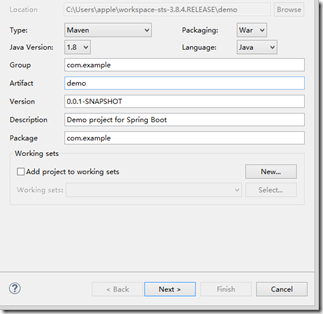
一、创建一个maven web project
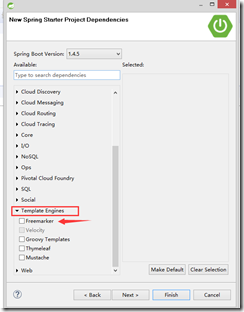
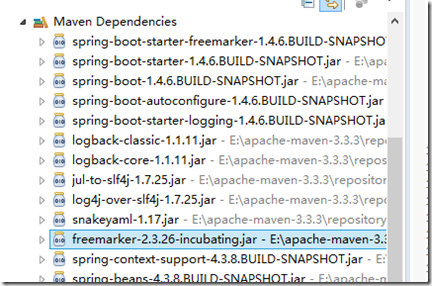
二、检查freemarker包是否已经添加
三、编写测试类
1、新建一个用户数据模型SysUser
package com.example.entity;

public class SysUser {

    private long id;

    private String name;

    private String phone;

    public SysUser() {

    }

    public SysUser(long id, String name, String phone) {

        this.id = id;

        this.name = name;

        this.phone = phone;

    }

    public long getId() {

        return id;

    }

    public void setId(long id) {

        this.id = id;

    }

    public String getName() {

        return name;

    }

    public void setName(String name) {

        this.name = name;

    }

    public String getPhone() {

        return phone;

    }

    public void setPhone(String phone) {

        this.phone = phone;

    }

    @Override

    public String toString() {

        return "SysUser [id=" + id + ", name=" + name + ", phone=" + phone + "]";

    }

}
2、编写controller类
package com.example.controller;

import java.util.ArrayList;

import java.util.List;

import org.springframework.stereotype.Controller;

import org.springframework.ui.Model;

import org.springframework.web.bind.annotation.RequestMapping;

import com.example.entity.SysUser;

@Controller

public class Hello {

    @RequestMapping("hello")

    public String hello(Model m){

        m.addAttribute("name", "spring-boot");

        return "hello";

    }

    @RequestMapping("sysUser")

    public String user(Model m){

        List<SysUser> list = new ArrayList<SysUser>();

        SysUser u1 = new SysUser(0001, "hello1", "11111111111111111");

        SysUser u2 = new SysUser(0002, "hello2", "22222222222222222");

        SysUser u3 = new SysUser(0003, "hello3", "33333333333333333");

        list.add(u1);

        list.add(u2);

        list.add(u3);

        m.addAttribute("userList", list);

        m.addAttribute("sysUser", "SysUser");

        return "sysUser/list";

    }

}
3、配置application.properties文件
########################################################

###FREEMARKER (FreeMarkerAutoConfiguration)

########################################################

spring.freemarker.allow-request-override=false

spring.freemarker.cache=true

spring.freemarker.check-template-location=true

spring.freemarker.charset=UTF-8

spring.freemarker.content-type=text/html

spring.freemarker.expose-request-attributes=false

spring.freemarker.expose-session-attributes=false

spring.freemarker.expose-spring-macro-helpers=false

#spring.freemarker.prefix=

#spring.freemarker.request-context-attribute=

#spring.freemarker.settings.*=

spring.freemarker.suffix=.ftl

spring.freemarker.template-loader-path=classpath:/templates/

#comma-separated list

#spring.freemarker.view-names= # whitelist of view names that can be resolved
4、编写.ftl模型
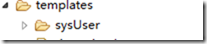
说明:我这里使用到的bootstrap-3.3.7方便好看 ,新建一个sysuser的视图层文件,保证良好的规则
<!DOCTYPE html>

<html xmlns="http://www.w3.org/1999/xhtml" xmlns:th="http://www.thymeleaf.org"

      xmlns:sec="http://www.thymeleaf.org/thymeleaf-extras-springsecurity3">

    <head>

        <meta content="text/html;charset=utf-8"></meta>

        <title>Hello World!</title>

        <script sec="../jquery-2.1.1/jquery.min.js"></script>

        <link rel="stylesheet" href="../bootstrap-3.3.7/dist/css/bootstrap.min.css"></link>

        <script sec="../bootstrap-3.3.7/dist/js/bootstrap.min.js"></script>

    </head>

<body>

<div class="container">

        <table class="table">

            <caption>${sysUser}</caption>

            <thead>

                <tr>

                    <th>First Name</th>

                    <th>Last Name</th>

                    <th>User Name</th>

                </tr>

            </thead>

            <tbody>

                <tr>

                    <td>aehyok</td>

                    <td>leo</td>

                    <td>@aehyok</td>

                </tr>

                <tr>

                    <td>lynn</td>

                    <td>thl</td>

                    <td>@lynn</td>

                </tr>

                <#list userList as user>

                <tr>

                    <td>${user.id}</td>

                    <td>${user.name}</td>

                    <td>${user.phone}</td>

                </tr>

                   </#list>

            </tbody>

        </table>

    </div>

</body>

</html>
freemarker的表达式可参考本博客【FreeMarker】随笔分类:http://www.cnblogs.com/xxt19970908/p/5594258.html
四、启动测试
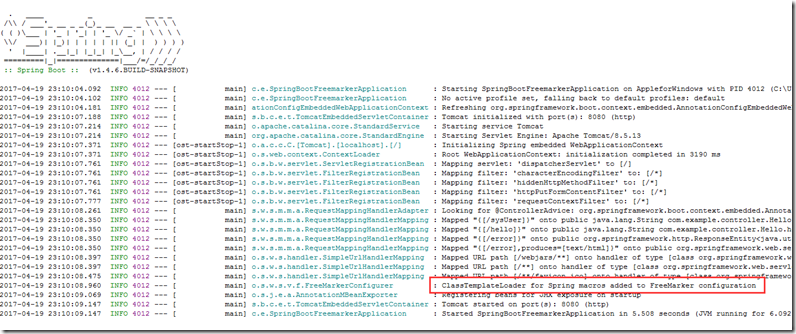
1、检查启动信息:freemarker配置是否生效
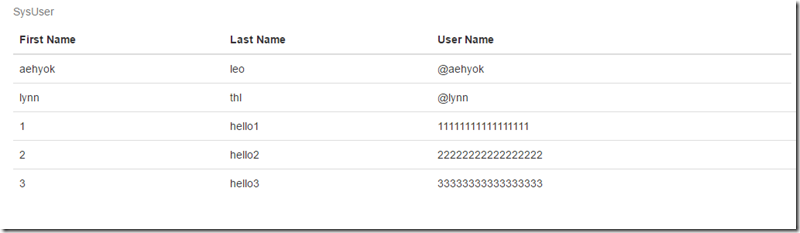
2、访问:http://localhost:8080/sysUser
十二.spring-boot使用spring-boot-freemarker的更多相关文章
- 菜鸟学SSH(十二)——Hibernate与Spring配合生成表结构
前几天向大家介绍了一种用工具类生成数据表的方法,只是之前的方法须要使用一个跟项目关系不大的工具类.不免让人认为有些多余,所以呢.今天再向大家介绍一种方法.即Hibernate与Spring配合生成表结 ...
- 基于Netty的RPC架构学习笔记(十二):借助spring实现业务分离、聊天室小项目、netty3和4、5的不同、业务线程池以及消息串行化
文章目录 借助spring实现业务分离(
- spring boot / cloud (十二) 异常统一处理进阶
spring boot / cloud (十二) 异常统一处理进阶 前言 在spring boot / cloud (二) 规范响应格式以及统一异常处理这篇博客中已经提到了使用@ExceptionHa ...
- Spring Boot(十二):spring boot如何测试打包部署
Spring Boot(十二):spring boot如何测试打包部署 一.开发阶段 1,单元测试 在开发阶段的时候最重要的是单元测试了,springboot对单元测试的支持已经很完善了. (1)在p ...
- Spring Boot 2.X(十二):定时任务
简介 定时任务是后端开发中常见的需求,主要应用场景有定期数据报表.定时消息通知.异步的后台业务逻辑处理.日志分析处理.垃圾数据清理.定时更新缓存等等. Spring Boot 集成了一整套的定时任务工 ...
- Spring Boot干货系列:(十二)Spring Boot使用单元测试(转)
前言这次来介绍下Spring Boot中对单元测试的整合使用,本篇会通过以下4点来介绍,基本满足日常需求 Service层单元测试 Controller层单元测试 新断言assertThat使用 单元 ...
- (转)Spring Boot(二十):使用 spring-boot-admin 对 Spring Boot 服务进行监控
http://www.ityouknow.com/springboot/2018/02/11/spring-boot-admin.html 上一篇文章<Spring Boot(十九):使用 Sp ...
- 从零开始的Spring Boot(4、Spring Boot整合JSP和Freemarker)
Spring Boot整合JSP和Freemarker 写在前面 从零开始的Spring Boot(3.Spring Boot静态资源和文件上传) https://www.cnblogs.com/ga ...
- Spring Boot 2.0 整合 FreeMarker 模板引擎
本篇博文将和大家一起使用Spring Boot 2.0 和FreeMarker 模板引擎整合实战. 1. 创建新的项目 2. 填写项目配置信息 3. 勾选web 模块 4. 勾选freemarker模 ...
- Spring Boot 入门系列(二十七)使用Spring Data JPA 自定义查询如此简单,完全不需要写SQL!
前面讲了Spring Boot 整合Spring Boot JPA,实现JPA 的增.删.改.查的功能.JPA使用非常简单,只需继承JpaRepository ,无需任何数据访问层和sql语句即可实现 ...
随机推荐
- linux 设置开机启动项两种方式
原文链接:http://blog.csdn.net/karchar/article/details/52489572 有时候我们需要Linux系统在开机的时候自动加载某些脚本或系统服务. 在解问题之前 ...
- 16:django 有条件的视图处理(Last-Modified和ETag)&&加密签名
有条件的视图处理 上一节我们介绍了缓存来减轻服务器的负担,这里的有条件的视图处理也从一定程度上减轻了服务器的负担,在正式介绍之前,先来看两个概念:Last-Modified和ETag Last-Mod ...
- OpenCL与CUDA,CPU与GPU
OpenCL OpenCL(全称Open Computing Language,开放运算语言)是第一个面向异构系统通用目的并行编程的开放式.免费标准,也是一个统一的编程环境,便于软件开发人员为高性能计 ...
- redis之(十三)redis的三种启动方式
Part I. 直接启动 下载 官网下载 安装 tar zxvf redis-2.8.9.tar.gz cd redis-2.8.9 #直接make 编译 make #可使用root用户执行`make ...
- kubernetes如何要使用用户名和密码登陆harbor以拉取docker镜像,应该如何操作?
还好,网上有相应的CASE处理. http://www.jianshu.com/p/ffbfb44dc496 =========================== 先生成名为为regsecret的S ...
- H264与AAC ES打包成MP4
注意 设置图像的sps pps MP4AddH264SequenceParameterSet(file,video,sps,sizeof(sps)); MP4AddH264PictureParamet ...
- 关于Vue-cli的跨域解决
由于Vue-cli服务器是跑在node环境下的8080端口,我们的php代码可能在Apache环境下的7070端口,这个时候就会出现跨域 此刻这段php代码在7070端口上 如果直接去访问 页面报错 ...
- sql 时间日期格式化
sql server2000中使用convert来取得datetime数据类型样式(全) 日期数据格式的处理,两个示例: CONVERT(varchar(16), 时间一, 20) 结果:2007-0 ...
- Project interpreter not specified(eclipse+pydev) (转)
[小记] 最近因为想配置Android的开发环境,把原来的MyEclipse5.5删了,下载了最新的Eclipse3.7版本,因为之前在进行Python开 发,就下载了最新的Pydev2.4版本,安装 ...
- [putty] ubuntu 通过配置文件设置字体
创建了一个session之后,就能在 ~/.putty/sessions/ 文件夹下看到session的配置文件了 $ vim ~/.putty/sessions/session-name 搜索Fon ...