
c# 局域网文件传输实例
一个基于c#的点对点局域网文件传输小案例,运行效果截图
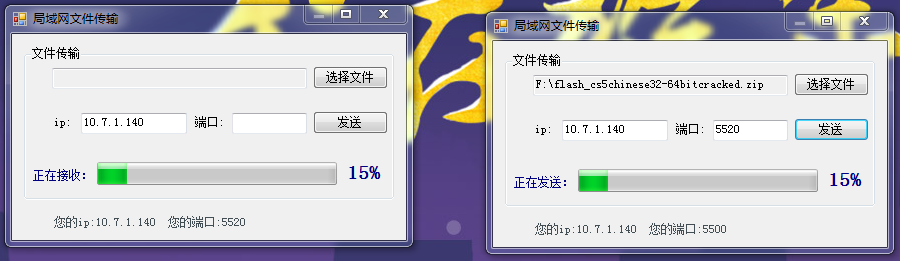
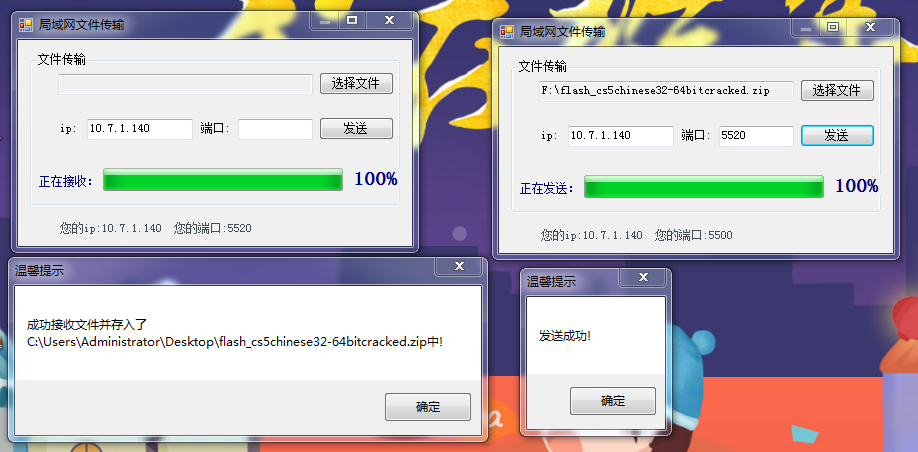
//界面窗体
using System;
using System.Collections.Generic;
using System.ComponentModel;
using System.Data;
using System.Drawing;
using System.IO;
using System.Linq;
using System.Text;
using System.Threading;
using System.Threading.Tasks;
using System.Windows.Forms;
namespace 文件传输
{
public partial class Form1 : Form
{
/// <summary>
/// 文件名
/// </summary>
private string fileName;
/// <summary>
/// 文件路径
/// </summary>
private string filePath;
/// <summary>
/// 文件大小
/// </summary>
private long fileSize;
public Form1()
{
InitializeComponent();
Thread.CurrentThread.IsBackground=true;
textBox2.Text = IpUtil.GetLocalIp();
label1.Text = "您的ip:" + IpUtil.GetLocalIp() + " 您的端口:" + IpUtil.GetRandomPort();
var s= new FileRecive(this);
new Thread(s.run).Start();
}
/// <summary>
/// 信息提示框
/// </summary>
/// <param name="msg"></param>
public void Tip(string msg) {
MessageBox.Show(msg,"温馨提示");
}
/// <summary>
/// 发送文件
/// </summary>
/// <param name="sender"></param>
/// <param name="e"></param>
private void button2_Click(object sender, EventArgs e)
{
string ip = textBox2.Text;
string port =textBox3.Text;
if (fileName.Length == 0) {
Tip("请选择文件");
return;
}
if(ip.Length==0||port.ToString().Length==0){
Tip("端口和ip地址是必须的!");
return;
}
var c = new FileSend(this,new string[]{ip,port,fileName,filePath,fileSize.ToString()});
new Thread(c.Send).Start();
}
/// <summary>
/// 选择文件
/// </summary>
/// <param name="sender"></param>
/// <param name="e"></param>
private void button1_Click(object sender, EventArgs e)
{
OpenFileDialog dig = new OpenFileDialog();
dig.ShowDialog();
//获取文件名
this.fileName = dig.SafeFileName;
//获取文件路径
this.filePath = dig.FileName;
FileInfo f = new FileInfo(this.filePath);
//获取文件大小
this.fileSize = f.Length;
textBox1.Text = filePath;
}
/// <summary>
/// 更新进度条
/// </summary>
/// <param name="value"></param>
public void UpDateProgress(int value) {
this.progressBar1.Value=value;
this.label2.Text = value + "%";
System.Windows.Forms.Application.DoEvents();
}
/// <summary>
/// 修改状态
/// </summary>
/// <param name="state"></param>
public void SetState(string state) {
label5.Text = state;
}
/// <summary>
/// 退出程序
/// </summary>
public void Exit() {
Application.Exit();
}
}
}
//ip和端口工具类
using System;
using System.Collections.Generic;
using System.Linq;
using System.Net;
using System.Text;
using System.Threading.Tasks;
namespace 文件传输
{
class IpUtil
{
/// <summary>
/// 获取本地ip地址
/// </summary>
/// <returns></returns>
public static string GetLocalIp()
{
string hostname = Dns.GetHostName();
IPHostEntry localhost = Dns.GetHostByName(hostname);
IPAddress localaddr = localhost.AddressList[0];
return localaddr.ToString();
}
/// <summary>
/// 产生随机端口
/// </summary>
/// <returns></returns>
public static int GetRandomPort() {
return new Random().Next(1000)+5000;
}
}
}
//文件发送类
using System;
using System.Collections.Generic;
using System.IO;
using System.Linq;
using System.Net.Sockets;
using System.Text;
using System.Threading.Tasks;
namespace 文件传输
{
//文件发送类
class FileSend
{
private TcpClient client;
private NetworkStream stream;
private string[] param;
private Form1 fm;
public FileSend(Form1 fm,params string[] param) {
this.param = param;
this.fm = fm;
}
public void Send()
{
try
{
//连接接收端
this.client = new TcpClient(param[0], int.Parse(param[1]));
string msg = param[2] + "|" + param[4];
byte[] m = Encoding.UTF8.GetBytes(msg);
while (true){
this.stream = this.client.GetStream();
this.stream.Write(m, 0, m.Length);
this.stream.Flush();
byte[] data = new byte[1024];
int len = this.stream.Read(data, 0, data.Length);
msg = Encoding.UTF8.GetString(data, 0, len);
//对方要接收我发送的文件
if (msg.Equals("1"))
{
fm.SetState("正在发送:");
FileStream os = new FileStream(param[3], FileMode.OpenOrCreate);
data = new byte[1024];
//记录当前发送进度
long currentprogress = 0;
len=0;
while ((len = os.Read(data, 0, data.Length)) > 0) {
currentprogress += len;
//更新进度条
fm.UpDateProgress((int)(currentprogress*100/long.Parse(param[4])));
this.stream.Write(data,0,len);
}
os.Flush();
this.stream.Flush();
os.Close();
this.stream.Close();
fm.Tip("发送成功!");
fm.Exit();
}
}
}
catch (Exception e)
{
fm.Tip(e.Message);
}
}
}
}
//文件接收类
using System;
using System.Collections.Generic;
using System.IO;
using System.Linq;
using System.Net;
using System.Net.Sockets;
using System.Text;
using System.Threading;
using System.Threading.Tasks;
using System.Windows.Forms;
namespace 文件传输
{
/// <summary>
/// 文件接收类
/// </summary>
class FileRecive
{
private TcpListener server;
private Form1 fm;
private NetworkStream stream;
public FileRecive(Form1 fm) {
this.fm = fm;
try
{
this.server = new TcpListener(IPAddress.Parse(IpUtil.GetLocalIp()), IpUtil.GetRandomPort());
server.Start();
}
catch (Exception e) {
fm.Tip(e.Message);
}
}
/// <summary>
/// 接收文件
/// </summary>
public void run()
{
while (true)
{
try
{
TcpClient client = server.AcceptTcpClient();
this.stream = client.GetStream();
byte[] msgs = new byte[1024];
int len = this.stream.Read(msgs, 0, msgs.Length);
string msg = Encoding.UTF8.GetString(msgs, 0, len);
string[] tip = msg.Split('|');
if (DialogResult.Yes == MessageBox.Show(IpUtil.GetLocalIp() + "给您发了一个文件:" + tip[0] + "大小为:" + (long.Parse(tip[1]) / 1024) + "kb ,确定要接收吗?", "接收提醒", MessageBoxButtons.YesNo))
{
//将接收信息反馈给发送方
msg = "1";
msgs = Encoding.UTF8.GetBytes(msg);
this.stream.Write(msgs, 0, msgs.Length);
this.stream.Flush();
fm.SetState("正在接收:");
//开始接收文件
string path = @"C:\Users\Administrator\Desktop\" + tip[0];//接收文件的存储路径
FileStream os = new FileStream(path, FileMode.OpenOrCreate);
byte[] data = new byte[1024];
long currentprogress = 0;
int length = 0;
while ((length = this.stream.Read(data, 0, data.Length)) > 0)
{
currentprogress += length;
//更新进度条
fm.UpDateProgress((int)(currentprogress * 100 / long.Parse(tip[1])));
os.Write(data, 0, length);
}
os.Flush();
this.stream.Flush();
os.Close();
this.stream.Close();
fm.Tip("成功接收文件并存入了" + path + "中!");
fm.Exit();
}
}
catch (Exception e)
{
fm.Tip(e.Message);
}
}
}
}
}
c# 局域网文件传输实例的更多相关文章
- java基于P2P的聊天和文件传输实例
用java的NIO技术编写的 1. 支持聊天功能 2. 拖拽文件能够实现文件传输功能.也能够是目录 3. 启动时能够选择server端或client端启动 4. 本人原创.学习NIO和java的网络通 ...
- C#实现局域网文件传输
网络通信一般都是通过Socket进行的,称为进程通信机制,通常也称作"套接字",用于描述IP地址和端口,是一个通信链的句柄. 先学习一下socket基本原理: socket原理: ...
- nc 局域网聊天+文件传输(netcat)
nc 局域网聊天+文件传输 nc的全程是netcat,这个工具非常好用. 有时候我们需要在局域网内传送一些文本消息或者文件的时候,通常的做法是安装一些局域网通讯软件,然后来做.其实不必要这样,使用nc ...
- python+socket实现网络信息交互及文件传输
Socket 网络上的两个程序通过一个双向的通信连接实现数据的交换,这个连接的一端称为一个socket. Socket又称"套接字",应用程序通常通过"套接字" ...
- 企业网盘居然支持高速局域网文件传输工具(速度可达20M)
高速局域网文件传输工具Mobox,局域网内文件共享是公司内非常必须的功能,原本文件共享可以通过:1)windows目录共享目录来实现文件交互:2)通过U盘拷贝给对方:3)通过QQ发送给对方:4)通过邮 ...
- 基于WCF的支持跨局域网可断点续传的大文件传输服务实现
题外话:这个系列的文章记录了本人最近写的一个小工程,主要包含了两个功能,一是对文件的断点续传的功能,二是基于WCF的一对多文件主动发送的功能,顺便这也是我自己在WCF学习路上的一个小成果吧. 在网上找 ...
- [转]实用教程:搭建FTP服务器以实现局域网飞速传输文件
原文地址:https://www.ithome.com/html/win10/304059.htm 相信很多人都面临过这样的问题:一个局域网下有很多设备,我们想在这些设备之间互传文件,有些文件非常大, ...
- 用Java开发局域网内文件传输软件遇到的一些问题
项目地址:https://github.com/b84955189/FileTransfer 由于巨懒的我不太喜欢使用U盘操作文件,特此开发一个简易的文件传输程序. 目前仅限局域网内传输,后期会尝试写 ...
- Delphi 局域网点对点文件传输(IdTcpClient控件)
unit Unit1; interface uses Windows, Messages, SysUtils, Variants, Classes, Graphics, Controls, Forms ...
随机推荐
- linux之netstat命令
netstat用于显示各种网络相关的信息,如网络连接,路由表接口状态(interface statistics), masquerade连接,多播成员(Multicast Memberships)等等 ...
- Eclipse导出插件工程
一.Feature Projecties工程设置 1. 新建一个Feature Projecties 2. 选择我们的插件工程,finish 3. 在目录下新建一个Category definitio ...
- 人工智能 启发式算法(A,A*)
启发式算法区别于盲目搜索算法,是搜索策略的一种.主要特点是 可以利用问题自身的一些特征信息(启发式信息)来指导搜索的过程,从而可以缩小搜索范围,提高搜索效率. 实际上,启发式算法也代表了"大 ...
- ./configure,make,make install的作用
这些都是典型的使用GNU的AUTOCONF和AUTOMAKE产生的程序的安装步骤. ./configure是用来检测你的安装平台的目标特征的.比如它会检测你是不是有CC或GCC,并不是需要CC或GCC ...
- NXP NFC移植及学习笔记(原创)
NFC功能介绍 NFC 目前使用的三种功能: 1. P2P模式:基于LLCP协议的基础上,以NDEF数据交换格式来通信. 2. 读写模式:当作为读卡器,对NFC Tag的读写. 3. 卡模拟模式:模块 ...
- cmd连接mysql的方法详解(转载)
连接:mysql -h主机地址 -u用户名 -p用户密码 (注:u与root可以不用加空格,其它也一样)断开:exit (回车) 创建授权:grant select on 数据库.* to 用户名@登 ...
- POJ 2533 Longest Ordered Subsequence LCS O(n*log(n))
题目链接 最长上升子序列O(n*log(n))的做法,只能用于求长度不能求序列. #include <iostream> #define SIZE 1001 using namespace ...
- debian8安装Odoo中的Barcode Scanner Hardware Driver模块时,提示没有evdev
解决方法: $ apt-get install python-dev python-pip gcc $ apt-get install linux-headers-$(uname -r) $ sudo ...
- Vue学习笔记(一)
组件:分三步 创建组件: var myComponent = Vue.extend({ template:'<div>This is my first component</div& ...
- Lintcode 157. 判断字符串是否没有重复字符
------------------------ 因为字符究竟是什么样的无法确定(比如编码之类的),恐怕是没办法假设使用多大空间(位.数组)来标记出现次数的,集合应该可以但感觉会严重拖慢速度... 还 ...